Repository navigation
Releases: RecompTeam/DisruptorRecomp
Release list
0.3.1

Download
| System | File |
|---|---|
| Windows 10 or 11 x64 | DisruptorRecomp-win-Setup.exe |
| Windows, without installing | DisruptorRecomp-win-Portable.zip |
| Linux x64, glibc 2.35 or newer | DisruptorRecomp.AppImage |
Coming from 0.3.0-alpha.1 or 0.2.0-alpha.1: the launcher offers this release by itself.
In this release
| Change | |
|---|---|
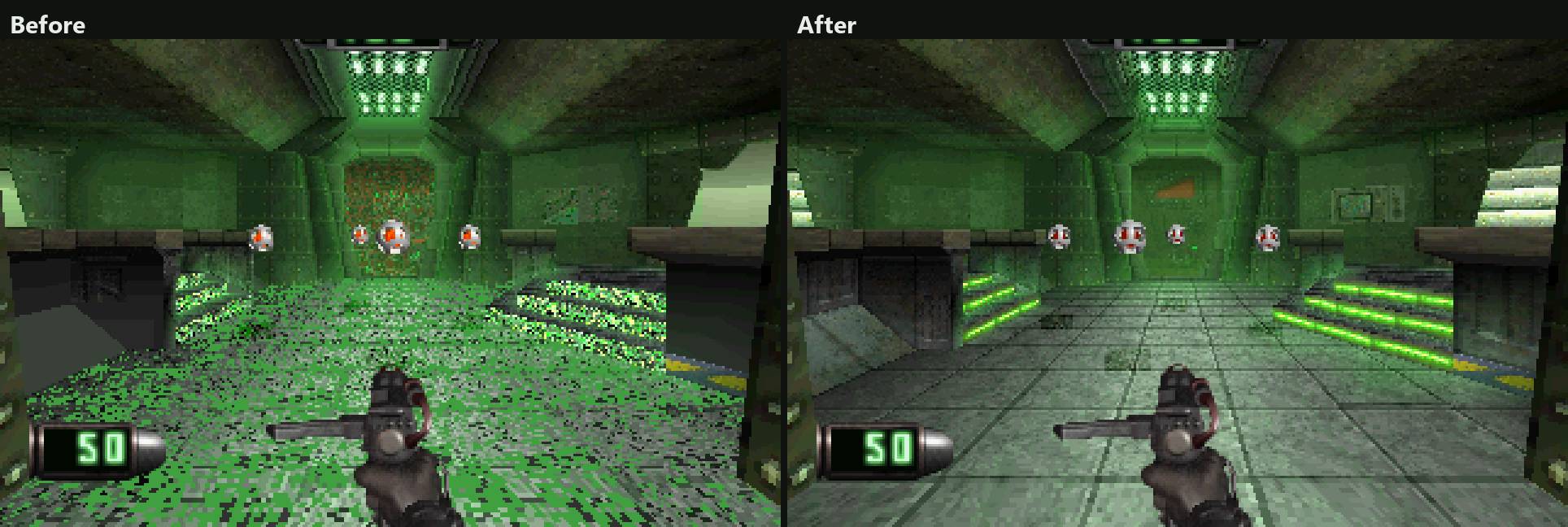
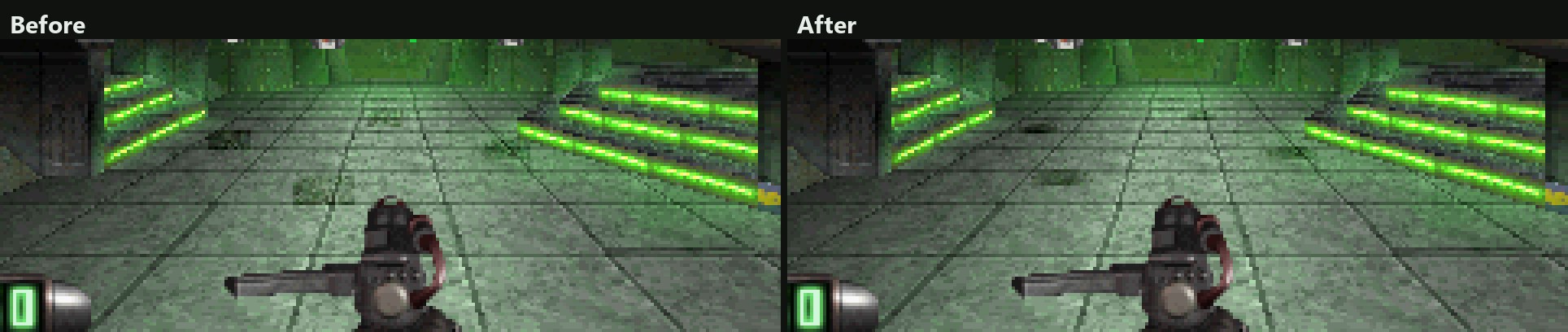
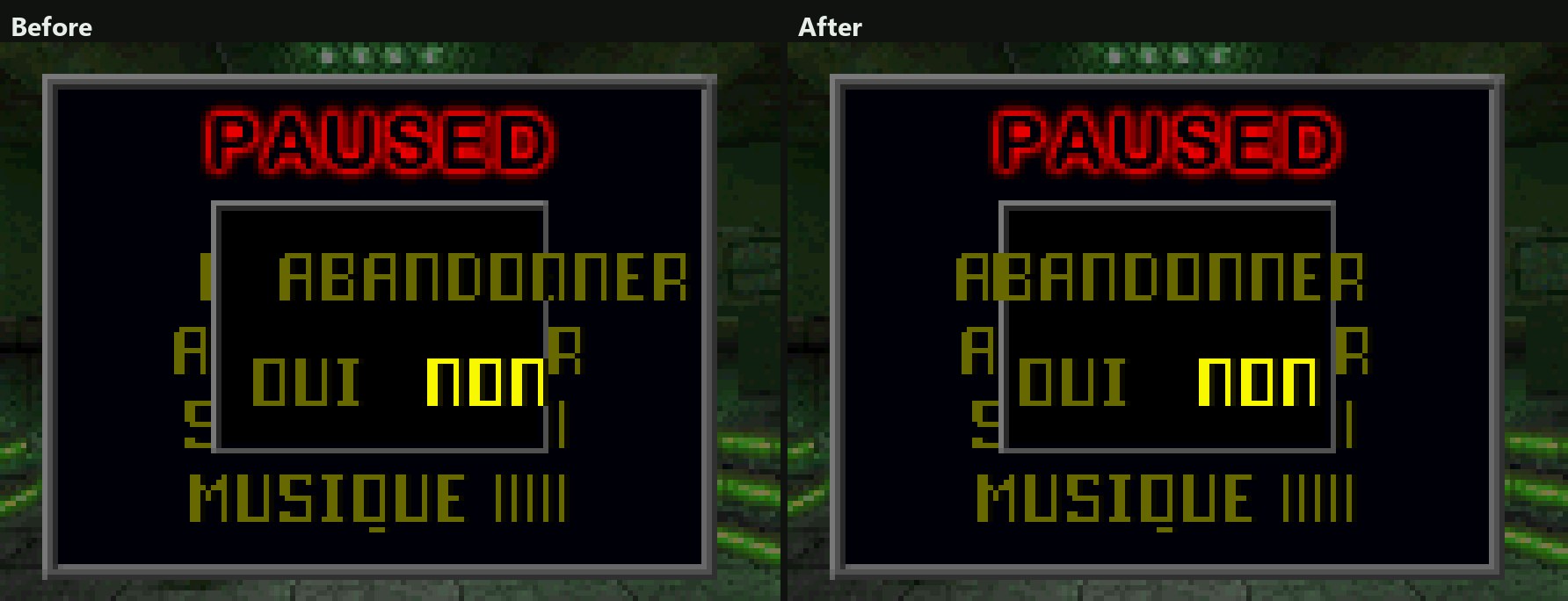
| French and German discs | Textures, shadows and the pause menu as on the PAL versions |
| Linux | The game can save |
| Launcher | Its last message beside Play, a Report a problem button under Troubleshooting |
French and German discs
Mission 1's floor and stairs have their textures. The game placed the US pictures by the PAL disc's tables, which are made for its own pictures:
The drones' shadows are round again:
The pause menu's quit question and its answers stand where the PAL version puts them:
Linux
- On Linux the game can save. The AppImage kept the memory cards inside itself, where nothing can be written, so the game said GAME SAVES UNAVAILABLE.
- The memory cards are now in
~/.local/share/DisruptorRecompData/saves, beside your other files.
Launcher
- The launcher shows its last message in the banner, beside Play.
- Troubleshooting has a Report a problem button of its own.
- The portable ZIP no longer has Play Disruptor.cmd. Start the game with DisruptorLauncher.exe.
Version numbers drop the -alpha label from this release on.
Install
Your own Disruptor (USA, SLUS-00224) disc image is needed.
Windows 10 or 11 x64
- Download DisruptorRecomp-win-Setup.exe and run it.
- It installs the game into
%LocalAppData%\DisruptorRecomp, with shortcuts on the desktop and in the Start menu. - Your files are kept in
%LocalAppData%\DisruptorRecompData. - Or, without installing, unpack DisruptorRecomp-win-Portable.zip into a folder of its own and run
Disruptor Recompiled.exe. - The portable copy needs the Microsoft Visual C++ x64 Redistributable.
- The portable copy keeps your files in its
datafolder.
Linux x64, glibc 2.35 or newer
- Download DisruptorRecomp.AppImage.
- Make it executable:
chmod +x DisruptorRecomp.AppImage - Run it.
- Your files are kept in
~/.local/share/DisruptorRecompData.
0.3.0-alpha.1

Download
| System | File |
|---|---|
| Windows 10 or 11 x64 | DisruptorRecomp-win-Setup.exe |
| Windows, without installing | DisruptorRecomp-win-Portable.zip |
| Linux x64, glibc 2.35 or newer | DisruptorRecomp.AppImage |
Coming from 0.2.0-alpha.1: the launcher offers this release by itself.
In this release
| Change | |
|---|---|
| Controls | Number keys pick weapons only when you turn them on, a baton you pick stays in hand |
| Fixes | Doors, windows, stairs and columns |
Controls
- Number keys pick weapons is its own setting now, off at first, in both schemes. Turn it on in Controls.
- The number keys and the weapon and psionic wheels carry an EXPERIMENTAL tag.
- A baton you pick with a number key or on the wheel stays in hand. The game used to swap it for the best gun with ammunition.
- Two number keys pressed quickly during a weapon change pick the second weapon once the change ends. The first one no longer opens again.
- The psionic wheel stays shut until you find the first psionic.
- The mouse no longer turns the view while the game is paused or one of its lists is open.
Fixes
A pickup or a body under a shut door stays behind the door, close up and from afar. From afar the PlayStation version drew it over the door too:
door-pickup.mp4
door-pickup-far-slow.mp4
A drone under the stairs stays behind the floor in front of it:
drone-under-stairs.mp4
The sky stays in a window while the view turns with in-between frames. Played at half speed:
window-sky-turn-slow.mp4
No dark rim hangs beside a column in in-between frames:
column-rim-slow.mp4
Install
Your own Disruptor (USA, SLUS-00224) disc image is needed.
Windows 10 or 11 x64
- Download DisruptorRecomp-win-Setup.exe and run it.
- It installs the game into
%LocalAppData%\DisruptorRecomp, with shortcuts on the desktop and in the Start menu. - Your files are kept in
%LocalAppData%\DisruptorRecompData. - Or, without installing, unpack DisruptorRecomp-win-Portable.zip into a folder of its own and run
Disruptor Recompiled.exe. - The portable copy needs the Microsoft Visual C++ x64 Redistributable.
- The portable copy keeps your files in its
datafolder.
Linux x64, glibc 2.35 or newer
- Download DisruptorRecomp.AppImage.
- Make it executable:
chmod +x DisruptorRecomp.AppImage - Run it.
- Your files are kept in
~/.local/share/DisruptorRecompData.
0.2.0-alpha.1
The biggest alpha so far: a new launcher that keeps the game up to date, a Linux build, 60 FPS gameplay from the first start, and a long list of fixes to the picture.
Download
| System | File |
|---|---|
| Windows 10 or 11 x64 | DisruptorRecomp-win-Setup.exe |
| Windows, without installing | DisruptorRecomp-win-Portable.zip |
| Linux x64, glibc 2.35 or newer | DisruptorRecomp.AppImage |
In this release
| Change | |
|---|---|
| New launcher | Installs the game, checks your disc and updates itself |
| Linux | An AppImage for Linux x64 |
| 60 FPS gameplay at first | The game runs at up to 60 FPS from the first start, doors and a ridden lift included |
| Smooth mouse turning at first | The view turns between the game's 256 steps, the sky and the sprites with it |
| Controls | Modern or Classic, the game's actions rebound to any key or button, a gamepad beside the keyboard |
| Picture | Anti-aliasing, an even distance fade, movies at their full width |
| Fixes | Walls beside you, bodies on the floor, textures, the level's end |
The Before and after page shows every change from the PlayStation version side by side.
New launcher
- DisruptorRecomp-win-Setup.exe installs the game for your Windows user, with shortcuts on the desktop and in the Start menu.
- DisruptorRecomp-win-Portable.zip plays without installing.
- By default the launcher looks for a new release at every start. It downloads only what changed when it can, checks each package by its SHA-256 and installs it when you press Restart and update.
- Saves, settings and save states live outside the program folder, so an update keeps them. Bring saves... copies the saves of an older copy.
- The home page shows art from your own disc, the state of the disc and what is new in this version.
- Settings sit in the side bar: Display, Enhancements, Controls, Audio, Experimental and Troubleshooting. Each page except Troubleshooting resets on its own.
- Help shows the whole player's guide inside the launcher.
Coming from 0.1.0-alpha.5 or older: install 0.2.0-alpha.1 once with the Setup or the ZIP, then press Bring saves.... Later releases arrive through the launcher.
Linux
- DisruptorRecomp.AppImage for Linux x64 with glibc 2.35 or newer: Ubuntu 22.04, Debian 12, Fedora 36 and later.
- The launcher updates the AppImage in place. Saves and settings are kept in
~/.local/share/DisruptorRecompData. - Tested under WSLg on Ubuntu 22.04 up to the save-name screen. A level has not been played on Linux yet.
60 FPS gameplay at first
The game runs at up to 60 frames a second instead of 30 from the first start. A settings file that already names the setting keeps that choice: switch it on in Enhancements.
frame-rate-60.mp4
Doors and a ridden lift now move on every frame. The game itself moves them on every second one.
door-steps.mp4
lift-ride.mp4
In-between frames reach 320 FPS on any display. Here at 120 FPS, played at half speed so a 60 Hz screen shows them:
in-between-frames-slow.mp4
Smooth mouse turning at first
The view turns between the game's 256 heading steps from the first start. It needs mouse aim and exact geometry, both on at first.
The sky backdrop turns with the world instead of jumping a whole step:
sky.mp4
Bodies and pickups turn with the world instead of jumping onto each other:
bodies-under-turn.mp4
A far corner is no longer thrown across the screen:
turn-clip-upload.mp4
Controls
- Choose Modern (WASD, left click fires, right click uses psionics, side buttons choose) or Classic (the original keys).
- Each of the game's actions can be moved to another key or gamepad button on the launcher's Controls page. Click it, then press the new one. The fixed keys, such as Escape, the F keys and B for fast-forward, stay as they are.
- A gamepad plays beside the keyboard and mouse, with an adjustable stick dead zone.
- The launcher's Controls page lists what each fixed key does.
Picture
Anti-aliasing (MSAA / SSAA), an experimental setting. MSAA smooths polygon edges, SSAA smooths textures and cut-out outlines too.
multisampling.mp4
Smooth distance fade, on at first. Walls fade evenly into the distance, not in twelve steps.
smooth-fade.mp4
Depth-sorted world is on at first too.
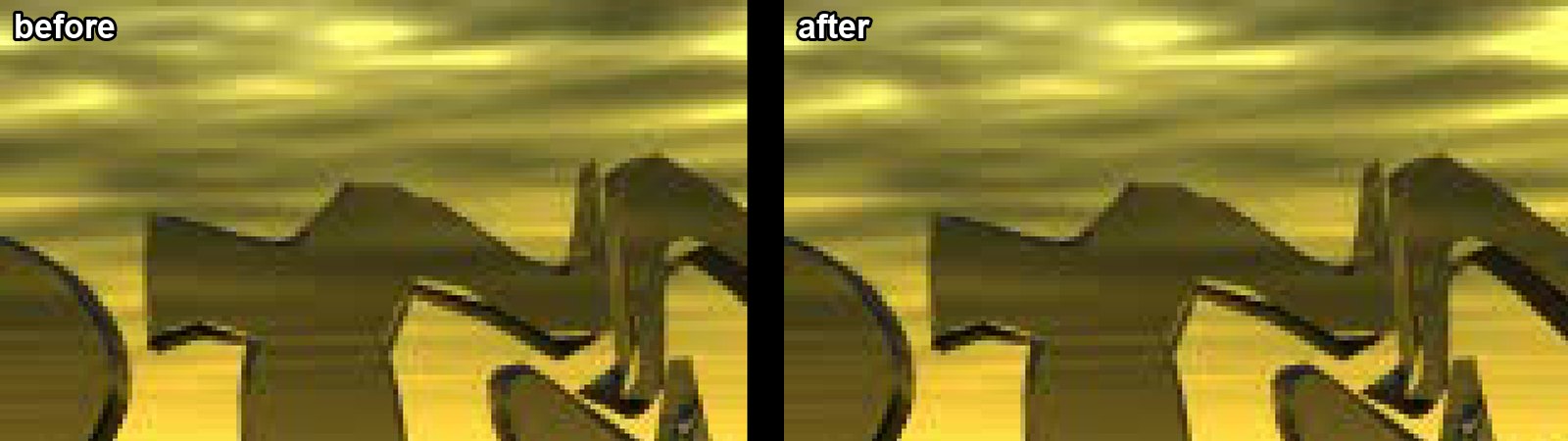
Movies and logos show all 320 columns. The last 8 used to be black.
Fixes
A wall right beside you is drawn whole, without holes, smears or a dark face over the scene:
wall-see-through.mp4
near-plane-upload.mp4
A body lying on the floor stays whole:
corridor-corpses.mp4
In widescreen, a level's end stays wide while the game fades its last frame:
level-end.mp4
In widescreen, pickups and bodies stay drawn until they leave the picture:
pickups-walk.mp4
- World textures no longer jump a texel as the camera moves.
- Gap filling fills only empty space, so no rims hang off the edges of objects.
- Shadows follow the picture's shape by themselves, the shadow setting is gone.
- The held weapon sits between whole pixels in widescreen.
- A state loaded mid-run no longer freezes the game.
- A number key you bind to an action no longer also picks a weapon.
- A wheel opens only on the key its choice is bound to. In the Modern scheme the Up and Down arrows step through it while you have not bound them to an action.
Replay capsules
- The Debug tab lists your capsules with a picture each, and plays one under the mouse.
- Ctrl+F12 records a capsule, F12 loads the newest.
- A new Texture coordinates view shows how textures are laid on the world.
Under the hood
- The installer, the archives and the update packages are signed with Sigstore, with SLSA provenance. The Verify section below shows how to check one.
- The project is under the MIT license, with a security policy, CodeQL, OpenSSF Scorecard, zizmor for the workflows and Dependabot.
- Building needs CMake 3.24 and Python 3.11 or newer. The launcher builds on Linux with GCC 13 and newer.
- The framework's 24-bit margin is set per title, from upstream.
Install
Your own Disruptor (USA, SLUS-00224) disc image is needed.
Windows 10 or 11 x64
- Download DisruptorRecomp-win-Setup.exe and run it.
- It installs the game into
%LocalAppData%\DisruptorRecomp, with shortcuts on the desktop and in the Start menu. - Your files are kept in
%LocalAppData%\DisruptorRecompData. - Or, without installing, unpack DisruptorRecomp-win-Portable.zip into a folder of its own and run
Disruptor Recompiled.exe. - The portable copy needs the Microsoft Visual C++ x64 Redistributable.
- The portable copy keeps your files in its
datafolder.
Linux x64, glibc 2.35 or newer
- Download DisruptorRecomp.AppImage.
- Make it executable:
chmod +x DisruptorRecomp.AppImage - Run it.
- Your files are kept in
~/.local/share/DisruptorRecompData.
0.1.0-alpha.5

The fifth Windows x64 alpha adds direct weapon hotkeys, optional weapon and psionic wheels, and improvements to widescreen rendering, mouse capture, settings, and bug reporting.
Changes since alpha.4
- Number-key weapon selection. With modern controls enabled, press 1 for Baton, 2 for 18mm Semi, 3 for 18mm Auto, 4 for Phase Rifle, 5 for Phase Repeater, 6 for Lockon Cannon, 7 for AM Blaster, 8 for AM Cyclone, 9 for Zodiac, and 0 for Plasma Lance. Both the number row and keypad work. Selection requires owning the weapon; menus and save-name entry keep their usual input.
- Weapon and psionic wheels. One Weapon and psionic wheels toggle in Controls enables both selectors in the launcher and in-game settings. It starts off. Hold the existing selector binding (Q / R with modern controls, or the mapped controller buttons), point with the mouse or left stick, and release to equip. Arrow keys and the D-pad cycle through owned items. Left-click or Enter confirms; Escape, right-click, or the controller cancel button cancels. Gameplay continues while the wheel is open. Turning the option off restores the original selection lists.
- Correct wheel ammo counts. Counts include both of the game's ammo pools and update live, including the shared pools used by pistols and AM weapons. Special weapons follow the game's behavior and omit a numeric ammo counter. Wheel selections are recorded in replay capsules.
- Mouse capture and widescreen fixes. Mouse aim captures the pointer automatically while the game window has focus. Held weapons keep their correct size and position in widescreen. In-between frames order geometry using its interpolated depth.
- Clearer settings. The launcher and game share setting descriptions and dependency rules. Hovering over an in-game setting shows its explanation, and options stay disabled when their required settings are off.
- Bug reports. Report a problem in the launcher collects logs and settings. Its Troubleshooting page offers optional detailed logging for reproduction runs. Reports identify Windows 11 correctly.
- Save and input fixes. Save states are captured and resumed at checked execution points. Typing a save name keeps letter and number keys from also pressing mapped controller buttons. Loading a state cancels an open wheel.
Thanks to Solganis for the contributions since alpha.4.
Getting started
- Download DisruptorRecomp-v0.1.0-alpha.5-win64.zip below and use Extract All.
- On Windows 10/11 x64, install the Microsoft Visual C++ x64 Redistributable if needed. Your graphics driver must support OpenGL 3.3. The launcher itself does not require the redistributable.
- Open DisruptorLauncher.exe and browse to your supported Disruptor USA (SLUS-00224) raw MODE2/2352 BIN/CUE. The launcher imports and verifies it. An identical raw ISO/IMG is accepted; cooked 2048-byte ISOs are unsupported.
- Select Play game. Use arrow keys and Enter at the game menu. Play Disruptor.cmd opens the same launcher.
OpenBIOS, dependency licenses, and the player guide are included. Supply your own supported USA disc image; game data and language discs are excluded. Optional French, German, and Japanese content can come from an additional owned disc. The USA disc remains required.
Updating and validation
Extract into a fresh folder and back up saves/ before updating. Copy your memory-card saves, settings.toml, and custom keybinds.ini if desired. Copying input/discs/ from an existing installation avoids another import; the launcher verifies it before booting. Use memory-card saves for progress across releases. Save states and replay capsules require matching builds and language.
Both wheels start off. Modern keyboard/mouse controls, geometry correction, and perspective textures remain enabled by default; experimental options remain optional.
The Windows x64 Release build, framework verification, code-generation audit, and all 92 automated checks passed. The package's exact 23-file list, x64 executables, source commit, default settings, manifest hashes, and SHA-256 checksum were verified. The packaged launcher imported and checked a real supported USA disc dump, and the packaged runtime passed a 12-second headless startup check.
Full campaign validation and broader live testing of rendering and regional language options remain incomplete. Minor geometry or texture artifacts can remain.
Read GETTING_STARTED.md in the ZIP or the player guide. Use Report a problem in the launcher when reporting an issue, and include the level, reproduction steps, and settings. The .zip.sha256 asset contains the download checksum.
Source commit: 0b0f21f816cc3c790b664c642936b3db233cd072.
Join the community Discord to discuss the project and share feedback.
0.1.0-alpha.4
The fourth Windows x64 alpha brings wider menus, smoother mouse turning, keyboard save naming, replay capsules, and improvements to the launcher and renderer.
Changes since alpha.3
- Widescreen menus and fixes. Front-end menus fill a wide screen while the logo and text keep their shape. Loading screens, pause-menu text, and the ordering of world sprites have been corrected.
- Keyboard save names. Type letters, digits, and spaces on the game's save-name screen. Backspace and Delete edit the name; Enter moves to DONE.
- Smooth mouse turning. An optional setting in Controls turns the picture between the game's 256 heading steps. It requires captured mouse aim and exact geometry.
- Renderer options. Gap filling closes small gaps between polygons. Optional depth sorting changes how world polygons overlap, and experimental ambient occlusion adds adjustable shading in corners and under objects. These options require exact geometry.
- Replay capsules and reporting tools. Ctrl+F12 starts and finishes a capsule containing a save state, input, settings, and build details. The new Debug tab offers diagnostic views and a short screen recording for rendering reports. Capsules require the build that recorded them and are not recorded in network games; see the replay instructions for playback and its limits.
- Launcher improvements. Long settings pages scroll, hovering over an option shows its explanation, and experimental renderer options are available before starting the game. Play restores settings omitted from an older settings file. Paths containing non-ASCII characters are handled correctly.
- Window and state fixes. Borderless fullscreen stays borderless on Windows, mouse capture returns when the window regains focus, and loaded states resume with their saved CPU timing settings, including in headless mode.
- Language and settings layout. The in-game language controls have their own tab. Long explanatory notes wrap, and the 60 FPS and in-between-frame options have clearer labels.
Thanks to Solganis for the contributions in #16–#35.
Getting started
- Download DisruptorRecomp-v0.1.0-alpha.4-win64.zip below and use Extract All.
- On Windows 10/11 x64, install the Microsoft Visual C++ x64 Redistributable if needed. Your GPU driver must support OpenGL 3.3. The launcher itself does not require that redistributable.
- Open DisruptorLauncher.exe and browse to your own supported Disruptor USA (SLUS-00224) raw MODE2/2352 BIN/CUE. The launcher imports and verifies it. An identical raw ISO/IMG is accepted; cooked 2048-byte ISOs are unsupported.
- Select Play game, then use arrow keys and Enter at the game menu. Play Disruptor.cmd opens the same launcher.
OpenBIOS and dependency licenses are included. Game data and language discs are not included. No build tools, extracted game executable, or proprietary BIOS are required. French, German, and Japanese language content can come from an additional owned disc; the supported USA disc remains required.
Updating
Extract into a fresh folder and back up saves/ before updating. Copy your memory-card saves and settings.toml if desired. Copying input/discs/ from an existing launcher installation avoids another import; the launcher verifies it before booting.
Use the game's memory-card saves for progress across releases. Save states and replay capsules are specific to their build and language; compatibility across releases is not guaranteed. States from alpha.1 and alpha.2 remain incompatible with alpha.3 and later.
Defaults are 4x resolution at 4:3 with modern controls, geometry correction, and perspective textures. Vertical look, smooth mouse turning, 60 FPS gameplay, in-between frames, depth sorting, ambient occlusion, and intro skipping start off. Movies, maps, and loading screens remain at 4:3.
Validation and known limits
The Windows x64 Release build, code-generation audit, and all 77 automated checks passed. The ZIP's exact 23-file list, x64 executables, source commit, manifest hashes, and download checksum were checked. Its packaged launcher imported and verified a real supported USA disc dump, and the packaged runtime passed a 12-second headless startup check.
This validates the build, installation, and booting. Full campaign coverage and broader live testing of the new renderer options remain incomplete. Minor geometry or texture artifacts can remain. Regional language handling has automated fixture coverage; broader testing with real regional images is still needed.
Read GETTING_STARTED.md in the ZIP or the player guide. Report issues with the level, reproduction steps, settings, and startup.log; do not attach game data or BIOS files. The .zip.sha256 asset contains the download checksum.
Source commit: 7eadf85a8ad4b1581483e3526312144583ddbfdb.
Join the community Discord to discuss the project and share feedback.
0.1.0-alpha.3
The third Windows x64 alpha includes the native launcher, optional language discs, and fixes for widescreen UI, near walls, and movie edges.
Changes since alpha.2
- Native Windows launcher. Browse to or drop your supported USA disc image. The launcher copies it into place, creates its CUE, verifies the complete SHA-256, and starts the game. Your original dump is kept. Later launches verify the installed disc before booting.
- Settings in the launcher. Display, Enhancements, Controls, and Audio share the game's saved settings. Original and Enhanced presets, reset, language selection, and startup-log errors are available before launching.
- More reliable settings saves on Windows. Brief file locks are retried without replacing or damaging the previous settings when a save fails.
- Optional French, German, and Japanese content. Add a second disc image you own to choose its language. The USA SLUS-00224 disc remains required as the game disc. French and German discs supply movies, speech, menus, messages, and mission-reload hints; Japanese supplies movies, speech, and hints, with English menus as on that disc. Language disc images stay in their original location. Save-state slots are separate for each language.
- Intro skipping. An optional setting skips the boot logos and title movie. Escape can skip the current logo or movie. The default keeps the original intro.
- Widescreen and rendering fixes. Weapon/psionic selection lists and map frames remain whole in widescreen. Near-wall holes and noise around movie edges have been addressed.
Thanks to Solganis for the contributions in #11, #12, #13, #14, and #15.
Getting started
- Download DisruptorRecomp-v0.1.0-alpha.3-win64.zip below and use Extract All. The source-code ZIP is for development.
- On Windows 10/11 x64, install the Microsoft Visual C++ x64 Redistributable if needed. Your GPU driver must support OpenGL 3.3. The launcher itself does not require that redistributable.
- Open DisruptorLauncher.exe, browse to your own supported Disruptor USA (SLUS-00224) raw MODE2/2352 BIN/CUE, and let the launcher import it. An identical raw ISO/IMG is accepted; cooked 2048-byte ISOs are unsupported.
- Select Play game, then use arrow keys and Enter at the game menu. Play Disruptor.cmd opens the same launcher.
OpenBIOS and dependency licenses are included. No build tools, extracted game executable, or proprietary BIOS are required. Game assets and language discs are not included. PAL and Japanese discs cannot replace the USA game disc.
Updating
Save states from alpha.1 and alpha.2 are incompatible with alpha.3. Back up saves/ before updating and use the game's memory-card saves for progress across releases. Extract into a fresh folder, copy your memory-card saves and settings.toml if desired, and import your disc through the launcher. If you already used a launcher build, copying input/discs/ into the new build avoids another import.
Defaults remain 4x resolution at 4:3 with modern controls, geometry correction, and perspective textures. Experimental vertical look, 60 FPS gameplay, in-between frames, and intro skipping start off. Menus and movies remain at 4:3.
Validation and known limits
The Windows x64 Release build, code-generation audit, and all 59 automated checks passed. Both settings tests also passed 20 consecutive runs, including temporary-lock recovery and preservation of settings on permanent failure. The ZIP's complete file list and manifest hashes were checked. Its packaged launcher imported and verified a real supported USA disc dump, and the packaged runtime completed a 12-second headless startup check. This checks installation and booting; it is not a full playthrough.
Full campaign coverage and experimental features remain under development. Regional language handling has automated fixture coverage; broader testing with real regional images is still needed. Minor geometry or texture artifacts can remain.
Read GETTING_STARTED.md in the ZIP or the player guide. Report issues with the level, reproduction steps, settings, and startup.log; do not attach game data or BIOS files. The .zip.sha256 asset contains the download checksum.
Join the community Discord to discuss the project and share feedback.
0.1.0-alpha.2
The second public Windows x64 alpha adds experimental 60 FPS gameplay and in-between frames, HUD sizing, and improvements to widescreen rendering and near-wall geometry.
Changes since alpha.1
- Optional 60 FPS gameplay. Enable it under Settings → Enhancements. It starts off, preserving the original gameplay cadence by default.
- Optional in-between frames. The frame interpolator is included again, with a saved enable switch and rate control. It starts off and requires exact geometry. Frame matching and sub-pixel sprite placement have been improved.
- Improved near-wall geometry and shadows. Guard-band corners keep their true projection. Choose Vanilla or Improved shadows in Enhancements when geometry correction is enabled.
- Widescreen fixes. The sky backdrop uses extra tile columns to keep its proportions, and enemy shadows retain the correct width while the player moves.
- HUD size for widescreen. Adjust health and ammunition displays from 50% to 100%; the weapon keeps its size.
Thanks to Solganis for the contributions in #4, #5, #6, #7, #8, and #9. Source builds now require C++20 and can use a separate build directory.
Updating from alpha.1
Save states from alpha.1 are incompatible with this release. Back up your saves/ folder before updating. Use the game's memory-card saves or start a new game, then create new save states. Extract the new ZIP into a fresh folder and copy your disc and memory-card saves across. Copy your existing settings.toml too if you want to retain your preferences.
Getting started
- Download DisruptorRecomp-v0.1.0-alpha.2-win64.zip below and use Extract All. The source-code ZIP is for development.
- On Windows 10/11 x64, install the Microsoft Visual C++ x64 Redistributable if needed. Your GPU driver must support OpenGL 3.3.
- Copy your own Disruptor USA (SLUS-00224) MODE2/2352 BIN/CUE into the extracted
inputfolder. Name the CUE Disruptor (USA).cue; itsFILEline must match the BIN filename. - Double-click Play Disruptor.cmd. Use the arrow keys and Enter to select New Game, or try Practice Mode.
OpenBIOS and dependency licenses are included. No build tools, extracted game executable, or proprietary BIOS are required. Game assets are not included; PAL and Japanese discs are unsupported.
Controls and defaults
- WASD: move/strafe. Middle-click: capture or release mouse; Escape also releases.
- Left mouse / Enter: fire/confirm. Right mouse / F: psionics. Space: jump/cancel. E: use.
- Q/R: select weapon/psionic. Tab: map. P: pause.
- Backquote: settings. Alt+Enter: fullscreen.
- Shift+F1–F12: save state. F1–F12: load state.
Defaults are 4x resolution at 4:3, modern controls, geometry correction, and perspective textures. Experimental vertical look, 60 FPS gameplay, and in-between frames start off. Menus and movies remain at 4:3.
Validation and known limits
The Windows x64 Release build and all 37 automated tests pass. The translated game code also passes its generation audit, and the extracted package passed a startup check. Experimental features and full campaign coverage remain under development; minor geometry or texture artifacts can remain.
For setup and troubleshooting, read GETTING_STARTED.md in the ZIP or the player guide. Report issues with the level, steps, settings, and startup.log; do not attach game data or BIOS files. The matching .zip.sha256 asset contains the download checksum.
Join the community Discord to discuss the project and share feedback.
0.1.0-alpha.1
First public Windows x64 alpha of DisruptorRecomp. This release includes the in-game settings menu, 1x–8x rendering, modern mouse/keyboard controls, geometry/perspective correction, and the fix for ultrawide texture corruption and freezes. Frame interpolation is disabled.
Join the community Discord to discuss the project and share feedback.
Getting started
- Download DisruptorRecomp-v0.1.0-alpha.1-win64.zip below and use Extract All. Do not use the source-code ZIP to play.
- On Windows 10/11 x64, install the latest Microsoft Visual C++ x64 Redistributable if needed. Your graphics driver must support OpenGL 3.3.
- Copy your own Disruptor USA (SLUS-00224) MODE2/2352 BIN/CUE into the extracted
inputfolder. Name the CUE Disruptor (USA).cue; itsFILEline must match the BIN filename. - Double-click Play Disruptor.cmd. Use the arrow keys and Enter to select New Game, or try Practice Mode.
OpenBIOS is included. No build tools, extracted game executable, or proprietary BIOS are required. Game assets are not included; PAL and Japanese discs are unsupported.
Default controls
- WASD: move/strafe. Middle-click: capture or release mouse; Escape also releases.
- Left mouse / Enter: fire/confirm. Right mouse / F: psionics. Space: jump/cancel. E: use.
- Q/R: select weapon/psionic. Tab: map. P: pause.
- Backquote: settings. Alt+Enter: fullscreen.
- Shift+F1–F12: save state. F1–F12: load state.
The initial settings use 4x resolution at 4:3, modern controls, geometry correction, and perspective textures. Change resolution and widescreen in Enhancements. Experimental vertical look starts off and can be enabled in Controls.
Use memory-card saves for long-term progress and back up saves/ before updating. Save states may not remain compatible across builds.
Notes
The Windows Release build and all 25 tests pass. A clean extracted package reached the first mission using the disc alone; the production launcher also loaded a gameplay save state. The earlier 8x / 32:9 training retest stayed correct after the buffer-overflow fix. Full campaign coverage remains incomplete, and minor geometry or texture artifacts can remain.
For complete setup and troubleshooting, read GETTING_STARTED.md in the ZIP or the player guide. Report issues with the level, steps, settings, and startup.log; do not attach game data or BIOS files.
The matching .zip.sha256 asset contains the download checksum. Dependency license notices are included in the package.