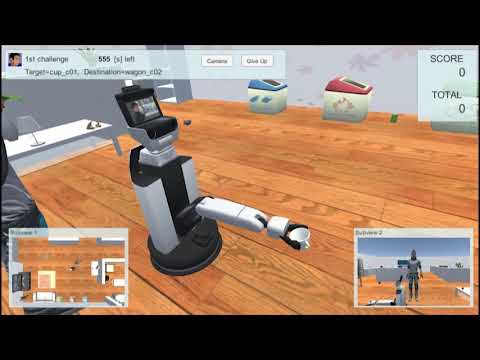
Screen
Fundamentally, the camera shall track the robot in the screen as shown below.

-
Status information
Status information displays the number of attempts left, the time remaining, a description of the task, the [Camera] button, and the [Give Up] button.
Press the [Camera] button to change the perspective of the camera.
Press the [Give Up] button to display the Give Up menu. -
Score information
Score information displays the score for each task and the total score for all of the tasks. -
Give Up menu
The Give Up menu forces the failure of a task by pressing the [YES] button.
This menu closes by pressing the [NO] button. -
Overhead view
The overhead view displays the room from a top view. -
Avatar view
The avatar view displays the human avatar.