Repository navigation
Remote Self-Control 1.3.6: display sensors, apps in Statistics, Image Fusionner tiles

·
22 commits
to main
since this release

Display sensors, apps in Statistics, and Image Fusionner tiles: 1.3.0 to 1.3.6 in one go.
Install: web configurator → Integrations → Add new → Install custom → uc-intg-self-control-1.3.6.tar.gz, with Update existing driver ticked. Your settings are kept. After updating, add the new display entities to the integration (Integrations → Remote Self-Control → add entities) before putting them on a page.
New
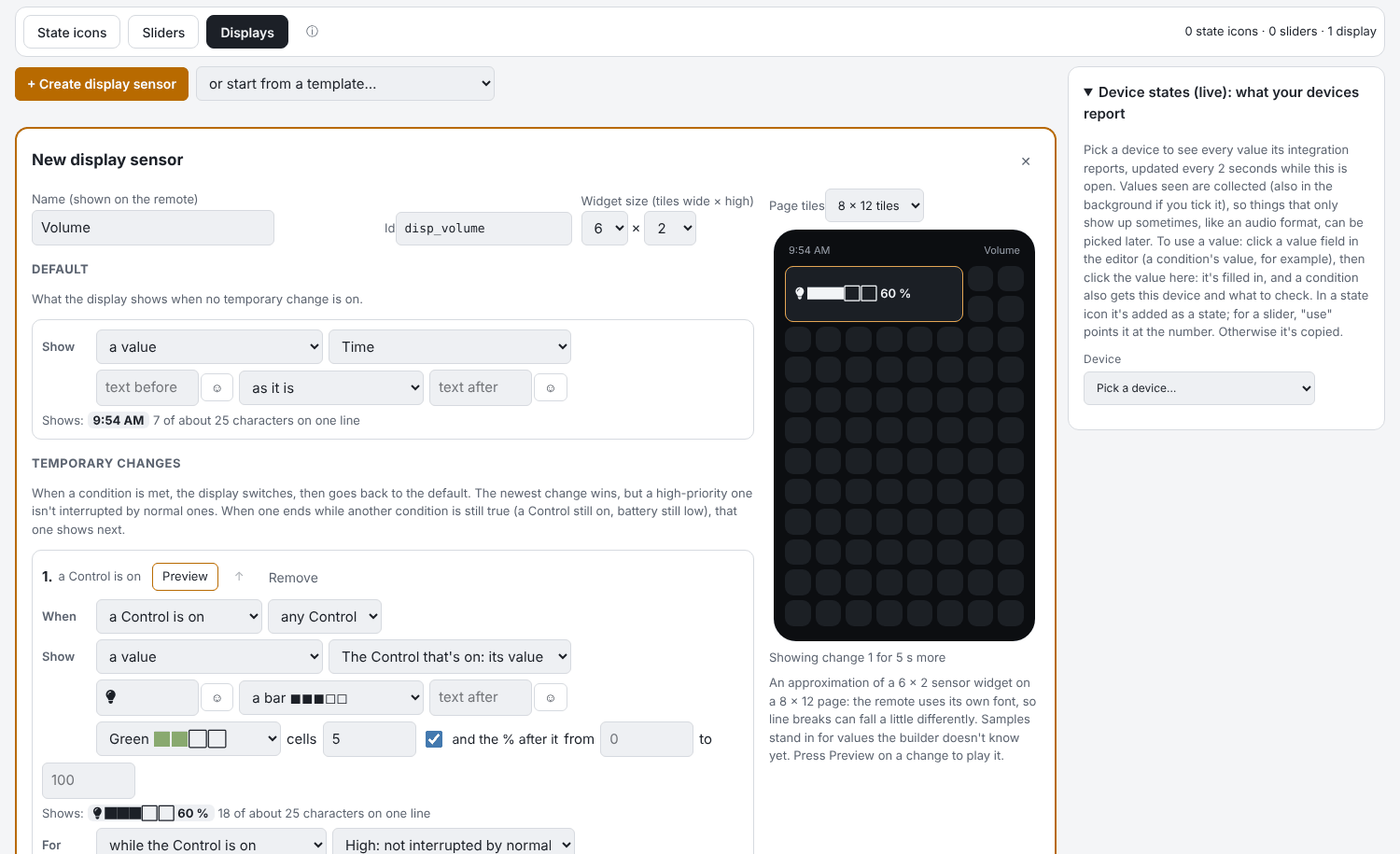
- Display sensors (1.3.0–1.3.2). Icons & Sliders → Displays. Each display is its own sensor entity that shows text on a page through the Page Editor's sensor widget, and updates at once without rewriting the page.
- Default: a device's value, one of your sliders, the remote's battery or settings, the time or date, the activity on screen, or messages one after another.
- Text around it: text before and after, with a ☺ picker for symbols, emoji and the remote's own icons. Only characters the remote's font has are offered, worked out with three rounds of tests on the remote.
- Formats: values as they are, as a number, with a decimal, or as a bar (◼◻, ▪▫, 🟩⬜, 🟢⚪, 🟦⬛, ⚫⚪, [##--], ||··) with the % after it.
- Temporary changes: when a value changes, goes above or below a number, or equals a value; while a Control is on; or when an activity starts. It shows something else for a few seconds, while that's true, once through its messages, or until the next change, with normal or high priority.
- Long text wraps, or scrolls through on one line.
- Templates: volume, a status line, a doorbell message and a ticker.
- Smart control step "Show on a display": messages one after another, e.g. "Ding dong | at the door".
- Preview: the display on a remote screen at its widget size (any width × height in tiles) on a 2 × 3, 4 × 6, 6 × 9 or 8 × 12 page. Preview on a change plays it for as long as it would show.
- This integration's own entities (sliders, controls…) can be shown too.
- Apps in Statistics (1.3.1, 1.3.2). The app a SHIELD, Roku or other player shows during an activity (its source, e.g. Netflix or YouTube) is recorded. TV inputs and receivers aren't counted.
- It shows in "Apps used" on the overview, in "Apps per activity", in the apps of each use, and in the CSV.
- Battery per app: the battery used while each app shows, off the dock, in %/h with how reliable the figure is.
- Image Fusionner tiles (1.3.6). For people who make their button pictures with Image Fusionner.
- ⚙ Settings (top right) takes its folder. Browse… reads the rendered tiles into your browser, which asks once to allow the folder.
- The Pictures window (Page Editor and every tab that takes pictures) shows one folder per layout with its grid, as many across as your page is wide, with search and Close all.
- Click or drag a tile onto a button. On an empty page with the same grid, + Add to page puts every tile on its own spot.
- ↻ Reload tiles after a render adds new layouts and drops ones deleted from
Grid_layout. Only the one folder in Settings is read. - Tiles are uploaded under their name plus a short fingerprint. The remote never replaces a picture with the same name, so a re-rendered tile won't show its old copy.
Fixed
- The Statistics tab could stay on "Loading…" after a slow or failed read. It now says so, with Try again.
- The remote's own icons in the ☺ picker were blank (white on white).
- On a phone, the builder's tab row scrolls instead of widening the page.
Tested on one Remote 3. Issues and ideas are welcome.