Repository navigation
Engram 憶跡 1.1.0

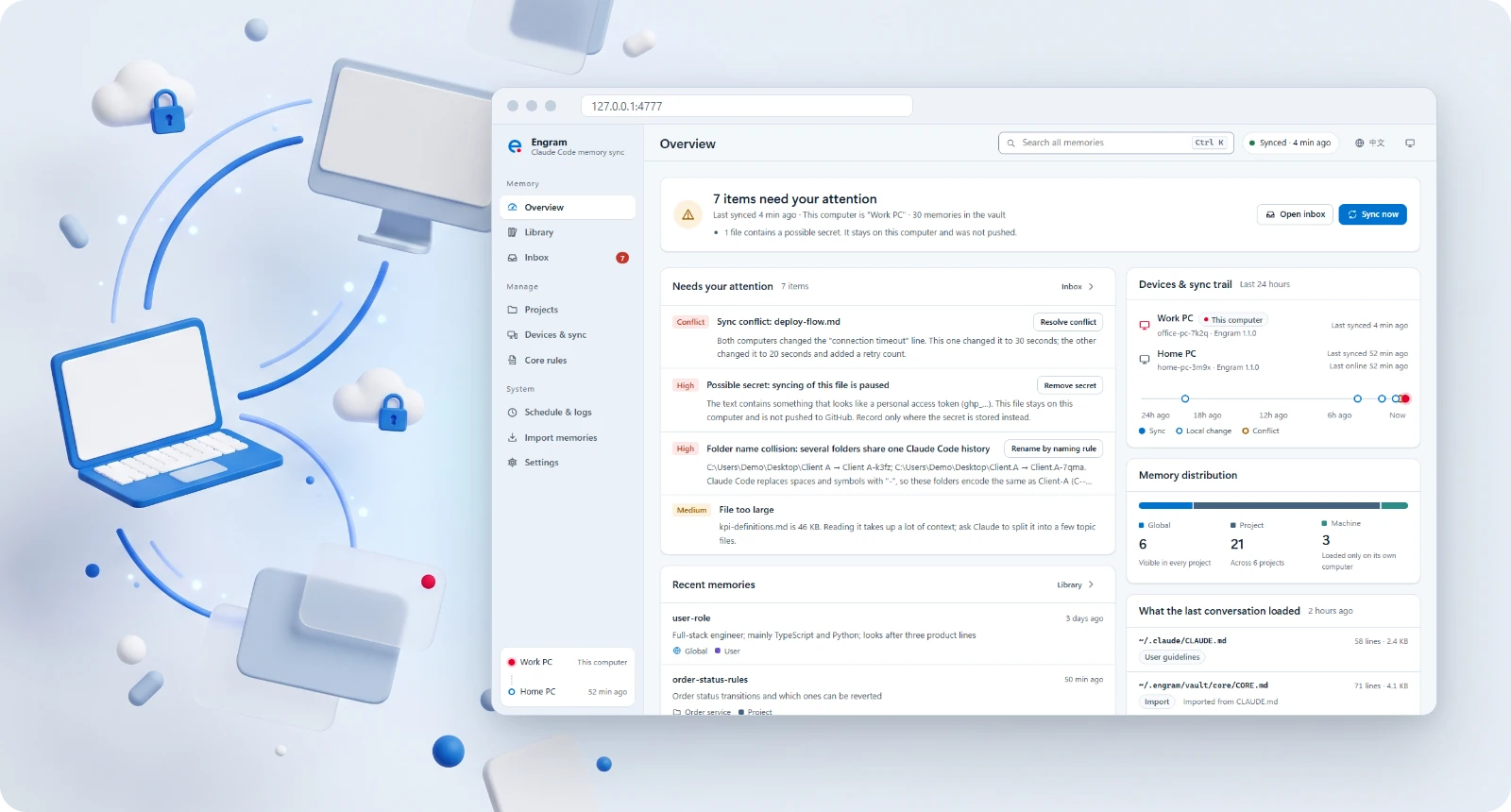
英文版。 管理介面可以切換正體中文與 English,GitHub 儲存庫加入完整的英文文件。
English edition. The dashboard now switches between Traditional Chinese and English, and the repository has full English documentation.
更新/Upgrade:在 Engram 資料夾 git pull(或下載新的 ZIP 覆蓋舊資料夾),然後執行 engram update。每台電腦都要更新。
Run git pull in your Engram folder (or download a new ZIP over the old folder), then run engram update. Update every computer.
管理介面
- 新增英文介面:用頂列的語言切換鈕,或「設定 › 介面語言」切換正體中文與 English。第一次開啟時依瀏覽器語言決定,選擇會記在這個瀏覽器。
- 常駐程式傳來的文字也有英文版:收件匣卡片、排程工作、相容性探測、錯誤訊息與建議、同步衝突摘要、匯入計畫的判斷理由。日誌與 git 變更紀錄維持原文。
文件
- 英文文件:README.en.md、INSTALL-WITH-AI.md、docs/en/(快速開始、使用說明、常見問題),附英文截圖與插圖。
- SECURITY.md 與問題回報範本改為中英雙語;每份文件頂端都有語言切換連結。
Claude Code 外掛
/engram:inbox的自動處理模式也接受auto(原本只認「自動」)。外掛說明改為中英雙語。
修正
- 記憶庫的疑似金鑰提示指向不存在的按鈕「遮蔽金鑰」,改為收件匣實際的「移除金鑰」。
- 安裝手冊引用了安裝程式不會印出的訊息,改為實際的「你的 Claude Code 預設權限模式是『…』」。
- 安全政策的支援版本更新為 1.1.x。
- 安全:
engram doctor、engram import plan --json、engram status的輸出(可能交給 Claude)現在也遮蔽疑似金鑰;同步衝突紀錄的 meta.json 寫入前先遮蔽,避免 frontmatter 有誤的那一行連同金鑰隨 vault 推送到 GitHub。 - 另一個 Engram 程序正在同步時,總覽不再顯示「所有電腦的記憶都是最新的」,同步狀態顯示為「同步中」(原本空白)。
尚未支援
- 命令列輸出、安裝程式的提示、Windows 通知與外掛技能的指示仍是正體中文;Claude 通常會用你使用的語言回覆。
English summary
- Dashboard: English interface. Switch between Traditional Chinese and English from the language button in the top bar or Settings › Interface language. The first visit follows your browser language; your choice is remembered in that browser.
- Agent messages: inbox cards, scheduled jobs, the compatibility probe, error messages and hints, sync conflict summaries, and import-plan reasons now carry English versions. Logs and the git change history keep their original text.
- Docs: English README, INSTALL-WITH-AI.md, and docs/en/ (quick start, user guide, FAQ) with English screenshots and illustrations. SECURITY.md and the issue templates are bilingual.
- Claude Code plugin:
/engram:inboxauto mode also acceptsauto. - Fixes: the Library's possible-secret tip now points to the inbox's real Remove secret button; the install manuals quote the installer's actual permission-mode notice; the security policy lists 1.1.x as supported.
- Security: output from
engram doctor,engram import plan --json, andengram status(which may be handed to Claude) now redacts possible secrets, and sync conflict records (meta.json) are redacted before they are written, so a malformed frontmatter line containing a secret is no longer pushed to GitHub with the vault. - Sync state: while another Engram process is syncing, the Overview no longer claims every computer is up to date, and the sync status shows Syncing (it used to be blank).
- Not yet localized: CLI output, setup prompts, Windows notifications, and the plugin skill instructions are still in Traditional Chinese; Claude normally replies in the language you write in.
Install: open Claude Code and paste the message from the English README, or download and double-click setup.cmd. Requires Windows 11, Claude Code, and a GitHub account.