Repository navigation
Releases
Engram 憶跡 2.0.0:從記得到做到,記憶與環境管家

 正體中文 |
 English |
從記得到做到:Claude Code 的記憶與環境管家
Engram 2.0 從「記憶同步」擴大為「記憶與環境管家」:重要的記憶在對的時候出現,踩過的坑變成護欄,整個 Claude Code 環境也有人照顧。升級是免費的。
重點功能
- 記憶活化:你的糾正與偏好永遠留在索引裡(所有電腦都更新到 2.0.0 之後生效);送出訊息時,情境召回帶出最多 3 筆相關的記憶(只從全域、這台電腦與目前專案找,在你的電腦上計算);護欄在 Claude 送出 Bash 或 PowerShell 指令前擋下已知會出錯的寫法;記憶可以「畢業」成核心準則的一行、護欄提醒或環境設定。
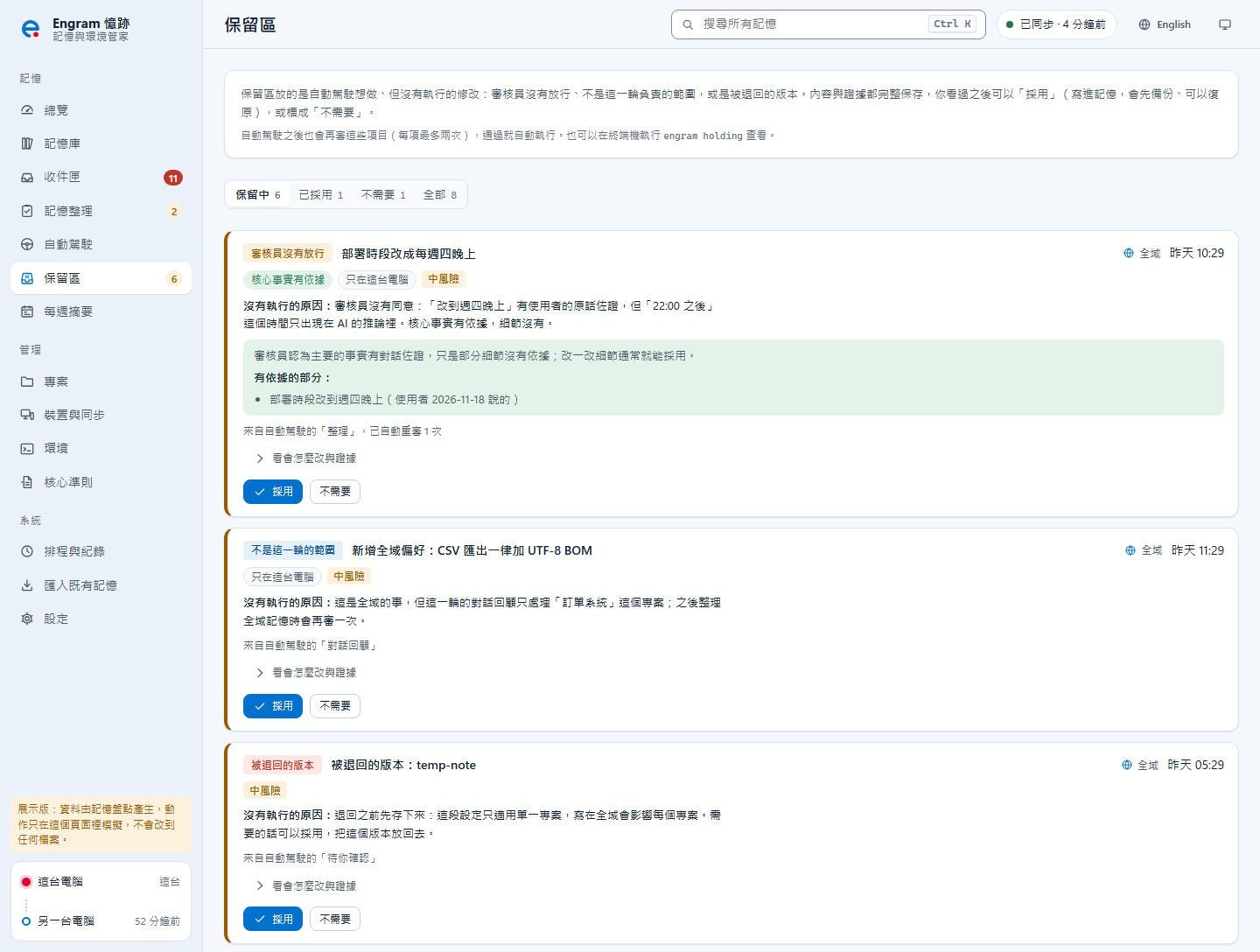
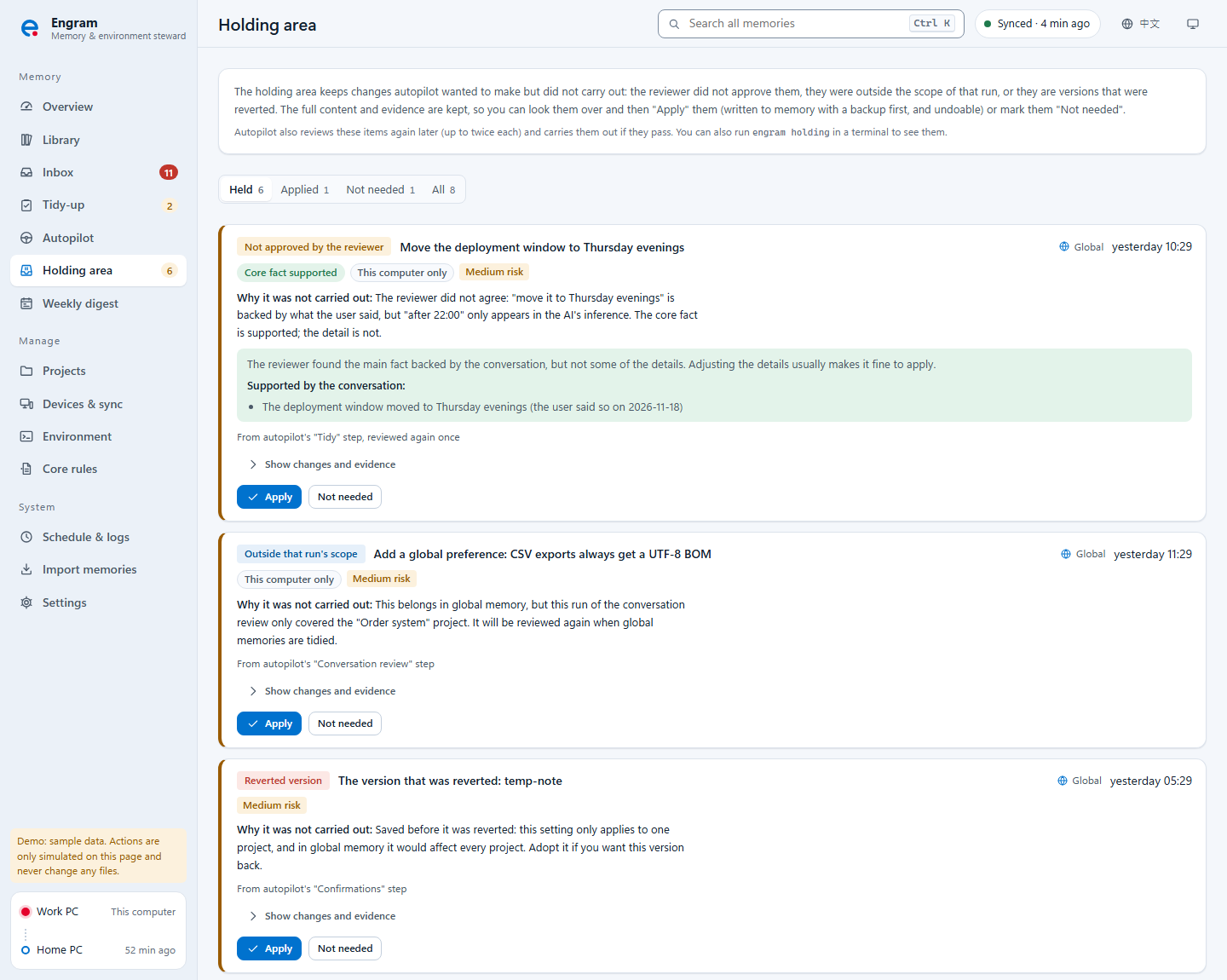
- 自動駕駛 2.0:只遵守你本人確認過的偏好;沒有執行的建議存進「保留區」,不再消失,可以採用或標成不需要;撞到用量上限或登入到期會停下來並通知你;新的「每週摘要」頁。
- 環境管家:每天檢查這台電腦的 Claude Code 環境、比較兩台電腦的差異(只記名稱、版本、雜湊與耗時,不讀環境變數的值);幾台電腦可以共用同一份環境設定,同步來的設定要在這台核可才會套用;一台更新新版,其他台(用 git 安裝的)自動跟上。
- 更安靜、更穩:背景存檔沒有變動就不動作;同步連續失敗會自我診斷並通知你;記憶庫每週自動打包;久沒用的專案自動休眠;疑似同一個專案會建議合併,自動駕駛不代你決定;混版期間共用的索引暫時照舊的排法(相容模式),兩台不會輪流改寫。
修正
- 用
engram remember寫的記憶,記憶多的時候可能被擠出索引、Claude 讀不到;現在糾正與偏好永遠列在索引裡。 - 審核員沒有放行的建議不再只留在那一輪的紀錄裡,會存進保留區;自動駕駛不再誤退回你想要的寫入、不再拆分記憶。
- 碰到 Claude 的用量上限時,自動駕駛不再一再呼叫失敗,而是停下來等重置。
- 同步被疑似金鑰的檔案卡住時會自我診斷,並在失敗滿 1 小時時通知你。
升級時要知道
- 自動駕駛不再拆分或精簡記憶,也只遵守你本人確認過的偏好:在 Claude Code 對話裡存的記憶、套用的整理一律記成「Claude 代為確認」,不會自動成為它的規則(同一個指令在你自己開的終端機執行才算本人確認),要在「自動駕駛」頁的偏好區塊按「這是我的偏好」。記憶畢業要寫進核心準則或變成護欄規則的內容,也只接受你本人確認過的,其他來源的會先等你確認。
- 從其他電腦同步來的環境設定、技能與護欄的「擋下」規則,要在每台電腦核可一次才會生效;核可只能在管理介面或你自己的終端機做。
- 新的預設:情境召回、環境健檢、自動更新開啟,護欄為「擋下」,環境設定同步為「只報告」,索引分層為「並行觀察」;自動駕駛維持你原本的設定。
- 請讓所有電腦都更新到 2.0.0:新的索引規則(糾正與偏好永遠列出、專案索引自動縮短、索引分層)要等全部更新才啟用。這不是怕舊版會壞:只更新一台時不會遺失資料,共用的索引會進入「相容模式」、暫時維持舊的排法,兩台不會輪流改寫,舊版更新之後自動切換(
engram status會說明)。混版期間不要手動編輯記憶庫裡的settings.json、release.json,以及env/、guardrails/、holding/底下的檔案:舊版不認得它們,也不替它們檢查疑似金鑰。
升級方式
- 在 Engram 資料夾執行
git pull(用 ZIP 安裝的,下載新版 ZIP 覆蓋原資料夾)。 - 執行
engram update。 - 已經開著的 Claude Code 對話執行
/reload-plugins。
1.x 沒有自動更新,所以每一台還在 1.x 的電腦,從 1.x 升級的第一次都要手動更新(git pull、engram update);更新到 2.0.0 之後,用 git 安裝的電腦,另一台更新時會在每天檢查時自動跟上。
相容性:實測 Claude Code 2.1.329、2.1.330,更早的版本未測試。情境召回與護欄靠外掛的 mod,mod 沒有載入時,情境召回改由指令型 hook 接手,護欄只能在對話開頭列出提醒。需要 Node.js 22 以上、Windows 11。
完整內容見 CHANGELOG。
From remembering to doing: the memory and environment steward for Claude Code
Engram 2.0 grows from "memory sync" into a "memory and environment steward": the right memories show up at the right time, command pitfalls you've hit become guardrails, and the whole Claude Code environment gets looked after. The upgrade is free.
Highlights
- Memory that shows up when needed: your corrections and preferences always stay in the index (once every computer is on 2.0.0); when you send a message, context recall brings up to 3 relevant memories (searched only among global memories, this computer's, and the current project's, computed on your computer); guardrails block known-bad command patterns before Claude sends a Bash or PowerShell command; memories can "graduate" into one line in the core rules, a guardrail reminder, or an environment setting.
- Autopilot 2.0: it follows only the preferences you confirmed yourself; suggestions it didn't carry out go to the Holding area instead of vanishing, where you can apply them or mark them not needed; it stops and notifies you when it hits a usage limit or its sign-in expires; and there's a new Weekly digest page.
- Environment steward: every day it checks this computer's Claude Code environment and compares computers (it records names, versions, hashes, and timings, and never the values of environment variables); several computers can share one environment profile, and what syncs in takes effect only after you approve it on this computer; update one computer and the others (installed with git) follow on their own.
- Quieter and steadier: the background save does nothing when nothing changed; sync diagnoses itself when it keeps failing and notifies you; the vault is packed automatically every week; projects nobody uses go dormant; projects that look like the same one get a merge suggestion that autopilot never decides for you; while versions are mixed, the shared indexes are temporarily written the old way (compatibility mode) so computers don't rewrite each other's.
Fixes
- Memories written with
engram remembercould be pushed out of the index when you had many, so Claude never read them; corrections and preferences are now always listed. - Suggestions the reviewer didn't approve no longer stay only in that run's record; they go to the holding area. Autopilot no longer sends back writes you wanted, and no longer splits memories.
- When Claude's usage limit is reached, autopilot no longer keeps calling and failing; it stops and waits for the reset.
- When a file held back as a possible secret blocks sync, sync now diagnoses itself and notifies you after an hour of failures.
What to know when you upgrade
- Autopilot no longer splits or condenses memories, and it follows only the preferences you confirmed yourself: memories saved and tidy-ups applied inside a Claude Code conversation are always recorded as "confirmed on your behalf by Claude" and don't automatically become its rules (the same command counts as yours only when you run it in a terminal you opened yourself); select This is my preference in the preferences block on the Autopilot page. A line that memory graduation wants to put into the core rules, or a guardrail rule it wants to add, is likewise accepted only from content you confirmed yourself; other sources wait for you first.
- Environment settings, skills, and "block" guardrail rules that sync from another computer take effect only after you approve them on each computer; approval works only in the dashboard or in your own terminal.
- New defaults: context recall, environment check, and automatic updates are on; guardrails are set to block; environment sync is report only; index layers are set to observe; autopilot keeps whatever you had set.
- Please update every computer to 2.0.0: the new index rules (corrections and preferences always listed, project indexes shortened automatically, index layers) start only once all of them are updated. It isn't that the old version would break: with only one updated, nothing is lost, and the shared indexes go into "compatibility mode" and stay the old way so the computers don't rewrite each other's, then switch by themselves once the older computers are updated (
engram statusexplains it). While versions are mixed, don't edit by handsettings.json,release.json, or the files underenv/,guardrails/, andholding/in the vault: the older version doesn't recognize them or check them for possible secrets.
How to upgrade
- Run
git pullin your Engram folder (if you installed from a ZIP, download the new ZIP and overwrite the folder). - Run
engram update. - In a Claude Code conversation that is already open, run
/reload-plugins.
1.x has no automatic updates, so every computer still on 1.x needs one manual update (git pull, then engram update) for this first upgrade; once it is on 2.0.0, computers installed with git catch up on their own during the daily check after another computer updates.
Compatibility: tested with Claude Code 2.1.329 and 2.1.330; earlier versions are untested. Context recall and guardrails run through the plugin's mod; when the mod isn't loaded, context recall is taken over by a command hook and guardrails can only list reminders at the start of a conversation. Requires Node.js 22 or later and Windows 11.
Full notes: CHANGELOG.
Engram 憶跡 1.6.0:多台電腦平等、預算更寬裕
多台電腦平等、預算更寬裕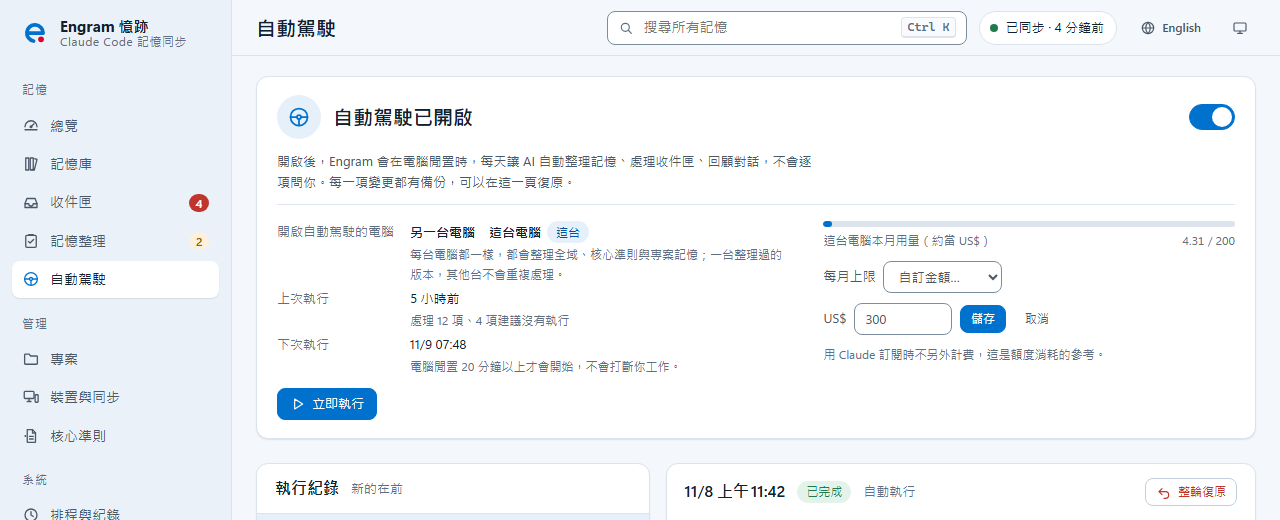 正體中文 自動駕駛不再只讓一台電腦處理共用記憶:每台開啟的電腦都平等,都會整理全域、核心準則與專案記憶,也都會處理同步衝突。一台整理過的版本記在記憶庫裡跟著同步,其他台不會重複處理;兩台剛好同時改到同一筆時,同步會產生衝突、下一輪再合併,不會遺失內容。 改了什麼
請把每台電腦都更新到 1.6.0(還在 1.5.0 的電腦看不到其他電腦的整理紀錄)。實測 Claude Code 2.1.319。 |
Every computer is equal, and a roomier budget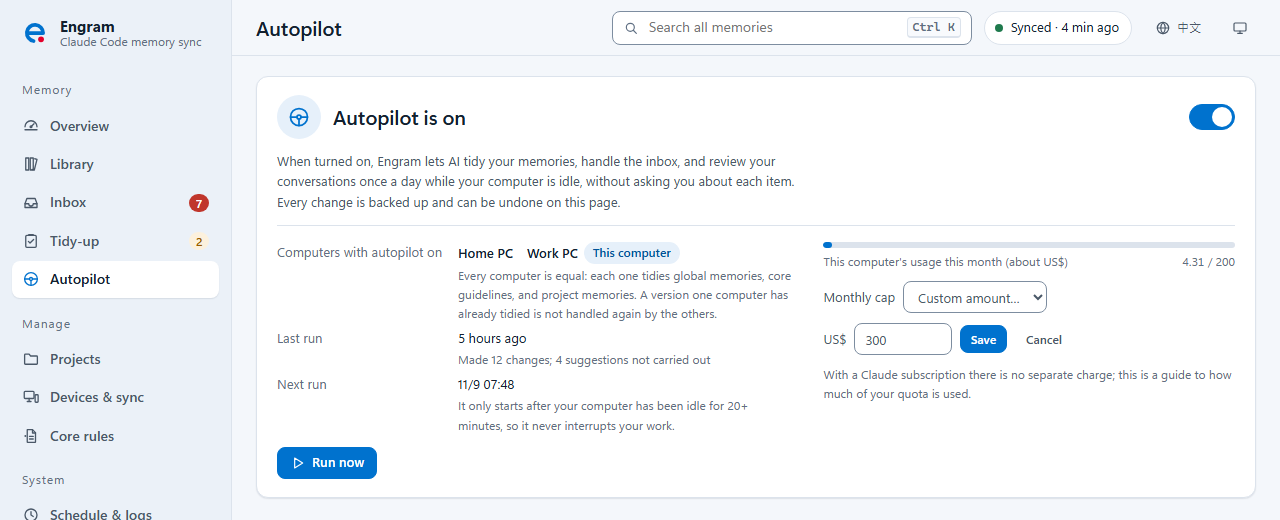 English Autopilot no longer leaves shared memories to a single computer: every computer with autopilot on is equal. Each one tidies global memories, core rules, and project memories, and resolves sync conflicts. A version one computer has already tidied is recorded in your vault and synced, so the others don't handle it again; if two computers change the same memory at once, syncing turns it into a conflict that the next run merges, so nothing is lost. What changed
Update every computer to 1.6.0 (a computer still on 1.5.0 can't see the others' tidy-up records). Tested with Claude Code 2.1.319. |
Engram 憶跡 1.5.0:自動駕駛
自動駕駛:整理工作全部交給 AI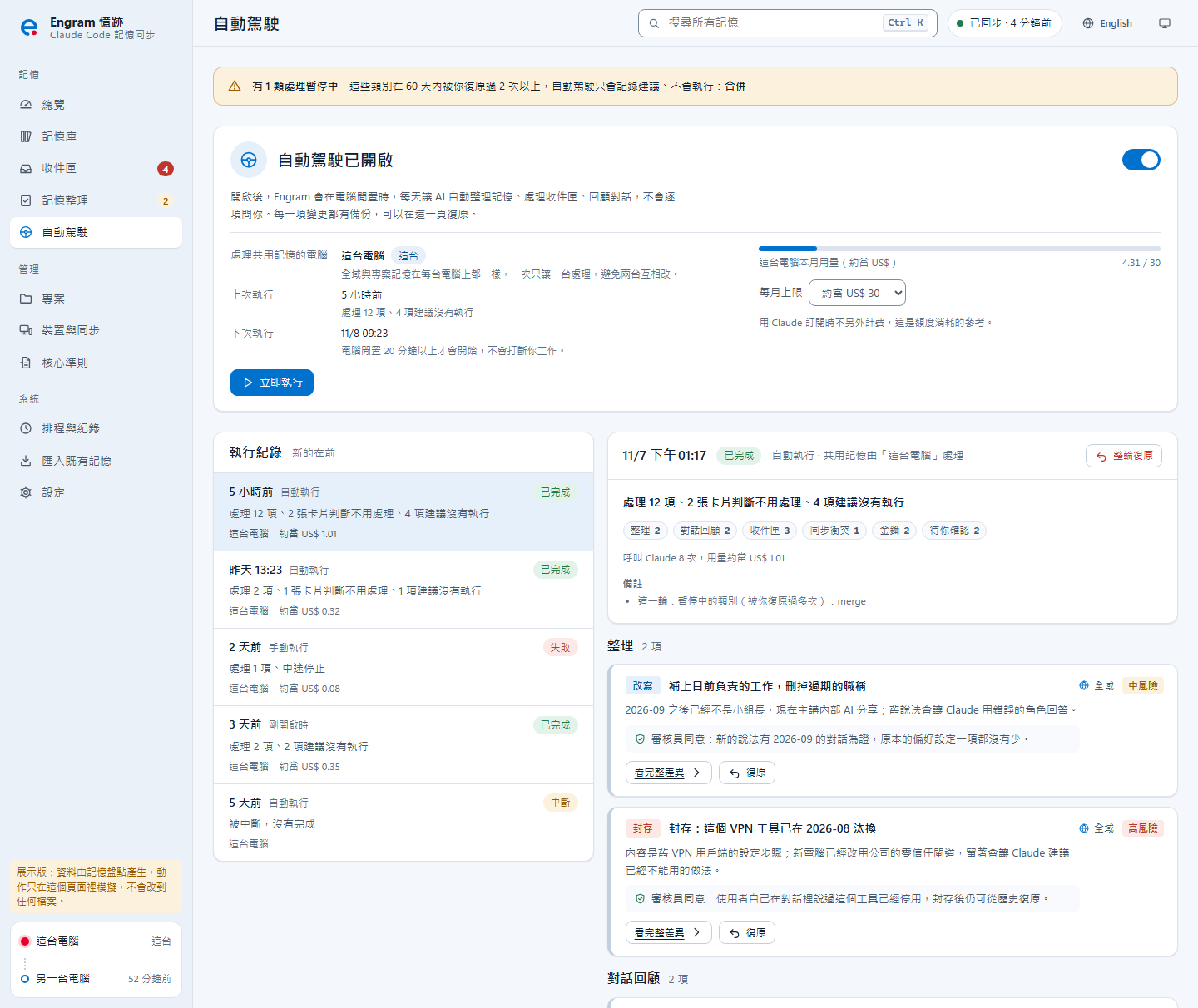 正體中文 開啟後,原本要你判斷或觸發的整理工作全部由 AI 自主處理:收件匣、重複與過時的記憶、放錯範圍的記憶、對話回顧、同步衝突、Claude 寫入的內容把關,以及記憶裡的金鑰。每天在電腦閒置時執行一輪,不需要逐項確認;每一項都附理由,在「自動駕駛」頁可以逐項或整輪復原。 怎麼把關
用 Claude 訂閱時不另外計費;每月上限預設約當 US$30(API 牌價),每輪最多 US$5。實測 Claude Code 2.1.319。 |
Autopilot: hand all the tidy-up work to AI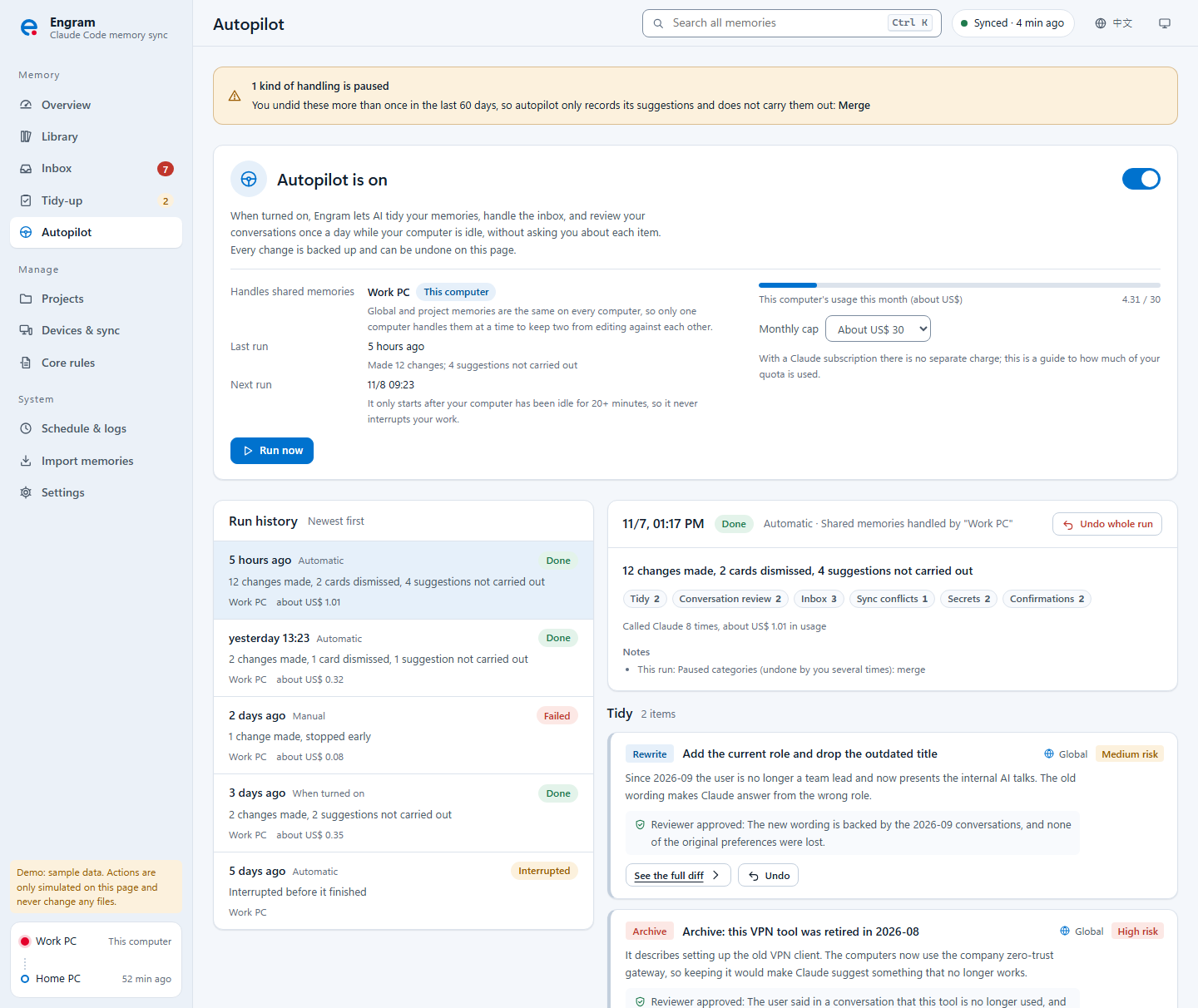 English Once it's on, the tidy-up work that used to wait for your decisions is handled by AI on its own: the inbox, duplicate and outdated memories, memories in the wrong scope, conversation review, sync conflicts, checking what Claude wrote, and secrets inside memories. It runs once a day while your computer is idle, with nothing to confirm item by item. Every change comes with its reason and can be undone, one by one or a whole run at a time, on the Autopilot page. How it's guarded
No extra charge on a Claude subscription; the monthly cap defaults to about US$30 at API list prices, up to US$5 per run. Tested with Claude Code 2.1.319. |
Engram 憶跡 1.4.1
|
修正版:用
正體中文 |
Bug fix release: issues found while tidying 81 inbox cards in one go with
English |
完整說明見 CHANGELOG。· Full notes in the changelog.
更新方式 · How to update:git -C "<Engram 資料夾>" pull → engram update
Engram 憶跡 1.4.0
 正體中文 |
 English |
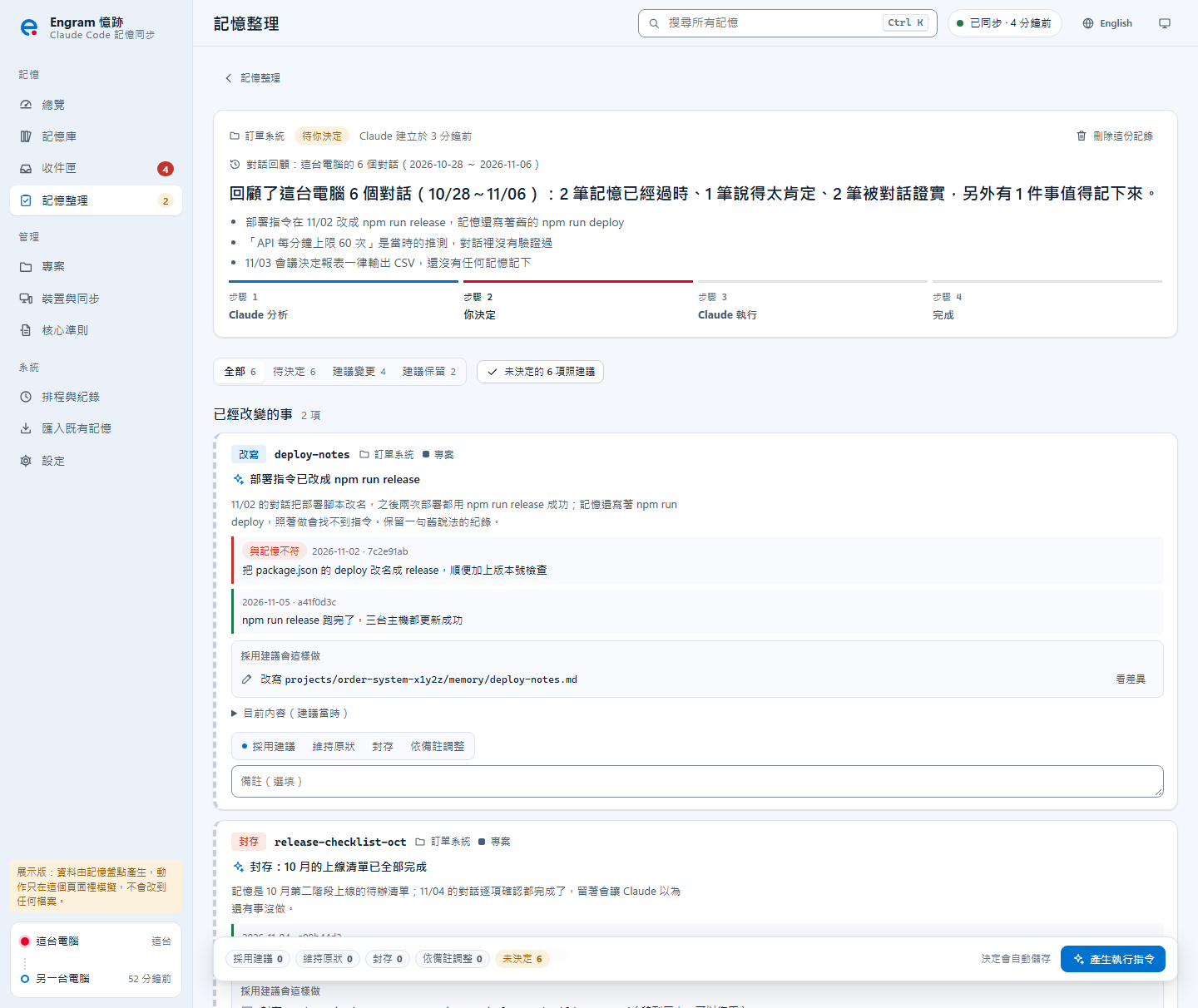
對話回顧:拿對話紀錄驗證記憶。 記憶寫錯了,或專案改了做法卻沒更新,Claude 還是會一直讀到、一直相信。依 Anthropic〈Components of agent memory〉的研究,這一版讓 Claude 回頭拿原始對話當證據,逐筆檢查記憶;同時讓每次對話都會載入的內容更精簡、更可信。
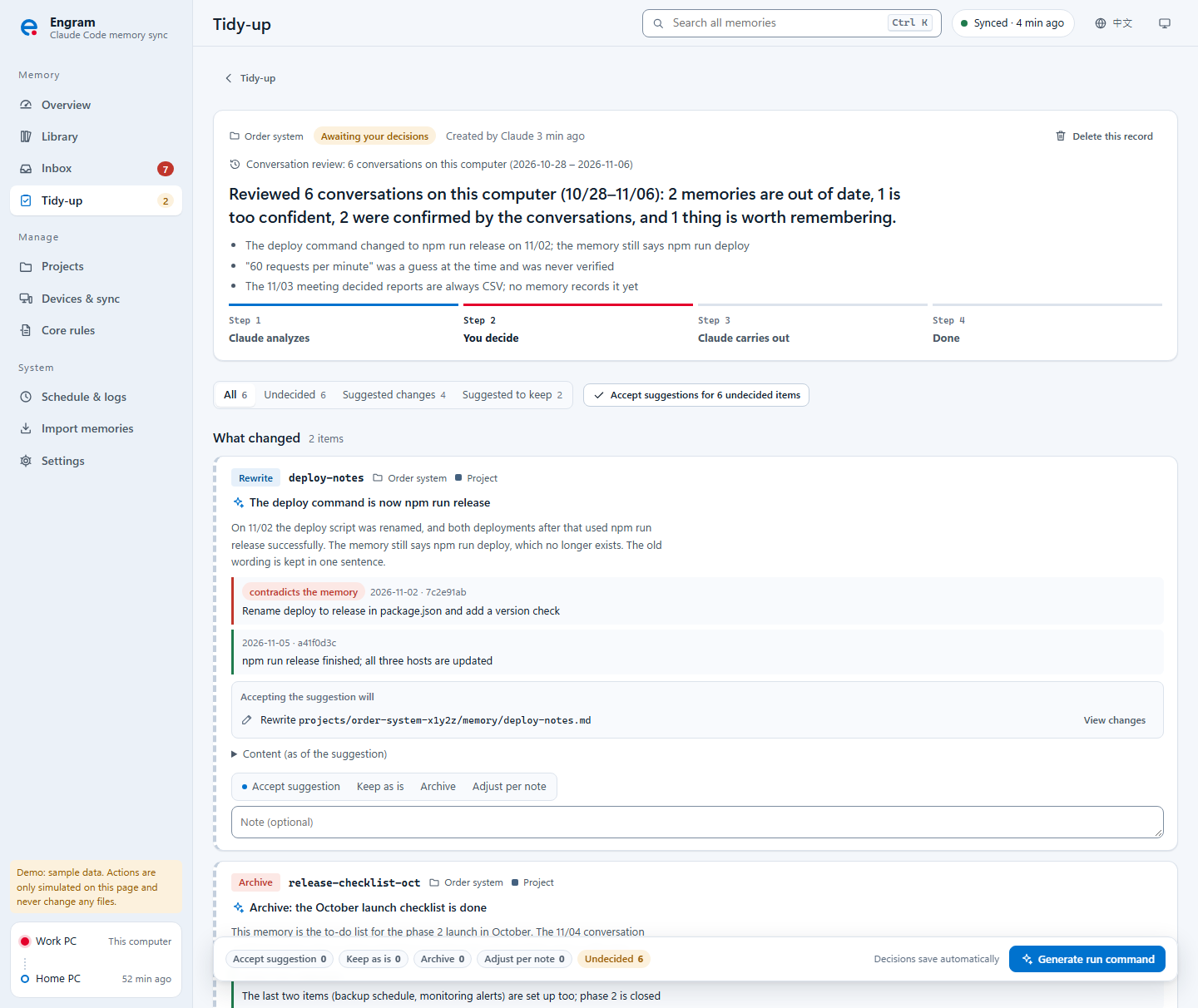
Conversation review: check memories against your conversations. When a memory is wrong, or a project changed how it does something and nobody updated the memory, Claude keeps reading it and believing it. Based on Anthropic's research in "Components of agent memory", this release has Claude go back to the original conversations as evidence and check memories one by one, and it keeps what loads in every conversation smaller and more trustworthy.
更新/Upgrade:在 Engram 資料夾 git pull(或下載新的 ZIP 覆蓋舊資料夾),然後執行 engram update,已開著的 Claude Code 對話執行 /reload-plugins。每台電腦都要更新;讀取次數要等所有電腦都更新到 1.4.0 才會用來排序索引。
Run git pull in your Engram folder (or download a new ZIP over the old folder), run engram update, then /reload-plugins in any open Claude Code conversation. Update every computer; read counts are used to order the index only once every computer runs 1.4.0.
對話回顧
| 在哪裡 | 做什麼 | |
|---|---|---|
| 1 | Claude Code,或管理介面「記憶整理」 | 輸入 /engram:dream(或在記憶整理頁選專案、選「對照對話紀錄」,複製指令) |
| 2 | Claude Code | Engram 把這台電腦上這個專案還沒回顧的對話轉成精簡的文字(疑似金鑰先遮蔽);每一份交給一個只有讀取工具的子代理,拿對話當證據檢查每一筆記憶:被證實、已經改變或過時、說得太肯定、互相矛盾,以及值得新增的事 |
| 3 | 管理介面 | 和記憶整理相同,逐項決定;每一項附對話原文引句與日期,引句找不到原文的會標出來 |
| 4 | Claude Code | 貼上 /engram:tidy-apply … 執行,每一項都能復原 |
- 新的整理動作「確認仍正確」:只記下驗證日期,內容不變(只用在容易過時或超過 30 天沒確認的記憶)。
- 對話紀錄不會同步,也不會上傳到 GitHub;轉出來的文字在整理記錄建立後就刪除。回顧過的對話不再分析,之後又接著聊的只分析新增的部分。
- Claude Code 預設只保留 30 天的對話,未回顧的對話快被清除時,收件匣會提醒你回顧。
每次都會載入的記憶
- 待你確認:Claude 自己寫入全域記憶、單機記憶或核心準則時,收件匣請你看差異,確認、編輯或退回。你在管理介面改的、記憶整理頁採用建議的、
/engram:save同意寫入的都算確認過。 - 讀取統計:從對話紀錄算出每筆記憶近 90 天被打開幾次,兩台電腦合計;很少用到或只在一個專案用到的全域記憶會提醒你。索引放不下時,先列釘選的、最近新增或修改的,再列常用的。
- 連結斷了:
[[名稱]]指向已經合併或封存的記憶時,一鍵改連到合併後的記憶。 - 核心準則建議更新:記憶寫入協定加入「記憶的用途」與「註明怎麼確認的」,由你在核心準則頁決定要不要加入;載入預算新增大小。
English summary
| Where | What happens | |
|---|---|---|
| 1 | Claude Code, or Tidy-up in the dashboard | Type /engram:dream (or pick a project on the Tidy-up page, choose Check against conversations, and copy the command) |
| 2 | Claude Code | Engram turns this project's not-yet-reviewed conversations on this computer into compact text (possible secrets masked first). Each piece goes to a subagent with read-only tools that uses it as evidence to check every memory: confirmed, changed or out of date, too confident, contradictory, and worth adding |
| 3 | The dashboard | Decide on each item, just as in a tidy-up. Each item quotes the conversation with its date, and quotes that can't be found in the conversation are flagged |
| 4 | Claude Code | Paste /engram:tidy-apply … to carry it out; every item can be undone |
- New action Still correct: records only the date it was checked, without changing the content (used only for memories that go out of date easily or haven't been checked for over 30 days).
- Conversations aren't synced or uploaded to GitHub, and the exported text is deleted as soon as the tidy-up record is created. Reviewed conversations aren't analyzed again; for one you resume later, only the new part is analyzed.
- Claude Code keeps conversations for only 30 days by default, so the inbox reminds you when unreviewed conversations are about to be deleted.
- Waiting for your review: when Claude writes global memories, machine memories, or core rules on its own, the inbox asks you to look at the changes and confirm, edit, or go back. Edits in the dashboard, items you accepted as suggested in Tidy-up, and
/engram:savewrites you agreed to count as reviewed. - Read statistics: how often each memory was opened in the last 90 days, added up across your computers; rarely used global memories, or ones used in only one project, are flagged. When the index runs out of room, pinned and recently changed memories come first, then the most-used ones.
- Broken links: one-click relink when a
[[name]]points to a memory that was merged or archived. - Suggested core-rule updates: the memory-writing protocol now says what memory is for and asks to note how a rule was confirmed; you decide on the Core rules page whether to add them. The load budget now shows size too.
See Conversation review in the user guide and the changelog.
Engram 憶跡 1.3.0
 正體中文 |
 English |
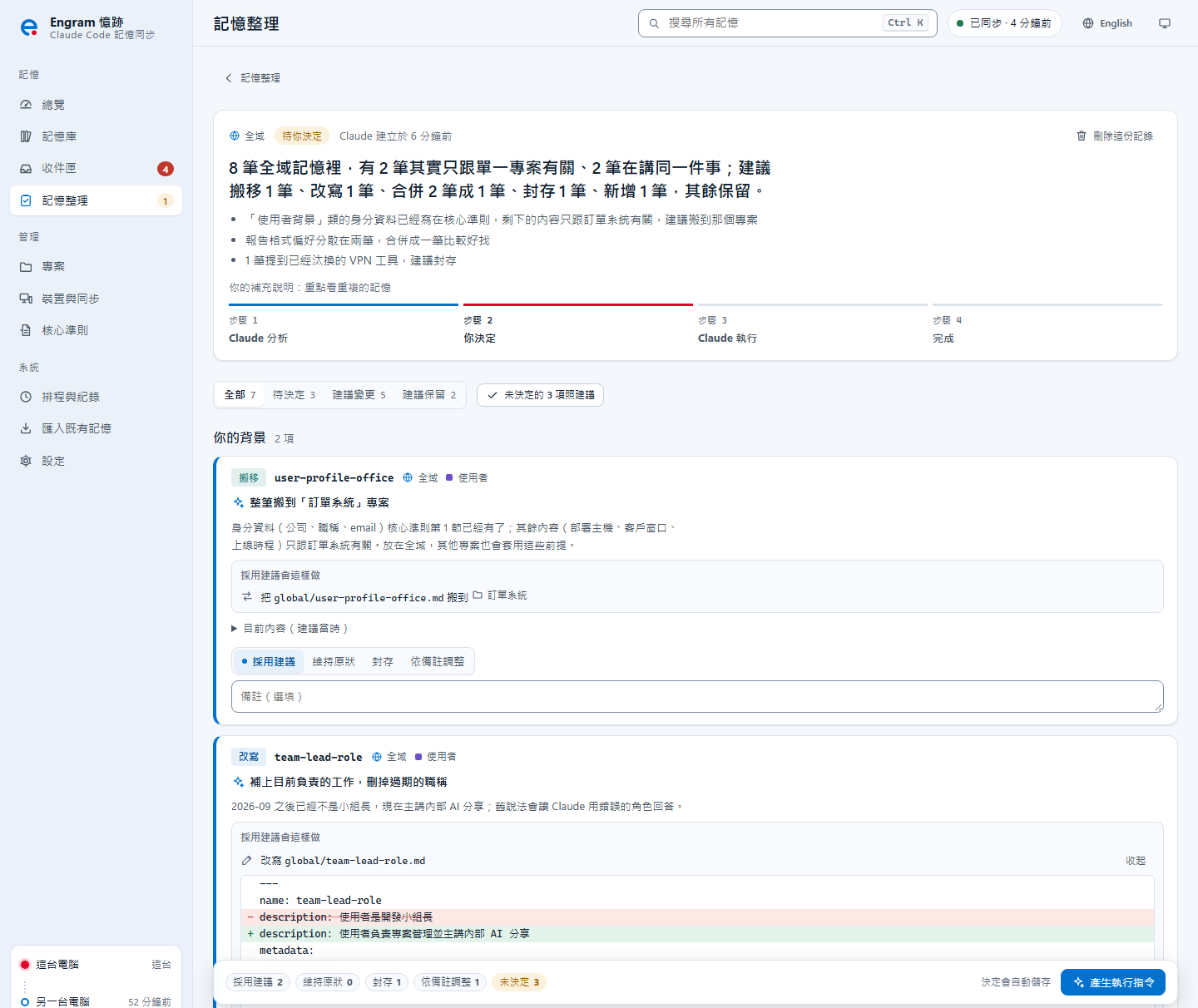
記憶整理:Claude 提建議,你逐項決定。 在管理介面選好範圍、把一行指令貼給 Claude Code,Claude 讀過範圍內的記憶、提出整理建議與修改後的內容;你在網頁上逐項看差異、做決定,Claude 才照你的決定動手,每一項都能復原。
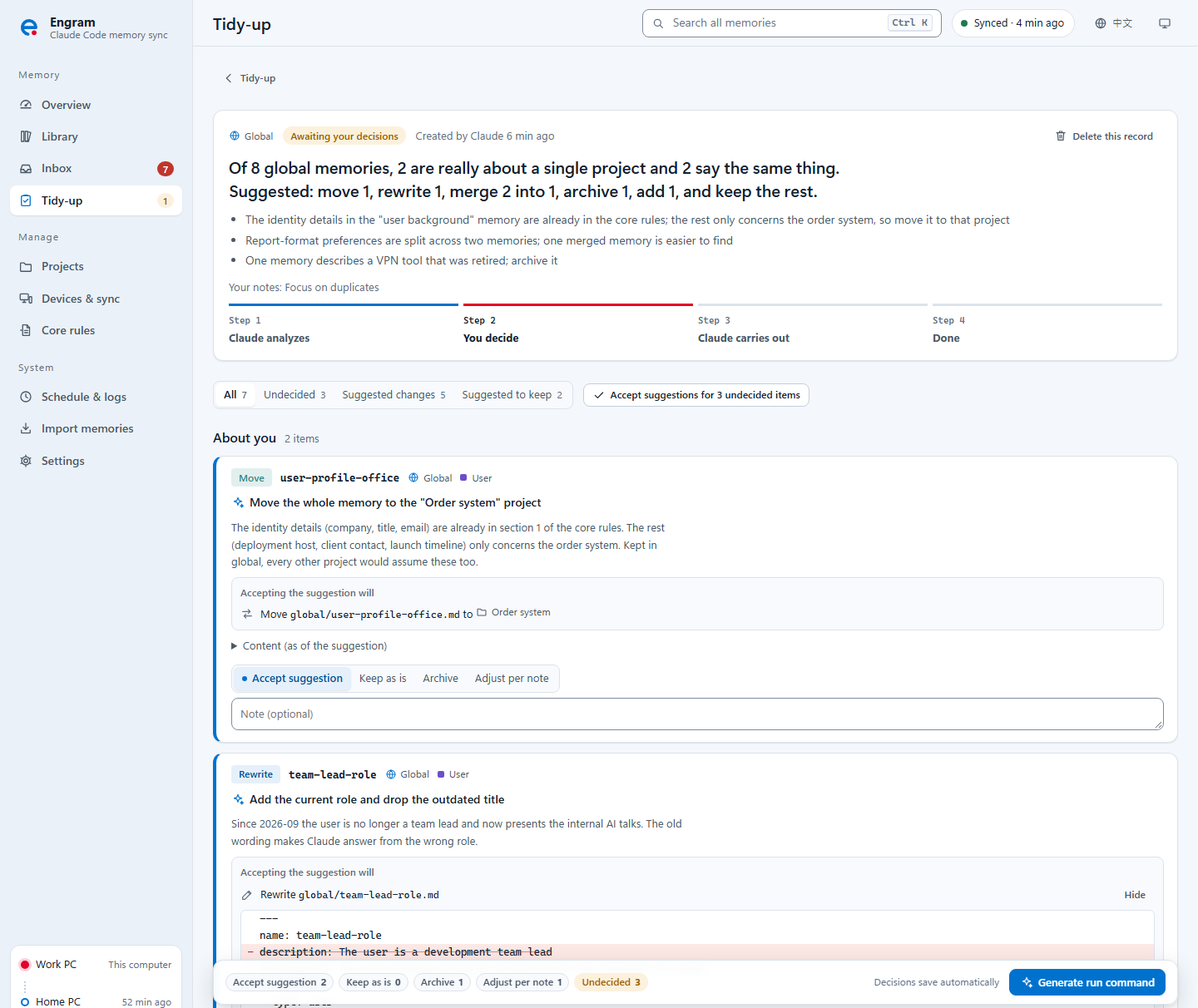
Tidy-up: Claude suggests, you decide each item. Pick a scope in the dashboard and paste one command into Claude Code. Claude reads the memories in that scope and suggests how to tidy them up, revised content included; you review the changes item by item on a web page and decide, and only then does Claude act. Every item can be undone.
更新/Upgrade:在 Engram 資料夾 git pull(或下載新的 ZIP 覆蓋舊資料夾),然後執行 engram update,已開著的 Claude Code 對話執行 /reload-plugins。每台電腦都要更新。
Run git pull in your Engram folder (or download a new ZIP over the old folder), run engram update, then /reload-plugins in any open Claude Code conversation. Update every computer.
記憶整理
| 在哪裡 | 做什麼 | |
|---|---|---|
| 1 | 管理介面「記憶整理」 | 選範圍(全域、單機、專案、核心準則或全部),寫下補充說明,複製指令 |
| 2 | Claude Code | 貼上 /engram:tidy …:Claude 讀過記憶、提出建議,給你一個回到管理介面的網址。這一步不改任何記憶 |
| 3 | 管理介面 | 每一項看建議、理由與修改前後的差異,選「採用建議/維持原狀/封存/依備註調整」,自動儲存 |
| 4 | Claude Code | 貼上 /engram:tidy-apply …:先備份,採用的項目照你看過的內容執行,選了「依備註調整」的交給 Claude 處理;結果回到同一頁,每一項都能單獨復原 |
/engram:tidy只讀取記憶、建立整理記錄,寫入一定要等你在網頁決定之後;採用建議的項目照你看過的內容寫入,不會重新生成。- 執行前備份會動到的檔案;建議之後被改過的記憶(例如另一台電腦同步過來)不會被覆蓋;每一項先確認前提才動手、全有全無,一項失敗不影響其他項,中斷後再執行會從下一步接著做。
- 記憶庫的「請 Claude 檢查」、專案頁的「請 Claude 整理」、核心準則頁的「請 Claude 精簡」改為帶著範圍開啟記憶整理頁。
- 新指令
engram tidy(給技能使用)。整理記錄只存在這台電腦的~/.engram/local/tidy/,不會同步,90 天後自動清除。
詳見使用說明第 3 節。
English summary
| Where | What happens | |
|---|---|---|
| 1 | Tidy-up in the dashboard | Pick a scope (global, machine, a project, core rules, or everything), add notes for Claude, and copy the command |
| 2 | Claude Code | Paste /engram:tidy …: Claude reads the memories, makes suggestions, and gives you a link back to the dashboard. Nothing is changed at this step |
| 3 | The dashboard | For each item, see the suggestion, the reasoning, and the before-and-after changes; choose Accept suggestion, Keep as is, Archive, or Adjust per note. Decisions save automatically |
| 4 | Claude Code | Paste /engram:tidy-apply …: a backup is made first, accepted items are carried out exactly as you saw them, and "Adjust per note" items go to Claude. Results come back to the same page, and every item can be undone on its own |
/engram:tidyonly reads memories and creates a tidy-up record; nothing is written until you decide on the page, and accepted items are written exactly as you saw them, never regenerated.- The files involved are backed up first; memories that changed after the suggestion (for example, synced from another computer) are never overwritten; each item checks its preconditions first and is all-or-nothing, one failed item doesn't affect the others, and running it again after an interruption resumes from the next step.
- Ask Claude to check in Library, Ask Claude to tidy up on Projects, and Ask Claude to trim on Core rules now open the Tidy-up page with the scope filled in.
- New command
engram tidy(used by the skills). Tidy-up records stay on this computer in~/.engram/local/tidy/, are not synced, and are cleared after 90 days. See section 3 of the user guide.
Engram 憶跡 1.2.0
 正體中文 |
 English |
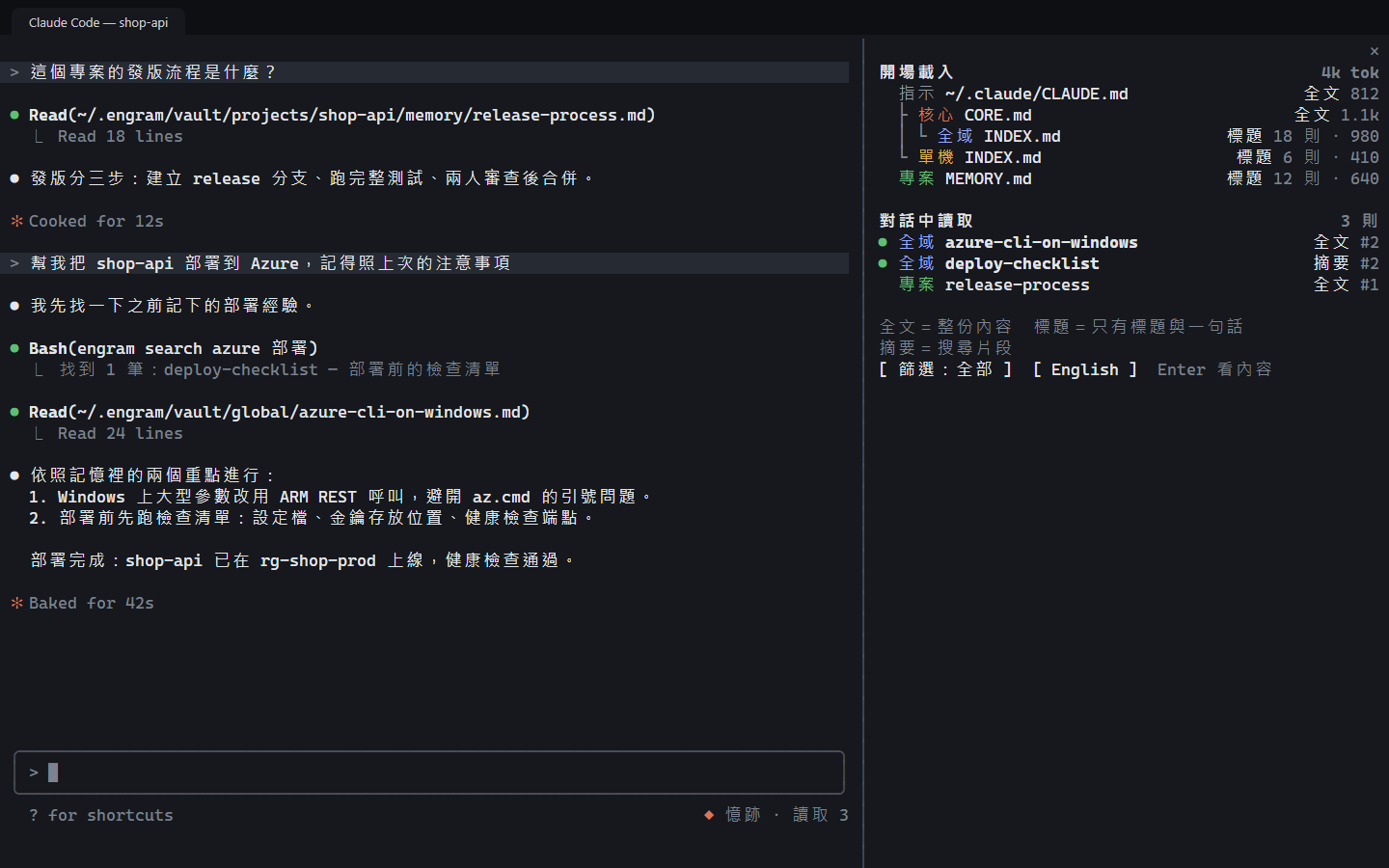
全新記憶視覺化面板:親眼看見 Claude 每次對話讀了哪些記憶。 Claude 的回答是根據哪些記憶?以前只能猜,現在 Claude Code 旁邊的面板一眼告訴你。
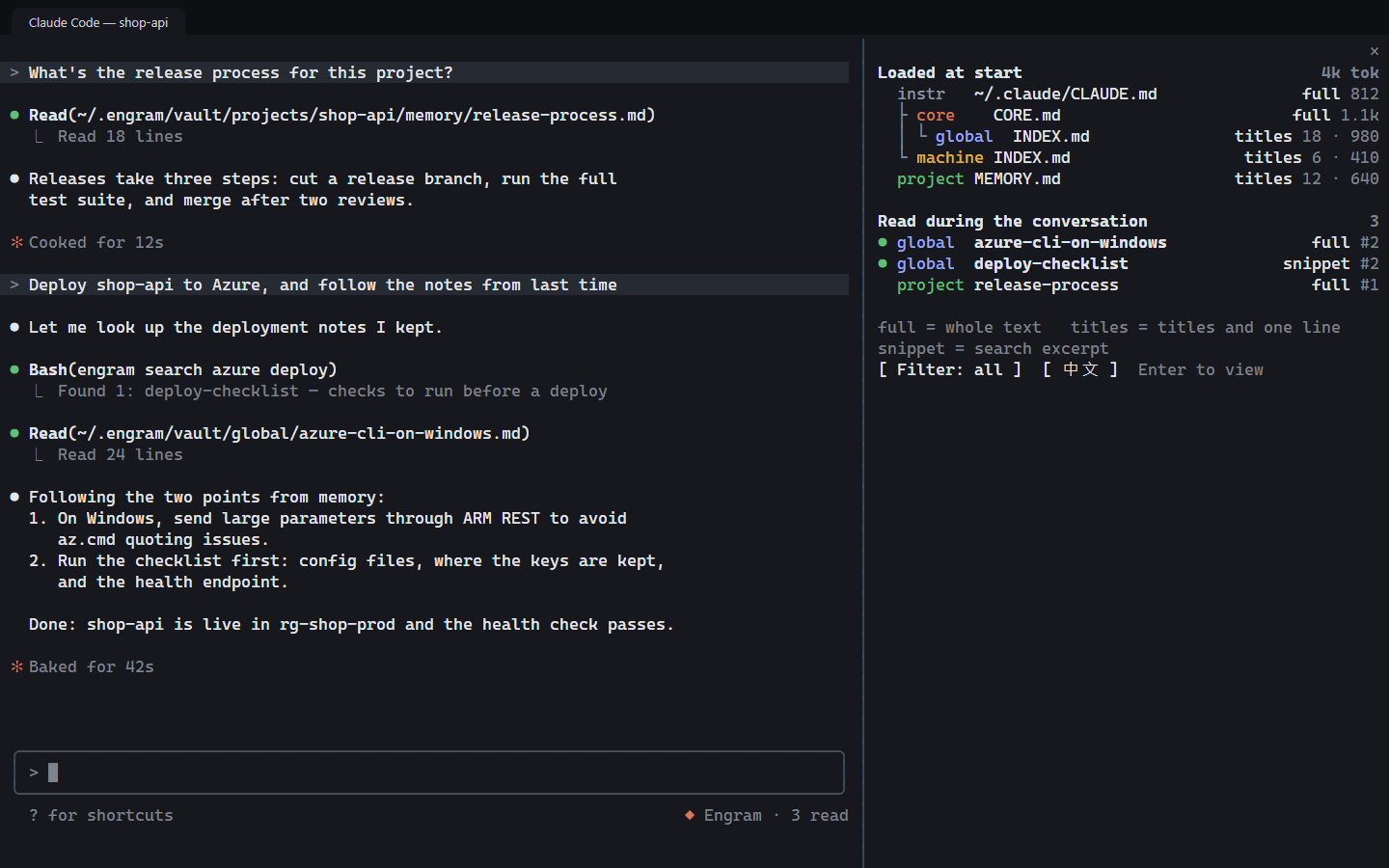
New memory pane: see which memories Claude read in every conversation. Which memories is an answer based on? You used to have to guess; now a pane beside Claude Code shows you at a glance.
更新/Upgrade:在 Engram 資料夾 git pull(或下載新的 ZIP 覆蓋舊資料夾),然後執行 engram update,已開著的 Claude Code 對話執行 /reload-plugins。每台電腦都要更新。
Run git pull in your Engram folder (or download a new ZIP over the old folder), run engram update, then /reload-plugins in any open Claude Code conversation. Update every computer.
記憶面板
| 你看得到 | 說明 |
|---|---|
| 開場載入 | 每次對話一開始就放進 Claude 腦袋的指示檔與記憶索引,用 ├ └ │ 樹狀線畫出誰匯入了誰,附上估計的 token 數 |
| 對話中讀取 | Claude 中途讀了哪一則記憶、engram search 找到哪些、自動載入的指示檔(例如子資料夾的 CLAUDE.md),以及第幾回合;這一回合新讀到的標上 ●,子代理讀的另外標示 |
| 讀到多深 | 每一列標出「全文」、「標題」或「摘要」:索引只讓 Claude 看到標題與一句話說明,記憶內容要讀取後才會進入對話 |
| 被截掉的記憶 | MEMORY.md 超過 Claude Code 的載入上限(前 200 行或 25KB)時,直接告訴你 Claude 只看得到前幾則 |
| 壓縮前後 | 對話被壓縮後標題改成「壓縮後重新載入」,壓縮前讀取的記憶調暗並標出內容已整理成摘要 |
- 點任何一列看記憶內容,以及它是怎麼、什麼時候進到對話的;可以依範圍篩選。
- 開關:Claude Code 底部的「◆ 憶跡 · 讀取 N」按鈕,或輸入
/engram-memories;全螢幕而且夠寬的終端機會自動開啟。 - 介面有正體中文與 English,在面板切換,選擇會記住。
- 面板只在本機讀取,不呼叫 AI、不送出任何資料。需要支援外掛畫面(mods)的 Claude Code;實測 2.1.307 至 2.1.309 可用,更早的版本未測試。
詳見使用說明第 4 節。
修正
- 管理介面「最近一次對話載入了什麼」一直少列專案的 MEMORY.md:Claude Code 載入自動記憶的索引時不會觸發 InstructionsLoaded,現在改由 SessionStart 補記。
English summary
- Memory pane: a new pane beside Claude Code lists, live, the memories in this conversation.
- Loaded at start: the instruction files and memory indexes put into Claude's head when the conversation starts, drawn as a
├ └ │tree of which file imports which, with estimated tokens. - Read during the conversation: memories Claude read along the way, what an
engram searchturned up, and instruction files loaded automatically (for example a subfolder's CLAUDE.md), with the turn they appeared in; anything new in this turn is marked ●, and reads by subagents are labeled. - How much Claude saw: every row says full, titles (an index holds only titles and one-line descriptions), or snippet (a search excerpt).
- Memories cut off: when MEMORY.md is over Claude Code's load limit (the first 200 lines or 25KB), the pane shows that Claude sees only the first few entries.
- Before and after compaction: after a compaction the heading changes to Reloaded after compaction, and memories read before it are dimmed under a note that their text is now summarized.
- Loaded at start: the instruction files and memory indexes put into Claude's head when the conversation starts, drawn as a
- Select any row to read the memory and see how and when it entered the conversation; filter by scope.
- Toggle it with ◆ Engram · N read at the bottom of Claude Code or
/engram-memories; it also opens by itself in a fullscreen terminal that is wide enough. - English and Traditional Chinese, switchable in the pane; your choice is remembered.
- The pane reads files on your computer only: no AI calls, nothing sent anywhere. It needs a Claude Code version that supports plugin panes (mods); tested on 2.1.307 through 2.1.309, earlier versions untested. See section 4 of the user guide.
- Fix: the dashboard's What the last conversation loaded always left out the project's MEMORY.md, because Claude Code doesn't fire InstructionsLoaded when it loads the auto-memory index. SessionStart now records it.
Install: open Claude Code and paste the message from the README (English), or download and double-click setup.cmd. Requires Windows 11, Claude Code, and a GitHub account.
Engram 憶跡 1.1.0
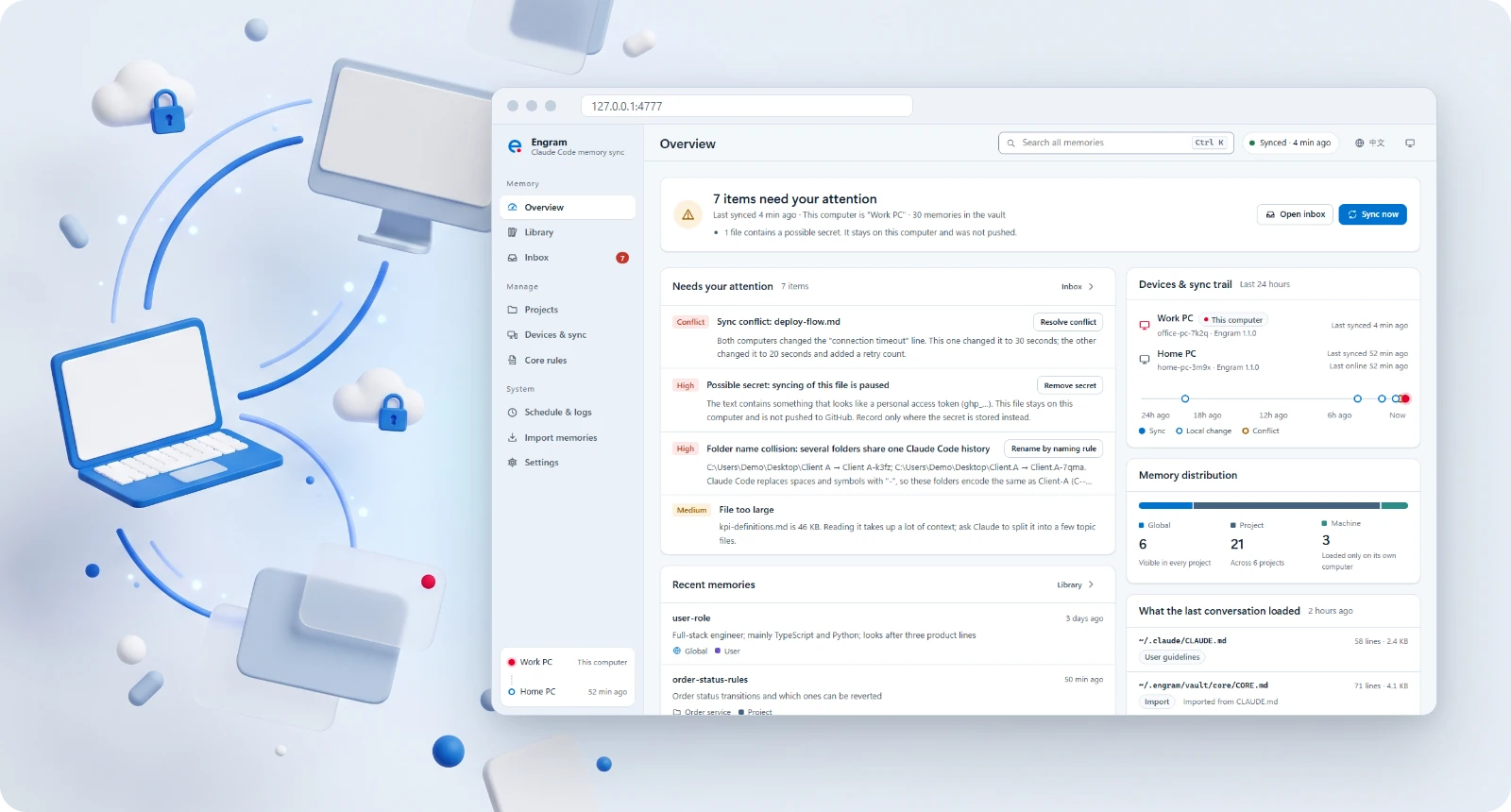
英文版。 管理介面可以切換正體中文與 English,GitHub 儲存庫加入完整的英文文件。
English edition. The dashboard now switches between Traditional Chinese and English, and the repository has full English documentation.
更新/Upgrade:在 Engram 資料夾 git pull(或下載新的 ZIP 覆蓋舊資料夾),然後執行 engram update。每台電腦都要更新。
Run git pull in your Engram folder (or download a new ZIP over the old folder), then run engram update. Update every computer.
管理介面
- 新增英文介面:用頂列的語言切換鈕,或「設定 › 介面語言」切換正體中文與 English。第一次開啟時依瀏覽器語言決定,選擇會記在這個瀏覽器。
- 常駐程式傳來的文字也有英文版:收件匣卡片、排程工作、相容性探測、錯誤訊息與建議、同步衝突摘要、匯入計畫的判斷理由。日誌與 git 變更紀錄維持原文。
文件
- 英文文件:README.en.md、INSTALL-WITH-AI.md、docs/en/(快速開始、使用說明、常見問題),附英文截圖與插圖。
- SECURITY.md 與問題回報範本改為中英雙語;每份文件頂端都有語言切換連結。
Claude Code 外掛
/engram:inbox的自動處理模式也接受auto(原本只認「自動」)。外掛說明改為中英雙語。
修正
- 記憶庫的疑似金鑰提示指向不存在的按鈕「遮蔽金鑰」,改為收件匣實際的「移除金鑰」。
- 安裝手冊引用了安裝程式不會印出的訊息,改為實際的「你的 Claude Code 預設權限模式是『…』」。
- 安全政策的支援版本更新為 1.1.x。
- 安全:
engram doctor、engram import plan --json、engram status的輸出(可能交給 Claude)現在也遮蔽疑似金鑰;同步衝突紀錄的 meta.json 寫入前先遮蔽,避免 frontmatter 有誤的那一行連同金鑰隨 vault 推送到 GitHub。 - 另一個 Engram 程序正在同步時,總覽不再顯示「所有電腦的記憶都是最新的」,同步狀態顯示為「同步中」(原本空白)。
尚未支援
- 命令列輸出、安裝程式的提示、Windows 通知與外掛技能的指示仍是正體中文;Claude 通常會用你使用的語言回覆。
English summary
- Dashboard: English interface. Switch between Traditional Chinese and English from the language button in the top bar or Settings › Interface language. The first visit follows your browser language; your choice is remembered in that browser.
- Agent messages: inbox cards, scheduled jobs, the compatibility probe, error messages and hints, sync conflict summaries, and import-plan reasons now carry English versions. Logs and the git change history keep their original text.
- Docs: English README, INSTALL-WITH-AI.md, and docs/en/ (quick start, user guide, FAQ) with English screenshots and illustrations. SECURITY.md and the issue templates are bilingual.
- Claude Code plugin:
/engram:inboxauto mode also acceptsauto. - Fixes: the Library's possible-secret tip now points to the inbox's real Remove secret button; the install manuals quote the installer's actual permission-mode notice; the security policy lists 1.1.x as supported.
- Security: output from
engram doctor,engram import plan --json, andengram status(which may be handed to Claude) now redacts possible secrets, and sync conflict records (meta.json) are redacted before they are written, so a malformed frontmatter line containing a secret is no longer pushed to GitHub with the vault. - Sync state: while another Engram process is syncing, the Overview no longer claims every computer is up to date, and the sync status shows Syncing (it used to be blank).
- Not yet localized: CLI output, setup prompts, Windows notifications, and the plugin skill instructions are still in Traditional Chinese; Claude normally replies in the language you write in.
Install: open Claude Code and paste the message from the English README, or download and double-click setup.cmd. Requires Windows 11, Claude Code, and a GitHub account.
Engram 憶跡 1.0.0

讓 Claude 在每一台電腦都記得你。 Claude Code 記憶的跨裝置同步、整理與復原,記憶存在你自己的 GitHub 私人 repo。
安裝:打開 Claude Code,貼上 README 裡的那段話,讓 AI 代你安裝;或下載後雙擊 setup.cmd。需要 Windows 11、Claude Code 與 GitHub 帳號。
第一個正式版本。
同步與管理
- 多台電腦透過你自己的 GitHub 私人 repo
engram-vault背景同步(預設每 10 分鐘);離線照常記憶,恢復連線後自動補上。 - 專案以 ID 識別:搬家、改名、在另一台電腦 clone 同一個 git repo 都認得;git 專案第一次在新電腦開啟時自動綁定。
- 三種記憶範圍:全域、專案、單機。
- 衝突處理:不同段落自動合併;同一段的衝突保留兩邊版本,在收件匣並排比對,Claude 永遠不會讀到衝突標記。
- 每日健康檢查與收件匣:索引超過上限、疑似金鑰、大量刪除、可能重複、可能過時等情況一鍵處理。
- 資料夾撞名偵測與依命名規則改名,可整批還原。
用 Claude 整理
- Claude Code 外掛指令
/engram:inbox、/engram:tidy、/engram:save、/engram:recall:先提計畫、你同意才執行,每一筆寫入都可以復原。
管理介面
- 總覽、記憶庫、收件匣、專案、裝置與同步、核心準則、排程與紀錄、匯入既有記憶、設定;支援深色模式,可安裝成桌面應用程式。
安裝與移除
setup.cmd一鍵安裝:自動補齊 Node.js、Git、GitHub CLI,自動判斷第一台或之後的電腦。- AI 幫你快速安裝.md:把一段話貼給 Claude Code,由 AI 代為安裝。
- 匯入既有記憶前先在複本上沙盒演練,套用後有還原點。
engram uninstall依安裝紀錄逐項還原,預設保留記憶庫。
安全
- 含疑似金鑰的記憶不推送;交給 Claude 前先在本機遮蔽;寫入 API 拒絕帶進新的疑似金鑰。
- 「不是金鑰」清單只存雜湊,且只能由使用者本人在自己的終端機確認。