Repository navigation
Engram 憶跡 1.2.0

 正體中文 |
 English |
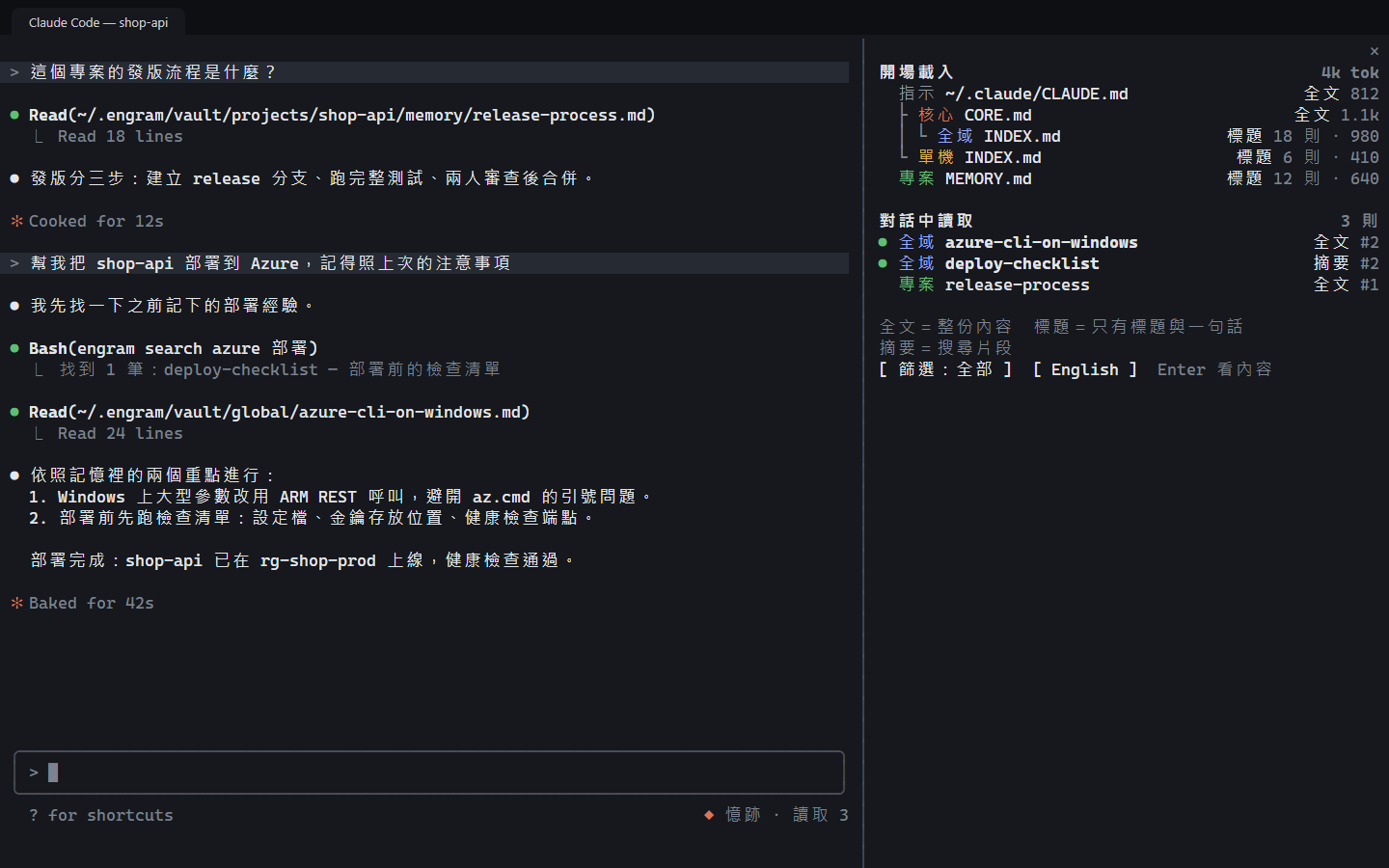
全新記憶視覺化面板:親眼看見 Claude 每次對話讀了哪些記憶。 Claude 的回答是根據哪些記憶?以前只能猜,現在 Claude Code 旁邊的面板一眼告訴你。
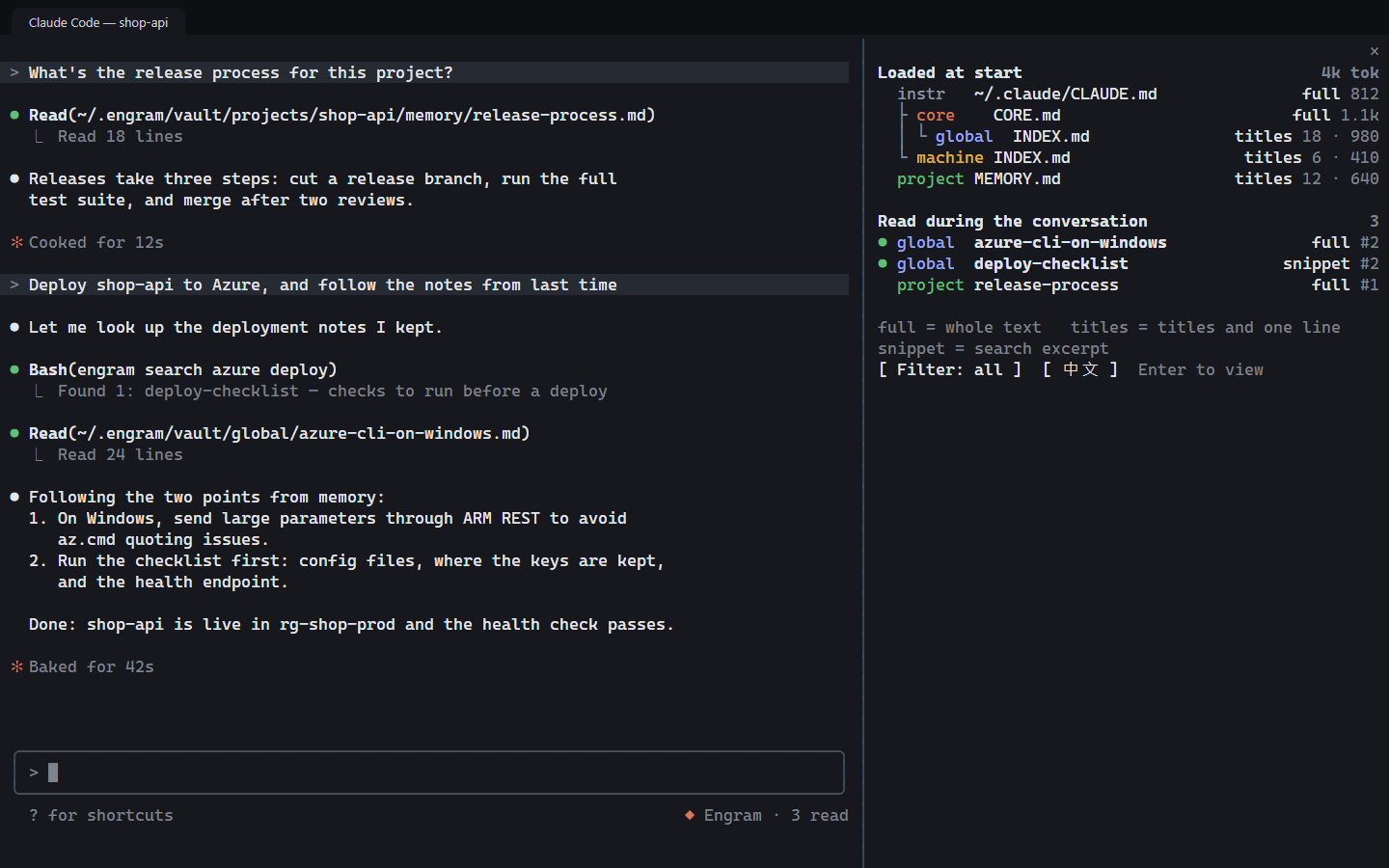
New memory pane: see which memories Claude read in every conversation. Which memories is an answer based on? You used to have to guess; now a pane beside Claude Code shows you at a glance.
更新/Upgrade:在 Engram 資料夾 git pull(或下載新的 ZIP 覆蓋舊資料夾),然後執行 engram update,已開著的 Claude Code 對話執行 /reload-plugins。每台電腦都要更新。
Run git pull in your Engram folder (or download a new ZIP over the old folder), run engram update, then /reload-plugins in any open Claude Code conversation. Update every computer.
記憶面板
| 你看得到 | 說明 |
|---|---|
| 開場載入 | 每次對話一開始就放進 Claude 腦袋的指示檔與記憶索引,用 ├ └ │ 樹狀線畫出誰匯入了誰,附上估計的 token 數 |
| 對話中讀取 | Claude 中途讀了哪一則記憶、engram search 找到哪些、自動載入的指示檔(例如子資料夾的 CLAUDE.md),以及第幾回合;這一回合新讀到的標上 ●,子代理讀的另外標示 |
| 讀到多深 | 每一列標出「全文」、「標題」或「摘要」:索引只讓 Claude 看到標題與一句話說明,記憶內容要讀取後才會進入對話 |
| 被截掉的記憶 | MEMORY.md 超過 Claude Code 的載入上限(前 200 行或 25KB)時,直接告訴你 Claude 只看得到前幾則 |
| 壓縮前後 | 對話被壓縮後標題改成「壓縮後重新載入」,壓縮前讀取的記憶調暗並標出內容已整理成摘要 |
- 點任何一列看記憶內容,以及它是怎麼、什麼時候進到對話的;可以依範圍篩選。
- 開關:Claude Code 底部的「◆ 憶跡 · 讀取 N」按鈕,或輸入
/engram-memories;全螢幕而且夠寬的終端機會自動開啟。 - 介面有正體中文與 English,在面板切換,選擇會記住。
- 面板只在本機讀取,不呼叫 AI、不送出任何資料。需要支援外掛畫面(mods)的 Claude Code;實測 2.1.307 至 2.1.309 可用,更早的版本未測試。
詳見使用說明第 4 節。
修正
- 管理介面「最近一次對話載入了什麼」一直少列專案的 MEMORY.md:Claude Code 載入自動記憶的索引時不會觸發 InstructionsLoaded,現在改由 SessionStart 補記。
English summary
- Memory pane: a new pane beside Claude Code lists, live, the memories in this conversation.
- Loaded at start: the instruction files and memory indexes put into Claude's head when the conversation starts, drawn as a
├ └ │tree of which file imports which, with estimated tokens. - Read during the conversation: memories Claude read along the way, what an
engram searchturned up, and instruction files loaded automatically (for example a subfolder's CLAUDE.md), with the turn they appeared in; anything new in this turn is marked ●, and reads by subagents are labeled. - How much Claude saw: every row says full, titles (an index holds only titles and one-line descriptions), or snippet (a search excerpt).
- Memories cut off: when MEMORY.md is over Claude Code's load limit (the first 200 lines or 25KB), the pane shows that Claude sees only the first few entries.
- Before and after compaction: after a compaction the heading changes to Reloaded after compaction, and memories read before it are dimmed under a note that their text is now summarized.
- Loaded at start: the instruction files and memory indexes put into Claude's head when the conversation starts, drawn as a
- Select any row to read the memory and see how and when it entered the conversation; filter by scope.
- Toggle it with ◆ Engram · N read at the bottom of Claude Code or
/engram-memories; it also opens by itself in a fullscreen terminal that is wide enough. - English and Traditional Chinese, switchable in the pane; your choice is remembered.
- The pane reads files on your computer only: no AI calls, nothing sent anywhere. It needs a Claude Code version that supports plugin panes (mods); tested on 2.1.307 through 2.1.309, earlier versions untested. See section 4 of the user guide.
- Fix: the dashboard's What the last conversation loaded always left out the project's MEMORY.md, because Claude Code doesn't fire InstructionsLoaded when it loads the auto-memory index. SessionStart now records it.
Install: open Claude Code and paste the message from the README (English), or download and double-click setup.cmd. Requires Windows 11, Claude Code, and a GitHub account.