Repository navigation
Engram 憶跡 1.3.0

 正體中文 |
 English |
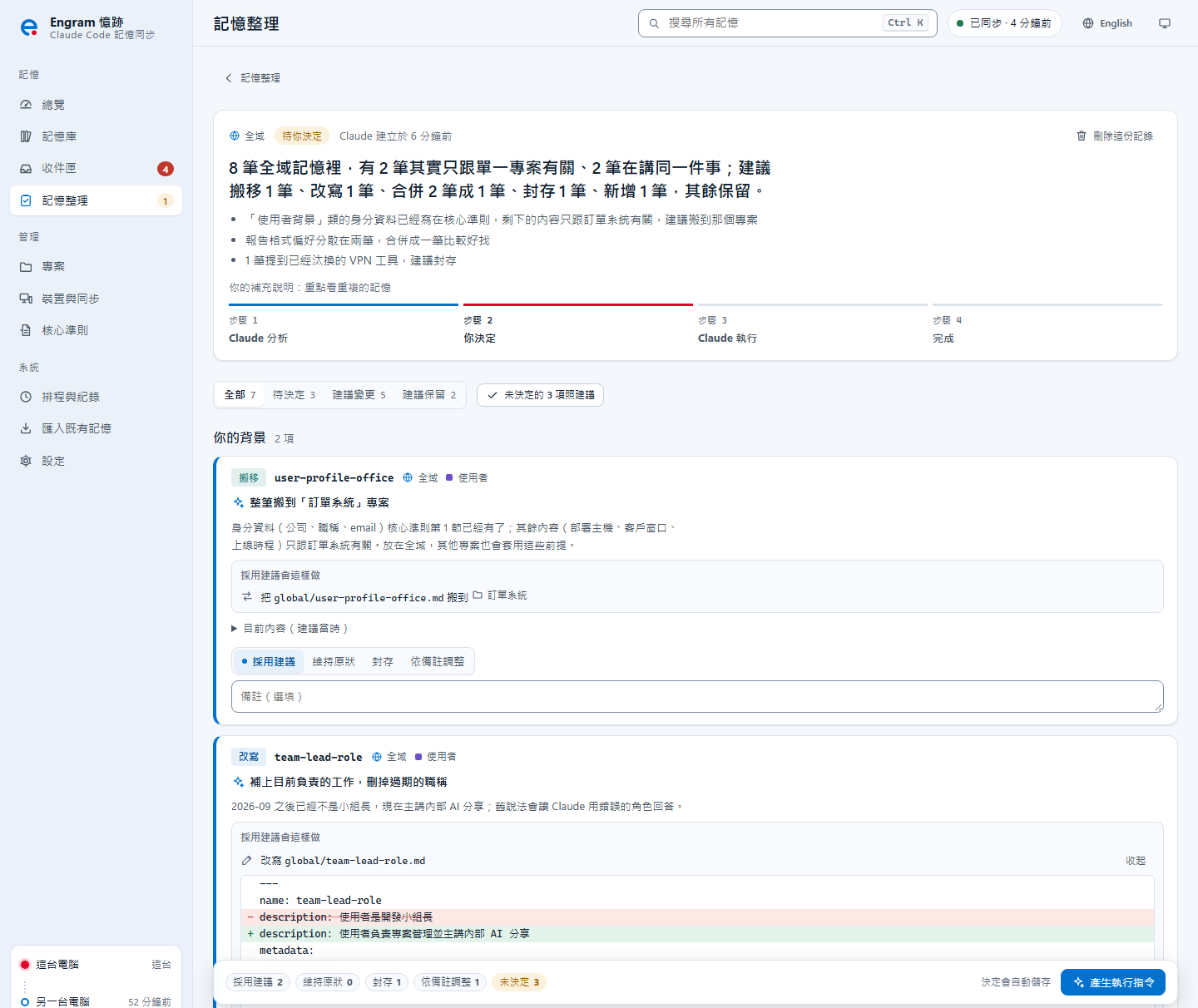
記憶整理:Claude 提建議,你逐項決定。 在管理介面選好範圍、把一行指令貼給 Claude Code,Claude 讀過範圍內的記憶、提出整理建議與修改後的內容;你在網頁上逐項看差異、做決定,Claude 才照你的決定動手,每一項都能復原。
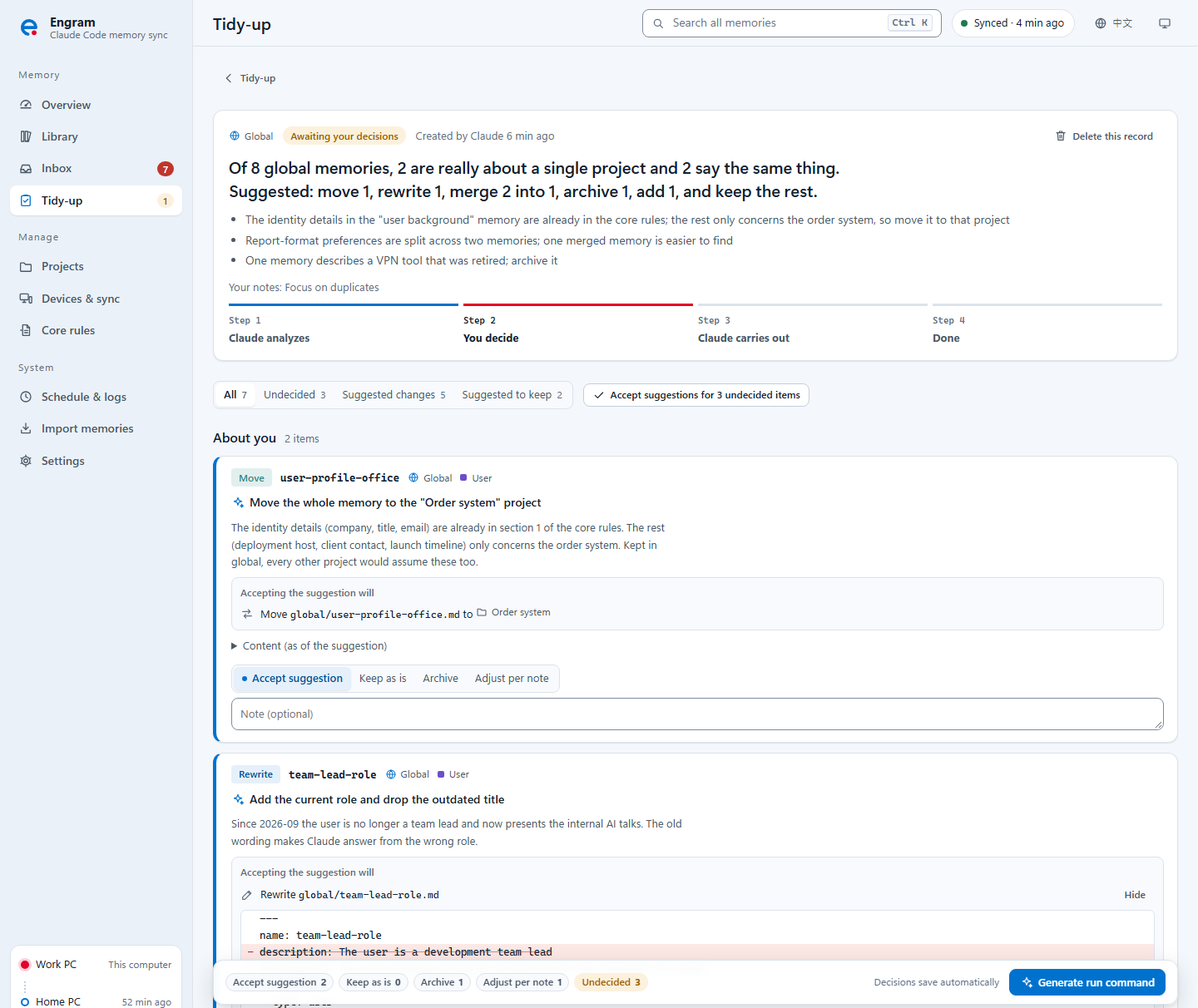
Tidy-up: Claude suggests, you decide each item. Pick a scope in the dashboard and paste one command into Claude Code. Claude reads the memories in that scope and suggests how to tidy them up, revised content included; you review the changes item by item on a web page and decide, and only then does Claude act. Every item can be undone.
更新/Upgrade:在 Engram 資料夾 git pull(或下載新的 ZIP 覆蓋舊資料夾),然後執行 engram update,已開著的 Claude Code 對話執行 /reload-plugins。每台電腦都要更新。
Run git pull in your Engram folder (or download a new ZIP over the old folder), run engram update, then /reload-plugins in any open Claude Code conversation. Update every computer.
記憶整理
| 在哪裡 | 做什麼 | |
|---|---|---|
| 1 | 管理介面「記憶整理」 | 選範圍(全域、單機、專案、核心準則或全部),寫下補充說明,複製指令 |
| 2 | Claude Code | 貼上 /engram:tidy …:Claude 讀過記憶、提出建議,給你一個回到管理介面的網址。這一步不改任何記憶 |
| 3 | 管理介面 | 每一項看建議、理由與修改前後的差異,選「採用建議/維持原狀/封存/依備註調整」,自動儲存 |
| 4 | Claude Code | 貼上 /engram:tidy-apply …:先備份,採用的項目照你看過的內容執行,選了「依備註調整」的交給 Claude 處理;結果回到同一頁,每一項都能單獨復原 |
/engram:tidy只讀取記憶、建立整理記錄,寫入一定要等你在網頁決定之後;採用建議的項目照你看過的內容寫入,不會重新生成。- 執行前備份會動到的檔案;建議之後被改過的記憶(例如另一台電腦同步過來)不會被覆蓋;每一項先確認前提才動手、全有全無,一項失敗不影響其他項,中斷後再執行會從下一步接著做。
- 記憶庫的「請 Claude 檢查」、專案頁的「請 Claude 整理」、核心準則頁的「請 Claude 精簡」改為帶著範圍開啟記憶整理頁。
- 新指令
engram tidy(給技能使用)。整理記錄只存在這台電腦的~/.engram/local/tidy/,不會同步,90 天後自動清除。
詳見使用說明第 3 節。
English summary
| Where | What happens | |
|---|---|---|
| 1 | Tidy-up in the dashboard | Pick a scope (global, machine, a project, core rules, or everything), add notes for Claude, and copy the command |
| 2 | Claude Code | Paste /engram:tidy …: Claude reads the memories, makes suggestions, and gives you a link back to the dashboard. Nothing is changed at this step |
| 3 | The dashboard | For each item, see the suggestion, the reasoning, and the before-and-after changes; choose Accept suggestion, Keep as is, Archive, or Adjust per note. Decisions save automatically |
| 4 | Claude Code | Paste /engram:tidy-apply …: a backup is made first, accepted items are carried out exactly as you saw them, and "Adjust per note" items go to Claude. Results come back to the same page, and every item can be undone on its own |
/engram:tidyonly reads memories and creates a tidy-up record; nothing is written until you decide on the page, and accepted items are written exactly as you saw them, never regenerated.- The files involved are backed up first; memories that changed after the suggestion (for example, synced from another computer) are never overwritten; each item checks its preconditions first and is all-or-nothing, one failed item doesn't affect the others, and running it again after an interruption resumes from the next step.
- Ask Claude to check in Library, Ask Claude to tidy up on Projects, and Ask Claude to trim on Core rules now open the Tidy-up page with the scope filled in.
- New command
engram tidy(used by the skills). Tidy-up records stay on this computer in~/.engram/local/tidy/, are not synced, and are cleared after 90 days. See section 3 of the user guide.