Repository navigation
0.6.0: Nothing pairs quite like an 808


New in 0.6.0
-
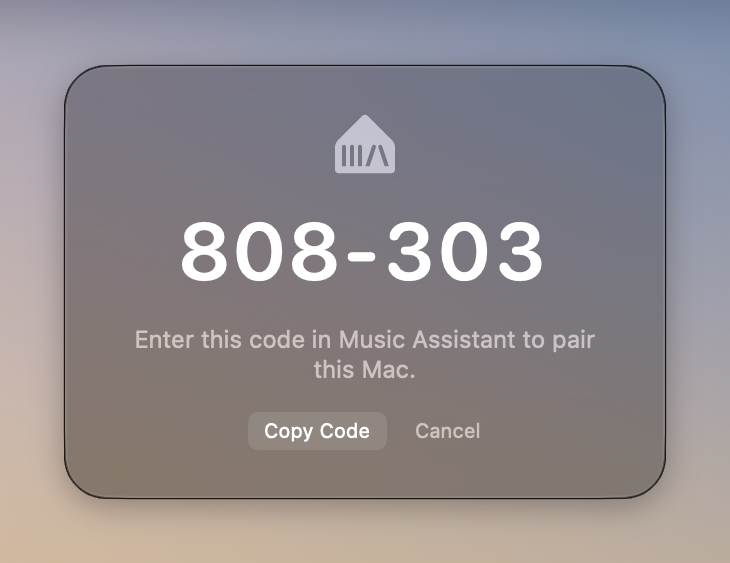
Pair with a code instead of a token. When you set this Mac up in Music Assistant, it now offers pairing with a PIN. Your Mac shows a six-digit code in a small window; type it into Music Assistant, and you're paired. The window doesn't take the keyboard away from where you're typing, and has a Copy Code button if you'd rather paste.
-
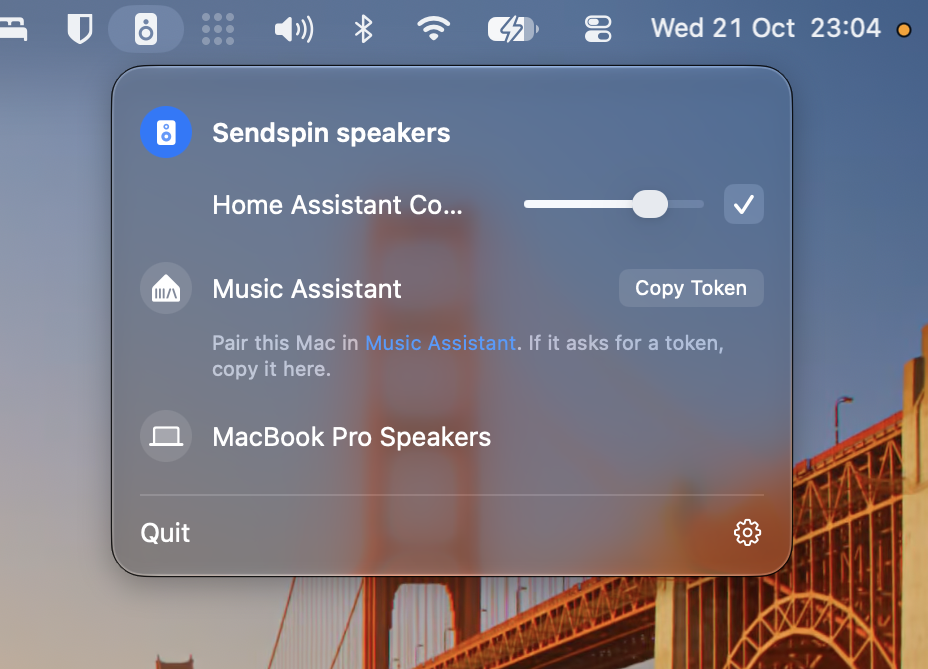
Clearer pairing instructions. The menu now starts with where pairing happens: "Pair this Mac in Music Assistant", linking to the right page. The token is still there, for servers that don't support codes yet: copy it only if they ask for it. Your Mac can't tell in advance which of the two a server will ask for; we've proposed a way for servers to say so in the Sendspin spec (Sendspin/spec#333), so the menu can show just the one that applies.
-
Other Sendspin servers pair the same way, and show their own name in the menu.
-
Upgrading: drag the new app to Applications (replace the old one) and open it. The audio driver hasn't changed, so no password is needed.
Full Changelog: v0.5.0...v0.6.0