Repository navigation
Scroller 1.1.0

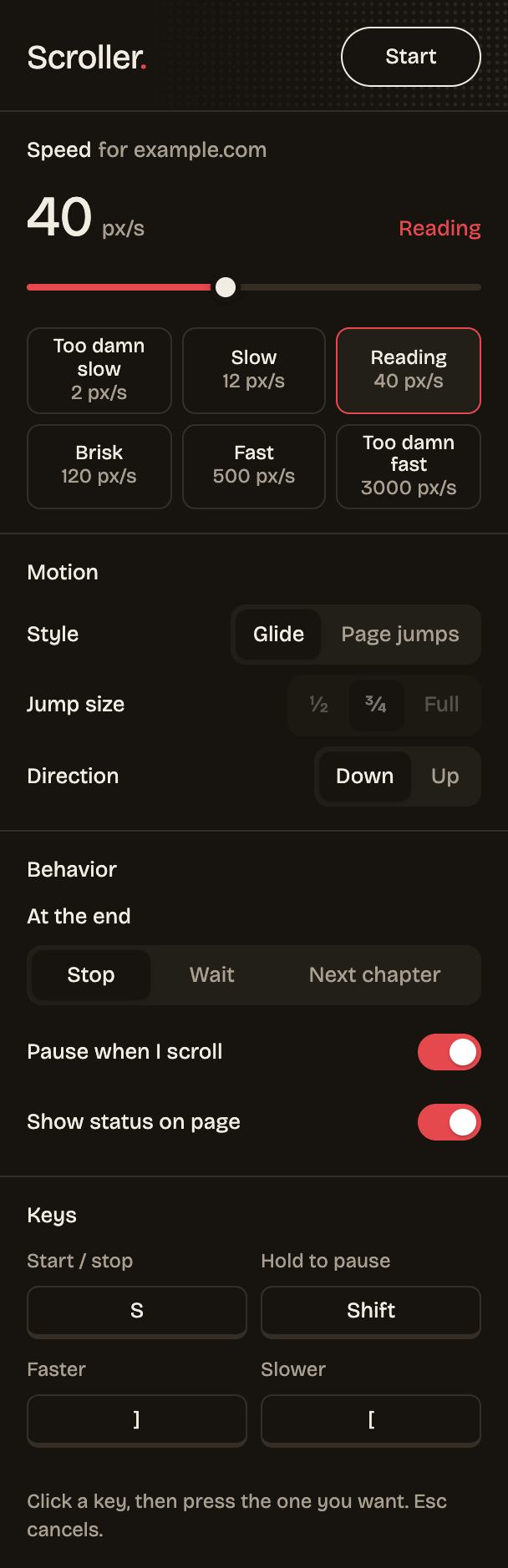
Read a whole series hands-free. Scroller can now open the next chapter by itself when one ends, remembers a separate speed for every site, pauses while you hold Shift, eases in and out instead of lurching, and shows ON on its toolbar icon while it runs.
What's new
Added
- Next chapter option under At the end: finds the reader's next-chapter control, opens it and keeps scrolling. Works with full page loads and with readers that swap chapters in place.
- Per-site speed. Speed is remembered for each website; new sites start from the last speed used. The popup shows which site it's editing.
- Hold to pause key,
Shiftby default and remappable. The on-page pill reads "Paused" while it's held. - ON badge on the toolbar icon in tabs where Scroller is running.
- Scrolling eases in and out on start, stop and resume.
- Releases ship a ready-to-load
scroller-x.y.z.zip.
Changed
- At the end choices are now Stop, Wait and Next chapter, on a full-width row.
- The popup key grid holds four keys.
Install
- Download scroller-1.1.0.zip below and unzip it.
- Open
chrome://extensionsand turn on Developer mode. - Click Load unpacked and pick the unzipped folder.
Updating? Replace your Scroller folder with the new one, click the reload arrow on Scroller's card in chrome://extensions, then refresh your reader tabs. Your settings are kept.
Full changelog: v1.0.0...v1.1.0