Repository navigation
Scroller 1.2.0

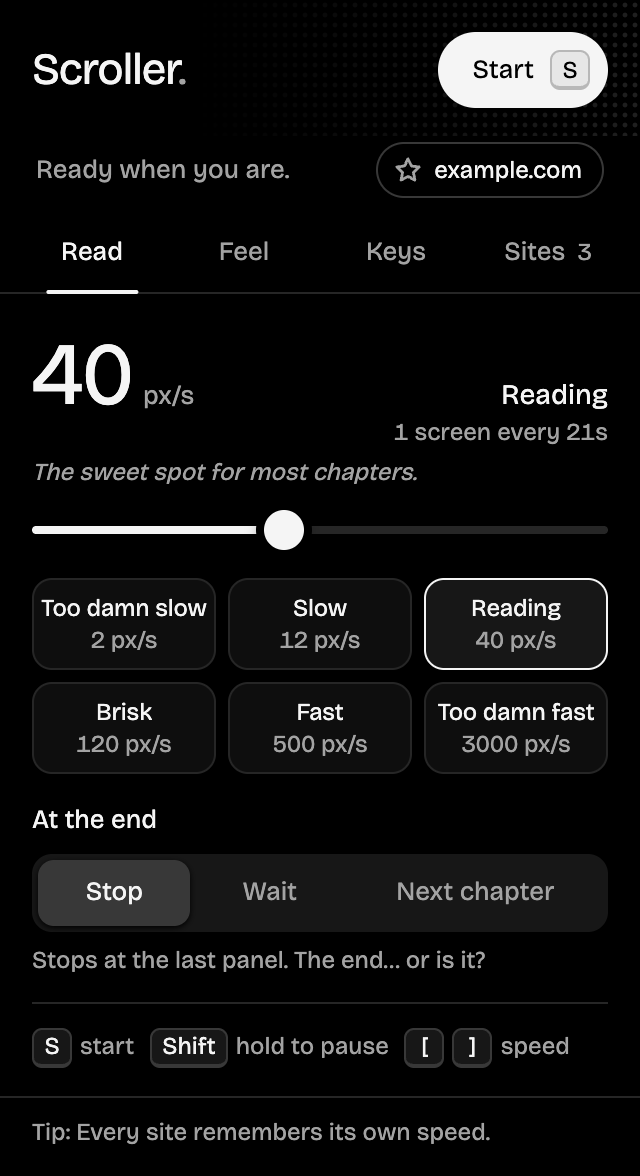
A new look and more control. The popup is now pure black with four tabs (Read, Feel, Keys and Sites) that each fit without scrolling, and red only lights up while Scroller is actually scrolling. Star your favorite reader sites, see and forget the speed saved for each one, and pick how big a jump each faster/slower tap makes.
What's new
Added
- Sites tab: every site with a remembered speed, the current site first, each with a button to forget it (and Undo).
- Favorite sites: star a site from the status chip or the Sites tab. Favorites are pinned on top and open in one click. Nothing is starred by default.
- Step setting on the Keys tab: faster/slower taps change speed by 10%, 25% (default), 50% or 2×.
- Reload tab banner when the popup can't reach the page, instead of a disabled button.
- Status line under the header showing whether it's scrolling and which site you're on.
- Speed in human terms: how long one screen takes, plus a line of personality per preset.
- Restore default keys, with Undo.
- The Start button shows its key, and a strip on the Read tab lists every shortcut.
Changed
- Popup redesigned: pure black theme and four tabs (Read, Feel, Keys, Sites) that each fit without scrolling. Red now only means "scrolling right now", with speed lines streaming through the header while it runs.
- At the end explains the selected option on screen instead of in a tooltip. Jump size only shows in Jumps mode. "Page jumps" is now "Jumps".
- Larger tap targets, screen-reader labels for the slider and key buttons, and announced status messages.
- The on-page status pill is black to match.
Fixed
- Faster/slower taps no longer do nothing at very low speeds; each tap moves at least 1 px/s.
Install
- Download scroller-1.2.0.zip below and unzip it.
- Open
chrome://extensionsand turn on Developer mode. - Click Load unpacked and pick the unzipped folder.
Updating? Replace your Scroller folder with the new one, click the reload arrow on Scroller's card in chrome://extensions, then refresh your reader tabs. Your settings are kept.
Full changelog: v1.1.0...v1.2.0