Repository navigation

Scroller for reading in bed. Novels scroll in words per minute, measured from the page itself. A new Night tab dims and warms the page and can spotlight the strip, then puts you to sleep with a timer or a chapter limit. Manga readers get a Pages style that snaps to each page, and the on-page pill now shows how long is left in the chapter.
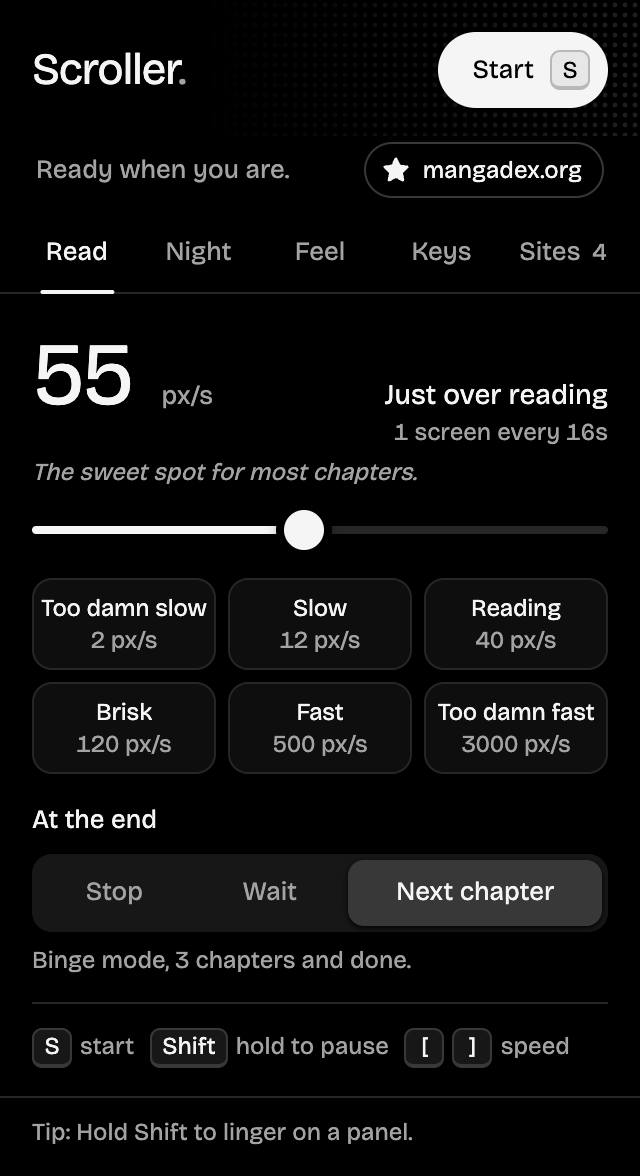
What's new
Added
- Words per minute. Text pages (novels, web fiction, articles) switch to wpm automatically. Scroller measures how many pixels a word takes in that page's own font, line height and column, so 250 wpm really reads at 250 words a minute. Chinese and Japanese count characters at a matched pace. Tap the unit next to the speed to switch between wpm and px/s on any site;
[and]step wpm on text pages. - Night tab, with the night filter Off, While scrolling (fades in when you press start, out when you stop) or Always:
- Dim and Warmth sliders, previewed on the page while you drag them.
- Focus: darkens everything beside the reading column, so sidebars, ads and comments fade away.
- Stop after a time (15 min to 1 hour) or a number of chapters, whichever comes first. It carries across next-chapter page loads, and the pill says good night when it's time. Picking a chapter limit turns on Next chapter.
- Pages style (Feel tab): each jump lands with the next page's top at the top of the screen, just below the site's header. Banners and logos are skipped, and pages taller than the screen are read a step at a time first.
- Time left in the chapter, on the pill and in the popup. It counts to the end of the chapter's art or text, not the comments below it, and shows
~while the page is still loading in. - The pill shows the sleep timer, chapters read against the limit, and a hairline of chapter progress.
Changed
- The popup has five tabs: Read, Night, Feel, Keys and Sites. Each still fits without scrolling.
- The Sites tab shows each site in the unit it reads in, and forgetting a site clears its wpm too.
Fixed
- Jumps at high speeds came up short when a new jump started before the last smooth scroll finished. Every jump now lands exactly where it should.
- Next chapter skipped the real Next link on readers that give Prev and Next the same class (such as
next-prev), and stopped instead of opening the chapter. - At full speed the glide eased down a hair and back up every frame, a slight flicker on slow machines.
- The speed slider can land exactly on every preset; Fast and Too damn fast never lit up when dragged to.
Install
Chrome, Edge, Brave, Arc, Opera, Vivaldi
- Download scroller-1.3.0-chrome.zip below and unzip it.
- Open
chrome://extensionsand turn on Developer mode. - Click Load unpacked and pick the unzipped folder.
Updating? Replace your Scroller folder with the new one, click the reload arrow on Scroller's card in chrome://extensions, then refresh your reader tabs. Your settings are kept.
Firefox 140+
- Download scroller-1.3.0-firefox.zip below (no need to unzip).
- Open
about:debugging#/runtime/this-firefoxand click Load Temporary Add-on…. - Pick the zip.
Firefox keeps unsigned add-ons only until it restarts, so load it again after a restart until Scroller is signed by Mozilla.
Full changelog: v1.2.1...v1.3.0
Enjoying Scroller? Star the repo, buy me a coffee, or share ideas in Discussions.