Repository navigation
ViewLight v2.0.0 - accounts, a profile you can edit, and a clean slate
Pre-release
ViewLight 2.0 is the launcher finished: accounts you pick from, a profile you can shape, settings that fit on pages, and a reset that really does start from nothing. Every build is still published as a prerelease.
v2.0.0 - 2026-10-17
Added
-
Signing in is a screen of accounts instead of a menu with one row in it. Log out on the profile puts the profile down and covers the launcher with the sign-in screen: this machine's profiles as a row of cards to scroll across, each with its picture, name, achievement score and the first few wizards on the account — their school's element logo and level. One click signs in as that account and puts the launcher back. The row slides in, a card lifts under the pointer, and the arrows beside it move a page at a time. The accounts on it are the ones your server actually holds an account for.

-
A profile picture or banner can come from somewhere other than your computer. Tick Edit profile in the corner of the banner and click the one you want to change. From my computer… opens the usual file picker; Browse gamerpics… opens a backup of around 32,500 Xbox 360 gamerpics, square, which is the shape a profile picture wants; and Browse wallpapers… opens Wallhaven's weekly toplist, which is wide enough to be a banner and changes every week. Both browsers can be searched and are shown a page of pictures at a time, and what is looked at is kept on your PC, so paging back through a grid costs nothing the second time. Nothing is downloaded until you pick something, and whatever you settle on is kept in your profile, so it is backed up with the rest.
Profile picture. Banners. 

-
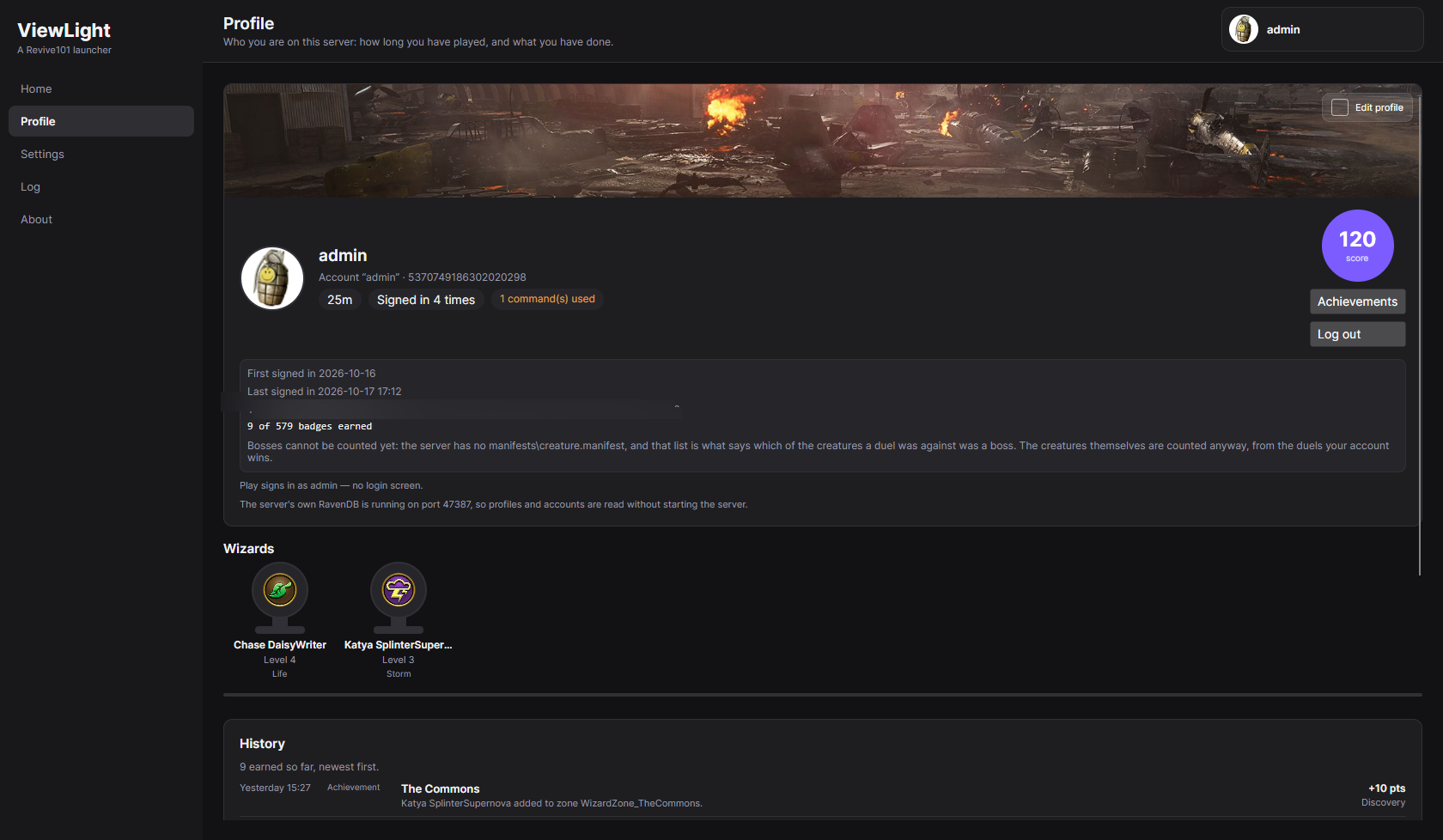
A profile's wizards are a shelf of trophies rather than a long rectangle. Under the account, each wizard is a cup wearing the game's own element logo for its school, with its name, level and school beneath it; hover one for its gold, spells learned, quests finished and when it was last seen. Below them, History lists what the account has earned lately, newest first — the achievements page's own badges read as a list — so the profile and the achievements screen cannot disagree about when something happened.
-
Settings is pages instead of one long scroll. Server, Client, ViewLight and Data, with the server's own settings split into ImLight and Aurorium and the client's into Game folder and Characters. Every page is one click from every other, and the group you are looking for says which page it is on rather than being found by scrolling past the rest. Default page, on the ViewLight page, chooses where the launcher opens — Home unless you say otherwise.

-
A way to start over completely. Settings → Data → Wipe everything… deletes both of the launcher's databases — the accounts, wizards, profiles, playtime, badges and pictures — and, if you tick it, the copy of them in your own Google Drive as well. It asks twice, and both steps are deliberately hard to do by accident: the first screen lists exactly what will go and holds its Next button for fifteen seconds while you read it, and the second asks you to type a sentence saying what is about to happen. The cloud copy is deleted before the new database is made, because a fresh database next to an old backup is a machine that takes the backup on its next sync — which is how the old data would come back. Your Google sign-in survives the reset so that delete-and-back-up can happen at all, and the launcher makes itself a new database and backs that up. Your server, patch server, game and settings are not touched; your server makes its own new, empty database the next time it starts, and the screen says so.

-
You can choose which Imlight builds ViewLight installs. Settings → Server → Build channel (and the same choice on the first screen) offers Stable release, Prerelease and Bleeding edge. Stable installs only builds Imlight publishes as a full release; there are none yet, and choosing it says so instead of quietly installing a prerelease. Prerelease is the newest published build and remains the default. Bleeding edge is different in kind: it clones Imlight's current source with git, builds it on your machine with the .NET 10 SDK, and installs the result over your server — keeping your settings and data, exactly as a published update does. Its later updates are a
git fetchand a merge followed by a rebuild, and it never merges over uncommitted edits. It is not a tested build; the screen says so, and says to tell Imlight's developers you built it from their source before reporting a bug. The two files Imlight does not publish — the WizWalker type dump and the game's message definitions — are no longer left for you to find: ViewLight installs [wiztype](https://github.com/wizspoil/wiztype) into a private Python environment, starts Wizard101 once to read its types, extracts the message XML from yourRoot.wad, and closes the game again if it was the one that opened it. The dump is kept under<ViewLight data>\sourceand reused until your client's revision changes; a dump you place there yourself is used as it is, with no Python needed.
Changed
- The launcher explains itself only when asked. Most controls have a sentence under them saying what
they are for; that sentence is a comment on the screen rather than part of it, so it is hidden by default.
Settings → ViewLight → Verbose mode shows all of it at once - what a setting changes, which file it is
written to and why it is there - and hides it again. A launcher should be used rather than read. - The launcher's own databases are read on this machine's own address. They are read at
127.0.0.1with
the loopback client and the system proxy switched off, so no part of reading them can reach the network or
anything that has to be looked up - which matters on a machine with no connection, where the profiles used
to fail to load at all. If a database still cannot be read, the Log now carries what the database
itself printed before it stopped: a port something else had taken, a data directory it could not open, or
a runtime it was not given. - The window is on screen in about half the time it used to be. Roughly 5.2 seconds instead of 10-11,
measured on the same machine and release build: the saved settings are filled in with one read of the
server's config instead of several, a folder with no install in it no longer waits as though a file were
being held, and Home is built after the shell is already up rather than before it. - The profiles database notice is now a notification in the top-left corner instead of a dialogue over the
whole window. It shares one notification area with the Google Drive sync notice, so the two stack rather
than cover each other - and both are visible over the sign-in screen, which is where the profiles database
is usually coming up. Neither takes the window: nothing is blocked while either one is on screen. - Notifications fold themselves into a tray in the corner, and one arrow opens them again. A notice stays
on screen for a few seconds and then becomes a small card saying how many are waiting, with a down arrow to
read them and an up arrow to put them away again. Opening it by hand keeps it open - the delay only folds
something nobody has touched - and when there is nothing left to say, the tray goes too.
Fixed
- A build from source is now actually written into the server folder, and the launcher checks that it
was. The build's three output folders - Director's runnable tree and the CoreLib and Common folders
beside it - are what gets deployed; a build without the executable or any of the three assemblies is
refused before anything is written. The installedImlight.Director.dll,Imlight.CoreLib.dlland
Imlight.Common.dllare then compared with the built ones and a difference is reported as a failed
install, instead of saying the build is installed while the folder still holds the previous server.
Only files that differ are written, so rebuilding the same source a second time copies nothing. A
server that is running no longer blocks the build either: it is stopped at the moment the files are
written, and the card updates to the new build immediately afterwards. That now includes a server the
launcher did not start itself - one left over from a previous session, or started from a shortcut or a
terminal - which used to holdImlight.Director.exeopen and leave the server folder untouched while
the build reported success. - A source build no longer needs a staging copy of its output. The deploy reads the folders
dotnet buildput the files in and writes them straight into the server folder, so a build no longer spends
time and disk copying itself to a mock server folder first. - Wizard101 is no longer started against a server whose database is not listening yet. Imlight opens
port 12000 about half a minute before its embedded RavenDB is ready, and the launcher used to take the
open port as "server ready". Readiness now waits for the server's ownImlight may now be connected to.
line whenever its log exists; the port is only a fallback after two minutes. The player-database read
also waits briefly, so arriving a moment early no longer switches automatic sign-in off.
Where this goes from here
ViewLight is, as of this release, the launcher it set out to be: it finds the game, installs and updates the
server, runs the patch server, starts a session, keeps a profile and its achievements, and backs all of it up.
What is left is not more features but another pass over the whole thing - most of all a hand rewrite that
keeps the concept and drops the accreted layers, an achievements system that is finished and worth chasing
rather than a ladder with gaps in it, some tidying of the interface, and the ordinary optimisations that come
from somebody reading the whole program at once. It is an idea and a reference as much as a program: fork it,
change it, use it for inspiration and build your own.