Repository navigation
Releases
ViewLight v2.1.0 - the newest commit on the branch you chose

ViewLight 2.1.0 is a fix for the one build channel that could be confidently wrong: the one compiled from Imlight's source. It described your checkout and called it the truth; now it asks GitHub, and it can build any branch you point it at. Every build is still published as a prerelease.
Fixed
- Bleeding edge shows the newest commit on the branch, not the last one it had fetched. The card used
to describe your source checkout instead of GitHub, so a checkout that had not fetched since the last
commit - or one left on another branch - named an older commit as "the newest source". It now asks the
repository for the branch's tip with a singlegit ls-remote, counts how far behind the checkout is
against that branch, and says when the checkout is on a different one. The commit's own words are read
from the object the fetch brought in, so before the first clone the hash is shown alone rather than
guessed at.
Added
- You can pick which branch bleeding edge builds. Under Settings → Server → Build channel and on the
first screen, choosing Bleeding edge now offers a Branch list of everything GitHub has, so a fix on
a feature branch can be built without waiting for it to be merged into the default one. Left empty, the
repository's default branch is built, as before. The choice is remembered, and the build moves the
checkout onto that branch rather than only fetching whatever it was already tracking. A saved branch that
GitHub no longer has is named in the error and the default is shown instead.
Getting it
Unpack ViewLight-win-x64.zip anywhere and run ViewLight.exe; it carries its own .NET runtime, so nothing
has to be installed first. If you are already running a portable copy, replace its files with this one - your
settings, server, game and profiles live in their own folders and are not in the zip.
Your existing source checkout is left exactly as it is until you press Update on the bleeding edge card
or rebuild; choosing a branch is what moves it from then on.
ViewLight v2.0.0 - accounts, a profile you can edit, and a clean slate
ViewLight 2.0 is the launcher finished: accounts you pick from, a profile you can shape, settings that fit on pages, and a reset that really does start from nothing. Every build is still published as a prerelease.
v2.0.0 - 2026-10-17
Added
-
Signing in is a screen of accounts instead of a menu with one row in it. Log out on the profile puts the profile down and covers the launcher with the sign-in screen: this machine's profiles as a row of cards to scroll across, each with its picture, name, achievement score and the first few wizards on the account — their school's element logo and level. One click signs in as that account and puts the launcher back. The row slides in, a card lifts under the pointer, and the arrows beside it move a page at a time. The accounts on it are the ones your server actually holds an account for.

-
A profile picture or banner can come from somewhere other than your computer. Tick Edit profile in the corner of the banner and click the one you want to change. From my computer… opens the usual file picker; Browse gamerpics… opens a backup of around 32,500 Xbox 360 gamerpics, square, which is the shape a profile picture wants; and Browse wallpapers… opens Wallhaven's weekly toplist, which is wide enough to be a banner and changes every week. Both browsers can be searched and are shown a page of pictures at a time, and what is looked at is kept on your PC, so paging back through a grid costs nothing the second time. Nothing is downloaded until you pick something, and whatever you settle on is kept in your profile, so it is backed up with the rest.
Profile picture. Banners. 

-
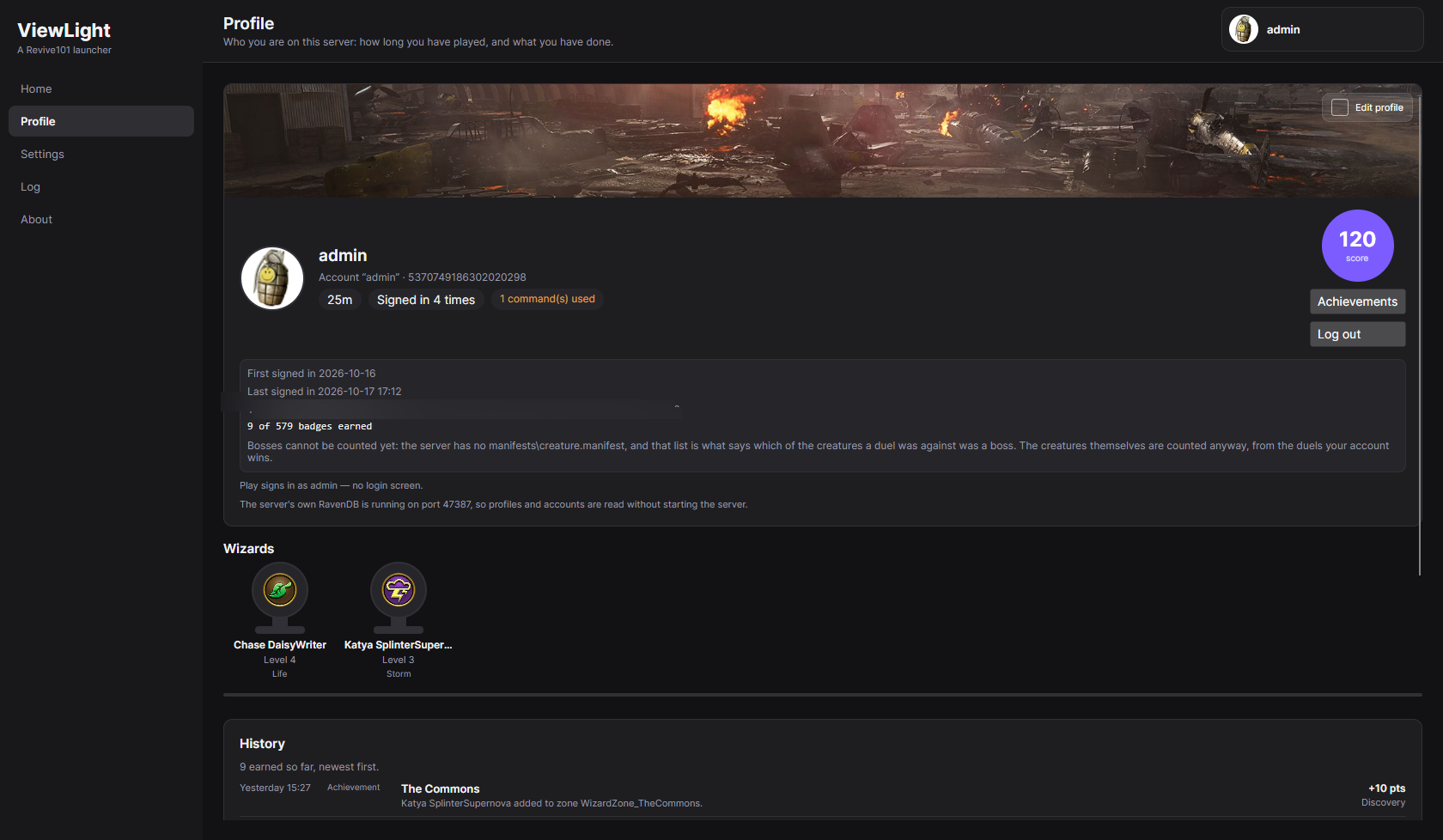
A profile's wizards are a shelf of trophies rather than a long rectangle. Under the account, each wizard is a cup wearing the game's own element logo for its school, with its name, level and school beneath it; hover one for its gold, spells learned, quests finished and when it was last seen. Below them, History lists what the account has earned lately, newest first — the achievements page's own badges read as a list — so the profile and the achievements screen cannot disagree about when something happened.
-
Settings is pages instead of one long scroll. Server, Client, ViewLight and Data, with the server's own settings split into ImLight and Aurorium and the client's into Game folder and Characters. Every page is one click from every other, and the group you are looking for says which page it is on rather than being found by scrolling past the rest. Default page, on the ViewLight page, chooses where the launcher opens — Home unless you say otherwise.

-
A way to start over completely. Settings → Data → Wipe everything… deletes both of the launcher's databases — the accounts, wizards, profiles, playtime, badges and pictures — and, if you tick it, the copy of them in your own Google Drive as well. It asks twice, and both steps are deliberately hard to do by accident: the first screen lists exactly what will go and holds its Next button for fifteen seconds while you read it, and the second asks you to type a sentence saying what is about to happen. The cloud copy is deleted before the new database is made, because a fresh database next to an old backup is a machine that takes the backup on its next sync — which is how the old data would come back. Your Google sign-in survives the reset so that delete-and-back-up can happen at all, and the launcher makes itself a new database and backs that up. Your server, patch server, game and settings are not touched; your server makes its own new, empty database the next time it starts, and the screen says so.

-
You can choose which Imlight builds ViewLight installs. Settings → Server → Build channel (and the same choice on the first screen) offers Stable release, Prerelease and Bleeding edge. Stable installs only builds Imlight publishes as a full release; there are none yet, and choosing it says so instead of quietly installing a prerelease. Prerelease is the newest published build and remains the default. Bleeding edge is different in kind: it clones Imlight's current source with git, builds it on your machine with the .NET 10 SDK, and installs the result over your server — keeping your settings and data, exactly as a published update does. Its later updates are a
git fetchand a merge followed by a rebuild, and it never merges over uncommitted edits. It is not a tested build; the screen says so, and says to tell Imlight's developers you built it from their source before reporting a bug. The two files Imlight does not publish — the WizWalker type dump and the game's message definitions — are no longer left for you to find: ViewLight installs [wiztype](https://github.com/wizspoil/wiztype) into a private Python environment, starts Wizard101 once to read its types, extracts the message XML from yourRoot.wad, and closes the game again if it was the one that opened it. The dump is kept under<ViewLight data>\sourceand reused until your client's revision changes; a dump you place there yourself is used as it is, with no Python needed.
Changed
- The launcher explains itself only when asked. Most controls have a sentence under them saying what
they are for; that sentence is a comment on the screen rather than part of it, so it is hidden by default.
Settings → ViewLight → Verbose mode shows all of it at once - what a setting changes, which file it is
written to and why it is there - and hides it again. A launcher should be used rather than read. - The launcher's own databases are read on this machine's own address. They are read at
127.0.0.1with
the loopback client and the system proxy switched off, so no part of reading them can reach the network or
anything that has to be looked up - which matters on a machine with no connection, where the profiles used
to fail to load at all. If a database still cannot be read, the Log now carries what the database
itself printed before it stopped: a port something else had taken, a data directory it could not open, or
a runtime it was not given. - The window is on screen in about half the time it used to be. Roughly 5.2 seconds instead of 10-11,
measured on the same machine and release build: the saved settings are filled in with one read of the
server's config instead of several, a folder with no install in it no longer waits as though a file were
being held, and Home is built after the shell is already up rather than before it. - The profiles database notice is now a notification in the top-left corner instead of a dialogue over the
whole window. It shares one notification area with the Google Drive sync notice, so the two stack rather
than cover each other - and both are visible over the sign-in screen, which is where the profiles database
is usually coming up. Neither takes the window: nothing is blocked while either one is on screen. - Notifications fold themselves into a tray in the corner, and one arrow opens them again. A notice stays
on screen for a few seconds and then becomes a small card saying how many are waiting, with a down arrow to
read them and an up arrow to put them away again. Opening it by hand keeps it open - the delay only folds
something nobody has touched - and when there is nothing left to say, the tray goes too.
Fixed
- A build from source is now actually written into the server folder, and the launcher checks that it
was. The build's three output folders - Director's runnable tree and the CoreLib and Common folders
beside it - are what gets deployed; a build without the executable or any of the three assemblies is
refused before anything is written. The installedImlight.Director.dll,Imlight.CoreLib.dlland
Imlight.Common.dllare then compared with the built ones and a difference is reported as a failed
install, instead of saying the build is installed while the folder still holds the previous server.
Only files that differ are written, so rebuilding the same source a second time copies nothing. A
server that is running no longer blocks the build either: it is stopped at the moment the files are
written, and the card updates to the new build immediately afterwards. That now includes a server the
launcher did not start itself - one left over from a previous session, or started from a shortcut or a
terminal - which used to holdImlight.Director.exeopen and leave the server folder untouched while
the build reported success. - A source build no longer needs a staging copy of its output. The deploy reads the folders
dotnet buildput the files in and writes them straight into the server folder, so a build no longer spends
time and disk copying itself to a mock server folder first. - **Wizard101 is no longer started...
ViewLight v1.4.0 - your sessions, and the launcher's notes filed with the program they are about
A session is now something you start, not something the launcher guesses. Playtime and sign-ins were read
off the server's own database saying an account was in the game - which it says whether the server is running
or not - so opening the launcher counted, looking at a profile counted, and idling on Home counted as playing.
This build makes Press Play the sign-in: one per session, on the account it signs you in as, with playtime
counted only while ViewLight's own server and its own game are both up.
Download ViewLight-win-x64.zip, unpack it anywhere and run ViewLight.exe. Still self-contained -
nothing to install first, no administrator rights.
 |
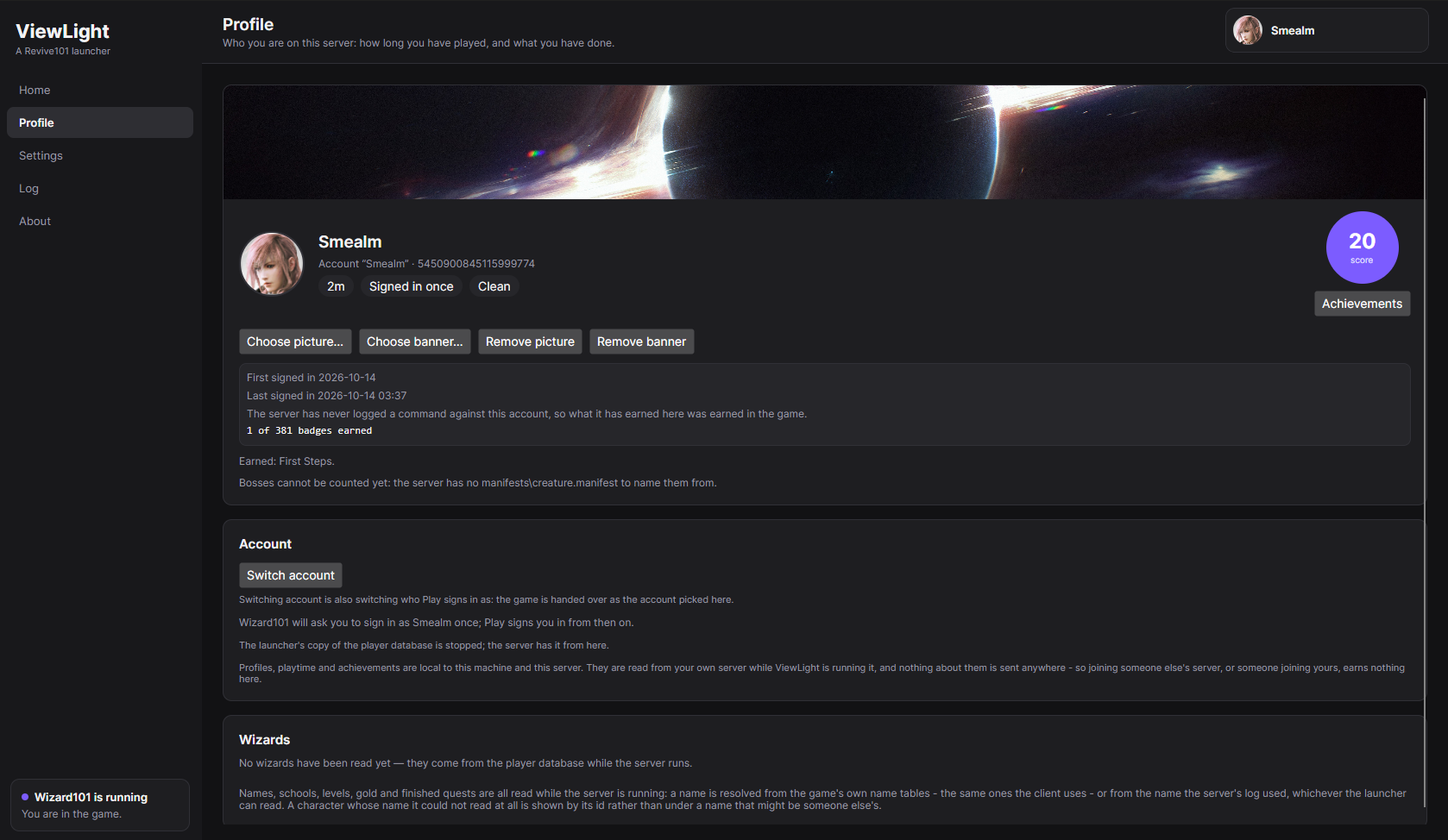 |
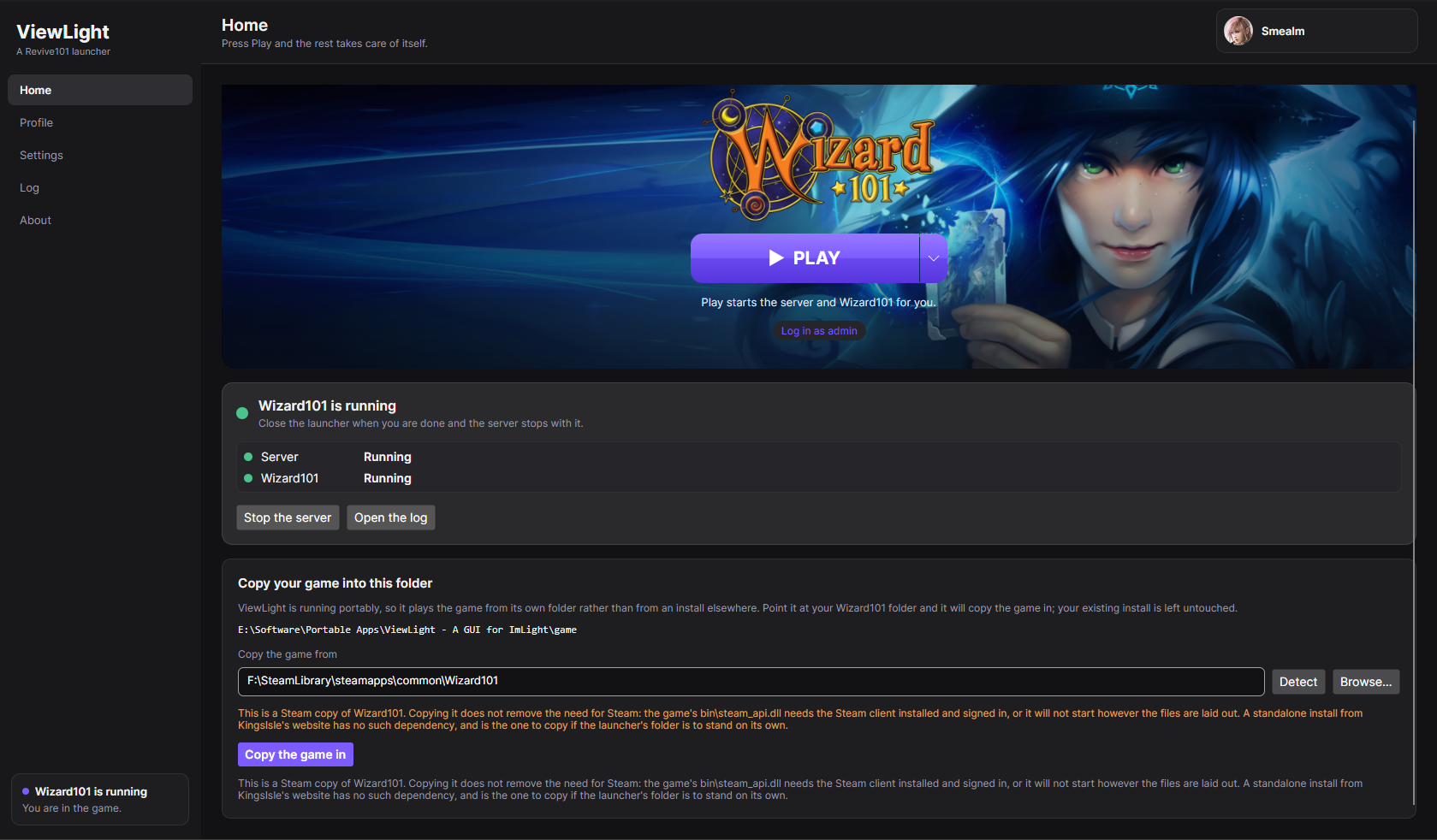
| Home. The game's banner, the Play button, and one quiet strip underneath it for the patch server, the server and the game. | Profile. The account Play signs in as, its playtime, its standing, and the score circle its achievements open from. |
 |
 |
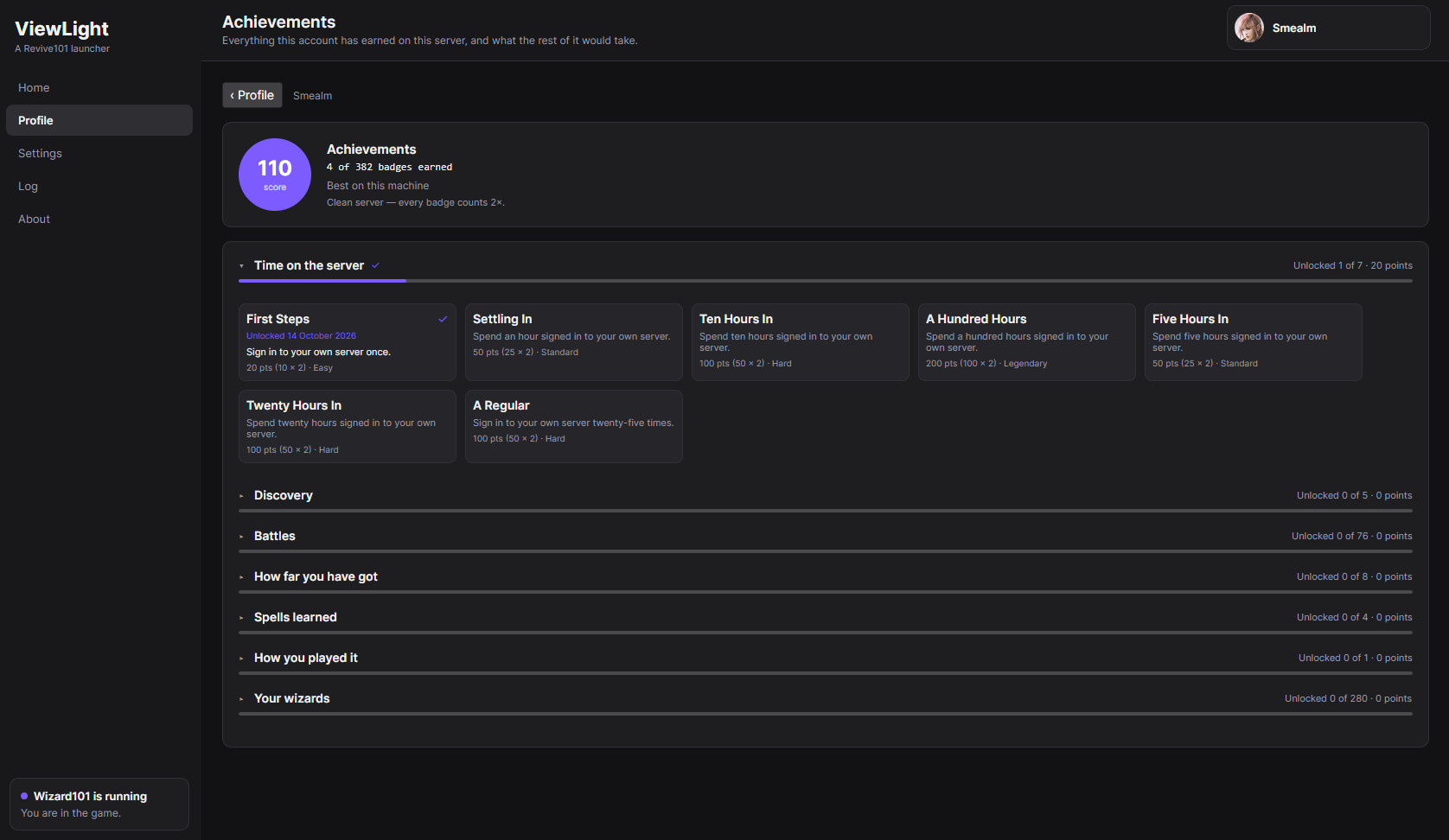
| Achievements. Grouped by category and scored, with one milestone card per ladder. | Earned. A badge announced over the game as it happens. |
New in this build
- Playtime and sign-ins are your sessions now. A session begins the moment Play starts the game on a
profile and ends when that game goes away - and it counts one sign-in, on that profile, rather than one
for every look that found the account in the server's database. Playtime is added up while the server and
the game are both running, and only for the profile you are playing. Idling on the launcher earns nothing,
switching to another profile's screen earns nothing, and the server's own database saying an account is in
the game no longer stands in for somebody playing. A disconnection mid-session is not a second sign-in: the
clock stops while you are out and starts again when you are back. - The Log folds the warning that never used to fold. Folding only worked on lines that were identical to
the character, and the server puts its own timestamp inside every line - so the warning it repeats a
thousand times, each with a later millisecond in front of it, arrived as a thousand lines. The timestamp is
not a difference worth a line of its own any more. Nothing is lost: press the folded line to open the run,
every line with its own time, and press it again to fold it back. - The launcher's remarks are filed with the program they are about - and can be taken out again. What
ViewLight noticed about the patch server now sits in the patch server's own box, including the line that
says which file a fetch is on, which that box did not show before. The new Launcher's own notes box
takes them back out, so one program's log can be handed to the people who wrote it without ViewLight's
commentary arriving with it. Their own lines stay either way. - Filling the patch server in from your game works with the two revisions kept in step. The copy was
aimed at the revision in the server's config, and with the sync on that is not the revision the patch server
holds - so it refused a game that is the version the server is going to ask it for. It is aimed at the
revision the patch server holds now, and re-worked out the moment that value moves. - "Apply starter settings" is "Apply recommended settings", and it leaves the tutorial alone. The preset
narrowed the starter kit and turned the tutorial off, which cost every new character its school's first
spell and its equipped starter kit - and the game has its own skip-tutorial button on the character-creation
screen, so a server-wide default was never needed. Skipping it is the tick box directly below the button,
and the Log says what the preset left as it was.
It does not modify anything
No patch, no hook, no injection, no memory editing, and the server is not modified either. Its revision
sync writes one line of Imlight's own configuration, the same line you would edit yourself. Accounts,
characters, sign-ins, zones, duels and creature kills are all read from the server's own player database and
log, and automatic sign-in uses the session key the server already holds for this machine - which is exactly
what the client's -U argument is designed to receive. Reading what a server writes down is the whole
technique, so there is nothing here that could get an account banned.
Read this before your first run
- A patch server has to fetch the game's files before it can serve any. Aurorium answers within seconds
and then downloads that version from Wizard101's own patch server - thousands of files, about 18 GB, hours
on a slow line. Leave it running: it only advances while the process is alive, and ViewLight does not stop
one that has not finished when the server stops. Home shows exactly what it is doing, and waiting is what
Play does by default until the one file the server's boot needs is there. - The largest files cannot arrive from the download at all. Aurorium gives up on any single file that
takes more than two minutes, and the biggest assets of a version take longer than that, so handing it the
files your own Steam or KingsIsle install already has - Copy the game's files in, under the patch
server card in Settings - is the only way those arrive. It is also minutes instead of hours. - The first server run is slow, and can crash once. It downloads its assets (a few hundred megabytes) and
warms up, which takes minutes. Once that finishes the server can still stop by itself for a reason nobody
has pinned down yet - press Play again and it starts normally. It has not been seen to happen again
after a first successful boot. - A new zone can load slowly on the public patch server. Zone assets come from the patch server, and the
Revive101 one is a community machine rather than KingsIsle's infrastructure. The server is local; the
assets are not. Running your own patch server is what fixes it.
Windows only. Your own Wizard101 install is required - Imlight is BYOD and ships no game files, and neither
does this.
Full instructions, everything the launcher writes, and how to read what it tells you:
readme.md.
Every build in plain language: CHANGELOG.md.
Why things are the way they are, including what has been measured on a real install:
docs/design-notes.md.
ViewLight v1.3.0 - watching the patch server, and waiting for it
The patch server becomes something you can watch, wait for, and keep in step. This build says which file
the patch server is downloading and how big it is, waits for the one file your server's boot needs before
starting it, reports a server that is asking for a version the patch server does not have, keeps the two on
the same version by default, and clears out the versions nobody is using any more.
Download ViewLight-win-x64.zip, unpack it anywhere and run ViewLight.exe. Still self-contained -
nothing to install first, no administrator rights.
|
|
| Home. The game's banner, the Play button, and one quiet strip underneath it for the patch server, the server and the game. | Profile. The account Play signs in as, its playtime, its standing, and the score circle its achievements open from. |
|
|
| Achievements. Grouped by category and scored, with one milestone card per ladder. | Earned. A badge announced over the game as it happens. |
New in this build
- You can finally see what the patch server's download is doing. The line under its row on Home - and in
its card in Settings - now names the file it is on and how big that file is
(Equipment-WorldData.wad (12.3 MB of 281.4 MB)), how many files are arriving at once, which version it is
fetching, and whether that version is the one your server asks it for. The Log keeps the same line as the
download moves from file to file, so a first fetch that takes hours leaves behind a record of what it did.
All of it is measured off the disk the patch server is writing to, never asked of the patch server itself,
so watching it cannot disturb it - and a download that has genuinely stopped moving says so instead of
showing a countdown nobody should believe. - You are not made to wait for it. The server cannot finish warming up without the file its own boot asks
the patch server for first, so ViewLight now waits for that one file rather than starting a server that
will 404 - and on a first run that wait is hours, so Play anyway on Home starts the session immediately.
The Log says what that means either way: nothing is blocked, and a patch server that has the file gets you
the right behaviour without a word. - A server that cannot load its own files now says so instead of sitting at "warming up" forever. When
Imlight asks the patch server for a version it does not have, it writes the404in its own log and then
retries until somebody notices. ViewLight reads it and puts it on Home, naming the version the server asked
for and the version the patch server actually holds - which is the whole of what to do about it. - Your server and your patch server are kept on the same version. The switch at the bottom of the patch
server card - Sync the patch server's revision with the server's accepted client revision - is on by
default now, and it is applied every time a patch server starts: the version the patch server actually
holds is written intoGameRevision. The server then asks for files the patch server has, and accepts the
client your game was just updated to. Switching it off puts the value your config had back. - Old versions are tidied up instead of piling up. Each revision is around 18 GB, and a patch server
keeps everything it has ever served. Automatic cleanup now keeps the newest version and removes the older
ones - the previous rule also kept whichever version your game happened to be on, which on a machine that
has not been patched to the current version was a second 18 GB held for nothing. Nothing your server asks
for by name, and nothing being downloaded, can be removed. - The warning in front of the revision switch is gone. It guarded an arrangement that is now the default,
and the switch says what it does in plain words instead.
It does not modify anything
No patch, no hook, no injection, no memory editing, and the server is not modified either. Its revision
sync writes one line of Imlight's own configuration, the same line you would edit yourself. Accounts,
characters, sign-ins, zones, duels and creature kills are all read from the server's own player database and
log, and automatic sign-in uses the session key the server already holds for this machine - which is exactly
what the client's -U argument is designed to receive. Reading what a server writes down is the whole
technique, so there is nothing here that could get an account banned.
Read this before your first run
- A patch server has to fetch the game's files before it can serve any. Aurorium answers within seconds
and then downloads that version from Wizard101's own patch server - thousands of files, about 18 GB, hours
on a slow line. Leave it running: it only advances while the process is alive, and ViewLight does not stop
one that has not finished when the server stops. Home now shows exactly what it is doing, and waiting
is what Play does by default until the one file the server's boot needs is there. - The largest files cannot arrive from the download at all. Aurorium gives up on any single file that
takes more than two minutes, and the biggest assets of a version take longer than that, so handing it the
files your own Steam or KingsIsle install already has - Copy the game's files in, under the patch
server card in Settings - is the only way those arrive. It is also minutes instead of hours. - The first server run is slow, and can crash once. It downloads its assets (a few hundred megabytes) and
warms up, which takes minutes. Once that finishes the server can still stop by itself for a reason nobody
has pinned down yet - press Play again and it starts normally. It has not been seen to happen again
after a first successful boot. - A new zone can load slowly on the public patch server. Zone assets come from the patch server, and the
Revive101 one is a community machine rather than KingsIsle's infrastructure. The server is local; the
assets are not. Running your own patch server is what fixes it.
Windows only. Your own Wizard101 install is required - Imlight is BYOD and ships no game files, and neither
does this.
Full instructions, everything the launcher writes, and how to read what it tells you:
readme.md.
Every build in plain language: CHANGELOG.md.
Why things are the way they are, including what has been measured on a real install:
docs/design-notes.md.
ViewLight v1.2.0 - a cloud backup, and nothing to install
A safety net for the data, profiles that keep up with you, and a launcher with nothing left to install.
This build adds the cloud backup, makes the profile and achievement screens update as you play instead of
after a restart, counts the creatures you beat, and carries the .NET runtime it used to ask you for.
Download ViewLight-win-x64.zip, unpack it anywhere and run ViewLight.exe. Nothing has to be
installed first this time - the runtime the launcher's own notes run in is inside the zip, so a machine
that has never seen .NET is fine, and no administrator rights are needed. (The previous build asked you to
install that runtime; if you did, nothing here minds.)
|
|
| Home. The game's banner, the Play button, and one quiet strip for the server underneath it - now with a row for the patch server. | Profile. The account Play signs in as, its playtime, its standing, and the score circle its achievements open from. |
|
|
| Achievements. Grouped by category and scored, with one milestone card per ladder. | Earned. A badge announced over the game as it happens. |
New in this build
- A cloud backup of the things nothing can give back. Your accounts, wizards, profiles, playtime and
badges live in two folders that no amount of reinstalling can recreate. Settings → Cloud backup signs
in to your own Google Drive and keeps a copy of them in a private folder nobody else can see, and puts
them back on a machine that has lost them. It saves and restores by itself: one side changed means that
side moves, neither changed means nothing happens and nothing is said, and only a genuine conflict stops
and asks. The dangerous case is handled first - a new machine takes the cloud's copy rather than writing
its own empty database over it, so signing in on a fresh install cannot destroy the backup that was the
reason to sign in. Your game's files, your client, your builds and your server's configuration are all
deliberately left out, because those can be fetched or re-made. - Everything on the profile and achievement screens updates as you play. A picture or banner shows the
moment you choose it rather than after a restart; a wizard made while the launcher is open appears, and a
level, a school, a gold total or a finished quest moves as it happens. The count on each achievement
category - "unlocked 3 of 40" - and its progress bar follow the badges instead of freezing at whatever they
were when you opened the screen. - Creatures you beat are counted. The creature ladder moves now, read from the duels your own server
logs: a duel you win leaves one creature beaten per creature slot your spells reached. It is a count of
kills, so the same creature twice counts twice. Bosses are the one thing still waiting, and the profile
says why rather than counting nothing quietly. - A wizard's school is detected. It used to read "School not read" on a real server - the server writes
the school as a name and the launcher was only reading numbers - which also stopped that school's level
ladder from ever progressing. - Time played is a ladder now, not five fixed badges. Half an hour, an hour, then five hours at a time
up to a thousand, every rung worth more than the last. The final rung is a badge of its own:
Wizard of a Thousand Hours. - A portable launcher can bring its own copy of the game up to date. Portable mode plays the game out of
its own folder, so a Steam or KingsIsle update leaves that copy behind. Every start compares the two, and
Home offers to close the gap - either by writing only the files that differ, or by copying the game in
fresh. Neither runs without you asking. - A first run asks one more question: whose patch server. Imlight loads the game's files from a patch
server and cannot start without one, so a session always has one - the only question is whose. Running one
on your own PC is the recommended answer, because it is the one that lets you play with no internet at all;
the public instance is there too, with what it costs spelled out. - Updating the server can no longer fail because of the launcher. The launcher used to run its own notes
out of the database files inside the server's folder, which meant an update collided with the launcher
itself. It now keeps its own copy of the small database engine it needs, well away from the server.
It does not modify anything
No patch, no hook, no injection, no memory editing, and the server is not modified either. Accounts,
characters, sign-ins, zones, duels and creature kills are all read from the server's own player database and
log, and automatic sign-in uses the session key the server already holds for this machine - which is exactly
what the client's -U argument is designed to receive. Reading what a server writes down is the whole
technique, so there is nothing here that could get an account banned.
Read this before your first run
- Accounts are made by the server, in the game. Nothing in this launcher writes into the server's player
data. The server's own way of making an account is.account create $username $password, typed by the
admin account inside the client, and Settings → Making another account has the two steps. It does mean
a server that has never booted has no accounts at all - Profile says No profile until it has run
once, so press Play first. - The first server run is slow, and can crash once. It downloads its assets (a few hundred megabytes) and
warms up, which takes minutes. Once that finishes the server can still stop by itself for a reason nobody
has pinned down yet - press Play again and it starts normally. It has not been seen to happen again
after a first successful boot. - A patch server has to fetch the game's files before it can serve any. Aurorium answers within seconds
and then downloads that version from Wizard101's own patch server - thousands of files, about 18 GB - so
leave it running: it only advances while the process is alive, and ViewLight no longer stops one that has
not finished when the server stops. Handing it the files your own game already has is most of that, and the
only way the largest files arrive at all. - A new zone can load slowly on the public patch server. Zone assets come from the patch server, and the
Revive101 one is a community machine rather than KingsIsle's infrastructure. The server is local; the
assets are not. Running your own patch server is what fixes it. - Five playtime badges were replaced by the ladder. The hours are not lost - they are what the ladder is
measured in - but an existing profile is rescored once against the new rungs.
Windows only. Your own Wizard101 install is required - Imlight is BYOD and ships no game files, and neither
does this.
Full instructions, everything the launcher writes, and how to read what it tells you:
readme.md.
Every build in plain language: CHANGELOG.md.
Why things are the way they are, including what has been measured on a real install:
docs/design-notes.md.
ViewLight v1.1.0 - the patch server, and a database of the launcher's own
ViewLight — Release Notes
This release adds patch server management, automatic patch file caching, configurable game revision handling, and a RavenDB-backed storage system for launcher profiles and statistics. It also improves startup validation, logging, and game installation detection.
Download ViewLight-win-x64.zip, extract it to any folder, and run ViewLight.exe. The launcher does not require installation or administrator privileges. This release requires the ASP.NET Core Runtime (Windows, x64) to run its bundled database. If the required runtime is missing, the launcher displays installation instructions on startup.
Screenshots
|
|
| Home. Game launch controls and server status, including patch server status. | Profile. Account details, playtime, standing, and achievement score. |
|
|
| Achievements. Category-based achievement lists and milestone cards. | Achievement notifications. Notifications appear when achievements are earned. |
New and improved
Patch server management
- Local or remote patch server: Settings now lets you choose between running a local patch server or connecting to a remote one. The public patch server is used by default for remote connections.
- Integrated Aurorium support: The launcher can download and configure [Aurorium](https://github.com/Revive101/Aurorium), a lightweight patch server. It starts Aurorium before Imlight and manages its lifecycle alongside the game server.
- Patch server status and logs: Home displays patch server status, and the Log includes a separate patch server output view.
- Automatic patch file caching: The launcher can copy compatible files from an existing Wizard101 installation into the patch server's cache. This is available through Play, Settings, or an automatic mode. Only files matching the expected revision, filename, and size are copied. Files are staged before being moved into place, preventing incomplete copies from being served. Repeated runs copy only missing files.
- Improved large-file support: Local file caching provides files that exceed Aurorium's two-minute request limit and therefore cannot be retrieved successfully through its normal download process.
- Automatic game revision configuration: An optional setting updates Imlight's
GameRevisionto match the revision available from the selected patch server. This setting is disabled by default, applies whenever the launcher starts the local patch server, and restores the previous configuration value when disabled.
Launcher data storage
- RavenDB storage: Profiles, playtime, sessions, achievements, zone-to-world mappings, and images are now stored in a RavenDB database instead of a single JSON file.
- Profile attachments: Profile pictures and banners are stored as attachments to their respective profile documents.
- Automatic migration: Existing
profiles.jsondata is imported on first startup. The original file is preserved asprofiles.json.imported. - Self-contained data directory: The database is stored in the Imlight installation directory, separate from the server's own data, so the launcher data can be backed up alongside the installation.
Startup and installation checks
- Improved startup validation: The launcher checks for a valid Imlight installation, required database components, and the .NET runtime. If a requirement is missing, it displays the issue and any available instructions instead of opening an unusable Home screen.
- Recheck after installation: Use Check again to repeat the checks after resolving an issue, without restarting the launcher.
- Game installation detection: Detect searches for Wizard101 installations, including installations on secondary drives.
- Server configuration: The launcher downloads the latest Windows build of Imlight, configures the admin account, tutorial, starter items, realms, and ports, and writes the settings to
Config/Imlight.ini. - Configuration repair: The launcher checks for common startup issues, including database port conflicts and unreachable patch servers, and attempts to correct them.
Logging
- Unified terminal-style output: Launcher, server, and patch server logs are displayed in a shared monospace view.
- Improved text selection: Log output is not automatically wrapped, making it
ViewLight v1.0.0 - first build
The first build of ViewLight - a launcher that turns Imlight into something you press Play on.
Download ViewLight-win-x64.zip, unpack it anywhere and run ViewLight.exe. It is self-contained:
no .NET install, no administrator rights. On the first run it asks for your Wizard101 folder and where
the server should live; then press Play, and it fetches the server (about 260 MB the first time),
configures it, starts it, waits until it is genuinely ready, and opens Wizard101 connected to it and
already signed in.
|
|
| Home. The game's banner, the Play button, and one quiet strip for the server underneath it. | Profile. The account Play signs in as, its playtime, its standing, and the score circle its achievements open from. |
|
|
| Achievements. Grouped by category and scored, with one milestone card per ladder. | Earned. A badge announced over the game as it happens. |
What is in this build
- Finds your game. Detect looks for a Wizard101 install, including one on a second drive.
- Fetches and configures the server. The newest Imlight Windows build, unpacked into a folder you
choose, with the admin account, tutorial, starter items, realms and ports written into its own
Config/Imlight.ini- and the two settings that stop it booting (a contended database port, an
unreachable patch server) repaired on the spot. - Press Play. The server warms up, and Wizard101 opens connected to it, skipping the login screen.
- A profile. Picture, banner, playtime, sign-ins, standing, the account's wizards, and achievements -
all kept on your own machine and sent nowhere. - Achievements, scored. Earned while you play and read from your own server's database and log. The
long ladders are shown as one milestone card each rather than forty rows of badges, and a profile with
no commands ever run against it is clean, and worth double. - Play somewhere else. The caret beside Play joins any other server by address, scans your network
for one, or connects to Wizard101's own servers. That part is the client's own-Largument; the
launcher just makes it easier to type. - Portable. Put a
portable.txtmarker besideViewLight.exeand everything - settings, server,
cached art, the game if you copy it in - stays in that folder instead of%LOCALAPPDATA%.
It modifies nothing
No patch, no hook, no injection, no memory editing, and the server is not modified either. Accounts,
characters, sign-ins, zones, duels and creature kills are all read from the server's own player database
and log, and automatic sign-in uses the session key the server already holds for this machine - which is
exactly what the client's -U argument is designed to receive. Reading what a server writes down is the
whole technique, so there is nothing here that could get an account banned.
Read this before your first run
- Do not create accounts in Settings until the server has run once. A server that has never been
started has no player database, so there is nothing to write an account into. Press Play once
first. - The first server run is slow, and can crash once. It downloads its assets (a few hundred megabytes)
and warms up, which takes minutes. Once that finishes the server can still stop by itself for a reason
nobody has pinned down yet - press Play again and it starts normally. It has not been seen to
happen again after a first successful boot. - A new zone can load slowly on the public patch server. Zone assets come from the patch server, and
the Revive101 one is a community machine rather than KingsIsle's infrastructure. The server is local;
the assets are not.
Windows only. Your own Wizard101 install is required - Imlight is BYOD and ships no game files, and
neither does this.
Full instructions, everything the launcher writes, and how to read what it tells you:
readme.md.
Why things are the way they are: docs/design-notes.md.