Repository navigation
Releases
v0.9.0 (beta)

✨ New
-
Options nothing reads are faded. A
Game.AddOptionwhose key the handler never reads (Context.Options["fps"]) changes nothing for the players: the key now shows faded, like unused code in VS Code, with no squiggle (VS Code, other editors throughncdev lsp, Notepad++ andncdev lint --verbose), and Remove this option is offered when nothing else names it. It stays quiet when it can't follow every read. -
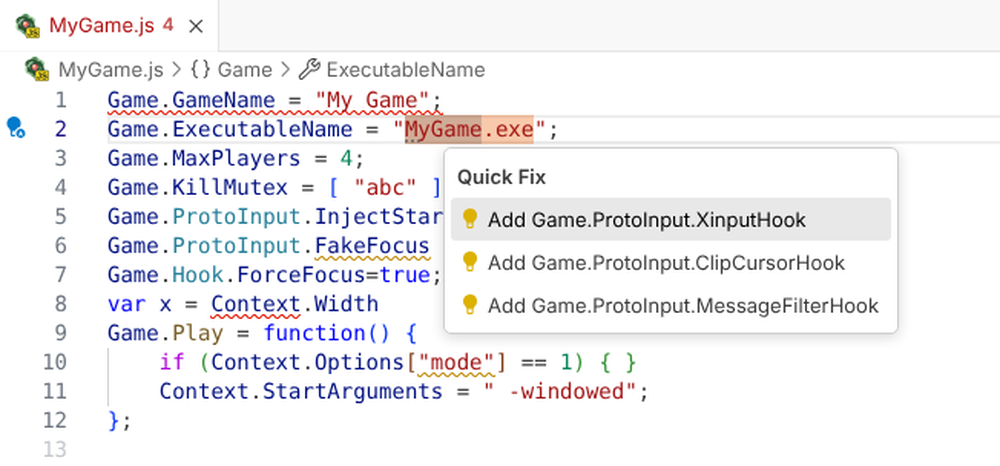
Which hooks does my game need? Ask its files. Link the handler to the game's folder (Nucleus: Game Folder: Link…, or
gameFoldersin other editors) and the tools read the game's.exeand DLLs in the background: what it uses for controllers, the cursor, keys, focus and windows. Quiet hints then suggest the Proto Input hooks and Nucleus options that match and the handler doesn't have yet, each with a fix that adds the line.ncdev imports <game folder>(and the MCP toolnucleus_game_imports) print the whole picture. It follows a launcher to the game it starts (Warcraft III's), spots SDL built into a game, and was checked against 35 games' Hub handlers and Proto Input's and Nucleus' source. Idea from messenils (#39).Screenshot
-
Vote on docs in VS Code too. The Docs panel has 👍/👎 inside each part of a doc (under the doc, and in the AI-written "In practice" box), counted with the workbench's, anonymously and only while VS Code telemetry is on. After a vote, a link asks for more: Tell us what's wrong after 👎, Give feedback after 👍, its title naming the part ("In practice" or the doc). Click again to take a vote back.
-
Report from where you are. Nucleus: Report a Problem… and Request a Feature… (Command Palette, the language status's Feedback, Notepad++'s plugin menu,
ncdev report) open the right GitHub form, filled in with the versions and where the handler came from, never its code. You never pick a repository, and you see everything before it's sent. (#14) -
"This check is wrong" on every check's problem. Ctrl+. in VS Code, Alt+Enter in Notepad++, the code actions of other editors and
ncdev report --check <rule>open a report with the check, the message and the line; the flagged lines' code only if you choose to include it. -
"Nucleus did something different" in Try it. The Try it panel's report button sends what Try it showed (each player's window, arguments, file changes) next to what really happened.
-
Possible duplicates first, and no account needed. Before a new report, the tools show open reports that may be the same, to 👍 instead. No GitHub account? Copy the report and paste it in the testers' Discord thread. A problem with one Hub handler goes to its Hub page, Discord or Reddit instead of our forms.
-
Releases tell the issues they fix. A release comments "Fixed in vX.Y.Z" (or "Added in vX.Y.Z") on each issue it delivers, with the release notes link, and thanks whoever reported or asked for it.
-
"In practice" in the docs. For the 86 most used options and calls, the docs now have a second part, written by AI from Nucleus Co-op's source and the Hub handlers: what the option really does (
Game.Hook.ForceFocusonly matters with the custom XInput DLL; Nucleus replacesGame.LockInputToggleKeywith your own lock key) and, in a few plain sentences, how, where, why and for which kinds of games Hub handlers use it. It's labelled AI-written in hovers, suggestions, the Docs panel,ncdev apiand the.d.ts, apart from the doc above it. -
A hint when keyboard and mouse players would get nothing. In a handler for several keyboards and mice, Proto Input's cursor and key hooks (
GetCursorPosHook,GetKeyStateHook, …) withoutGame.ProtoInput.RegisterRawInputHooknow get a quiet hint: those hooks answer from keyboards and mice that only the raw input hook reads, so players would see no key presses and a frozen cursor. The fix adds the hook. "In practice" for these hooks and forGame.Hook.SDL2Enabled(which only works for games with a separateSDL2.dll) explains it, from Proto Input's and Nucleus' source. -
"In practice" says where game engines differ. For 59 options and calls, the docs add a line where handlers for Unreal Engine, Unity or Source games use them notably more or less than all Hub handlers ("By engine: more common in Unity games."), and "In practice" names a few engine habits (Unity's
Screenmanagerregistry values, Source'shl2_singleton_mutex). Engines come from Wikidata (by the game's Steam ID or IGDB page) and the handlers' own code. -
An example for most options. Docs show an example for 611 of the 750 options and calls: the official docs' own, else the value most Hub handlers use ("From Hub handlers"), an AI-written one, or one made from the type, each saying where it comes from in a few words.
-
Vote on docs, people and AIs apart. 👍/👎 on both parts of a doc (the doc and "In practice"). AI agents can vote too (
ncdev docs vote, the MCP toolnucleus_vote_doc), counted apart; an AI-written part with at least 10 votes from people, 90% 👍, is labelled Verified by people. The docs show the counts. -
One Run button above a handler. The editor title's Run button (▷) now holds Test in Nucleus Co-op (Windows), Try It and the new Debug Handler, as the Python extension does, instead of two separate ▷ icons. Debug steps through the handler, simulated, and pauses on its first line when it has no breakpoint.
-
The handler's status beside its language. Hover {} Nucleus Co-op handler in the status bar for its checks (the problem count, or OK) and its game folder, with Link… or Unlink, as TypeScript and Python show theirs. Nothing new sits on screen.
-
A Nucleus output channel. View › Output › Nucleus logs what the extension did (packaged, installed, linked, tested) and every error, with Show Log on error messages.
-
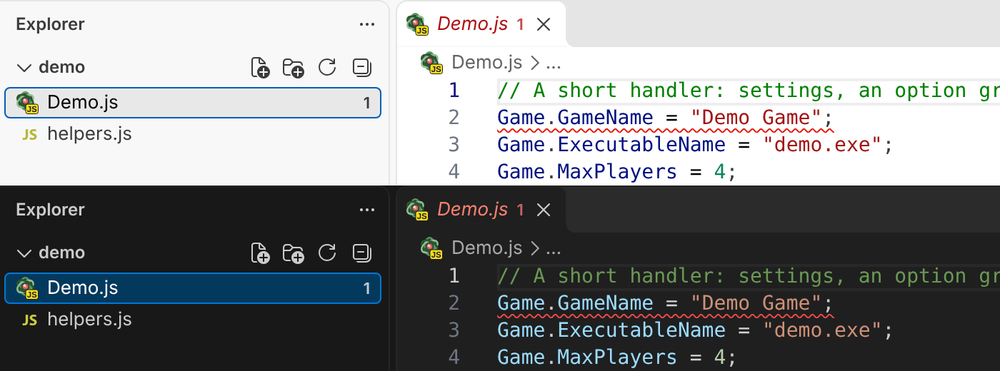
Handlers have their own file icon. Handler files show Nucleus Co-op's logo with a JS tag in the Explorer, tabs and breadcrumbs, so you can tell them from other JavaScript at a glance (and see when one wasn't detected). It shows with VS Code's default file icons; icon themes that pick icons by file extension, such as Material Icon Theme, keep their JavaScript icon.
Screenshot
🛠️ Improved
-
Option compares fixed with text first. When an option's values are text,
Context.Options["fps"] === 144now gets=== "144"as its first fix (text with text, the exact match), and the message says== 144works too. -
AI-written docs are easy to tell apart, without a label. In the Docs panel each AI-written part (a doc, "In practice", an example, parameter docs) sits in a lightly tinted frame with a sparkle in its corner, whose tooltip says what it is based on; hovers and suggestions put a ✨ before it, and Notepad++'s call tip "[AI]". Human-written docs stay plain, and "Checked by …" and "Verified by people" still show.
-
Where AI-written docs come from, at a glance, with links. The sparkle's tooltip is now a short list instead of one long sentence: "✨ AI-written" (with Checked by … or Verified by people when they apply), then Based on and one line per source: each Nucleus or Proto Input file links to it on GitHub (a permalink to that file's latest version, which moves on only when the file itself changes, so it keeps working when the file moves; when one does change, the daily sync lists the docs written from it to check again), a docs page to the page, the Hub handlers to the Hub and the engine data to its file. The tooltip stays open while you point at it or tab into it, so the links can be clicked; hovers and suggestions put the same links on their one line. Behind it, what each AI-written part is based on is data (files, Hub count date, engines) and the links come from one table of source repositories, so every tool shows it the same way.
-
Shorter hovers. Hovering an API name shows its signature, the first sentence of its doc and a Full docs link (in VS Code also the docs page on the web); "In practice", votes, engine notes and examples are in the docs it opens and in the suggestion docs, in VS Code, Notepad++ and every editor using
ncdev lsp. -
No error for code that never runs. A name that doesn't exist inside a function nothing in the handler calls is now a warning that says so, instead of an error: it can't break anything until something calls that function.
-
Settings in titled groups. Settings has the extension's settings in titled groups (General, Checks, Format, Nucleus Co-op) with readable choices (JavaScript, not
javascript). Searching Settings for "nucleus" still finds them. Command ids, setting keys and keybindings stay the same, so nothing you set up breaks. -
Fewer pop-ups. "Nothing to fix", "Fixed 3 problems", "Checked 12 handlers" and a handler that can't be formatted yet (with format on save, a syntax error used to warn on every save) now show briefly in the status bar and go to the output channel, not a notification.
-
Game facts aren't problems. With a game folder linked, facts such as Your game: Unreal Engine are hints (no squiggle, still in the hover and the language status); real mismatches stay problems.
-
Try it, tidier and keyboard friendly. Its explanation is folded into How this works ⓘ; Players, Keyboard & mouse and Monitor are real toggle buttons (screen readers...
Test build: v0.9.0 (cc4d0f2)
For testing only: not released. Snailedlt/nucleus-devtools claude/next-release at cc4d0f2 (version 0.9.0), built like a release.
Built from commit cc4d0f23f055ff56d54cc59ea795e0113f7f5e96 by Jrgen Kalsnes Hagen, committed 2026-11-19T18:28:45+01:00.
Get it the way users will: from the tools page of the next release's site, https://nucleus-workbench-next.vercel.app/tools/ (or build the site with node build.mjs --preview --test-build in workbench/playground and serve dist/pages).
v0.8.0 (beta)
⚠️ Changed
-
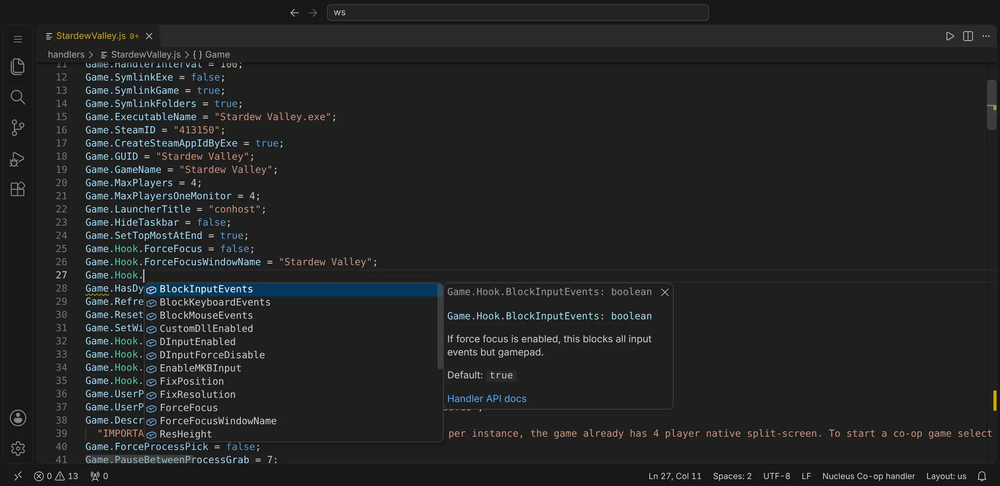
Handlers open as "Nucleus Co-op handler", without VS Code's JavaScript suggestions. VS Code's own JavaScript suggestions and type lines no longer mix in with the handler's: no browser globals, and no newer methods that Nucleus' engine doesn't have. Colours, brackets and folding stay those of JavaScript. Click the language in the status bar to switch a file back, or set
splitscreenme.languageModetojavascriptto keep all handlers as JavaScript; Set Up Type Definitions does that for its folder.Screenshot
-
Handlers are coloured like any JavaScript file. Nucleus names now use JavaScript's own categories, so your theme colours them as it colours everything else:
GameandContextas variables, what's on them as properties, what you call as methods. Option groups (Game.ProtoInput,Nucleus.Folder), fixed choices (Nucleus.Folder.InstancedGameFolder) and callbacks (Game.Play) keep a colour of their own in VS Code, through your theme's namespace, enum value and function colours.Gameis no longer shown in the type colour. Other editors can style these three with the newgroup,choiceandcallbackmodifiers (PORTING.md).
✨ New
- Options compared as numbers or booleans. When the player starts from a saved profile, Nucleus gives every
Game.AddOptionvalue back as text, soContext.Options["players"] === 4,== trueorcase 4:never match, and afalseoption is the text "False", which anifcounts as true. The new check,option-compare, finds these, also through the handler's own variables (var p = Context.Options["players"]; if (p === 4)), and offers==orcase "4":as the fix. Loose== 4works and stays quiet.
🐛 Fixed
- No "has no effect" warning on
File.Exists((Context.filePath = ...)). An unknownContextproperty assigned inside a call or a condition passes its value on, like thevar x = (Context.X = ...)idiom, so it's now the same quiet hint instead of a warning that said the line does nothing.
📦 Install: download splitscreenme-vscode-v0.8.0.vsix below, then in VS Code run Extensions: Install from VSIX… (Ctrl+Shift+P). New to the tools? Start with the intro and install guide and TESTING.md.
🤖 AI agents: nucleus.js (below) is the command-line tool and MCP server: node nucleus.js mcp. See the README.
🌐 Offline workbench: workbench.html (below) is the whole browser workbench in one file; open it locally or host it yourself.
💬 Feedback: tester feedback form.
v0.7.0 (beta)
✨ New
var Game = {}is now an error. DeclaringGameorContextyourself (a variable, a parameter, a function name) puts a new object where Nucleus's was, so Nucleus never sees what you set on it: withvar Game = {}it finds no Game.Play, and avar Contextin Game.Play loses StartArguments. The new check,replaces-nucleus-object, says so, and the other checks keep looking at those lines.- A quick fix for a misspelled file in the handler's folder. When the handler uses
Game.Folder + "\\Confg.json"and the package hasConfig.json, Ctrl+. changes the name (VS Code and other editors throughncdev lsp).
🛠️ Improved
- Setting up Notepad++ needs no administrator terminal. Double-click
ncdev.exefor a short menu and choose Set up Notepad++; when Notepad++ is in Program Files, ncdev asks Windows for permission itself (from a terminal too). From a terminal with no arguments, ncdev still just prints its help. ncdev api Gamelists what's on Game. Looking up an object Nucleus provides (Game,Context,Player,Game.Hook,Nucleus…) says what it is and lists its members by category, instead of "not part of the API". The MCP toolnucleus_apianswers the same way.- Nucleus's callbacks are coloured as functions.
Game.Play,Game.OnStop,Game.OnFinishedSetupand the other callbacks Nucleus calls now get your theme's function colour, likeContextmethods, so they stand out from the settings.
🐛 Fixed
- No "not defined" errors on top of an arrow function or destructuring. Names that an arrow function, destructuring, a default or rest parameter, or a class declares counted as undefined, with a wrong "Did you mean" fix. Now there's just the one error about the ES5-only syntax.
- Explain quotes a template string as it's written. It showed
`-w ${Context.Width}`in single quotes; it keeps the backticks now.
📦 Install: download splitscreenme-vscode-v0.7.0.vsix below, then in VS Code run Extensions: Install from VSIX… (Ctrl+Shift+P). New to the tools? Start with the intro and install guide and TESTING.md.
🤖 AI agents: nucleus.js (below) is the command-line tool and MCP server: node nucleus.js mcp. See the README.
🌐 Offline workbench: workbench.html (below) is the whole browser workbench in one file; open it locally or host it yourself.
💬 Feedback: tester feedback form.
v0.6.0 (beta)
✨ New
- Nucleus names in your theme's colours.
GameandContextshow as objects, with their properties, methods and enum values (Nucleus.Folder.InstancedGameFolder) each in their own colour, so a name Nucleus doesn't know stands out in plain text next to its underline. In VS Code and the LSP editors that colour by meaning (semantic highlighting). - Explain this line. Not sure what a line does? Ctrl+Alt+E (or right-click › Explain This Line) says it in plain words: what it sets or calls, the docs of the names in it, and what Check says about it. In Notepad++: Plugins › Nucleus Co-op handlers › Explain this line. Other editors get it as a code action (
nucleus.explainLine). - A page for every check. Each problem links to its own page: what it means, why Nucleus cares, a wrong and a right example, the fix, and how to turn it off. All checks, one page each, so you can link one in Discord too.
- Test in Nucleus Co-op, one click. The ▷ button above a handler (and Plugins › Nucleus Co-op handlers in Notepad++) installs it and starts Nucleus Co-op with its game selected: pick the players and press Play. An open Nucleus is restarted with your OK (it reads handlers when it starts), its debug log can be turned on with one answer, and Open Nucleus Co-op's Debug Log shows what happened. Also
ncdev testfor other editors. - Docs one click from your code. API names in hovers, parameter hints and suggestion docs are links. In VS Code they open Nucleus Docs beside the editor (offline): the name's page, a path back to its group and the main page (Docs / Context / ModifySaveFile), Search…, and Open in the workbench. Other editors (Neovim, Helix, Zed…) link to the same page in the browser workbench. Also Nucleus: Docs and Nucleus: Search the Docs… in the Command Palette.
- A Notepad++ plugin. Problems are underlined as you type, hovering a name shows its docs, suggestions know where you are (the members that exist there, an option's values, the game's own files), and
(shows the parameters. Alt+Enter offers the fixes for the line; Plugins › Nucleus Co-op handlers has Fix all, Format, Try it, a Problems panel and Link the game's folder.ncdev setup notepad++installs it. ncdev, one download, nothing else to install. The command-line tools are nowncdev(Nucleus Co-op dev tools), andncdev.exeon the release page runs on Windows without Node.js.ncdev updategets the newest version, checked against the release's checksums.nucleusstill works.- A getting-started guide in VS Code. Help › Welcome › Make a Nucleus Co-op handler walks from an empty file to the Hub in six steps (start, check, Try it, the game's folder, testing in Nucleus, sharing), each with its button.
- Notepad++: Browse the Hub, Package and Settings. Plugins › Nucleus Co-op handlers can now browse and search the Hub and download a handler with its files, package a handler as
.ncfor upload, and set how strict each check is and the format style in a Settings dialog. - Package, Install and New handler in every editor. Editors that use
ncdev lsp(Neovim, Helix, Zed, Sublime Text…) get Package as .nc and Install to Nucleus Co-op in their source actions, and anucleus.newHandlercommand. In an empty file, typinghandleroffers the whole New Handler template (VS Code and Notepad++ too). - One house style, your call. Format Document now also writes double quotes (what the Hub install reads
Game.GameNamebetween) and ends statements with semicolons, and only if the program provably stays the same. Both can be changed or turned off (splitscreenme.format.quotes,splitscreenme.format.semicolons;--quotes,--semicolonsforncdev format). Format Selection and format-as-you-type work too. - What to pass, for every parameter. Parameter hints and hovers now say what each parameter of the most used Nucleus methods takes (e.g.
ReplaceLinesInTextFile's"N|text"lines, counting from 1), written from the Nucleus source and marked AI-written, and JavaScript's own methods get theirs too. - Snippets for what most handlers do. Type the start of
iniset,replacelines,regkey,startargs,ifoption,firstplayer,eachplayeroroptionat the start of a line and pick it: ready-made code the way Hub handlers write it, to fill in. - Your own functions, understood.
myFunction().suggests what its result has when itsreturns (or an@returns {type}) say what it gives back, and@paramlines in the comment above it show in its parameter hints. - Smarter suggestions after a dot. A string literal, a joined string (
path + "\\x.ini"), what a method gives back (.replace(…).,.split(",")and its items) and numbers now get their own methods, hovers and parameter hints.Context.Options["…"]with a key noGame.AddOptionadds is flagged (a typo in the key), with a fix to the right one; hoveringContext.Optionslists the handler's keys. - Suggestions know your own code.
Context.Options["suggests the keys yourGame.AddOptionlines add,== "their choices, and hovering a key shows the option (all editors). In Notepad++ and other editors, your own functions and variables are suggested and explained too (with the comment above them), with parameter hints, and Rename… changes one everywhere. - New handler, Install and Outline in Notepad++. Plugins › Nucleus Co-op handlers can now create a handler (name, exe, Proto Input, Goldberg…), install it into Nucleus Co-op, and show an outline panel of its options and functions to jump around in.
ncdev installdoes the same from a terminal. - Go to definition. On a function or variable of the handler, F12 (VS Code, other editors) or Alt+F12 (Notepad++) jumps to where it's declared; on
Game.Playor any option to where it's set; onContext.Options["key"]to itsGame.AddOption. Find references lists every use (Language Server, Notepad++). - Open a handler in the browser workbench. Nucleus: Open in the Browser Workbench (VS Code) and Plugins › Nucleus Co-op handlers › Open in the browser workbench (Notepad++) open the handler you're editing there, for its visual editor, Lines and Test all.
- Common JavaScript mistakes caught. The checks now include ESLint's rules for real bugs:
=where==was meant, a backslash that disappears from a Windows path ("C:\Games"), the same key twice, code that never runs, a line that does nothing, and more, each explained in plain words. On the Hub's 896 handlers they found only real bugs. - AI agents sign their handlers. With the agent kit, Claude Code and other AI agents add a few comment lines at the top of a handler they write or change: which agent, what
ncdev lintandncdev simulateshowed, and that it wasn't run in Nucleus. Helpers see at a glance how a handler was made. - Notepad++, 32-bit too.
ncdev setup notepad++installs the plugin for 32-bit Notepad++ as well as 64-bit.
🛠️ Improved
- AI agents get the newer tools. The MCP server adds
nucleus_debug(breakpoints with conditions, watches),nucleus_explain(what a line does) and check explanations (nucleus_ruleswith a rule id); every problem carries its docs link, a path also checks the handler's folder, and the server hands every agent the hard rules. The CLI hasncdev rules <id>andncdev explain, and the skill lists them all. - Where to ask for help. Nucleus: Open Documentation lists the SplitScreen.Me Discord and r/nucleuscoop, and
ncdev --helpends with both. - The feedback form fits what you report. It's for checks and the editor tools, with up-to-date choices under Where, and links fill that in from where they are. Workbench and site feedback has its own form in the workbench's repository.
- The Notepad++ plugin says its version.
NcDev.dllnow carries its version and name (Properties › Details in Windows, and what Notepad++'s Plugins Admin reads), ready for a listing there. - Try it never freezes the editor. It runs in a background thread: a handler stuck in an endless loop is stopped, a new edit cancels the old run, and Test all shows progress and can be cancelled. The same goes for
ncdev lsp,ncdev mcpand the debugger. - Notepad++ stays responsive while ncdev works. Hub search and download, Install, Package, Test, Update and the API reference run in the background with a timer in the status bar, and a tool that hangs is stopped.
- Lighter on hub.splitscreen.me, and it knows who asks. Requests at the same time are shared, at most two downloads run at once, retries back off on errors, and when the Hub is down the last list is used for a while. Every request names these devtools, which tool sent it and why (e.g.
vscode-extension hub-browse), and nothing about you. ncdev lspwatches only handlers and their folders. Changes innode_modulesand.gitno longer wake it up.- Zip packages read more file names correctly. Names stored without the UTF-8 flag are read as UTF-8 when they are valid UTF-8.
- Missing required options, explained and filled in. A missing
Game.GUID,Game.GameNameorGame.ExecutableNamenow says what each one is for, and the fix fills in what the handler already tells it (the GUID from the game's name, or the other way round), so Fix all can add it; only real unknowns get a placeholder to fill in. A missingGame.ExecutableNameis reported once, not twice. - Every use of a name, highlighted. In editors that use
ncdev lsp, the cursor on a variable or function highlights its other uses, as VS Code does. - The Hub's most downloaded.
ncdev hub search --popularlists the Hub's most downloaded handlers. - Set it up in your own editor. The README has a new section for experienced developers: how to point Neovim, Helix, Sublime Text, Emacs, Kate, JetBrains IDEs or Zed...
v0.5.0-beta.1 (closed beta)
✨ New
- Debug a handler with VS Code's own debugger. Press F5 in a handler (or add a "Nucleus handler" launch configuration): set breakpoints in the margin, conditional ones too, step with F10 / F11 / Shift+F11, even step back, and see the variables,
Context,Player, the options set so far and what Nucleus would have done, with hover values and the Debug Console. It runs the way Nucleus does (simulated);players,keyboardandresolutionin launch.json pick the setup. - Notepad++ support.
nucleus setup notepad++adds every handler API name and theSystem.IOmembers handlers use to Notepad++'s suggestions, with parameters as call tips, and a Run menu entry that checks the open handler. Notepad++'s own words stay, and--removeputs everything back. It needs Node.js for now (a standalone download is planned). - Check a handler against the game on your PC. Nucleus: Link the Game's Folder… points a handler at the game's install folder; then
ExecutableName,BinariesFolder, the symlink and copy lists and more are checked against the real files, with fixes ("did you mean ShooterGame-Win64-Shipping.exe?"), and those lists suggest the game's own files as you type. Only names and sizes are read. Suggested by messenils. - Checks for the files next to your handler. The files in
<Name>/beside<Name>.jsare checked as they'd go into the .nc: names Windows can't install, two files that overwrite each other, broken INI or JSON, very large files, and a file the handler uses throughGame.Folderthat's probably misspelled ("did you mean Config.json?"). In the Problems panel,nucleus lintandnucleus lsp;splitscreenme.lint.packageChecksturns them off. - Hub handlers with all their files. Browse Handlers on the Hub › Open handler source now lays the package out the way Nucleus installs it (
<GameName>.jsand<GameName>/), says how many other files it has, and offers Open as Folder and Copy into Workspace. - An outline of your handler. The Outline view, breadcrumbs and Go to Symbol (Ctrl+Shift+O) list the handler's settings grouped by object (Game, Game.ProtoInput, Game.Hook…) with their values, the callbacks with what they set inside, and your own functions and variables. In other editors through
nucleus lsptoo. - Every Hub handler. Browse Handlers on the Hub and
nucleus hub searchnow see all of them (about 900), not only the 600 with the most stars. - Other editors: debugging and game-folder checks.
nucleus dapbrings the debugger to editors with DAP support (Neovim, Helix, Zed, JetBrains, Emacs), andnucleus lspnow checks a handler against the game's install folder (thegameFolderssetting) and shows package problems on the files themselves. PORTING.md has the setup. - Other editors see every handler.
nucleus lspnow checks all handlers in the folder you open, not only the open files, and checks again when a file changes on disk. Tried in Neovim.
🙏 Thanks
- messenils for the idea of checking a handler against the game's own files.
📦 Install: download splitscreenme-vscode-v0.5.0-beta.1.vsix below, then in VS Code run Extensions: Install from VSIX… (Ctrl+Shift+P). New to the tools? Start with the intro and install guide and TESTING.md.
🤖 AI agents: nucleus.js (below) is the command-line tool and MCP server: node nucleus.js mcp. See the README.
🌐 Offline workbench: workbench.html (below) is the whole browser workbench in one file; open it locally or host it yourself.
💬 Feedback: tester feedback form.
v0.4.0-beta.1 (closed beta)
The biggest update yet. Checks that catch settings which quietly do nothing, docs for 150 more API members (and a way to help check them), the same tools in any editor with LSP support, and a first look at stepping through a handler line by line. The workbench got its biggest update too: see its What's new.
✨ New
- Settings that silently do nothing. Four new checks, each from Nucleus' and Proto Input's source: Proto Input options with no way to start it (
protoinput-inactive);BlockedMessagesand the message filters withoutGame.ProtoInput.MessageFilterHook(protoinput-needs-hook); a blocked number Proto Input can't block as written (blocked-message); and options only read when another is on, likeFakeFocusIntervalwithoutFakeFocus(needs-option). On the Hub they find 15 handlers with settings that never take effect. Each comes with a fix. - Docs for 150 more API members, and you can check them. Hovers, suggestions and the reference now explain the Proto Input functions and hook IDs, the
Playermembers and the most used undocumented options, written from the Nucleus and Proto Input source. Each one is marked as AI-written and says what it's based on, since the official docs don't cover them. Hovers have Is it wrong? Tell us, which opens a short GitHub form with the doc attached; once a person confirms one, it says who checked it. - Other editors: a Language Server.
nucleus lspbrings the checks with their quick fixes, hover docs, suggestions, signature help, Format Document, window-message names and Try it to Neovim, Helix, Zed, Sublime Text, Emacs, JetBrains IDEs, Kate and any other editor with LSP support. PORTING.md has the setup for each one. - Step through a handler:
nucleus debug. Stop at a line (also only for one player:--break "14 if Context.PlayerID == 1") or where an error ends the run, and see where it is (top of the file,Game.Playfor player 2 of 4,Game.OnStop), the variables, the call stack,--watchvalues and what the handler did so far. The engine behind the coming debugger in VS Code and the workbench. - Window messages by name. In
Game.ProtoInput.BlockedMessages = [0x0008, 0x02a3, 0x02a1], each number shows its name after it (WM_KILLFOCUS,WM_MOUSELEAVE,WM_MOUSEHOVER), hovering says what it does and how many Hub handlers block it, and typing inside the brackets suggests the common ones. The names come from Proto Input's own list. Suggested by messenils.
🛠️ Improved
- A typo no longer hides every other problem. While a line doesn't parse yet (say you're halfway through
player.), the rest of the handler is still checked, and the error sits on the unfinished code with a plain message ("a name is missing afterplayer.") instead of on the next line. - Focus loop settings that do nothing.
Game.ProtoInput.FocusLoop_…andFocusLoopIntervalMillisecondsonly work withGame.ProtoInput.EnableFocusMessageLoop = true; theneeds-optioncheck now says so (14 Hub handlers). - More suggestions after
=.Game.Play =(and the other callbacks) insertsfunction () { }with the cursor inside, andGame.ProtoInput.BlockedMessages =offers the set most Hub handlers block. - Set twice: keep either value. The quick fixes for
duplicate-assignmentnow offer both: remove the overwritten line, or keep it and remove the later one. Hub.*lines explained. Hover andnucleus apinow say whatHub.Handler.Id,Hub.Handler.VersionandHub.Maintainer.*are for (the Hub writes them on upload; Nucleus uses the ID and version to link the handler to its Hub page). They still aren't suggested, since authors don't write them.
🐛 Fixed
- Format Document no longer splits
=>. In code that isn't ES5 yet, formatting turned() => 1into() = > 1(also**and??); these now stay in one piece.
🙏 Thanks
- messenils for the idea of naming the window messages.
📦 Install: download splitscreenme-vscode-v0.4.0-beta.1.vsix below, then in VS Code run Extensions: Install from VSIX… (Ctrl+Shift+P). New to the tools? Start with the intro and install guide and TESTING.md.
🤖 AI agents: nucleus.js (below) is the command-line tool and MCP server: node nucleus.js mcp. See the README.
🌐 Offline workbench: workbench.html (below) is the whole browser workbench in one file; open it locally or host it yourself.
💬 Feedback: tester feedback form.
v0.3.1-beta.1 (closed beta)

🛠️ Improved
Game.SetupSseno longer suggested. Nucleus never calls it, so completion and the Lines list leave it out; setting it still gets the warning that it never runs. Reported by messenils.
🙏 Thanks
- messenils for spotting that
Game.SetupSseis never called.
📦 Install: download splitscreenme-vscode-v0.3.1-beta.1.vsix below, then in VS Code run Extensions: Install from VSIX… (Ctrl+Shift+P). New to the tools? Start with the intro and install guide and TESTING.md.
🤖 AI agents: nucleus.js (below) is the command-line tool and MCP server: node nucleus.js mcp. See the README.
🌐 Offline workbench: workbench.html (below) is the whole browser workbench in one file; open it locally or host it yourself.
💬 Feedback: tester feedback form.
v0.3.0-beta.1 (closed beta)
✨ New
- Format Document for handlers. Shift+Alt+F re-indents and spaces a handler. It never moves a line (Nucleus runs handlers line by line) and checks that every token and comment is unchanged, so the handler does exactly the same. Also
nucleus format(--write,--check) and the MCP toolnucleus_format. - A changed Game.GUID before it reaches players. For a handler with a
Hub.Handler.Idline, VS Code comparesGame.GUIDwith the version on the Hub (once per version, cached). Nucleus keys each player's game and profiles by GUID, so a changed one drops the game from their list. Alsonucleus lint --hub; settingsplitscreenme.lint.compareWithHub. - Option values a saved profile turns into text.
Game.AddOption(..., [true, false])gets a warning: a profile gives the value back as"True", soContext.Options["x"] == truestops matching. Use text values. - Files that aren't UTF-8, and a backslash in GameName. A file saved as ANSI (accented letters arrive broken in Nucleus) gets a warning, and a
\inGame.GameNameis an error: the Hub install names the file after it and fails. - Names that don't exist. A stray word or a typo of a variable (
"system.cfg", sdfsdf) is now an error: Nucleus throws "sdfsdf is not defined", and at the top level the handler doesn't load. Names from the handler's plugins (pluginsInfo.txtin its folder) count as defined. - The .NET calls handlers use are known.
System.IO.File(Copy, Exists, Delete, ReadAllText…),System.IO.Directory,System.IO.Path.Combine,System.Environment.UserNameandSystem.Threading.Thread.Sleepnow have completion, hover docs and argument checks, and a typo likeSystem.IO.File.Exstsis flagged. Other .NET names are still allowed. Suggested by messenils. - Warns about options set too late. A new
too-laterule flagsGame.GUID,Game.GameName,Game.MaxPlayers,Game.SupportsKeyboard,Game.DescriptionorGame.AddOptioninsideGame.Playor another callback: Nucleus reads them when it loads the handler or on the setup screen, so there they do nothing. OtherGameoptions, such as Proto Input or FakeFocus, still work insideGame.Play. - Checks for options with a fixed format. A new
value-formatrule catches aGame.CustomHotkeysentry that isn't"true|Toggle HUD|Ctrl|H"(Nucleus then registers none of them), folder lists withoutfolder|destination, aGame.SteamlessPatchNucleus can't read, and aGame.BinariesFolderwith slashes in the wrong place. Each one would otherwise fail the setup or silently do nothing. - Test all combinations in Try it. One link runs every player count (up to the handler's maximum), input setup and monitor size, and shows which combinations fail and why. Pick a cell to see that run. The same check as the browser workbench's.
- Try it with a keyboard and mouse for every player. Choose "each player their own" (or
nucleus simulate --keyboard all): every player gets their own keyboard and mouse, as in Nucleus' multiple keyboards and mice mode. Try it says so when the handler doesn't setGame.SupportsMultipleKeyboardsAndMice = true.
🛠️ Improved
- Screenshots in your theme. The README's screenshots show VS Code light or dark, matching your theme on GitHub.
- Calling a name that doesn't exist is an error.
System.IO.File.Exsts(p)or a misspelledContextfunction used to be a warning that said the line does nothing; calling it actually throws, so Nucleus stops there. Reading or setting a misspelled name is still a warning. - Game.ForceFinishOnPlay is flagged as historical. It comes from the original Nucleus Coop, where it closed running copies of the game before each player; today's Nucleus doesn't read it and always closes leftover copies when a session starts. The linter now says so in a warning, instead of "probably a typo", with a fix that removes the line.
- AI agents report their own time. The agent skill tells AI agents that use WakaTime to register as agents (category
ai coding,ai_line_changes), not as the person.
🐛 Fixed
- Try it's Game.Folder is where the Hub installs the handler.
handlers\<GameName>instead ofhandlers\MyHandler, as the Hub install names the folder after the game name. - Try it without Game.Play. Game.OnFinishedSetup now runs, and Game.OnStop sees the last player's Context, as in Nucleus (it reported "Context is not defined" before).
- Context paths in Try it. Context.UserProfileConfigPath, UserProfileSavePath and the Documents paths now get the values Nucleus gives them, including moving a "Documents\" path to DocumentsConfigPath. The docs no longer claim that ten Context values, such as Context.Options, are copied from Game.
- Try it follows Jint for System calls. A misspelled System.IO name fails, a call with the wrong number of values fails, and System.Environment.UserName is text, checked against the real engine.
🙏 Thanks
- messenils for asking for the
System.IOlines.
📦 Install: download splitscreenme-vscode-v0.3.0-beta.1.vsix below, then in VS Code run Extensions: Install from VSIX… (Ctrl+Shift+P). New to the tools? Start with the intro and install guide and TESTING.md.
🤖 AI agents: nucleus.js (below) is the command-line tool and MCP server: node nucleus.js mcp. See the README.
🌐 Offline workbench: workbench.html (below) is the whole browser workbench in one file; open it locally or host it yourself.
💬 Feedback: tester feedback form.
v0.2.0-beta.1 (closed beta)
✨ New
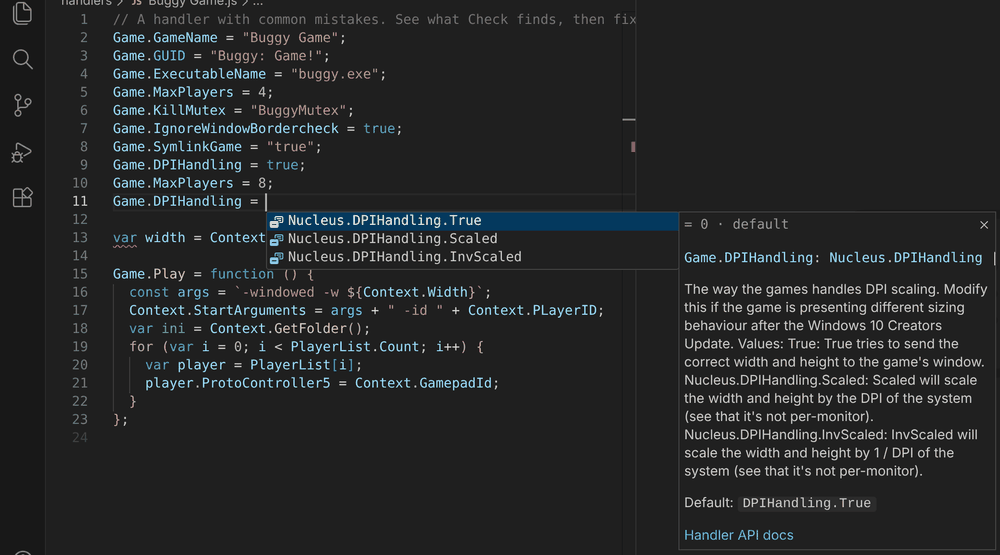
- Value suggestions as you type. After
=, completion offers the option's values:Game.DPIHandling =offersNucleus.DPIHandling.True,.Scaledand.InvScaledwith the default first; on/off options offertrueandfalse.
- AI agents can use the tools directly.
nucleus mcpis an MCP server for Claude Desktop, Cursor, VS Code Copilot and others: check, fix, Try it, API lookup, templates and Hub search. VS Code's agents get it automatically (VS Code 1.101+), and each release includes a single-filenucleus.jsfor other clients. - What's new, right here. After an update, one note shows the highlights, with a button to read them all. Nucleus: What's New opens this list any time;
splitscreenme.showWhatsNewturns the note off.
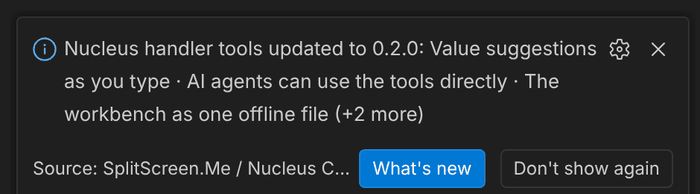
- The workbench as one offline file. Each release includes
workbench.html, andnucleus workbenchsaves it: open it locally or host it yourself.
🛠️ Improved
- Easier on the Hub. Searching Hub handlers (command-line tool, MCP server, Browse the Hub) reads our daily copy of the Hub's list instead of the Hub, checked at most once an hour; each handler version is downloaded once, and requests say which tool sent them. Agents are told to fetch one or two handlers, never in bulk.
- Options and docs stay current. A daily check notices when Nucleus Co-op or the splitscreen.me docs change and proposes the updated options for review.
📦 Install: download splitscreenme-vscode-v0.2.0-beta.1.vsix below, then in VS Code run Extensions: Install from VSIX… (Ctrl+Shift+P). New to the tools? Start with the intro and install guide and TESTING.md.
🤖 AI agents: nucleus.js (below) is the command-line tool and MCP server: node nucleus.js mcp. See the README.
🌐 Offline workbench: workbench.html (below) is the whole browser workbench in one file; open it locally or host it yourself.
💬 Feedback: tester feedback form.