Repository navigation

✨ New
-
Options nothing reads are faded. A
Game.AddOptionwhose key the handler never reads (Context.Options["fps"]) changes nothing for the players: the key now shows faded, like unused code in VS Code, with no squiggle (VS Code, other editors throughncdev lsp, Notepad++ andncdev lint --verbose), and Remove this option is offered when nothing else names it. It stays quiet when it can't follow every read. -
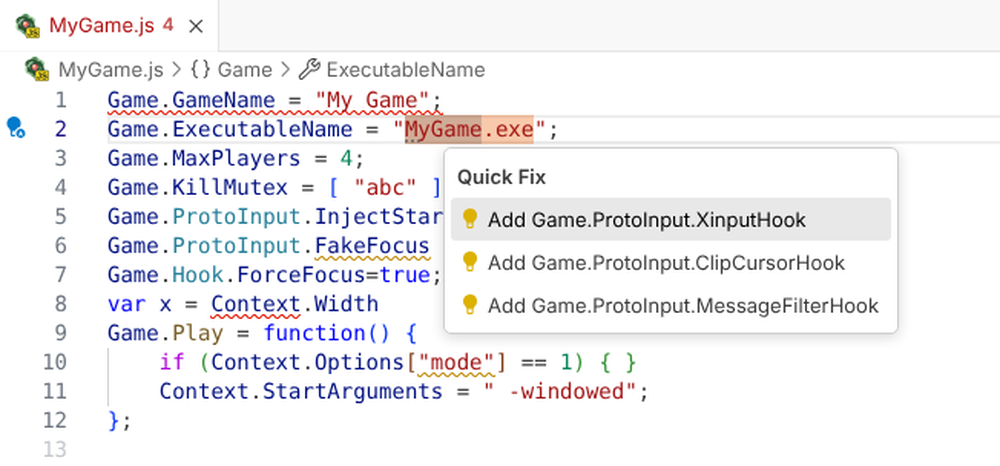
Which hooks does my game need? Ask its files. Link the handler to the game's folder (Nucleus: Game Folder: Link…, or
gameFoldersin other editors) and the tools read the game's.exeand DLLs in the background: what it uses for controllers, the cursor, keys, focus and windows. Quiet hints then suggest the Proto Input hooks and Nucleus options that match and the handler doesn't have yet, each with a fix that adds the line.ncdev imports <game folder>(and the MCP toolnucleus_game_imports) print the whole picture. It follows a launcher to the game it starts (Warcraft III's), spots SDL built into a game, and was checked against 35 games' Hub handlers and Proto Input's and Nucleus' source. Idea from messenils (#39).Screenshot
-
Vote on docs in VS Code too. The Docs panel has 👍/👎 inside each part of a doc (under the doc, and in the AI-written "In practice" box), counted with the workbench's, anonymously and only while VS Code telemetry is on. After a vote, a link asks for more: Tell us what's wrong after 👎, Give feedback after 👍, its title naming the part ("In practice" or the doc). Click again to take a vote back.
-
Report from where you are. Nucleus: Report a Problem… and Request a Feature… (Command Palette, the language status's Feedback, Notepad++'s plugin menu,
ncdev report) open the right GitHub form, filled in with the versions and where the handler came from, never its code. You never pick a repository, and you see everything before it's sent. (#14) -
"This check is wrong" on every check's problem. Ctrl+. in VS Code, Alt+Enter in Notepad++, the code actions of other editors and
ncdev report --check <rule>open a report with the check, the message and the line; the flagged lines' code only if you choose to include it. -
"Nucleus did something different" in Try it. The Try it panel's report button sends what Try it showed (each player's window, arguments, file changes) next to what really happened.
-
Possible duplicates first, and no account needed. Before a new report, the tools show open reports that may be the same, to 👍 instead. No GitHub account? Copy the report and paste it in the testers' Discord thread. A problem with one Hub handler goes to its Hub page, Discord or Reddit instead of our forms.
-
Releases tell the issues they fix. A release comments "Fixed in vX.Y.Z" (or "Added in vX.Y.Z") on each issue it delivers, with the release notes link, and thanks whoever reported or asked for it.
-
"In practice" in the docs. For the 86 most used options and calls, the docs now have a second part, written by AI from Nucleus Co-op's source and the Hub handlers: what the option really does (
Game.Hook.ForceFocusonly matters with the custom XInput DLL; Nucleus replacesGame.LockInputToggleKeywith your own lock key) and, in a few plain sentences, how, where, why and for which kinds of games Hub handlers use it. It's labelled AI-written in hovers, suggestions, the Docs panel,ncdev apiand the.d.ts, apart from the doc above it. -
A hint when keyboard and mouse players would get nothing. In a handler for several keyboards and mice, Proto Input's cursor and key hooks (
GetCursorPosHook,GetKeyStateHook, …) withoutGame.ProtoInput.RegisterRawInputHooknow get a quiet hint: those hooks answer from keyboards and mice that only the raw input hook reads, so players would see no key presses and a frozen cursor. The fix adds the hook. "In practice" for these hooks and forGame.Hook.SDL2Enabled(which only works for games with a separateSDL2.dll) explains it, from Proto Input's and Nucleus' source. -
"In practice" says where game engines differ. For 59 options and calls, the docs add a line where handlers for Unreal Engine, Unity or Source games use them notably more or less than all Hub handlers ("By engine: more common in Unity games."), and "In practice" names a few engine habits (Unity's
Screenmanagerregistry values, Source'shl2_singleton_mutex). Engines come from Wikidata (by the game's Steam ID or IGDB page) and the handlers' own code. -
An example for most options. Docs show an example for 611 of the 750 options and calls: the official docs' own, else the value most Hub handlers use ("From Hub handlers"), an AI-written one, or one made from the type, each saying where it comes from in a few words.
-
Vote on docs, people and AIs apart. 👍/👎 on both parts of a doc (the doc and "In practice"). AI agents can vote too (
ncdev docs vote, the MCP toolnucleus_vote_doc), counted apart; an AI-written part with at least 10 votes from people, 90% 👍, is labelled Verified by people. The docs show the counts. -
One Run button above a handler. The editor title's Run button (▷) now holds Test in Nucleus Co-op (Windows), Try It and the new Debug Handler, as the Python extension does, instead of two separate ▷ icons. Debug steps through the handler, simulated, and pauses on its first line when it has no breakpoint.
-
The handler's status beside its language. Hover {} Nucleus Co-op handler in the status bar for its checks (the problem count, or OK) and its game folder, with Link… or Unlink, as TypeScript and Python show theirs. Nothing new sits on screen.
-
A Nucleus output channel. View › Output › Nucleus logs what the extension did (packaged, installed, linked, tested) and every error, with Show Log on error messages.
-
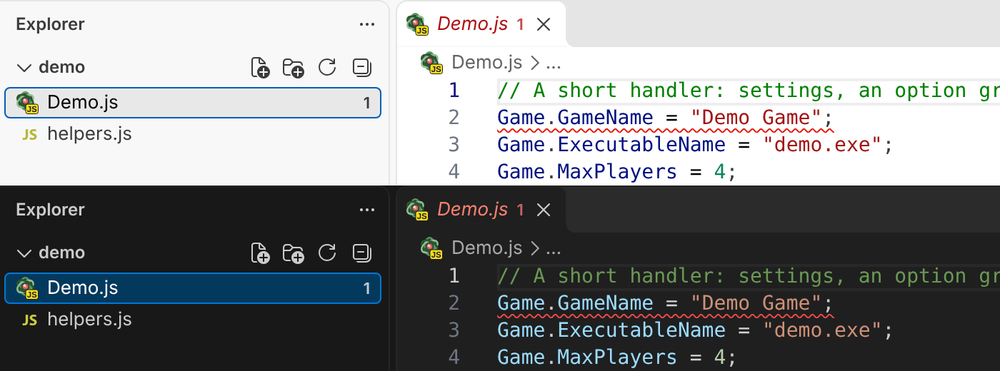
Handlers have their own file icon. Handler files show Nucleus Co-op's logo with a JS tag in the Explorer, tabs and breadcrumbs, so you can tell them from other JavaScript at a glance (and see when one wasn't detected). It shows with VS Code's default file icons; icon themes that pick icons by file extension, such as Material Icon Theme, keep their JavaScript icon.
Screenshot
🛠️ Improved
-
Option compares fixed with text first. When an option's values are text,
Context.Options["fps"] === 144now gets=== "144"as its first fix (text with text, the exact match), and the message says== 144works too. -
AI-written docs are easy to tell apart, without a label. In the Docs panel each AI-written part (a doc, "In practice", an example, parameter docs) sits in a lightly tinted frame with a sparkle in its corner, whose tooltip says what it is based on; hovers and suggestions put a ✨ before it, and Notepad++'s call tip "[AI]". Human-written docs stay plain, and "Checked by …" and "Verified by people" still show.
-
Where AI-written docs come from, at a glance, with links. The sparkle's tooltip is now a short list instead of one long sentence: "✨ AI-written" (with Checked by … or Verified by people when they apply), then Based on and one line per source: each Nucleus or Proto Input file links to it on GitHub (a permalink to that file's latest version, which moves on only when the file itself changes, so it keeps working when the file moves; when one does change, the daily sync lists the docs written from it to check again), a docs page to the page, the Hub handlers to the Hub and the engine data to its file. The tooltip stays open while you point at it or tab into it, so the links can be clicked; hovers and suggestions put the same links on their one line. Behind it, what each AI-written part is based on is data (files, Hub count date, engines) and the links come from one table of source repositories, so every tool shows it the same way.
-
Shorter hovers. Hovering an API name shows its signature, the first sentence of its doc and a Full docs link (in VS Code also the docs page on the web); "In practice", votes, engine notes and examples are in the docs it opens and in the suggestion docs, in VS Code, Notepad++ and every editor using
ncdev lsp. -
No error for code that never runs. A name that doesn't exist inside a function nothing in the handler calls is now a warning that says so, instead of an error: it can't break anything until something calls that function.
-
Settings in titled groups. Settings has the extension's settings in titled groups (General, Checks, Format, Nucleus Co-op) with readable choices (JavaScript, not
javascript). Searching Settings for "nucleus" still finds them. Command ids, setting keys and keybindings stay the same, so nothing you set up breaks. -
Fewer pop-ups. "Nothing to fix", "Fixed 3 problems", "Checked 12 handlers" and a handler that can't be formatted yet (with format on save, a syntax error used to warn on every save) now show briefly in the status bar and go to the output channel, not a notification.
-
Game facts aren't problems. With a game folder linked, facts such as Your game: Unreal Engine are hints (no squiggle, still in the hover and the language status); real mismatches stay problems.
-
Try it, tidier and keyboard friendly. Its explanation is folded into How this works ⓘ; Players, Keyboard & mouse and Monitor are real toggle buttons (screen readers hear which is pressed), and the focus stays on the button you clicked. Try It: Test All Combinations is in the Command Palette now.
-
New Handler as one guided flow. Five steps in one box, with a step count and a Back button that keeps your answers; the last step picks the folder, and it saves
<Name>.jstogether with its<Name>/folder. -
The Docs hold the web links. The Docs panel's main page lists the guides, Proto Input, FAQ, the Hub and where to ask for help, so Docs: Open and Docs: Search… are all you need (Docs: Web Links… leaves the palette; its id still works). Searching the docs ranks
Game.*options first. -
Clearer parameter hints. A parameter that takes text shows
string, notstring | number | boolean(and an enum parameter its enum), in hints, hovers and the reference. -
The debugger opens on Locals. Its first scope is now Locals (was Variables › Variables), expanded where it pauses.
-
What's New opens at your version, without the notes for the next one.
-
A better walkthrough. New steps for the Docs, the debugger (F5) and Fix all; Test in Nucleus Co-op shows only on Windows; no more raw code marks in the step text, and the first step no longer shows an unrelated picture.
-
Nucleus commands only where they work. The command palette shows Try It, Fix All, Explain This Line, Package, Install, Test in Nucleus Co-op and the game folder commands while a handler is open, and the Explorer's right-click menu offers Package and Install on handlers only, not on every
.jsfile. -
Clearer command names that sort together. In the palette, related commands now sit side by side: Docs: Open and Docs: Search… (Open Documentation…, renamed Docs: Web Links…, is no longer in the palette); Game Folder: Link… and Game Folder: Unlink (shown only when a folder is linked). Lint All Handlers in Workspace is now Check All Handlers in the Workspace, and Fix All Auto-fixable Problems is Fix All Problems That Can Be Fixed. Format Handler leaves the palette, since Format Document (Shift+Alt+F) does the same in a handler; its keybinding stays. Keybindings to the old commands keep working.
-
Fix all leaves harmless lines for you to choose.
fixAllin the shared checks can skip cleanups (lines that do nothing, such asPlayer.ProtoController5); the workbench uses it and offers them afterwards.
🐛 Fixed
-
Proto Input links work. The Docs panel, the Proto Input template's comment, the deprecation notes and the AI docs' sources linked splitscreen.me/docs/protoinput, a page that doesn't exist; they now lead to the Proto Input guide at splitscreen.me/docs/proto.
-
Docs examples keep their nesting. Examples such as
Game.ProtoInput.OnInputLockedshowed a loop's body and a call's arguments flat, and Insert into handler pasted them that way. -
Game-file hints: launchers and wording. A handler with
Game.LauncherExeandGame.ProtoInput.InjectStartupgets a warning: startup injection goes into the launcher, so the hooks never reach the game; the fix switches it to runtime injection. A hint no longer shows empty brackets when nothing in the files triggered it. -
Try it lists the Proto Input and Hook options you set. Options set left out every
Game.ProtoInput.*andGame.Hook.*value; VS Code, Notepad++ andncdev simulatenow show them. -
Game Folder: Link…, Install and Test in Nucleus Co-op in browser-based VS Code. code-server and Codespaces hid them from the command palette, though they work there.
-
"Move the code into Game.Play" keeps your indentation. It used two spaces even in a handler indented with four or with tabs.
-
Clearer
ncdevmessages.ncdev <command> --helpshows that command's help;importssays when a folder doesn't exist or--exenames no program there, and--jsonrespects--no-controllersand--no-kbm;reportsays when a word isn't a kind of report, or when the check doesn't flag the line you gave;lint --fix-dry-runshows what's left at the file's own line numbers. -
Reports and votes. A copied report's heading no longer repeats itself, VS Code's Request a Feature is titled as such, and a Docs vote no longer waits on a slow connection.
-
Notepad++: the right version and shorter status messages. About showed plugin 1.0.0; it now shows the release's version. The status bar messages after copying a report or linking a game folder fit.
-
Faster suggestions in other editors.
ncdev lspsends only the suggestions that fit what you've typed (afterGame.Xin, a few instead of all of Game's), so Notepad++ and others get much smaller replies. -
Docs attached to the wrong option. Some Proto Input docs came from the line next to them in the official docs (
InjectRuntime_EasyHookStealthMethodsaid "Automatically locks input once the instances are set up",BlockedMessageshad Block Raw Input's text), and a few options had the next option's line of code as their doc (IgnoreDeleteFilesPrompt,DeleteFiles,CopyFoldersTo,CMDStartArgsInside). Each doc now belongs to its own option, andHexEditFileAddress,RenameAndOrMoveFiles,CopyEnvFoldersToNucleusAccountsandCMDBatchClosegot theirs. -
Linking a game's folder no longer writes your PC's path into the project. Game Folder: Link… (was Link the Game's Folder…) keeps the link in VS Code's own storage on this PC instead of
.vscode/settings.json, so it can't end up in a shared repository; links made before still work. Unlink now says what it did, and with nothing linked it no longer creates an empty settings file. -
No wrong "quote the case" fix for option lists changed later.
option-compareno longer offerscase "2":when the option's list is changed by a method call, also one written with brackets (answers["push"]), since a fresh pick could then be a number. Found by CodeRabbit. -
Game-file hints are safer and more exact. A folder name with quotes or line breaks stays inside
Game.SDLPaths' string, a named pipe or special file is never read, and a damaged or hostile program file has one work and size budget, so it can't stall the editor.--exe/exematches a path before a bare name (and says when nothing matches), hints follow a launcher from the game too, ignore DLLs of the other bitness and commented-out hooks, and a fix never lands inside a callback or a comment.Game.SDLPathsis relative to the root of Nucleus' copy (the.exe's folder, or above it byGame.BinariesFolder), aGame.ExecutableNametwo programs share gives no hints instead of a guess, and the lastInjectRuntime_…assignment counts. -
Reports never send your code before you choose. In other editors (
ncdev lsp), This check is wrong opens the form without the flagged lines, the check's message or the handler's name; they're one choice away. Reports from a check that moved since are left without code, a form whose browser didn't open says so with the link, andncdev report --linetakes only real line numbers. -
Votes and the Docs panel. A vote that couldn't be sent isn't saved as counted, two quick votes no longer overwrite each other, and voting doesn't reopen a closed Docs panel. AI votes wait at most 8 s and are sent once per part, even when asked twice at once.
-
Smaller fixes. Unlinking a game folder keeps another handler's setting; Try it reports the handler on screen and keeps the focus through a long Test all; New Handler never replaces a file without asking, nor writes the script when its folder can't be made; F5 pauses on the first line as the Run menu does; What's New never shows a newer version's notes; Format Handler says when it can't format;
protoinput-needs-raw-inputuses the last assignment and ignores comments; the Notepad++ plugin checks the clipboard before opening Discord; the feature-request form loads again. -
ncdev lint --fix-dry-runfails whenever--fixwould. An error the fixes leave but word differently (a name that isn't defined, moved intoGame.Play) or move elsewhere was left out of the dry run, which could then pass.ContainsKeywritten in brackets (Context.Options["ContainsKey"]) also counts as reading the key it is given, like.ContainsKey("fps"), so that option isn't faded as unused.
🙏 Thanks
- messenils for the idea of reading the game's own program files to suggest hooks (#39 started from it).
📦 Install: download splitscreenme-vscode-v0.9.0.vsix below, then in VS Code run Extensions: Install from VSIX… (Ctrl+Shift+P). New to the tools? Start with the intro and install guide and TESTING.md.
🤖 AI agents: nucleus.js (below) is the command-line tool and MCP server: node nucleus.js mcp. See the README.
🌐 Offline workbench: workbench.html (below) is the whole browser workbench in one file; open it locally or host it yourself.
💬 Feedback: tester feedback form.