Repository navigation
Themes
Dress VibeCheck up however you like. Pick a theme in Settings > Theme. It changes straight away and remembers your choice.
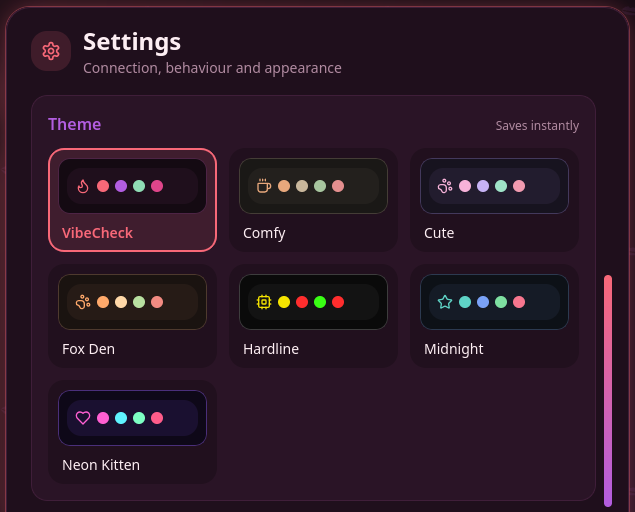
| Theme | Vibe |
|---|---|
| VibeCheck (default) | The logo's coral and purple on deep wine, with soft neon glows and faint kiss marks |
| Comfy | Warm charcoal with apricot and oat, and a soft knitted texture. Sweater weather |
| Cute | Pastel pink and lilac on dark plum, with cat ears and paw prints |
| Fox Den | Warm browns, orange and cream, with fox ears, leaves and paw prints |
| Midnight | Deep blue and teal under a faint starfield |
| Hardline | Brutalist cyberpunk: black and grey with hazard yellow and red, sharp corners, hard shadows, monospace text and circuit traces |
| Neon Kitten | Hot pink and cyan neon on deep violet, with kitten ears, hearts and sparkles |
| Hellfire | Crimson and hot pink on near-black with gold embers, devil horns, flames and pitchforks. It "summons" toys |
| Latex | Shiny black with latex red and chrome silver, glossy panels, O-rings, chains and heart padlocks. It finds "playthings" |
Themes also recolour the logo, and a few have their own way of saying things. Fox Den, for example, "sniffs" for toys instead of scanning.
The screenshot above was taken before Hellfire and Latex were added.
Have a look in mind? Themes are small files in the app's source code, so making one means building VibeCheck from source.
Each theme is a single file in src/theme/themes/. You pick colours for a set of roles (background, panels, main accent and so on), and if you like you can add ears, a background pattern, an icon, a corner style, shadows and a font. Drop the file in and it shows up in the theme picker on its own.
The full guide, including what each colour role is used for, is in src/theme/README.md.
Made one you love? Show it off in the Discord or open a pull request.