Repository navigation
Releases
HTML Frontmatter 0.1.2

Type-safety update for the Obsidian community directory source review. Existing plugin features and supported versions are unchanged.
- Use parse5's built-in node types for HTML metadata traversal.
- Preserve native method receiver, argument and return types in the compatibility wrapper.
- Declare version-specific private interfaces at the compatibility boundary.
- Remove unsafe calls and unnecessary type assertions without disabling lint rules.
Verification
- Type checking and release build passed.
- All 15 existing unit tests passed.
- All 14 native property checks and 13 catalog checks passed in the isolated Windows Obsidian 1.14.4 test vault.
- Local type-aware linting reported no errors or warnings for all seven rule categories listed in the review: no-explicit-any, no-unsafe-assignment, no-unsafe-member-access, no-unsafe-argument, no-unsafe-call, no-unsafe-return and no-unnecessary-type-assertion. The community directory's new scan is still required.
Vibe-coded preview: developed through human-AI collaboration and AI-assisted coding. Supports desktop Obsidian 1.14.4 only; verified on Windows. HTML rendering, search and graph support remain outside scope. Global property rename/delete involving HTML remains blocked.
Installation and usage
Download html-frontmatter-0.1.2.zip below, extract it, and copy the entire html-frontmatter folder into your vault's .obsidian/plugins/ directory. Restart Obsidian, enable HTML Frontmatter under Community plugins, and enable the core Properties view plugin.
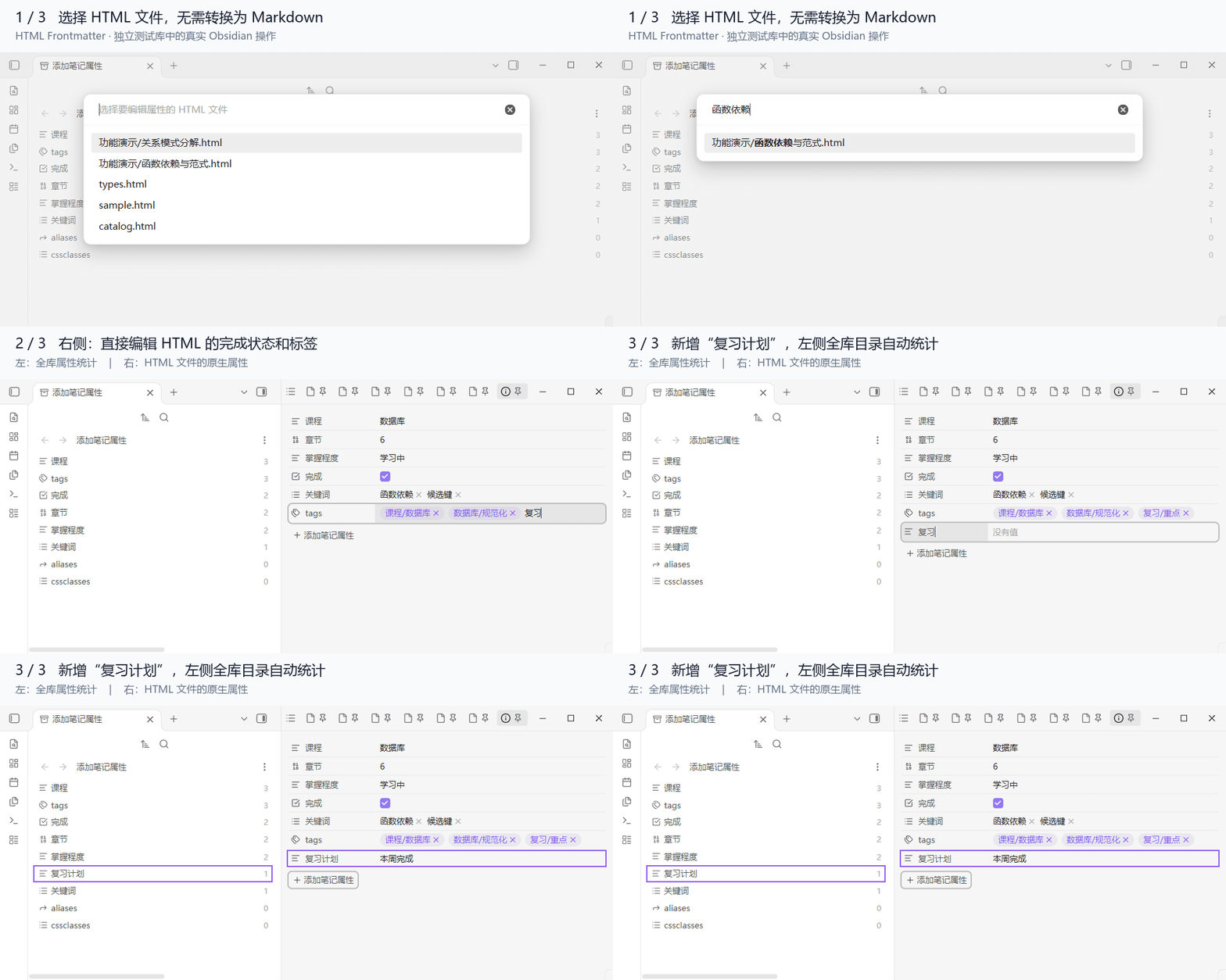
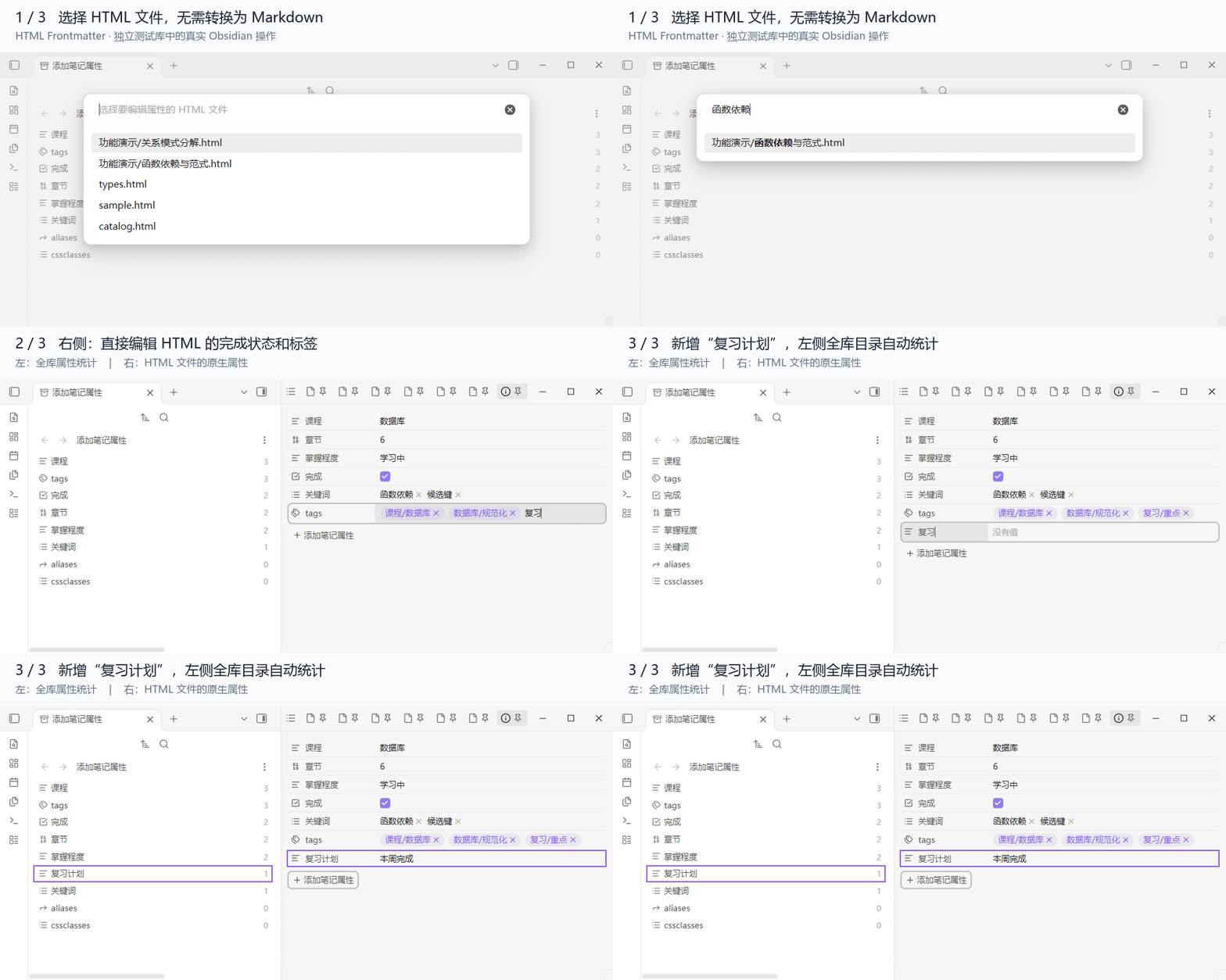
Open the command palette, search for HTML Frontmatter, run "HTML Frontmatter: 编辑 HTML 属性" (Edit HTML properties), and choose an HTML/HTM file. Edit its properties in the native sidebar. Use "Show all properties" to view the vault-wide catalog.
Installation and usage guide · 中文说明 · Verification record
Released under MIT; bundled dependencies retain their own license notices.
HTML Frontmatter 0.1.1
Documentation update for the Obsidian community directory review. Plugin behavior and runtime source are unchanged from 0.1.0.
- English README with dedicated Installation and Usage sections.
- Simplified Chinese documentation remains available in README.zh-CN.md.
- Existing demo GIF and known limitations remain documented.
Vibe-coded preview: developed through human-AI collaboration and AI-assisted coding. Supports desktop Obsidian 1.14.4 only; verified on Windows. See the repository's verification record for actual checks and limits.
Installation and usage
Download html-frontmatter-0.1.1.zip below, extract it, and copy the entire html-frontmatter folder into your vault's .obsidian/plugins/ directory. Restart Obsidian, enable HTML Frontmatter under Community plugins, and enable the core Properties view plugin.
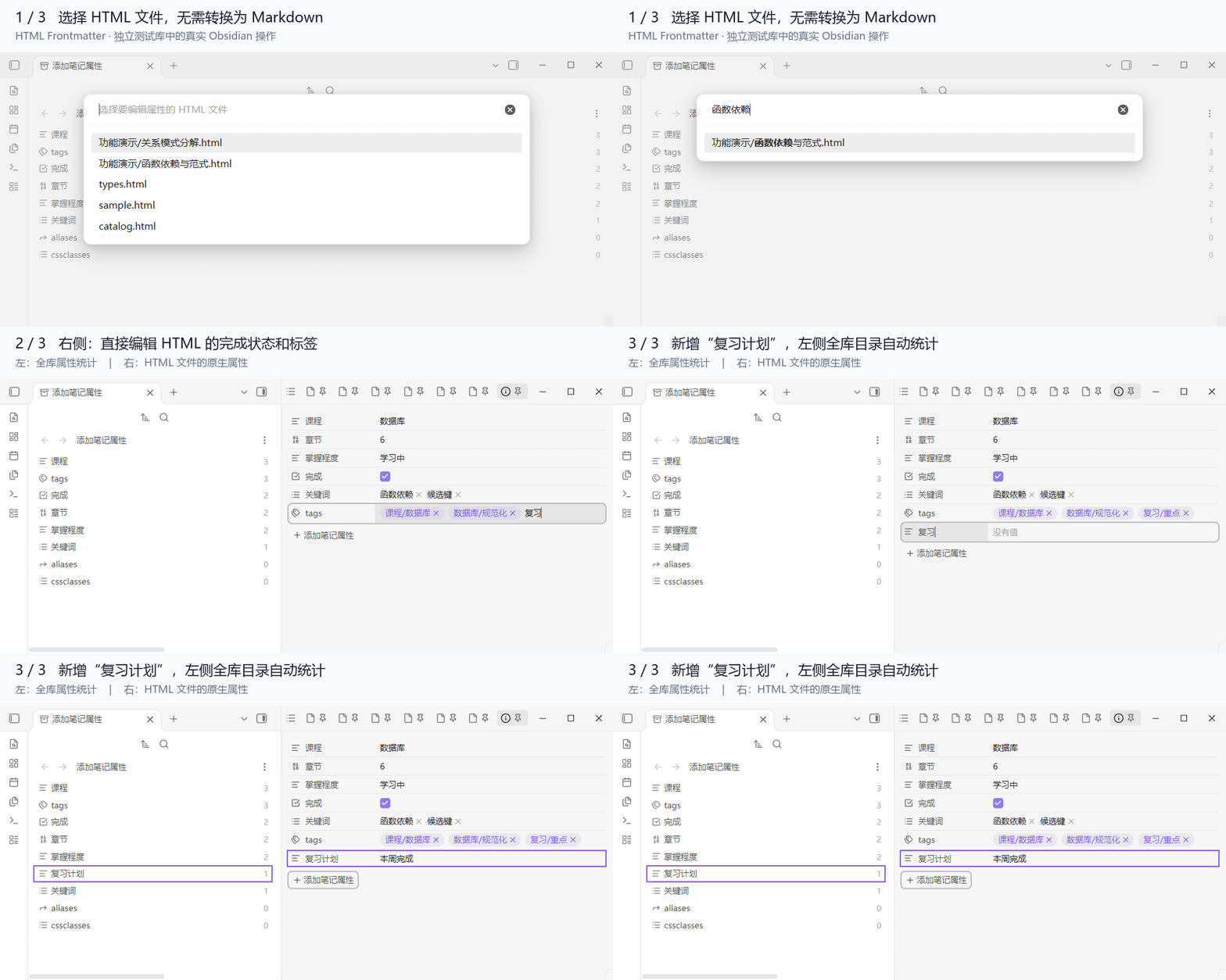
Open the command palette, search for HTML Frontmatter, run "HTML Frontmatter: 编辑 HTML 属性" (Edit HTML properties), and choose an HTML/HTM file. Edit its properties in the native sidebar. Use "Show all properties" to view the vault-wide property catalog.
Full installation and usage guide · 中文说明
Released under MIT; bundled dependencies retain their own license notices.
HTML Frontmatter 0.1.0
HTML Frontmatter 的首个试用版本,采用 MIT 许可证。
Vibe coding 产物:主要通过人机协作、AI 辅助编码开发。已做实际运行验证,验证范围和已知限制公开记录在仓库中;当前仍为试用版。
功能
- 使用 Obsidian 原生属性面板编辑 HTML/HTM 内的 JSON 属性。
- 支持常用属性类型,以及单文件属性新增、改名和删除。
- HTML 属性进入原生全库属性目录、出现次数和候选值读取。
- 保存时保留 JSON 数据块之外的 HTML 正文、样式和脚本。
安装
下载 html-frontmatter-0.1.0.zip,解压后将 html-frontmatter 文件夹放入目标库的 .obsidian/plugins/,重启并启用插件。命令面板运行“HTML Frontmatter: 编辑 HTML 属性”。
当前限制
- 仅允许桌面 Obsidian 1.14.4 加载,已在 Windows 验证。
- 涉及 HTML 的全局属性改名、删除暂时阻止;单文件操作可用。
- 不提供 HTML 正文阅读、搜索、图谱、Bases 或反链适配。
- 尚未提交 Obsidian 社区插件市场。
Release 同时提供独立 main.js、manifest.json、许可证、依赖许可说明与 ZIP 校验文件。
功能演示
真实操作:选择 HTML → 编辑原生属性 → 新属性自动进入全库统计。使用独立测试库中的合成笔记。