
Replies: 3 comments 3 replies

-
|
When there is only one line in the cell, |
Beta Was this translation helpful? Give feedback.

-
|
Visually the text seems to stick to the top of the cell in any case. That's especially true if there are no pqjyg letters in the text. Is there a way to manipulate the vertical alignment? |
Beta Was this translation helpful? Give feedback.

-
|
you can use |
Beta Was this translation helpful? Give feedback.

-
|
Cool. Actually |
Beta Was this translation helpful? Give feedback.

-
|
Just a stupid question: is the parameter dependent on the number of lines? E.g with 3 or 4 lines the value need to be adapted? |
Beta Was this translation helpful? Give feedback.
-
|
Yes, positive |
Beta Was this translation helpful? Give feedback.


Uh oh!
There was an error while loading. Please reload this page.
Uh oh!
There was an error while loading. Please reload this page.
-
If I follow the documentation of
1.3. Cell alignmentand the definitions ofTable 2.4the vertical alignment could be set withmto be vertically centered.The following code:
produces
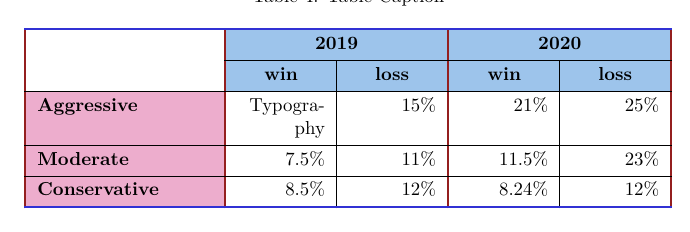
I would have expected that the parameter
X[r,m]would align the content in the middle. But as depicted the last row remains on the top. When I setmin the column withTypographythis works as expected.I would guess this is a bug but don't know if it works as designed or if the settings should be used that way.
Beta Was this translation helpful? Give feedback.
All reactions