Repository navigation
Releases
TrayBridge 0.1.5 preview (unsigned)

TrayBridge 0.1.5 preview
Unsigned GitHub preview. Windows 11 25H2 x64 build 26200.9457 only; other patch levels, ARM64, alternative taskbars, and managed-device policies have not been validated.
Download the Windows x64 ZIP. Extract the complete folder and run TrayBridge.exe; there is no installer and .NET is bundled. Choose a monitor, select its icons, and click Apply. Windhawk is not required or installed.
Windows/browser security warnings may appear because this preview is unsigned. GitHub hosting and ZIP packaging do not remove those warnings; some device policies can block execution. Download from this repository and compare the ZIP's SHA-256 with SHA256SUMS.txt. Matching source and release.json identify the exact release commit/tag and unsigned status.
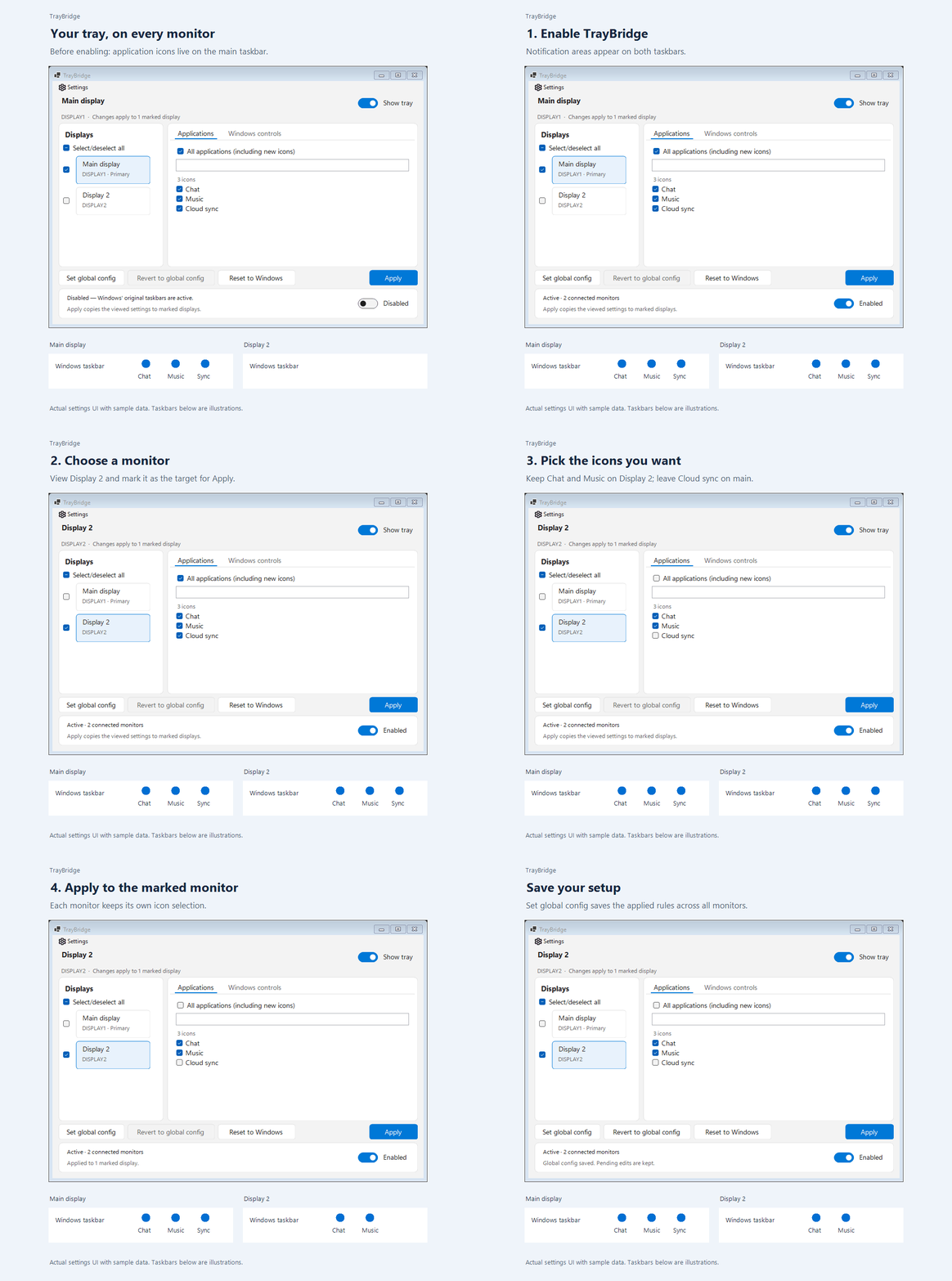
The walkthrough shows actual settings controls with sample data; the taskbar strips are illustrations.
- Restoration failures now block uninstall and preserve native recovery state. Disabling checks the actual loaded helper without injecting another copy.
- Cleanup recovery can inspect a verified signed plan, retry it, or stop its exact automatic registration. Missing, modified, and policy-blocked scripts no longer force an endless restart loop. Unverified legacy registrations remain untouched and do not block app startup.
- Uninstall checks Windows PowerShell source compilation and sign-in command length before changing taskbars or startup preferences. Host startup failures include their actual error.
- Untested Windows builds are rejected before symbol preparation or helper injection. Check for a compatible TrayBridge release after updating Windows.
- Publishing requires prepared, hash-verified uninstall metadata. SDK, native toolset, Windows SDK, and runtime versions are pinned. Packaging verifies the embedded file inventory and source snapshot, and includes matching source and SHA-256 checksums.
- Public unsigned previews retain clean exact-tag, source/build/inventory, and recent dependency-review checks. The README now covers usage, direct downloads, updates, uninstall, compatibility, and privacy. A reproducible UI walkthrough is included.
Extract the complete archive to a dedicated writable local NTFS folder and run TrayBridge.exe. First enable downloads matching symbols from Microsoft. No .NET SDK, developer tools, or Windhawk installation is required. Startup is off by default; the app has no analytics.
For upgrade, exit the old controller and keep the old folder as a rollback copy. Extract the new release into a separate folder. If an old helper remains resident or restoration cannot be confirmed, sign out or restart before starting the new version. Settings live under %LOCALAPPDATA%\TrayBridge and are shared between copies. Avoid running different versions together.
For rollback, exit the new controller, sign out/restart if necessary, and run the preserved older version only on its supported Windows build. Back up your settings before upgrading; older releases may not understand newer settings.
Use Manage trays → Settings → Uninstall TrayBridge… for removal. Uninstall removes only this published copy and individually verified local data. Unknown/edited files, older unrecorded caches, custom extraction locations, and other copies are preserved. A restart may be required to finish removal. Deferred cleanup retries at sign-in up to three times. If it cannot finish, the recovery screen lists the approved paths. Restricted PowerShell policies are unsupported; the app reports them without asking you to disable security controls.
Support: GitHub Issues. Private security reporting: see SECURITY.md. Source and license provenance: THIRD-PARTY-NOTICES.md.
Local isolated checks do not verify a real shell restart, sign-out, reboot, or browser security prompts. Full Windows lifecycle behavior is assumed working at the owner's request; no VM verification is claimed. This release is unsigned; certificate-backed signing remains optional future work.
TrayBridge v0.1.4 - Compact manager, search and appearance
TrayBridge's manager now uses a compact layout with Applications and Windows controls visible side by side.
- Horizontal monitor picker, separate view/Apply target actions, and scrolling for additional displays.
- Search above each scrollable icon list, with match counts and an empty-result message.
- Filtering preserves hidden selections. Apply and the all-icon switches operate on complete lists.
- Settings > Appearance provides System (default), Light, and Dark. The saved preference switches immediately and stays independent of tray configurations.
- Start at sign-in moved into Settings. Enable/Disable remain in the separate service area.
- Improved selected-row contrast and prevented status-file reads from blocking the helper's Active update.
Validation: managed publish and 16 policy checks passed; live accessibility checks covered minimum sizing, both searches, hidden selections through Apply, theme switching and restart persistence, independent monitor targeting, bulk routing, global snapshots, and Windows restore. Original local assignments were restored after tests. The cached build reported an unavailable NuGet vulnerability feed; compilation succeeded.
Current validated target remains Windows 11 25H2 x64 build 26200.9457. This is a prerelease; other builds and ARM64 remain unvalidated. No Windhawk installation is required.
ZIP SHA-256: 65550C6DC0988771AE9D4CA33ADA1E1315397D9C66BE3B07E5E8B283E42FCBCF
TrayBridge v0.1.3 - Modern manager and global configurations
The manager has a Windows-style layout with system app color mode, rounded cards and buttons, distinct display and icon areas, and native window controls. Application and Windows control pages remain keyboard accessible.
- Apply replaces Apply settings and updates all marked displays.
- Set global config saves the complete applied setup across all monitors, including independent rules, default/disconnected-monitor rules, and enabled state. Apply pending edits first to include them.
- Revert to global config restores that saved setup across every monitor. It becomes available after saving a global config.
- Reset to Windows restores native Windows taskbars and clears current assignments while preserving the saved global config and sign-in preference.
- Enable, Disable, and Start at sign-in are in a separate Tray service area. Disable preserves current assignments; Enable resumes them without applying pending edits.
Validation: self-contained build and policy tests passed. Live UI checks verified independent monitor viewing/marking, bulk and single-monitor Apply, complete snapshot save/restore, restoration after Windows reset, unchanged saved snapshots after later edits, native secondary-tray cleanup on reset, page switching, and layout at minimum window size. Original user preferences were restored after temporary checks.
This remains a prerelease targeting Windows 11 25H2 x64 build 26200.9457. Other Windows builds, ARM64, and physical unplug/replug remain unvalidated. Native tray handling is unchanged from v0.1.2. Extract the whole ZIP and keep the helper DLL and symbol indexer beside TrayBridge.exe. Windhawk is not required.
ZIP SHA256: 0DD008DA961FB888FEC063051A30D74A4BD9C53BD109D042894809BA642B872A
TrayBridge v0.1.2 - Independent monitor controls
Click a monitor's name to view its settings; check its separate checkbox to mark it for changes. Only one monitor is viewed at a time, while any number can be marked. Select/deselect all marks or clears every monitor without replacing the settings in the editor.
Apply settings copies the displayed application and system-icon rule to every marked monitor. Applying to one monitor preserves the other's saved rule. Pending edits survive switching between monitor names. The editor shows the viewed monitor and target count; Apply is disabled when none are marked. Enable starts the helper without implicitly applying pending changes.
Explicitly unchecked application icons now stay hidden on primary as well as secondary taskbars, even when excluded everywhere. Previously the primary recovery rule brought them back. Newly appearing icons remain recoverable on primary. Existing saved custom rules are upgraded using the known application catalog. The primary management icon remains accessible.
Validation on the current two-monitor machine: independent viewing and marking, single-view selection, draft preservation, select/deselect all, no-target handling, bulk Apply to both actual native trays, and sequential primary-only/secondary-only Apply without reverting the other tray. Policy checks cover independent rule/exclusion copies, migration, native configuration, and disconnect/reconnect recovery. The user's preferences were restored after temporary integration checks.
This is a prerelease for Windows 11 25H2 x64 build 26200.9457. Other Windows builds, ARM64, and physical monitor unplug/replug remain unvalidated. Extract the entire ZIP and keep the native helper and symbol indexer beside TrayBridge.exe. Windhawk is not required.
ZIP SHA256: FA4385EEDB987D75FEA26E089E847EB1EE97B1418BF0195889D77DC655F690A1
TrayBridge v0.1.1 - Clickable icon selections
Application and Windows system icon lists remain clickable when their "All" option is enabled. Unchecking an individual icon switches to a custom selection and preserves the other checked icons. Checking "All" again selects every current icon and automatically includes newly appearing icons.
Choose the target monitor(s), adjust icon checkboxes, then click Apply settings. Existing monitor assignments and sign-in preferences are preserved.
Validation: self-contained Windows x64 build passed. Physical clicks in both lists switched to individual selection, edits survived live inventory refresh, and restoring all mode checked every icon. UI validation left saved settings unchanged.
This remains a prerelease targeting Windows 11 25H2 x64 build 26200.9457. Native tray handling is unchanged from v0.1.0; other builds and ARM64 remain unvalidated. Extract the whole ZIP and keep its native helper and symbol indexer beside TrayBridge.exe. Windhawk is not required.
ZIP SHA256: 24531AEDB35DB9168B6CEAD683ECC90E15C511B7D3D3C946A49BF21EDD6DE0AF
TrayBridge 0.1.0 — Windows 11 current-build preview
Standalone native Windows 11 tray management, with no Windhawk installation. The app, native helper and Microsoft symbol indexer are built from the tagged source in this repository. Extract the ZIP and run TrayBridge.exe; keep the accompanying files together.
Tested on Windows 11 25H2 x64 build 26200.9457 with two monitors: native application mirroring, exclusive Stoplight routing, separate volume/network routing, per-monitor overflow filtering with native callbacks, disable/restore and controller-exit recovery. The UI supports global defaults, per-monitor overrides, bulk apply and optional sign-in startup.
This is a current-build prerelease. Battery, IME/privacy hardware conditions, other Windows builds and physical unplug/replug have not been validated. The README explains these limits and first-use Microsoft symbol preparation. GPLv3 source and all bundled license notices are included or linked alongside this release.
SHA256 (ZIP): 08DC90BE60F3C48BB72A222DA3400D90582D96AC7D9220E88D8D4E7854CDD015