Repository navigation
TrayBridge 0.1.5 preview (unsigned)
Pre-release
TrayBridge 0.1.5 preview
Unsigned GitHub preview. Windows 11 25H2 x64 build 26200.9457 only; other patch levels, ARM64, alternative taskbars, and managed-device policies have not been validated.
Download the Windows x64 ZIP. Extract the complete folder and run TrayBridge.exe; there is no installer and .NET is bundled. Choose a monitor, select its icons, and click Apply. Windhawk is not required or installed.
Windows/browser security warnings may appear because this preview is unsigned. GitHub hosting and ZIP packaging do not remove those warnings; some device policies can block execution. Download from this repository and compare the ZIP's SHA-256 with SHA256SUMS.txt. Matching source and release.json identify the exact release commit/tag and unsigned status.
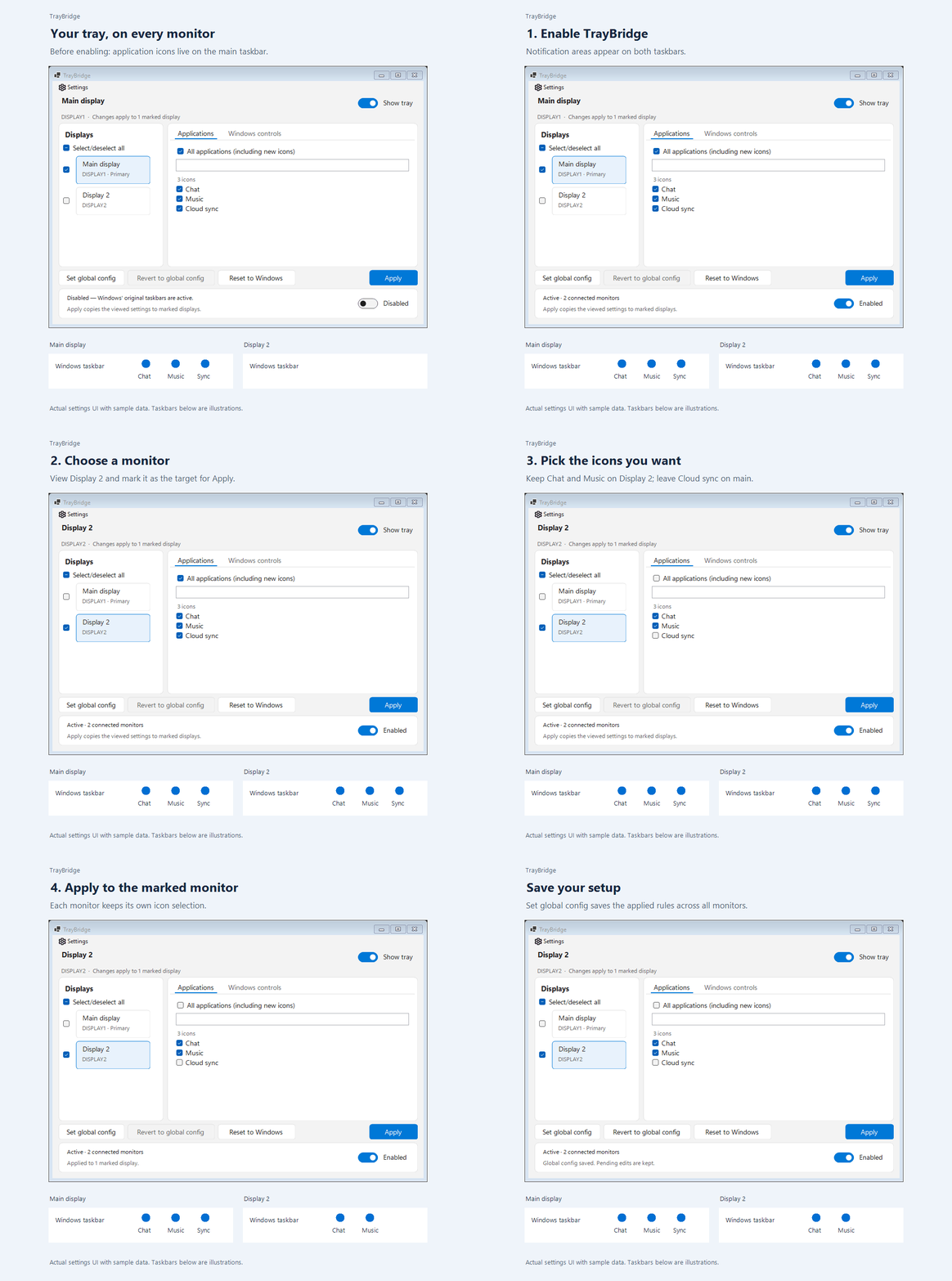
The walkthrough shows actual settings controls with sample data; the taskbar strips are illustrations.
- Restoration failures now block uninstall and preserve native recovery state. Disabling checks the actual loaded helper without injecting another copy.
- Cleanup recovery can inspect a verified signed plan, retry it, or stop its exact automatic registration. Missing, modified, and policy-blocked scripts no longer force an endless restart loop. Unverified legacy registrations remain untouched and do not block app startup.
- Uninstall checks Windows PowerShell source compilation and sign-in command length before changing taskbars or startup preferences. Host startup failures include their actual error.
- Untested Windows builds are rejected before symbol preparation or helper injection. Check for a compatible TrayBridge release after updating Windows.
- Publishing requires prepared, hash-verified uninstall metadata. SDK, native toolset, Windows SDK, and runtime versions are pinned. Packaging verifies the embedded file inventory and source snapshot, and includes matching source and SHA-256 checksums.
- Public unsigned previews retain clean exact-tag, source/build/inventory, and recent dependency-review checks. The README now covers usage, direct downloads, updates, uninstall, compatibility, and privacy. A reproducible UI walkthrough is included.
Extract the complete archive to a dedicated writable local NTFS folder and run TrayBridge.exe. First enable downloads matching symbols from Microsoft. No .NET SDK, developer tools, or Windhawk installation is required. Startup is off by default; the app has no analytics.
For upgrade, exit the old controller and keep the old folder as a rollback copy. Extract the new release into a separate folder. If an old helper remains resident or restoration cannot be confirmed, sign out or restart before starting the new version. Settings live under %LOCALAPPDATA%\TrayBridge and are shared between copies. Avoid running different versions together.
For rollback, exit the new controller, sign out/restart if necessary, and run the preserved older version only on its supported Windows build. Back up your settings before upgrading; older releases may not understand newer settings.
Use Manage trays → Settings → Uninstall TrayBridge… for removal. Uninstall removes only this published copy and individually verified local data. Unknown/edited files, older unrecorded caches, custom extraction locations, and other copies are preserved. A restart may be required to finish removal. Deferred cleanup retries at sign-in up to three times. If it cannot finish, the recovery screen lists the approved paths. Restricted PowerShell policies are unsupported; the app reports them without asking you to disable security controls.
Support: GitHub Issues. Private security reporting: see SECURITY.md. Source and license provenance: THIRD-PARTY-NOTICES.md.
Local isolated checks do not verify a real shell restart, sign-out, reboot, or browser security prompts. Full Windows lifecycle behavior is assumed working at the owner's request; no VM verification is claimed. This release is unsigned; certificate-backed signing remains optional future work.