


Bin Lin1,2,*,
Zheyuan Liu1,2,*,
Chenguo Lin1,
Sixiang Chen2,*,
Yunyang Ge1,2,*,
Yunlong Lin,
Jianwei Zhang2,
Miles Yang2,
Zhao Zhong2,
Liefeng Bo2,
Li Yuan1,†
1 Peking University 2 Tencent Hunyuan
* Work done during internship at Tencent Hunyuan † Corresponding author
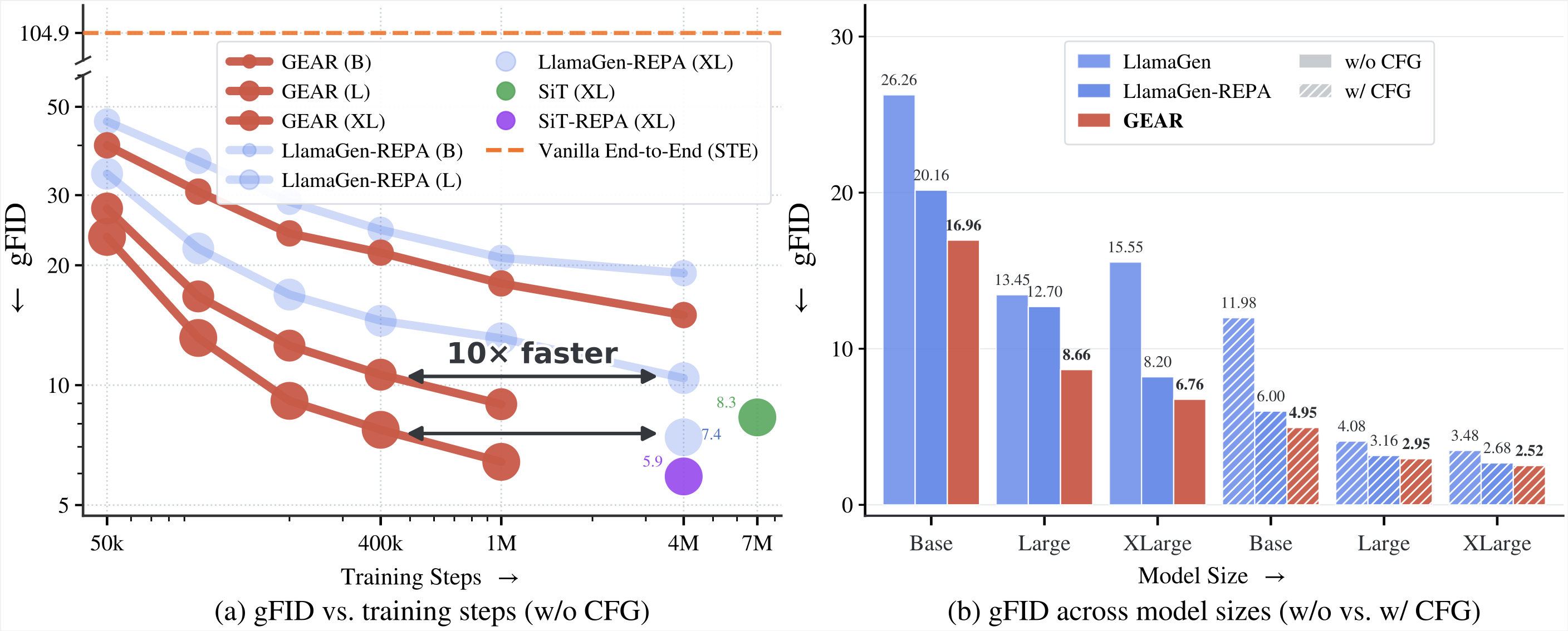
🚀 GEAR co-trains a VQ tokenizer and an autoregressive (AR) generator end-to-end — the tokenizer feels the gradient from its downstream generator, so the tokens it emits become much easier to predict. Up to ~10× faster ImageNet gFID convergence, drop-in across VQ / LFQ / IBQ and text-to-image.
- 🔗 Guided end-to-end. The soft-assignment bridge lets the AR guide the tokenizer, succeeding exactly where the straight-through estimator collapses; the next-token loss never touches the tokenizer.
- 🔄 Alignment flips to the AR. Opposite of diffusion-side REPA (REPA-E / VA-VAE): the tokenizer becomes less DINOv2-like and lower-entropy, while the AR's per-patch features track DINOv2 far more closely — reconstruction preserved.
- ⚡ Faster & better. ~10× faster ImageNet gFID convergence; on GPIC text-to-image a fresh AR on the frozen tokenizer hits the baseline's NTP loss 2.5× and REPA loss 11.1× faster, with better gFID at B / L / XL.
- 🧩 General & drop-in. Works across VQVAE / LFQ / IBQ and across class-conditional ImageNet and text-to-image — freeze the tuned tokenizer and drop it into a standard pipeline.
🔬 How it works
The blocker for end-to-end AR training is that the VQ index is a non-differentiable argmax (a straight-through estimator collapses, gFID≈105). GEAR fixes it with a dual read-out of the codebook: a hard one-hot branch trains the AR, while a differentiable soft branch softmax(-d/τ) carries a REPA loss back to update only the tokenizer. The two optimizations stay decoupled, with one coefficient λ and no crosstalk:
The tokenizer loss is the standard VQ objective (reconstruction + LPIPS + GAN + entropy + commit) plus the soft alignment term; the AR is trained by NTP plus the hard REPA term.
conda create -n gear python=3.13 -y
conda activate gear

# 1) PyTorch first, matched to your CUDA (example: CUDA 12.8)
pip install torch==2.10.0 torchvision==0.25.0 torchaudio==2.10.0 \
    --index-url https://download.pytorch.org/whl/cu128

# 2) everything else
pip install -r requirements.txt
The gear env above covers training, inference, and the in-repo GPIC FD-DINOv2
eval. The external benchmark scorers (GenEval, DPG-Bench, WISE judge, and the ADM
ImageNet evaluator) each need their own conda environment — create them by
following the per-benchmark READMEs linked under Evaluation before
running those benchmarks.
GEAR's core contribution is the tokenizer, so that is what we release. Train your own AR on a frozen GEAR tokenizer with the training scripts.
For each public quantizer (VQ-16 / LFQ-16 / IBQ-16, all with a 16384-entry codebook) we release two tokenizers on the 🤗 Hub:
- Warm-up — a short reconstruction fine-tune that only recovers the GAN discriminator the public weights omit. It is the baseline both LlamaGen-REPA and GEAR start from.
- GEAR — the same tokenizer after end-to-end fine-tuning with the AR.
| Quantizer | Warm-up (baseline) | GEAR (end-to-end) |
|---|---|---|
| VQ-16 | Warmup-VQ · vq-with-gan.pt |
GEAR-VQ · gear-vq.pt |
| LFQ-16 | Warmup-LFQ · lfq-with-gan.pt |
GEAR-LFQ · gear-lfq.pt |
| IBQ-16 | Warmup-IBQ · ibq-with-gan.pt |
GEAR-IBQ · gear-ibq.pt |
huggingface-cli download BinLin203/GEAR-VQ --local-dir ckpts/GEAR-VQThe warm-up and end-to-end (GEAR) tokenizers both keep reconstruction performance on par with the original pretrained weights. Original is the public release.
| Quantizer | Setting | rFID↓ | PSNR↑ | SSIM↑ |
|---|---|---|---|---|
| VQ-16 | Original | 2.19 | 20.79 | 0.55 |
| Warm-up | 1.72 | 21.06 | 0.57 | |
| GEAR | 1.64 | 20.78 | 0.56 | |
| LFQ-16 | Original | 2.82 | 21.47 | 0.58 |
| Warm-up | 2.42 | 20.97 | 0.56 | |
| GEAR | 2.13 | 20.48 | 0.55 | |
| IBQ-16 | Original | 2.23 | 21.23 | 0.58 |
| Warm-up | 1.97 | 21.18 | 0.58 | |
| GEAR | 1.72 | 20.92 | 0.57 |
All rows use bicubic resize for an apples-to-apples comparison. The choice of interpolation matters (the official LFQ / IBQ numbers use bilinear, which differs); see the paper appendix for the full bilinear vs. bicubic table.
The Original rows above are the public pretrains; start from these to redo the warm-up step:
- VQ:
vq_ds16_c2i.pt(LlamaGen) - IBQ:
IBQ_pretrain_16384.ckpt(TencentARC) - LFQ:
pretrain256_16384.ckpt(Open-MAGVIT2)
- ImageNet-1K (tokenizer + AR training): the canonical
ImageFolderlayout<root>/<synset>/<file>.JPEG. Augmentation (short-side resize → random crop → hflip) happens online in the dataloader; no offline feature cache. - GPIC (t2i): stanford-vision-lab/gpic —
a single WebDataset directory (
{key}.jsoncaption +{key}.jpg/.png). (The t2i trainer also accepts BLIP3o-style WebDataset shards via--data-type=blip3o.) - COCO-2017 val (t2i online monitoring): the GPIC t2i trainer logs
COCO caption→image FID + CLIPScore during training. Download
BinLin203/COCO2017-Val
to a local dir and point
COCO_FID_PATHat it (setCOCO_FID_STEPS=0to skip).
Point the DATA_DIR variables at the top of each training script to
your local copies (the scripts ship with /path/to/... placeholders).
GEAR is trained in three stages; each script exposes its choices as variables at
the top (encoder, model size, tokenizer, resolution, …). All scripts launch a
single 8-GPU node by default; for multi-node set
NNODES / NODE_RANK / MASTER_ADDR / MASTER_PORT and launch once per node.
| Stage | Script | What it does |
|---|---|---|
| 0 | scripts/train/train_tokenizer.sh |
Warm up the tokenizer to recover its GAN discriminator (VQ / LFQ / IBQ) |
| 1 | scripts/train/train_gear.sh |
GEAR e2e: jointly train tokenizer + AR with REPA |
| 2 (GEAR) | scripts/train/train_ar_gear.sh |
Freeze the e2e tokenizer, train the AR longer |
| 2 (baseline) | scripts/train/train_ar_llamagen_repa.sh |
LlamaGen-REPA baseline on the frozen pretrained tokenizer |
| t2i (GPIC) | scripts/train/train_t2i_gpic.sh |
Text-to-image on GPIC |
# Stage 0 — tokenizer (vq | lfq | ibq)
TOKENIZER=vq bash scripts/train/train_tokenizer.sh

# Stage 1 — GEAR end-to-end (encoder/size/tokenizer/temperature/resolution selectable)
ENCODER=dinov2 SIZE=xl TOKENIZER=vq bash scripts/train/train_gear.sh

# Stage 2 — GEAR (inherits the Stage-1 AR; or GEAR_MODE=vq-only to train AR from scratch)
SIZE=xl GEAR_MODE=ar-init bash scripts/train/train_ar_gear.sh
#       — LlamaGen-REPA baseline
SIZE=xl bash scripts/train/train_ar_llamagen_repa.sh

# Text-to-image on GPIC (RECIPE=gear|llamagen-repa)
RECIPE=gear bash scripts/train/train_t2i_gpic.shGEAR releases tokenizers, not AR generators, so to generate images you first train an AR
on a frozen GEAR tokenizer with the training scripts and sample from it with
src/inference.py (class-conditional) or src/inference_t2i.py (text-to-image).
To use a tokenizer on its own, encode → decode reconstructs an image:
import torch, torchvision.transforms as T
from PIL import Image
from models import Tokenizers
from src.utils import load_pretrained_tokenizer_state_dict

# VQ-16; for the others use "LFQ-16" (codebook_embed_dim=14) or "IBQ-16" (codebook_embed_dim=256)
vq = Tokenizers["VQ-16"](codebook_size=16384, codebook_embed_dim=8)
vq.load_state_dict(load_pretrained_tokenizer_state_dict("ckpts/GEAR-VQ/gear-vq.pt"), strict=False)
vq = vq.eval().cuda()

x = T.ToTensor()(Image.open("input.jpg").convert("RGB").resize((256, 256)))
x = (x * 2 - 1).unsqueeze(0).cuda()             # to [-1, 1]
with torch.no_grad():
    recon, _ = vq(x)                             # encode -> quantize -> decode
out = (recon[0].clamp(-1, 1) + 1) / 2
T.ToPILImage()(out.cpu()).save("recon.png")One-shot drivers live in scripts/eval/. Sampling always runs in the
gear env; each benchmark's scorer has its own environment (set it up via the
linked per-benchmark README before running).
| Metric | Driver | Scorer env |
|---|---|---|
| gFID / sFID / IS / Precision / Recall | scripts/eval/eval_gfid.sh |
adm (ADM evaluator, TensorFlow) |
| Tokenizer recon (L1/PSNR/SSIM/rFID) | scripts/eval/eval_tokenizer.sh |
gear |
The gFID path scores with the ADM evaluator in a separate adm env. Set it up and
fetch the ImageNet-256 reference batch once:
conda create -n adm python=3.10 -y
conda activate adm
pip install tensorflow==2.15.0 scipy requests tqdm numpy==1.23.5
pip install nvidia-pyindex
pip install nvidia-cublas-cu12 nvidia-cuda-cupti-cu12 nvidia-cuda-runtime-cu12 nvidia-cudnn-cu12
# ImageNet-256 reference batch (point REF_NPZ at this)
wget https://openaipublic.blob.core.windows.net/diffusion/jul-2021/ref_batches/imagenet/256/VIRTUAL_imagenet256_labeled.npz
Then run gFID on an AR you trained (samples in gear, scores in adm; edit the paths at the
top of the script, or pass them inline):
EXP_NAME=my-gear-xl \
CKPT=exps/<your-run>/checkpoints/0400000.pt \
AR_MODEL=LlamaGen-XL IMAGE_SIZE=256 \
OUT_DIR=infer_out REF_NPZ=/path/to/VIRTUAL_imagenet256_labeled.npz \
bash scripts/eval/eval_gfid.sh
On the tokenizer (
VQ_CKPT). A checkpoint fromtrain_gear.py(end-to-end) bundles its tokenizer (vq/vq_ema), so leaveVQ_CKPTempty and the scripts read it straight from the checkpoint (eval_gfid.shdefaults it to empty). A checkpoint fromtrain_ar.py(frozen tokenizer) needs the matching tokenizer passed viaVQ_CKPT(e.g.ckpts/GEAR-VQ/gear-vq.pt).
| Benchmark | Driver | Scorer env / README |
|---|---|---|
| GenEval | scripts/eval/eval_geneval.sh |
geneval_eval — README |
| DPG-Bench | scripts/eval/eval_dpgbench.sh |
dpgbench_eval — README |
| WISE (WISE_Verified) | scripts/eval/eval_wise.sh |
vLLM judge in gear (pip install vllm) — README |
| GPIC (FD-DINOv2) | scripts/eval/eval_gpic.sh |
gear — README |
| COCO-FID + CLIPScore | scripts/eval/eval_coco.sh |
gear (single pass) — README |
Point each t2i driver at a model you trained with train_t2i_gpic.sh (--ar-model LlamaGen-1B,
IMAGE_SIZE=256) and pass its tokenizer via --vq-ckpt-path (gear-vq.pt for GEAR,
vq-with-gan.pt for the warm-up baseline). WISE here is the WISE_Verified protocol
(refreshed prompt set + local Qwen3.5 judge), not the legacy GPT-4o one.
@misc{lin2026gearguidedendtoendautoregression,
      title={GEAR: Guided End-to-End AutoRegression for Image Synthesis},
      author={Bin Lin and Zheyuan Liu and Chenguo Lin and Sixiang Chen and Yunyang Ge and Yunlong Lin and Jianwei Zhang and Miles Yang and Zhao Zhong and Liefeng Bo and Li Yuan},
      year={2026},
      eprint={2606.32039},
      archivePrefix={arXiv},
      primaryClass={cs.CV},
      url={https://arxiv.org/abs/2606.32039},
}

@article{ifsq_llamagenrepa,
  title   = {iFSQ: Improving FSQ for Image Generation with 1 Line of Code},
  author  = {Lin, Bin and Li, Zongjian and Niu, Yuwei and Gong, Kaixiong and
             Ge, Yunyang and Lin, Yunlong and Zheng, Mingzhe and Zhang, JianWei and
             Yang, Miles and Zhong, Zhao and others},
  journal = {arXiv preprint arXiv:2601.17124},
  year    = {2026}
}GEAR builds on LlamaGen, REPA / REPA-E, Open-MAGVIT2 and IBQ. The LlamaGen-REPA baseline follows iFSQ / LlamaGen-REPA, and our evaluation harness (GenEval / DPG-Bench / WISE integration) is adapted from UniWorld-V1 — built on the original GenEval, DPG-Bench and WISE. Our text-to-image experiments use the GPIC corpus and its evaluation toolkit. Thanks to all of them.