Repository navigation
Releases
Devdevian V1 — From conversation to contribution

Devdevian V1 — From conversation to contribution
Devdevian is an open-source forum for developers, available in your browser and terminal. V1 brings technical conversations, human code review and shared project work into one account and permission system.
Watch the new film · Try Devdevian · Read the documentation
From a question to shared work
- Conversations: ask questions, discuss tradeoffs, share projects and request code feedback. Threaded replies, accepted answers, follows and notifications help keep a useful discussion going.
- Project Workspaces: keep focused work requests with a project, link discussions and retain multi-file code revisions as the implementation changes.
- Review Flow: invite a named reviewer and record outcomes against the exact code snapshot. A verdict on an earlier revision never silently approves a newer one.
- Rooms: share a task board, claim or assign work, track progress, and pin decisions with retained history.
- Contributions: submit a task result with its context and optional GitHub PR evidence, then keep the outcome with the project.
- My Work: find review invitations, requested changes, replies awaiting an answer, assigned tasks and submitted results in one place.
Your GitHub workspace
Connect the GitHub App to repositories you select. Browse issues, pull requests, diffs and checks using the connected user's permissions. Select changes for a Devdevian code review and link repository work to project tasks. Connecting the workspace is separate from GitHub sign-in.
GitHub workspace guide · Project participation guide
The same forum in your terminal
The CLI includes a live keyboard-driven workspace, local file and Git diff selection, code review threads, Rooms, Projects, Events, GitHub context, My Work and appearance preferences.
npm install -g @tenyokjs/devdevian-cli@alpha
devdevian login
devdevian tui
Requires Node.js 24+. Only explicitly selected local files are read. Publishing uses preview and confirmation; browser and terminal share server-side access rules.
The CLI remains an alpha: this release includes the existing 0.22.0-alpha.1 milestone and does not publish a new npm package or promote the terminal client to stable.
Clear participation and practical documentation
Project visibility and contribution access are separate. Owners can allow open participation or approve specific contributors; approval does not grant access to a private community. Contributor credits follow visible work.
The documentation site includes a starting dashboard, 25 guides, section search with destination highlights, code and Markdown copying, interactive diagrams, product screenshots, and light/dark themes.
Upgrading
Browser/API is now 1.0.0. This release consolidates the shipped Workspaces, Review Flow, Rooms, Contributions, GitHub App, My Work, participation and documentation milestones, plus the new launch film.
There are no new database migrations or GitHub permissions compared with browser/API 0.10.1. Existing data is preserved. Older self-hosted installations must follow the migrations for the intermediate versions in the deployment guide; changing the version label does not skip those steps.
Devdevian remains in active development. V1 marks this product milestone, not a guarantee of error-free operation or unlimited hosting capacity. Keep operational backups and report reproducible problems.
Full changelog · CLI version history · Report a bug · Contribute
Released under GPL-3.0-only. Thank you to everyone trying the project and helping improve it.
Devdevian CLI 0.14 — Keep the review moving
Devdevian CLI 0.14 — Keep the review moving
This combined alpha release collects CLI 0.11.0-alpha.1 through 0.14.0-alpha.1 and browser/API 0.1.7 through 0.1.10. One published PR snapshot can now travel from terminal selection to browser review, focused discussion and a return to your work.
Try Devdevian · Launch film · What's new · FAQ
Install or update
Requires Node.js 24+; the TUI supports VS Code's integrated terminal and terminals from 60 columns × 18 rows.
npm install -g @tenyokjs/devdevian-cli@0.14.0-alpha.1
devdevian tui
Use npm install -g @tenyokjs/devdevian-cli@alpha for future alpha updates. The untagged latest channel may point to an older version. Existing credentials, local drafts and appearance settings remain compatible. Review queue requires API 0.1.10 or newer.
A complete review loop
- Multi-file PR selections: collect complete hunks from up to ten files of one public GitHub PR revision, preview the exact combined patch, then publish one review. The total code limit remains 20,000 characters. Frozen drafts preserve selected code without rereading GitHub or disk.
- Browser review navigation: choose a file, jump between selected changes and see additions/removals. Show in code returns from a current remark to its exact file and page. Published global line numbers and snippet hashes remain stable; earlier-version remarks retain their saved quote.
- Review queue:
/reviewsshows Open requests and Awaiting you. The latter finds involved unresolved remark discussions where someone else wrote the last visible message. Enter opens one waiting remark at its latest visible reply. Private membership, accepted solutions, removal and paused/resolved states are respected. - Version-aware feedback: totals distinguish current open/resolved remarks from earlier versions. F filters status; G filters snippet versions. Deep links locate the correct filtered feedback page.
- Reading continuity: leaving and reopening the review restores code position and selected remark during the session. The bounded cache is memory-only, clears on account reset and invalidates positions when code changes. Explicit Inbox links retain their exact targets.
GitHub remains read-only: these workflows publish and discuss code in Devdevian, without posting GitHub comments, changing PR state or requesting additional GitHub OAuth permissions.
Find your work and your way in
CLI 0.13 adds My work: Mine, Reviews, Saved and Following, with paging and shortcuts to Inbox/local drafts. An optional Halloween theme brings orange accents and a pumpkin greeting; switching themes disables the seasonal appearance. Reduced motion and hiding the mascot remain supported.
CLI 0.12 adds /start and read-only devdevian doctor / /doctor diagnostics. Diagnostics use bounded requests, do not change files or credentials, and omit tokens and private response bodies. The guide helps new terminals reach a first conversation or review.
Share a conversation outside the workspace
Eligible public conversations now have server-rendered readable URLs, social metadata and paginated replies. Read without an account and sign in on the page to reply. Existing workspace links continue to work; private and removed publications stay excluded from public pages and sitemaps.
The browser review workspace was checked in light/dark themes and desktop/tablet/mobile sizes. A locked dependency update also addresses the compressed-request denial-of-service advisory GHSA-27r3-jxmh-p828 in body-parser.
Verification and boundaries
The release passed 150 automated tests, including unit/API and real pseudo-terminal scenarios. Browser/public SSR scenarios, libSQL/S3 fixtures and bounded load checks are also part of the required release checks. Passing these checks does not establish an independent security audit or a hosted traffic guarantee.
The CLI remains alpha. Public GitHub reads have GitHub quotas; private PRs, GitHub writeback, offline synchronization and cross-restart review positions are not included. Local review memory contains positions and code hashes, and is cleared on account reset. Drafts and terminal credentials retain their existing local storage rules.
CLI guide · Version history · Full changelog · Contribute · Report a bug
Devdevian CLI 0.10 — From pull request to conversation
This combined alpha release brings together CLI 0.7.0-alpha.1 through 0.10.0-alpha.1, plus the public website and documentation updates. The browser/API package remains 0.1.6.
Open a public GitHub pull request, choose the changes you want another developer to look at, and turn them into a focused Devdevian code review. The discussion is available in both the terminal and browser, with the same account and access rules.
Watch the launch film · Try the forum · What’s new · FAQ
Install or update
Requires Node.js 24+. The interactive workspace supports terminals from 60 columns × 18 rows, including the VS Code integrated terminal.
npm install -g @tenyokjs/devdevian-cli@0.10.0-alpha.1
devdevian tui
For subsequent alpha updates, use npm install -g @tenyokjs/devdevian-cli@alpha. Keep the explicit @alpha tag: an untagged install may select an older package from npm’s latest channel.
Authorize the terminal through your browser when prompted. Existing users can keep their account, local drafts, appearance preferences and connected terminal session. devdevian open launches a separate terminal window on supported systems.
Public GitHub PRs → human code review
- Open a public PR from the command bar with
/pr https://github.com/owner/repo/pull/42, or follow a linked PR from a conversation. Read its status, author, branches, description and paginated changed files. - Choose a file and inspect its colored diff, with separate old/new line numbers and horizontal scrolling for long lines.
- Select one complete hunk or a contiguous range of hunks. Create an editable review draft, add context, then preview and explicitly confirm publication.
- Browser and terminal show the selected patch’s repository, file and base/head commit context. Restoring a saved PR-review draft preserves the selected snapshot rather than silently fetching new code.
- Fresh commit checks detect a PR changing during loading. Unsupported, binary, oversized or incomplete patches produce an explanation instead of an incomplete review selection.
The github pr and github diff read commands also work without a Devdevian login. Publishing a review requires a forum account and the usual permissions. See the PR workflow and command reference.
GitHub integration is read-only. These actions create a discussion in Devdevian; they do not submit a GitHub review, post a GitHub comment, modify code or change PR state. No additional OAuth scope is requested.
A smoother terminal workflow
- Quick actions:
Ctrl+Kor/actionsopens searchable navigation, context actions, recent views and explicit search/open choices. - Clearer writing: step-by-step forms for conversations, Projects and Events; visible Back / Next / Preview controls; validation before advancing; preserved draft values and selections.
- Better multiline input: earlier text stays visible, the view follows the caret, and compact terminals show the logical line position and count.
- Visible links: Demo and Repository URLs appear in conversation details and previews alongside labeled links, without duplicate destinations.
- Reading continuity: full-text search and session reading positions help you return to long replies and review discussions.
- Optional GitHub context: local reviews can include repository, branch, base commit, file path and a matching PR link, visible in both clients.
A clearer public website and repository
- New What’s new page with separate Browser/CLI milestones.
- Expanded FAQ: 24 answers, four categories, search, direct answer links and keyboard-friendly animated disclosures.
- Brighter shared navigation/hero, a blurred photograph backdrop, a centered animated public-conversation counter, npm in the technology ribbon and a footer navigation directory.
- Public pages include prerendered content, canonical/social metadata and sitemap entries. The FAQ remains usable without JavaScript; motion respects the system’s reduced-motion preference.
- Updated product README and contributor documentation, with a source map, frontend/test/script guides, and the launch film.
Compatibility and current limits
- No new database migration is required when upgrading from the previous combined
cli-v0.6.1-alpha.1release. Browser/API remains 0.1.6. Self-hosters should deploy the matching API and frontend before using the new shared review context. Older deployments should follow the migration guide appropriate to their version. - This remains an alpha. Public GitHub requests use unauthenticated quotas; private repositories, GitHub write-back, synchronized GitHub threads and partial-line PR selections are not supported.
- A published PR review contains one file and a contiguous range of complete hunks, up to 20,000 characters including headers. Review line numbers refer to the published patch, not directly to the original file.
- Drafts and appearance preferences are local. There is no offline synchronization. Terminal credentials use a restricted local file rather than an OS keychain; access can be revoked in Settings.
- Tests and restore tooling do not establish a production capacity guarantee or an independent security audit. Keep your own copy of important work.
Verification
The release candidate passed 127 automated tests, real pseudo-terminal regressions, desktop/tablet/mobile browser checks, and SEO/prerender checks. CI also passed the libSQL/S3 fixture configuration and isolated load checks. The deployed FAQ, update history, metadata, sitemap, mobile search and filters were checked on the public site.
Each npm version is recorded independently in the CLI version history. This GitHub release groups those existing publications; it does not introduce another npm version.
CLI guide · npm package · Full changelog · Contribute · Report a bug
Full comparison: cli-v0.6.1-alpha.1...cli-v0.10.0-alpha.1
Devdevian CLI v0.6.1 — First combined public alpha
Devdevian now has a dedicated terminal workspace. Use the same forum account, conversations and community permissions from your editor, a terminal window or an SSH session.
This is the first combined Devdevian CLI public alpha release, collecting the individually documented npm versions 0.1.0-alpha.1 → 0.6.1-alpha.1.
Install and connect
Requires Node.js 24+ and a terminal at least 60 columns × 18 rows.
npm install -g @tenyokjs/devdevian-cli@alpha
devdevian tui
Use devdevian open for a separate supported desktop terminal window. Sign in on the website, compare the device code, then authorize the terminal. Google/GitHub credentials stay in the browser. Connected terminal sessions can be revoked in Settings.
A live workspace, in your terminal
- An alternate-screen interface with keyboard navigation, paginated feeds and Inbox, search, private communities, writing forms and explicit publication previews.
- Questions, discussions, Show & tell, human code reviews, ordinary/nested replies, accepted solutions and owner-scoped edit/delete actions.
- A workspace file explorer, selected line ranges and read-only staged/unstaged Git diffs or individual hunks. Files remain local until you select and confirm what to publish.
- A split code/feedback workspace with line comments, threads, open/resolved filters and a compact layout on smaller terminals.
- Exact reply notification links, bounded live Inbox polling, local drafts scoped to account/server/workspace, and external editor support through
VISUAL/EDITOR. - Four themes, accent colors, comfortable/compact density, navigation and review layouts, rounded/straight frames and reduced motion. Local appearance settings are independent of credentials.
- Meet Devi: a terminal-native ASCII mascot with English greetings, real loading states and useful empty-state prompts.
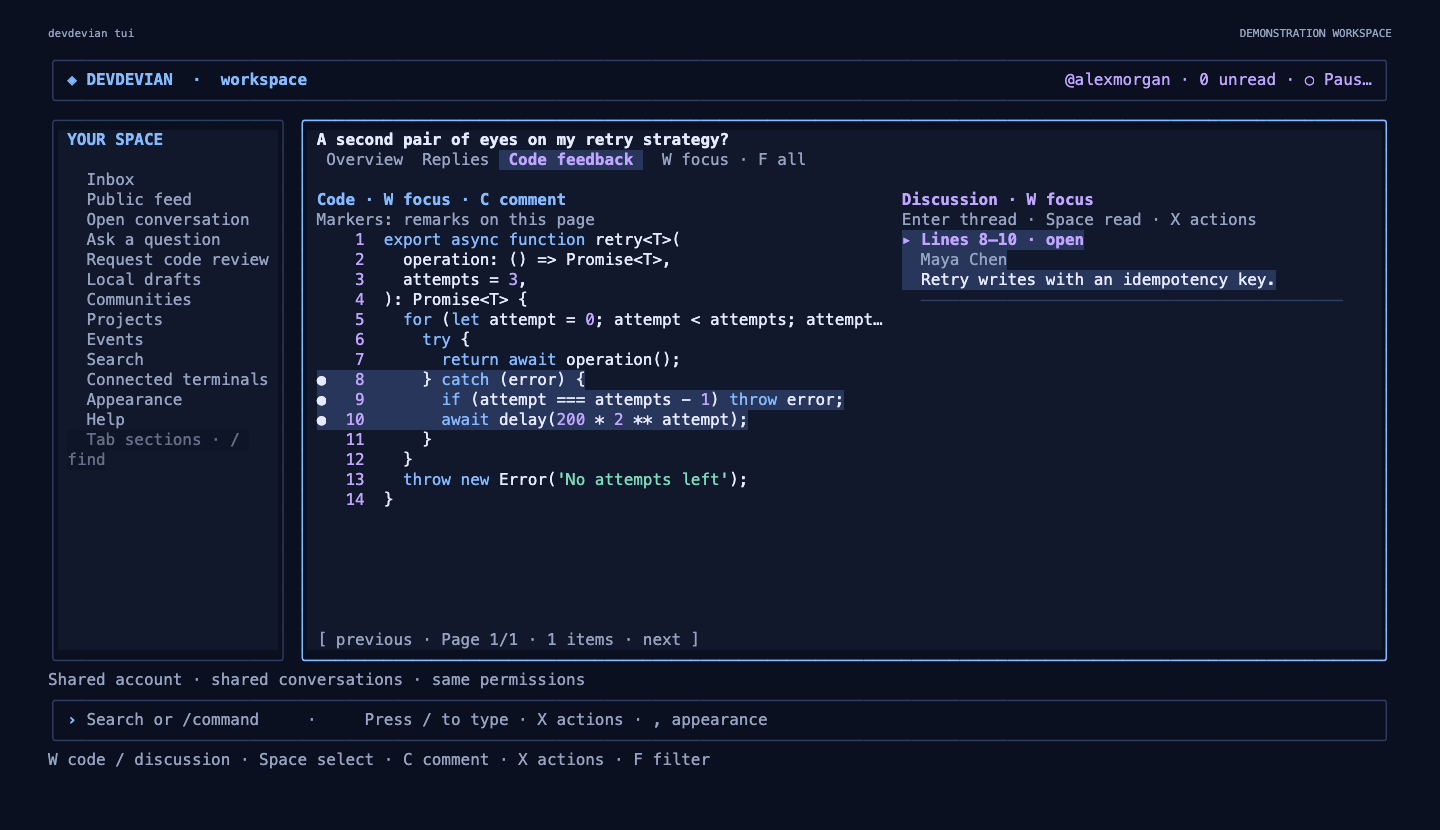
Projects and Events
Browse, search, filter and paginate projects/events without leaving the workspace. Create or edit your own publications, select project logos/screenshots and event banners through the file picker, add project teams and links, and open the linked project conversation.
Events show both viewer and organizer timezones. Join/leave with confirmation, export a new .ics file, and cancel/restore your own event. Meeting links follow the same server permissions as the browser.
Final polish in 0.6.1
- Large DEVDEVIAN wordmark and selective blue/violet accents in terminal
--help, with compact, plain-output andNO_COLORfallbacks. - A prominent CLI introduction on the landing page, actual terminal screenshots, copyable commands and links to the GitHub guide.
- An animated public-conversation counter with visible-only refreshes and bounded caching. Private-community and removed posts are excluded.
- Updated README, CLI guide and per-version history. Screenshot generation uses a disposable local database, never production data.
Compatibility and validation
The CLI has its own version; the web/API package remains 0.1.6. This release does not reset production data or require a database schema migration. Existing browser accounts, terminal credentials, drafts and appearance preferences remain compatible.
Validated with 110 automated tests, real pseudo-terminal regressions, installed-package checks and browser checks covering desktop/tablet/mobile layouts. Unknown publication outcomes are preserved for manual verification rather than automatically replayed.
This remains an alpha. There is no offline synchronization or automatic GitHub repository sync. Terminal image attachments are uploaded for browser viewing rather than rendered as inline graphics. Terminal credentials are stored in a restricted local file, not an OS keychain.
CLI guide · Every version and compatibility notes · npm · Try the forum · Report a bug
v0.1.3 — Reliability, recovery and Following
This release brings together the work from v0.1.1, v0.1.2 and v0.1.3, following the first public v0.1.0 release.
Open Devdevian · User guide · Changelog
Reliability and recovery
- Email-code password recovery with expiring, hashed codes, bounded attempts and revocation of previous sessions.
- Explicit database migrations outside hosted request startup, reusable API initialization and readable failures with request references.
- Active-screen loading, batched metadata reads, request deduplication and debounced search.
- Persistent authentication/email budgets, upload reservations and storage limits.
- Encrypted database/file backups with isolated restore verification, scheduled backup and health workflows, and sanitized server diagnostics.
Following, drafts and conversations
- Browser-local conversation drafts restore text, code, links, topic, technologies and audience after closing or reloading the form.
- Topic and conversation subscriptions with in-app notifications, independent from bookmarks.
- A personal Following feed with recent-activity ordering, search, topic/type filters and pagination.
- Searchable subscription management, including safe removal of unavailable private conversations.
- @Mention notifications in post and reply bodies, including newly added mentions in edits. Code and links do not send pings; duplicate alerts, self-mentions and inaccessible private content are excluded.
- Reply permalinks reveal the correct nested pages, focus and highlight the target, and respect reduced-motion preferences.
- Needs help keeps unresolved questions and code reviews visible even after they receive replies.
Interface polish
- Dates now show the year, hours, minutes and timezone, including publication, edit, notification and moderation timestamps.
- A compact forum footer links the running version, source repository, bug reporting and policies.
- Responsive checks cover phone, tablet and desktop layouts.
Validation and upgrade notes
- 68 tests passed against SQLite and the libSQL/S3 fixture configuration; Chromium acceptance checks cover real forms, subscriptions, mentions, nested pagination and responsive layouts.
- The isolated local workload completed 210 requests at concurrency 10 with no errors. This is a regression check, not a production capacity guarantee.
- No schema upgrade is needed from v0.1.2. Operators upgrading from v0.1.0 should back up their database and files, configure the required services and run the explicit migration. See deployment and backup/recovery.
- Drafts stay on the current browser and attachments must be added again when reopening. Notifications are in-app; mentions consider the first ten distinct handles in a body. Backup automation requires operator-provided secrets.
Full comparison: v0.1.0...v0.1.3
Devdevian v0.1.0 — First Public Release

Meet Devdevian
The first public release of Devdevian — an open-source forum for developers to ask questions, review code, share projects, and find their community.
🌐 Website · 💬 Open the forum · 📖 Documentation
What’s included
- Conversations: questions, discussions, code reviews, and Show & tell posts with topics, technologies, Markdown, code blocks, images, files, and labeled links.
- Replies and solutions: nested threads, accepted answers for questions and code reviews, votes, bookmarks, and pagination.
- Private communities: approved membership, owner-appointed validators, and conversations restricted to members.
- Projects: logos, screenshot carousels, team members, custom roles, and a dedicated feedback conversation.
- Events: timezone-aware scheduling, attendance, reminders, calendar downloads, and restricted meeting links.
- Profiles: permanent unique usernames, editable names, avatars, banners, biographies, and links.
- Authentication: Google, GitHub, and email/password registration with six-digit verification codes. Connecting another provider to an existing account preserves its profile and activity.
- Moderation: separate public-feed and community report queues with role-based permissions and action history.
- Interface: light and dark themes, global search, notifications, and responsive layouts.
Built in the open
The hosted application runs on Vercel with Turso/libSQL, Supabase Storage, and Brevo transactional email. The interface uses React and Vite, with a Node.js/Express backend.
The repository includes setup instructions, user and moderation guides, contribution guidelines, and a security reporting policy. The software is licensed under GPL-3.0-only.
Development was assisted by OpenAI Codex.
Early release
Devdevian is actively evolving. Bugs, rough edges, and changes are expected. This release has not received an independent security audit.
Search metadata and a sitemap are available for the public website. Individual forum publications still use hash routes and are not yet separately optimized for search indexing.
Help shape what comes next
Try the forum, share feedback, improve the documentation, or contribute a focused change.
A work in good company.