Repository navigation
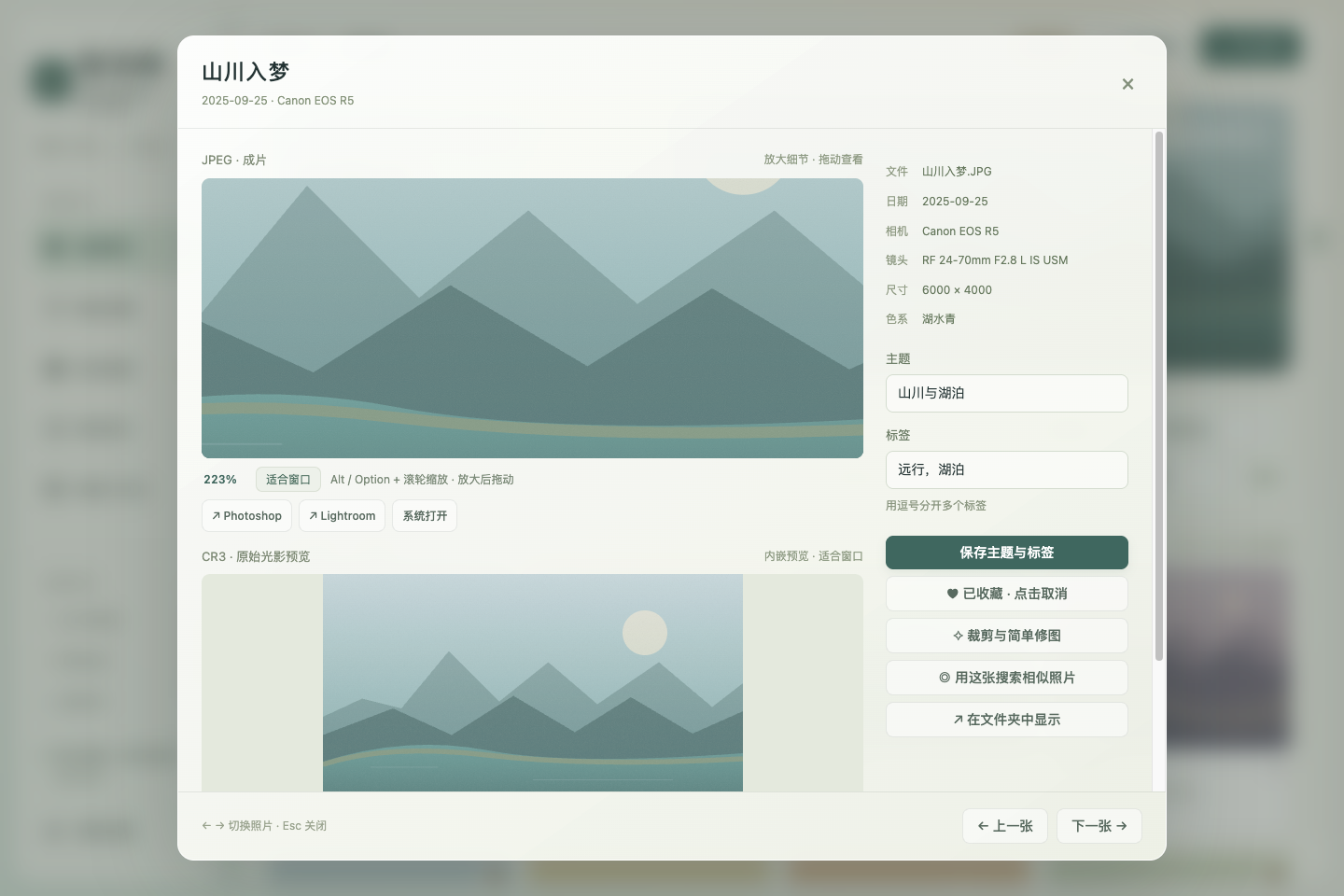
拾光屿 v1.0.6 · 放大细节

拾光屿 v1.0.6 / Shiguang Isle v1.0.6
专为拍摄 RAW 的单反与微单摄影用户量身定制的本地相册。
A local photo library built specifically for DSLR and mirrorless photographers who shoot RAW.
macOS 首次打开 / First launch: 当前 Mac 包使用 ad-hoc 签名,无 Developer ID 或 Apple 公证。核对同版 SHA-256,将 Shiguang Isle.app 拖入 Applications 并尝试打开一次;被阻止后到“系统设置 → 隐私与安全性 → 安全性”点“仍要打开”,再确认“打开”。
Mac packages are ad-hoc signed, without Developer ID or Apple notarization. Verify the same-version checksum, move Shiguang Isle.app into Applications and try opening it once; if blocked, use System Settings → Privacy & Security → Security → Open Anyway, then confirm Open.
完整中英文安装与提示排查 / Full bilingual installation and warning guide
简体中文
当前支持 JPEG 与 Canon CR3,RAW 支持目前限于 CR3。 CR3 使用相机内嵌预览,不提供 RAW 显影。
详情缩放与平移
详情默认保持比例、整张适配窗口。按住 Option(Mac)/ Alt 使用滚轮缩放,放大后拖拽平移,最多放大到适合窗口大小的 16 倍。点击“适合窗口”或双击图片恢复默认视图。100% 是相对于适合窗口大小,并非原图像素 1:1。
JPEG 与对应 CR3 继续上下配对显示,各自保留编辑器入口。CR3 放大的是内嵌预览,清晰度受预览分辨率限制;这些浏览操作不修改原片。
普通滚轮继续滚动详情;预览获得焦点时可按 + / − 缩放,按 0 复位。两个格式的预览独立缩放,切换照片或调整预览区域大小时恢复适配。
更新与已有资料
Mac 用户先退出旧版,再将新版 App 拖入 Applications 并替换,之后从 Applications 启动。相同系统用户及应用标识继续使用原有本地设置、标签与收藏,不需要重新复制照片。首次引导、按需预览缓存、选片与 SD 卡整理功能保留。
提供 Apple Silicon / Intel macOS 的 DMG 与 ZIP,以及 Linux x64 的 AppImage 与 deb;请使用同版 SHA256SUMS.txt 核验下载。
2026-10-12,源码缩放专项在 900 × 680 通过 667 项、1440 × 960 通过 661 项,共 1,328 项断言;原有详情适配回归在两种窗口各通过 233 项。本地最终 macOS arm64 包十六次启动通过 1,198 项断言,独立图库回归 24 项通过,共 1,222 项。真实文件复制与原片哈希、JPEG 导出、设置与引导状态持久化、可恢复 SD 日志均已核对;严格签名、DMG 完整性与包内脱敏检查通过。三平台 CI 的 macOS arm64、macOS x64 与 Linux x64 构建及包回归均成功,每个平台通过 1,222 项断言与实际磁盘结果核对。实际 Mac 更新后旧设置与相册资料保持一致,Applications 中的正式版本可唯一搜索并正常启动,生产详情放大与复位已核验。草稿装配成功,六个安装包及校验表全部上传且非空,六项 SHA-256 与 GitHub 资产摘要一致,校验表自身摘要也一致。
English
Currently supports JPEG and Canon CR3; RAW support is limited to CR3. CR3 browsing uses the camera's embedded preview, without RAW development.
Detail zoom and pan
Photo details initially fit the complete image to the window while preserving its aspect ratio. Hold Option (Mac) / Alt while scrolling to zoom, then drag the enlarged image to pan, up to 16 times the fitted size. Choose “适合窗口” (Fit to window) or double-click the image to reset. 100% is relative to the fitted view, not a 1:1 original-pixel scale.
JPEG and corresponding CR3 previews remain vertically stacked, each with editor handoff controls. CR3 zoom enlarges its embedded preview, so clarity depends on that preview's resolution. These viewing operations do not modify original photographs.
Ordinary scrolling still scrolls the detail view. With the preview focused, use + / − to zoom and 0 to reset. The two previews zoom independently; changing photographs or resizing the preview area restores the fitted view.
Updating and existing data
On Mac, quit the older version, drag the new app into Applications, choose Replace, and launch it from Applications. The same system account and application identifier continue using existing local settings, tags, and favorites without copying photographs again. The first-use guide, on-demand preview cache, selection tools, and SD organization remain available.
Packages include DMG and ZIP for Apple Silicon and Intel macOS, plus AppImage and deb for Linux x64. Verify downloads with the same-version SHA256SUMS.txt.
On 2026-10-12, the source zoom regression passed 667 assertions at 900 × 680 and 661 at 1440 × 960, totaling 1,328. The existing detail-fit regression passed 233 assertions at each size. The final local macOS arm64 package passed 1,198 assertions across sixteen launches and 24 independent gallery assertions, totaling 1,222. Actual file copies and original-file hashes, JPEG export, persisted settings and guide completion, and recoverable SD journals were verified. Strict signature verification, DMG integrity, and packaged privacy checks passed. Three-platform CI succeeded for macOS arm64, macOS x64, and Linux x64 builds and package regressions; each platform passed 1,222 assertions and actual disk-result checks. An actual Mac upgrade preserved existing settings and library metadata; the installed Applications copy appeared as a single searchable app and launched normally, with detail zoom and reset verified in production. Draft assembly succeeded. All six installers and the checksum file are uploaded and nonempty; all six SHA-256 entries match GitHub asset digests, and the checksum file's own digest also matches.
验收结果见 验证记录 / Validation records。
详情缩放 / Detail zoom — 合成演示,无私人照片 / Synthetic demo, no private photographs.