Repository navigation
Releases
时光杂货店 / Shutter Cove v1.4.0 · 光影调色室

Shutter Cove 1.4.0 · Light & Color Studio
English
Open a JPEG's details and choose Color & edit:
- Interactive Tone RGB, Red, Green and Blue curves, plus Temperature and Tint curves for separate shadow, midtone and highlight offsets. Click to add nodes; drag, type values or use arrow keys; delete nodes and reset individual channels.
- An interactive complementary color reference sits beside the curves.
- AI Skin Radiance analyzes skin-like colors entirely on your device. Adjustable strength, manual skin sampling and a mask preview support a restrained midtone lift and cast reduction while retaining texture. No AI model, account or upload is used; similar-colored backgrounds can also be selected.
- Before comparison, undo / redo, zoom and pan, and existing crop / rotation / mosaic tools share one editor. Full working-resolution export uses the same color analysis as the background preview and a lossless in-memory handoff. Closing an unsaved editor leaves no intermediate photo files.
- English and Chinese controls, readable font scaling, and resizable desktop layouts. JPEG replacement still requires confirmation; CR3 files are untouched.
Guide · Synthetic interface screenshot

Install the matching Apple Silicon / Intel DMG or ZIP, or Linux x64 AppImage / deb. Check downloads against the same release's SHA256SUMS.txt. Mac packages are ad-hoc signed and are not Apple-notarized; see the installation guide. Existing favorites, tags, settings and application identity are preserved. This editor adjusts rendered JPEGs, not RAW sensor data; very large sources are bounded to a safe working canvas and exported images do not retain source EXIF.
简体中文
打开 JPEG 的详情,点击 “调色与修图”:
- 新增明暗 RGB、红、绿、蓝曲线,以及色温、色调曲线;可分别调整暗部、中间调与亮部。点击加点、拖动、数值输入、方向键微调、删除节点和通道重置均可使用。
- 曲线旁加入可交互的互补色盘参考。
- AI 一键通透 使用本地色彩算法,自适应提亮肤色中间调、适度收敛偏色,保留纹理;可调整强度、取样肤色、查看调整范围。无需模型、账户或上传;相近颜色背景也可能被识别。
- 对比调色前、撤销 / 重做、放大与拖动查看细节,以及裁剪、旋转、马赛克整合在同一编辑器。后台预览与完整工作尺寸导出共用分析参数,无损内存传递避免中间 JPEG 重压。放弃编辑不会留下中间照片文件。
- 支持中英文、字体大小设置及可调整窗口;覆盖 JPEG 仍需确认,CR3 原片保留。
提供 Apple Silicon / Intel 的 DMG、ZIP,以及 Linux x64 的 AppImage、deb;请使用本版 SHA256SUMS.txt 核验。Mac 为 ad-hoc 签名,未经过 Apple 公证,首次打开请参考安装说明。升级保留收藏、标签、设置及既有应用标识。本编辑器处理 JPEG 成片,超大图使用安全画布上限,导出不保留原 EXIF。
Shutter Cove v1.3.8 · Smoked glass, quieter photographs
Shutter Cove v1.3.8 · Smoked glass, quieter photographs
A desktop JPEG / Canon CR3 photo organizer and creative studio for DSLR and mirrorless photographers, available for macOS and Linux.
- A refined two-tone workspace. A smoked sage, frosted sidebar anchors navigation; warm-white glass and restrained shadows keep the main gallery light. Photo cards use a neutral ivory surface, and both gallery and cover photographs retain their original colors.
- Clearer navigation and details. Consistent outline icons replace mixed symbols. The selected theme stays highlighted in the sidebar, including after import or restoring the default theme; resetting filters clears it. Softer menu, calendar and selection surfaces share the same material palette.
- Readable, adaptable controls. Dark-sidebar text is checked against both light and dark backdrops. Existing Chinese / English, font-size settings, compact windows, keyboard controls and reduced-motion behavior are retained. Reduced-transparency and unsupported-blur fallbacks use opaque surfaces. Blur stays on workspace surfaces rather than adding filters to every photo card.
Multi-directory indexing, automatic in-place updates, favorites, tags, creative posters and GIF / meme tools remain available. The update preserves local library records and settings. Download the matching Apple Silicon / Intel DMG or Linux x64 AppImage / deb from official Releases, and verify with this version's SHA256SUMS.txt. Mac installers are ad-hoc signed and not notarized; see the Mac installation guide.
中文
- 烟灰绿侧栏+暖白主区。 侧栏采用深色磨砂玻璃,主页面保持轻盈通透,阴影与边缘高光更克制。照片卡片改为接近中性的暖白底,缩略图与相册封面保持照片原色。
- 导航和信息层次更清楚。 统一线条图标,当前主题在侧栏高亮;导入完成、恢复默认主题和重置筛选时同步更新。日历、筛选菜单和多选浮栏采用一致的玻璃材质与配色。
- 兼顾可读性、窗口大小和浏览速度。 深色侧栏文字在明暗背景下检查对比度,保留中英文切换、字体设置、窄窗口、键盘操作及减少动态效果支持。减少透明度或浏览器不支持模糊时采用实色表面;照片卡片不增加额外模糊层。
多个目录统一索引、默认主题、自动原位更新、收藏标签、拼图海报与 GIF / 表情包功能继续保留。升级保留相册记录与设置。当前 App 支持英文与简体中文,日韩指南仍为文档翻译。
Shutter Cove v1.3.7 · Many folders, one library
Shutter Cove v1.3.7 · Many folders, one library
A desktop JPEG / Canon CR3 photo organizer and creative studio for DSLR and mirrorless photographers, available for macOS and Linux.
- A persistent library across directories. Add separate photo folders to the index without replacing earlier albums. Choose a default theme; All themes shows the complete registered library. Settings can add or remove indexed folders. Removal preserves originals, favorites and tags, and unavailable external folders remain registered for reconnection.
- Imports you can see. Preparation, capture-information reading, copying and indexing publish progress above the scrolling gallery. Completed imports immediately populate and open their theme. A source already inside its target theme is indexed in place; it is no longer rejected or copied again. Sources within an archive no longer deduplicate against themselves. Empty or entirely duplicate imports do not create phantom themes.
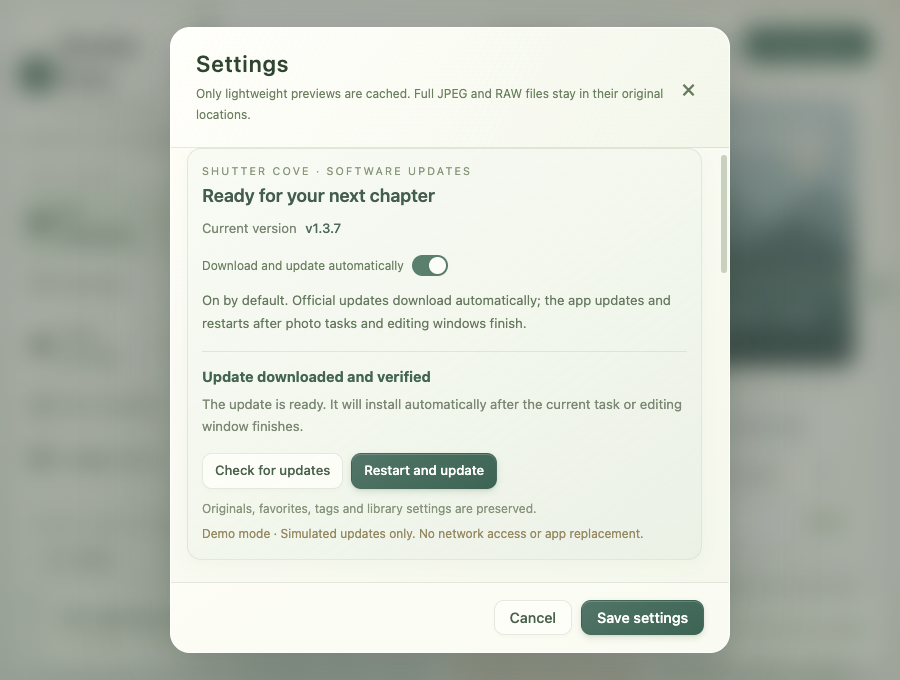
- Automatic updates, on by default. Turn them off in Settings. Supported writable Mac apps and AppImages download and verify stable releases, wait for photo work, editing/settings/detail dialogs and selection to finish, then show a 10-second idle countdown and update in place. New work delays the restart. Favorites, tags, settings and the existing application location are retained. Linux deb updates check and notify; installing still requires explicit system authorization. Manual Download only stays manual.
Download the matching Apple Silicon / Intel DMG or Linux x64 AppImage / deb from official Releases, and verify with this version's SHA256SUMS.txt. Mac installers are ad-hoc signed and not notarized; see the Mac installation guide. Compatibility package filenames retain Shiguang-Isle- and contain Shiguang Isle.app. Existing installations keep their identity and local data.
中文
- 多个目录,一份持久相册索引。 新增目录保留旧相册,主题负责当前展示,“全部主题”浏览完整索引。设置可添加、移除目录及选择默认主题;移除只影响索引,原片、收藏与标签保留。外置盘断开时保留目录,重新连接后刷新恢复。
- 修复导入后看不到照片和主题。 准备、拍摄信息、复制与索引阶段都有顶部进度,滚动后仍可看见。完成立即切到导入主题;来源已是同名目标主题时原位纳入,不再错误拒绝或重复复制。回忆目录内的来源不会再把自己当重复文件;空来源、全部重复时不创建空主题。
- 默认开启自动更新。 设置可关闭。可写位置的 Mac App 与 AppImage 自动下载并校验正式新版,等待照片任务、编辑/设置/详情窗口和多选结束,再显示 10 秒空闲倒计时并原位更新。有新操作就延期,保留收藏、标签、设置和原安装位置。Linux deb 仍需用户主动授权系统安装;手动“仅下载”不会自动重启。
当前应用支持英文与简体中文;日韩指南为文档翻译。中文界面名称仍为「时光杂货店」。
Shutter Cove · 时光杂货店 v1.3.6
Shutter Cove v1.3.6 · Color, motion, and 时光杂货店
A desktop photo organizer and creative studio for DSLR and mirrorless photographers shooting JPEG / Canon CR3, with paired RAW browsing, collage posters, GIFs, and memes.
- Custom collage colors. Choose background and text colors with a color picker or enter a 3 / 6-digit HEX value. Titles, subtitles, and imprints share your text color; the wooden board keeps its grain with your background tint. Switching templates or languages preserves your choices, and Restore template colors returns to the current template defaults. Share preview and save still use the same encoded JPEG bytes.
- A gallery with gentle motion. Newly visible photographs enter in a bounded, staggered spring cascade. Buttons compress to 0.96 with inset depth and settle after a subtle rebound. Photographs expand continuously from their cards into the detail viewer, with a matching return transition. These brief, in-memory effects respect the system's Reduce motion preference and release their decorative layers after use.
- A calmer glass interface. Warm ivory and sage surfaces, clearer visual hierarchy, refined spacing, and readable controls adapt to small windows and larger font settings. Filtering, sorting, and selection remain available in the sticky toolbar.
- A new Chinese name. The Chinese interface is now 时光杂货店, formerly 拾光屿. The English brand remains Shutter Cove. The Chinese wordmark stays on one line when space permits and breaks only as 时光 / 杂货店 in a narrow sidebar. Your library, favorites, tags, settings, and language choice continue to use the same application identity and data location.
The native desktop app remains available for macOS and Linux. Download the matching DMG for Apple Silicon or Intel, or an AppImage / deb for Linux x64, from official Releases. Verify downloads with the same-version SHA256SUMS.txt. Compatibility filenames retain Shiguang-Isle-, and Mac packages contain Shiguang Isle.app; these are the same app. Existing Mac installations and writable AppImages update in place from Settings. Mac packages use ad-hoc signing and are not notarized; see the Mac installation guide.
Fresh installations choose English or Chinese before the usage guide; existing profiles retain their choice. Japanese and Korean guides are documentation translations, while the current app supports English and Simplified Chinese.
中文
- 拼图背景、文字自由配色。 支持取色器与 3 / 6 位 HEX 输入,标题、副标题和页脚统一文字颜色,木质展示板保留木纹并随背景染色。切换模板、界面语言时保留自定义颜色,也可一键恢复当前模板默认色。分享预览与保存仍为同一份 JPEG 成品字节。
- 让相册有轻微呼吸感。 新出现的照片交错弹性上滑入场,按钮按下缩至 0.96、增加内阴影,释放轻微回弹。照片卡片与大图详情连续缩放转场,关闭时回到原卡片。动画遵循系统“减少动态效果”,不会生成中间文件或挡住缩放、拖动、导航操作。
- 更清楚的毛玻璃层次。 暖白与鼠尾草绿统一界面、改善留白和控件对比度,适配紧凑窗口与大字号。筛选、多选、排序仍固定在顶部。
- 中文名更新为「时光杂货店」。 原名「拾光屿」,英文品牌继续为 Shutter Cove。字标在空间足够时完整显示,需要换行时固定为「时光 / 杂货店」,兼顾窄窗口与大字号。应用标识和数据位置保留,收藏、标签、照片索引、设置与语言选择延续使用。
本次仍为 macOS / Linux 桌面 App。安装包兼容名称仍为 Shiguang-Isle-,Mac 包内为 Shiguang Isle.app,均是同一应用。可从设置原位更新;下载后请核对同版本校验表。首次 Mac 安装可能需要按 Mac 安装说明 允许打开。当前界面支持中英两种语言,首次安装先选择语言,已有中文用户继续使用中文。
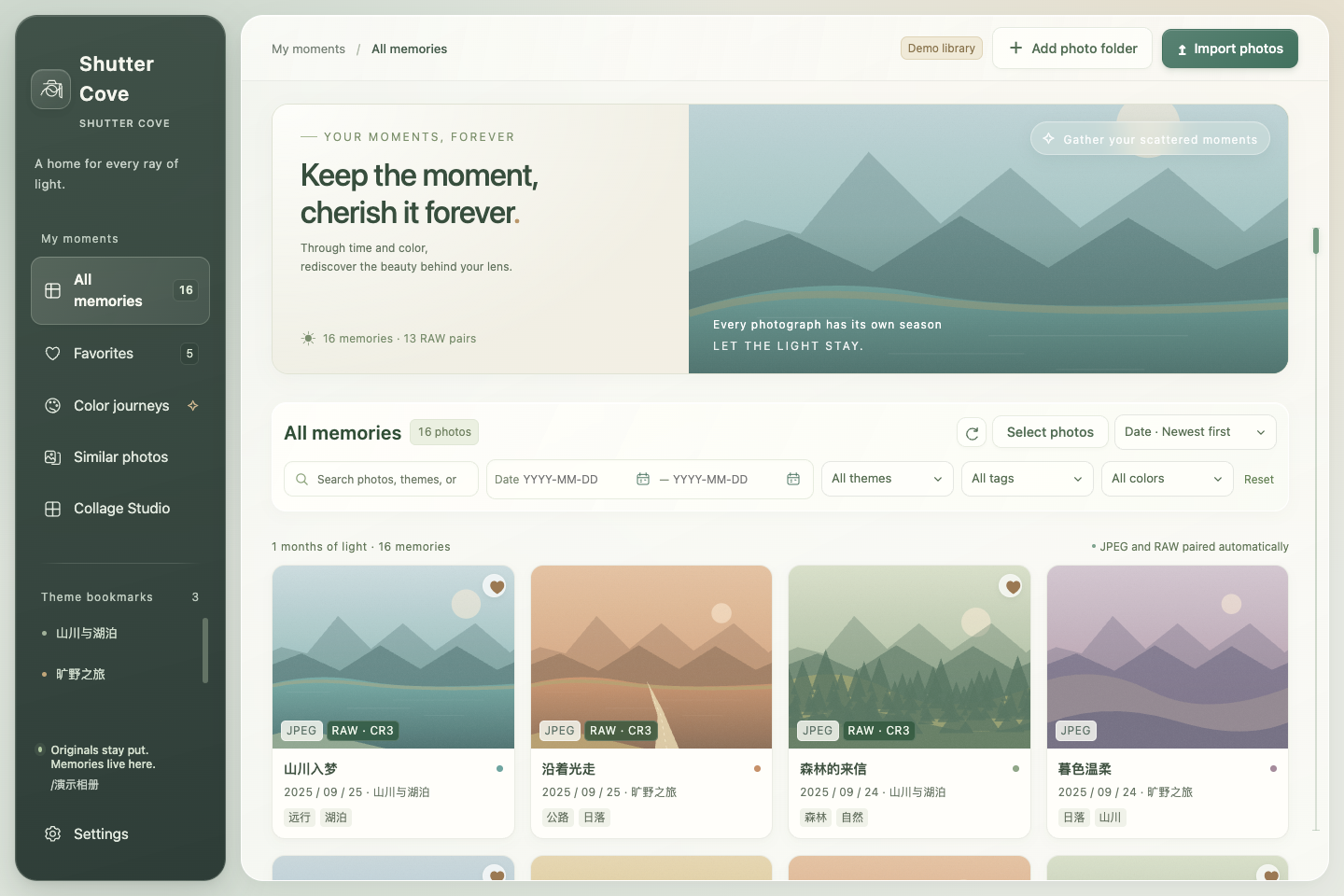
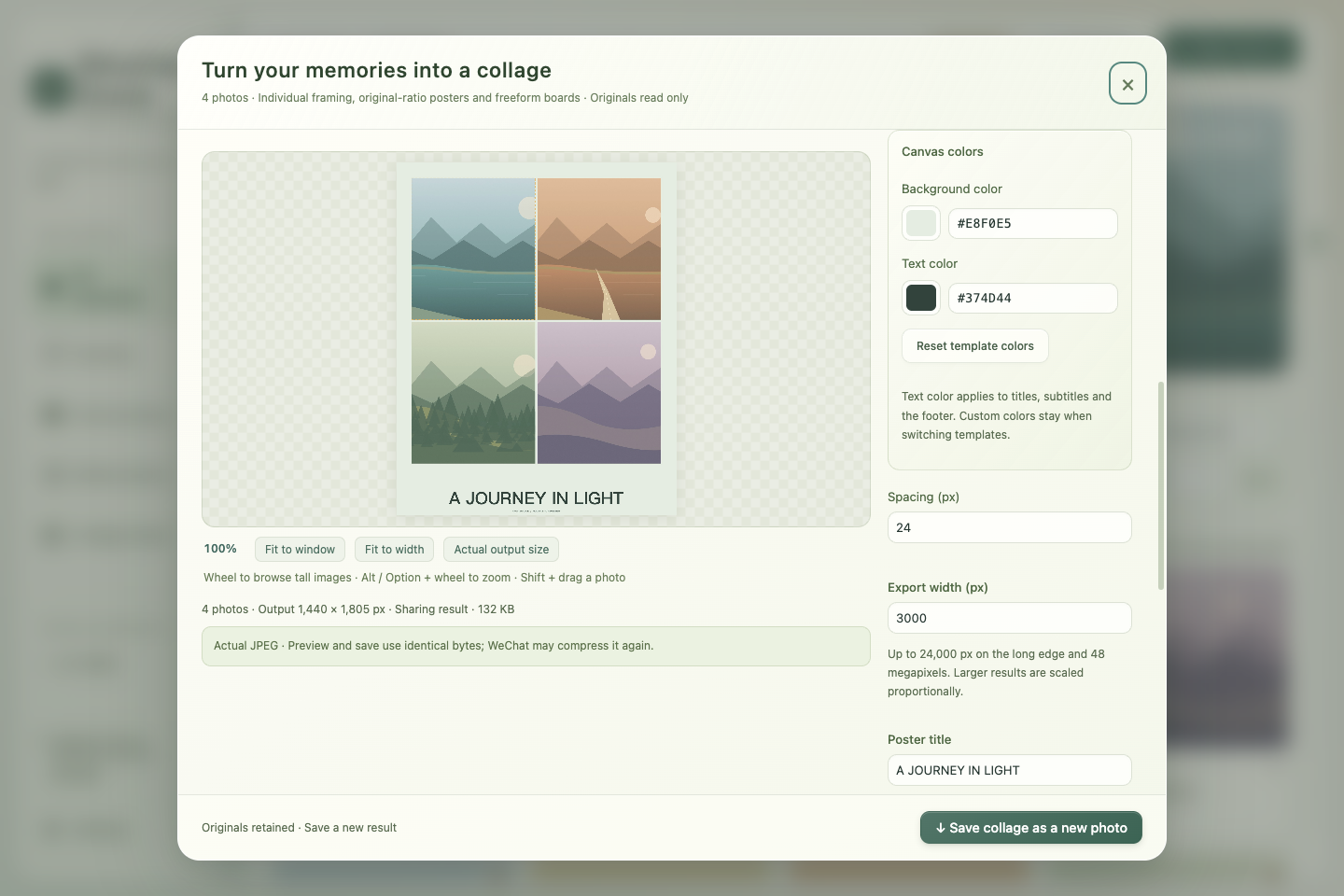
All screenshots use generated scenery and synthetic metadata, with no private photographs or real portraits. 所有截图均为合成风景与示例资料,不含私人原片或真人肖像。
Shutter Cove · 拾光屿 v1.2.1
Shutter Cove v1.2.1 · Repository migration and full-height collage exports
A desktop photo organizer and creative studio for photographers shooting JPEG / Canon CR3, with paired RAW browsing, collage posters, GIFs, and memes.
- A clearer public name. The official GitHub repository is now Undefeated-man/ShutterCove, with no hyphen in the repository name. The English brand is Shutter Cove; the Chinese name remains 拾光屿.
- Updates use the new address. Version 1.2.1 checks for stable releases and downloads verified installation packages from
Undefeated-man/ShutterCove. Documentation, screenshots, and release links also use the new repository address. - Tall collages keep their full height. Share compression now controls the final image width: 1,440 px by default, 2,560 px for a larger preset, or 480–8,000 px custom. The complete layout scales proportionally without stretching, instead of forcing a long collage's height into the width budget. Output does not enlarge beyond the base export; 24,000-pixel side and 48-megapixel safety limits still apply, with actual dimensions shown when they reduce the requested width.
- One final JPEG encoding. Originals are drawn directly to the final-sized canvas with high-quality smoothing, avoiding an additional per-photo resize. JPEG quality defaults to 90%. Preview and save still use the same encoded JPEG bytes; originals remain untouched. This controls this app's output and does not guarantee how WeChat will process it afterward. See the creative-studio guide.
- Browse the long result at a useful size. Share previews start in Fit to width; ordinary scrolling moves through the full-height image. Fit to window still provides an overview, and Alt / Option + scroll still zooms into details. These view controls do not change the exported dimensions.
- Continue with your existing library. The application identifier, existing installation path, and local data location remain the same. Favorites, tags, settings, and the photo index carry over. Original photographs stay in their selected folders.
- Recognizable installation packages. Filenames still begin with
Shiguang-Isle-, and the Mac package still containsShiguang Isle.app. These compatibility names identify the same Shutter Cove / 拾光屿 application.
Download mac-arm64.dmg for Apple Silicon, mac-x64.dmg for Intel, or the Linux x64 AppImage / deb from the official Releases. Mac ZIP packages support the in-place updater. Verify the same release's SHA256SUMS.txt. If an older app cannot check for updates after the repository move, install v1.2.1 at its existing location using the update guide.
Mac packages remain ad-hoc signed without Apple notarization; see the Mac installation guide for first-launch approval. The app continues to support English and Simplified Chinese, with language selection before the first-use guide and immediate switching in Settings.
拾光屿 v1.2.1 · 仓库迁移与长图完整导出
为拍摄 JPEG / Canon CR3 的摄影用户设计的桌面相册与创作工具,支持 RAW 配对浏览、拼图海报、GIF 和表情包。
- 公开名称更清楚。 官方 GitHub 仓库改为 Undefeated-man/ShutterCove,仓库名不含连字符。英文品牌为 Shutter Cove,中文名继续保留拾光屿。
- 更新地址同步迁移。 v1.2.1 从
Undefeated-man/ShutterCove检查正式新版、下载并校验安装包;说明文档、截图与发布链接也使用新地址。 - 长图保留完整高度。 分享压缩改按最终成图宽度控制,默认 1,440 px、清晰档 2,560 px、自定义 480–8,000 px。整幅排版等比缩放、不拉伸形变,不再把纵向长图的高度压到宽度预算内。不会放大超过基础导出尺寸;仍遵守每边 24,000 px、4,800 万像素的安全限制,受限时展示实际尺寸。
- 一次最终 JPEG 编码。 原片直接绘制到最终尺寸画布,启用高质量平滑,减少逐张预缩小的额外采样,JPEG 默认品质为 90%;预览和保存仍使用同一份编码字节,原片保留。这控制的是本应用的成品,不能保证微信后续处理方式,详见 光影创作台说明。
- 长图按宽度清楚浏览。 分享预览默认“适合宽度”,普通滚轮上下浏览完整长图;“适合窗口”仍可总览,Alt / Option + 滚轮继续放大细节。这些显示操作不改变导出尺寸。
- 继续使用原有相册。 应用标识、现有安装路径和本地资料位置保留,收藏、标签、设置与照片索引继续使用。原照片仍放在你选择的目录。
- 保留兼容包名。 安装文件名前缀仍为
Shiguang-Isle-,Mac 包内仍为Shiguang Isle.app,对应的是同一个 Shutter Cove / 拾光屿应用。
Apple Silicon 下载 mac-arm64.dmg,Intel 下载 mac-x64.dmg,Linux x64 下载 AppImage 或 deb。请从 官方 Releases 下载并核对同版 SHA256SUMS.txt;Mac ZIP 支持原位更新。旧版若在迁移后无法检查更新,可按 更新说明 在原位置安装 v1.2.1。
Mac 包仍使用 ad-hoc 签名,未经过 Apple 公证;首次打开时的系统允许流程见 Mac 安装说明。应用继续支持简体中文与英文,首次打开先选语言,在设置中可以即时切换。
拾光屿 v1.2.0 · English & 中文
Shiguang Isle v1.2.0 · English and Chinese
A desktop photo library for DSLR and mirrorless photographers shooting JPEG / Canon CR3, with collage posters and GIF / meme creation.
- Choose your language first. New installations start in English and show an English / Chinese choice before the usage guide. Existing Chinese profiles retain Chinese after upgrading.
- Switch instantly. Settings → Interface language changes the entire app between English and Simplified Chinese and remembers the choice after restarting. The gallery, calendar, photo details, collage and GIF studios, update controls, and native file dialogs are localized.
- Keep your work. Switching preserves favorites, tags, the photo index, open editing sessions, poster composition, photo order, zoom, and unsaved titles or captions. It never translates your filenames, themes, tags, or photographs.
- Read in four languages. The default README is English, with an English / Chinese introduction and English, Chinese, Japanese, and Korean guides. Japanese and Korean are documentation translations; the app currently supports English and Simplified Chinese. More interface languages may be added according to demand.
- Discover the creative tools. The introduction highlights per-photo collage adjustments, original-ratio magazine posters, freely movable wooden-board photographs, and GIF / meme creation with filmstrip ordering and speech bubbles.
Download mac-arm64.dmg for Apple Silicon, mac-x64.dmg for Intel, or the Linux x64 AppImage / deb. Mac ZIP packages support the app's in-place updater. Verify the same release's SHA256SUMS.txt. macOS builds use ad-hoc signatures and are not Apple-notarized; see the Mac installation guide if Gatekeeper blocks first launch.
Updates retain local favorites, tags, and settings and replace the existing installation in place. Original photos remain in their selected folders. Screenshots contain synthetic artwork only.
拾光屿 v1.2.0 · 中英界面
为拍摄 JPEG / Canon CR3 的单反与微单摄影用户设计的桌面相册,支持拼图海报、GIF 和表情包创作。
- 首次打开先选语言。 全新安装默认英文,先选择 English / 中文,再进入使用引导;已有中文资料升级后保留中文。
- 一键切换并记住选择。 在“设置 → 界面语言”即时切换简体中文与英文;覆盖相册、日历、详情、拼图、GIF、更新面板及原生文件对话框。
- 保留你的创作。 切换时保留收藏、标签、索引、未保存的构图、照片顺序、缩放、标题和字幕,不改变文件名、主题、标签与原片。
- 四种语言说明。 默认 README 为英文主体,安装前介绍为中英双语,顶部 Language 提供中、日、韩、英说明入口。日韩页面说明当前 App 仅支持中英界面,后续按需求增加语言。
- 创作亮点更清楚。 介绍补充单张拼图构图、原比例杂志海报、自由移动与叠放照片的木质展示板,以及胶片排序、文字气泡与 GIF / 表情包。
Apple Silicon 下载 mac-arm64.dmg,Intel 下载 mac-x64.dmg;Linux x64 下载 AppImage 或 deb。Mac ZIP 可用于应用内更新。请核对同版本的 SHA256SUMS.txt。macOS 包为 ad-hoc 签名、未经过 Apple 公证,首次打开可能需要按 Mac 安装说明 允许打开。
更新保留收藏、标签与设置,并在原安装位置替换。原照片留在所选目录。所有公开截图使用合成画面。
拾光屿 v1.1.0 · 自由构图与光影动图
拾光屿 v1.1.0 / Shiguang Isle v1.1.0
专为拍摄 RAW 的单反与微单摄影用户量身定制的本地桌面相册。 JPEG 与 Canon CR3 配对浏览,原片留在原目录,收藏、标签及设置沿用本机资料。
A local desktop library tailored to DSLR and mirrorless photographers who shoot RAW. Browse matching JPEG and Canon CR3 together while originals stay in their folders and favorites, tags, and settings keep using local data.
简体中文
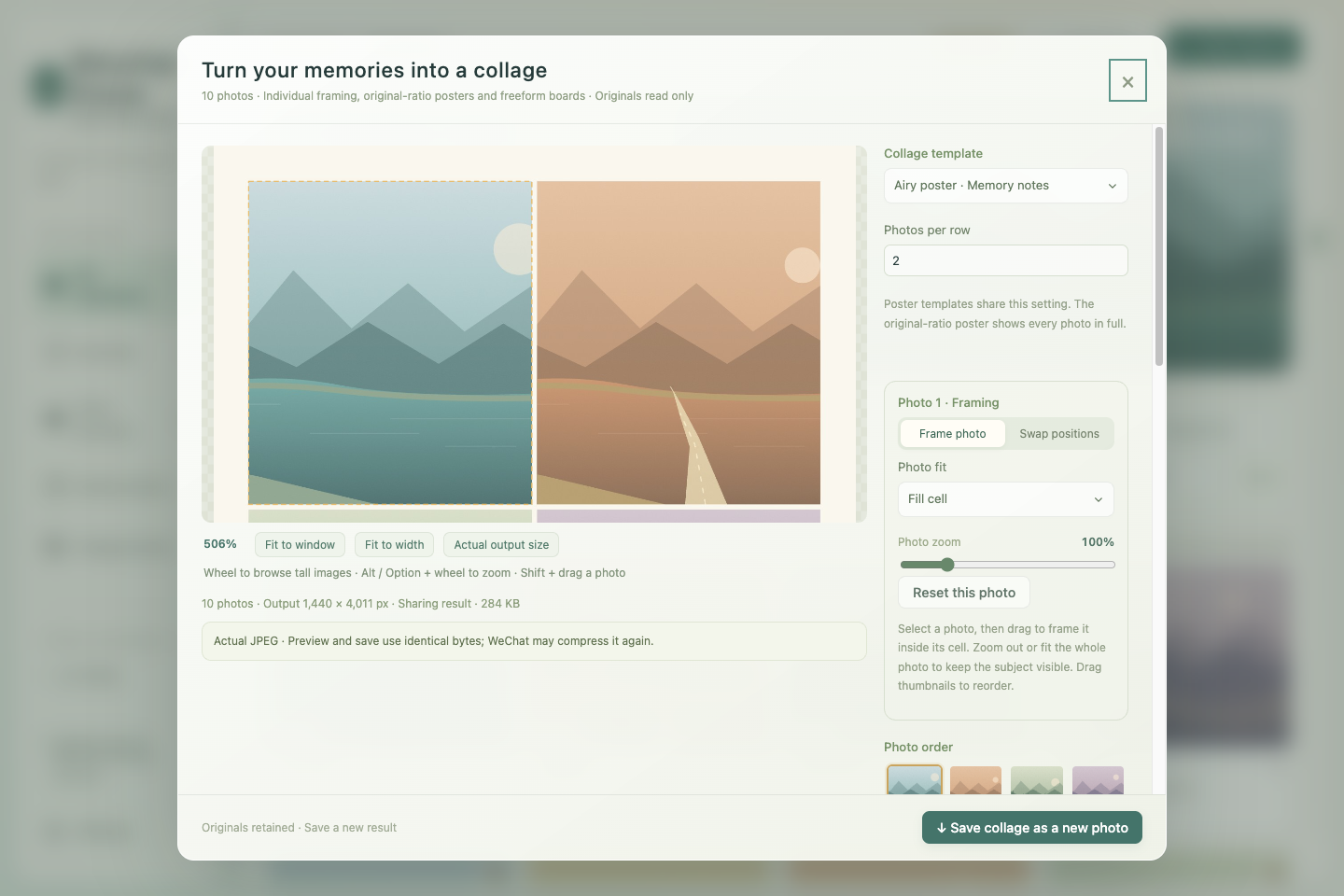
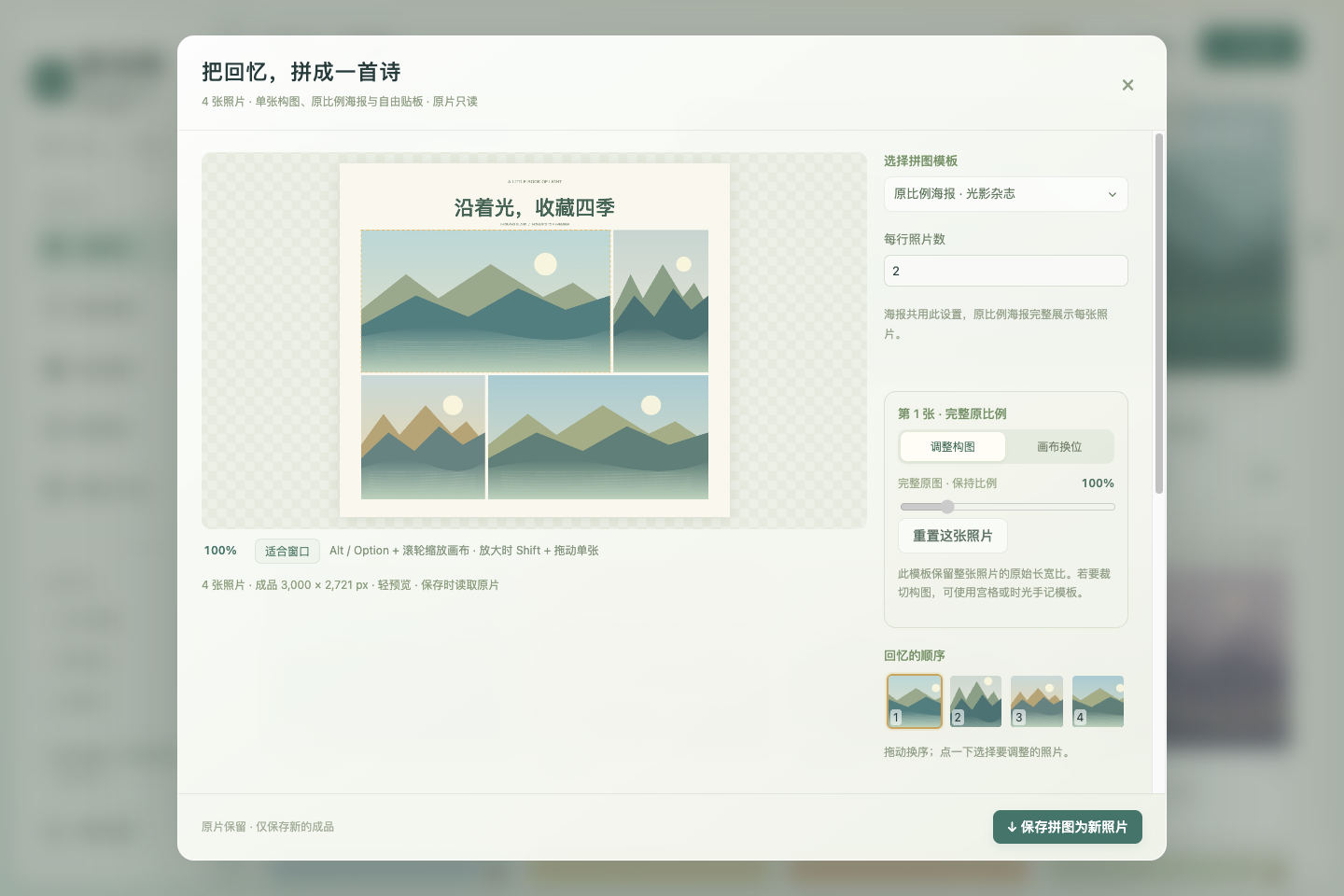
- 逐张调整构图:点选拼图里的照片,单独放大、缩小、拖动格内位置;可以选择填满或完整放入格子,保住主体。Option / Alt + 滚轮继续缩放整张画布,放大时 Shift + 拖动调整单张。
- 原比例海报:“光影杂志”保留横图、竖图与方图各自的长宽比,支持标题及字号。
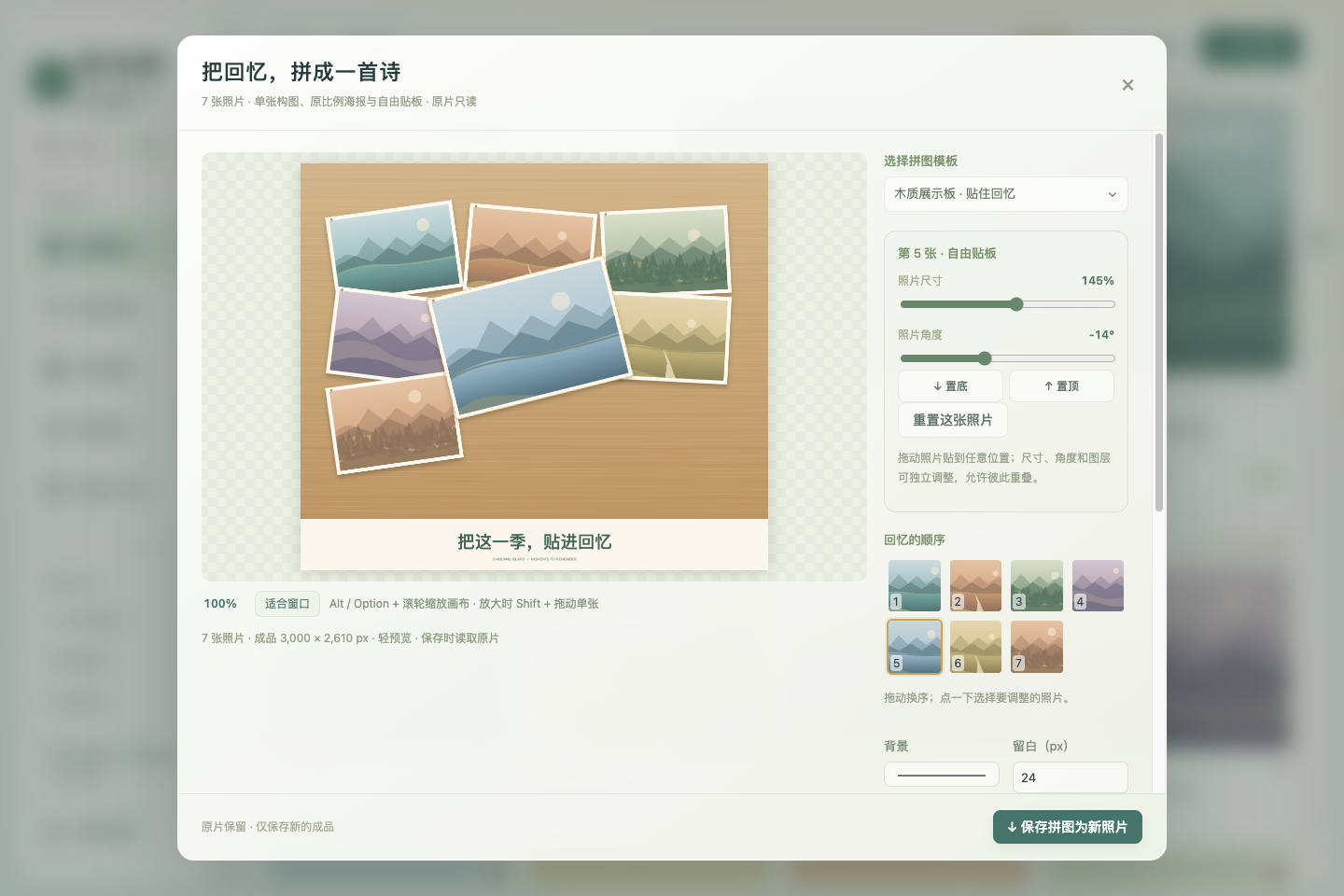
- 木质展示板:把完整照片直接贴在木板上,可拖动位置、调大小和角度,置顶或置底,允许重叠遮挡。导出保持摆放结果。
- 主动分享压缩:逐张从原片预缩采样,最终 JPEG 编码一次;界面显示实际编码成品,保存同一份字节。参考档为长边 1440 / JPEG 品质 80,也可选择清晰档或自定义尺寸、品质。显示像素和文件大小,可看成品 100%。修改布局后重新生成。
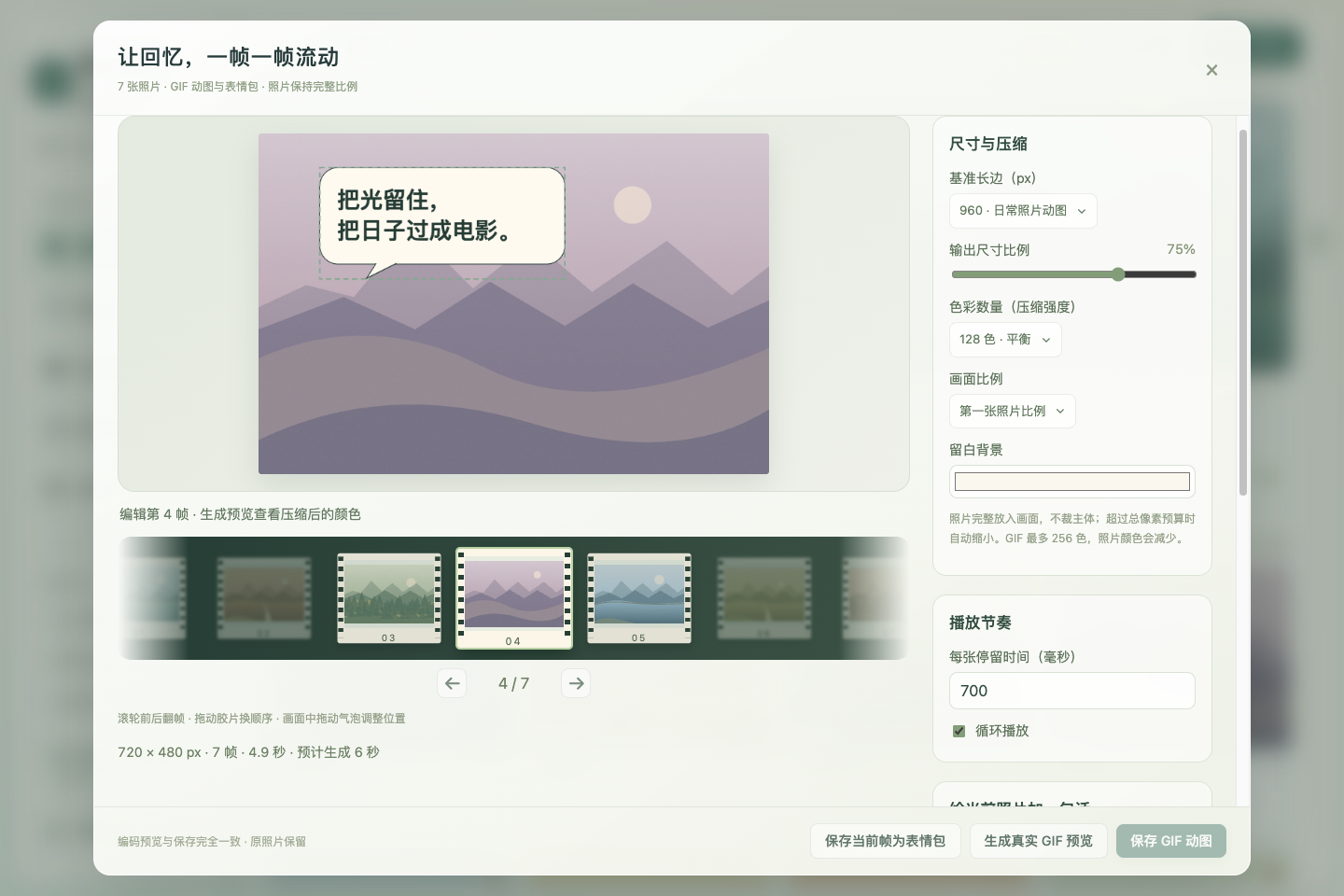
- GIF 与表情包:多选后打开“GIF / 表情包”;电影胶片支持滚轮翻帧、拖动换序,远处逐渐虚化。设置尺寸比例、色彩数量、时长和循环,每帧独立添加可拖动的对话气泡、想法气泡与文字。先预览真正编码的 GIF,再保存同一成品;一张照片也可制作静态 PNG 表情包。
- 详情全屏:点击全屏或按 F,保留缩放、拖动及左右切图;Esc 先退出全屏,再按关闭详情。关闭后恢复原窗口状态。
分享预览指本应用导出的文件,不能保证微信再次处理后的结果完全一致。 一组匿名实测长图从 3000 × 8364 变为 516 × 1440,1440 / 品质 80 是样本参考,不能代表所有微信版本与发送方式。预先压缩无法恢复已失去的细节,也无法保证免于二次压缩。完整使用与边界说明
处理在内存中完成,不把照片重新导入一份。GIF 最多 80 帧、最长边 1600 px、合计 2400 万像素,输出上限 24 MB;超预算可缩小尺寸或减少帧数,生成支持进度和取消。拼图最多 4800 万像素、长边 24000 px,超出时同比例缩小。CR3 使用相机内嵌预览,不提供 RAW 显影。
已安装 v1.0.8 可通过 相册设置 → 软件更新 → 一键更新并重启 升级;收藏、标签和设置继续保留。提供 Mac Apple Silicon / Intel 的 DMG、ZIP,Linux x64 的 AppImage、deb。核对同版 SHA256SUMS.txt。Mac 包为 ad-hoc 签名,无 Apple 公证;首次打开的系统安全提示见中英文安装指南。
English
- Individual composition: Select a photograph in a collage to zoom in or out and drag it within its cell. Choose fill or contain to keep subjects visible. Option / Alt + scroll zooms the entire canvas; Shift-drag adjusts an individual photograph while zoomed in.
- Original-ratio magazine: Landscape, portrait, and square photographs retain their own aspect ratios, with an editable title and font size.
- Wooden display board: Position full photographs directly on the board, resize and rotate them, change their stacking order, and allow overlaps. Export retains the arranged positions.
- Controlled share compression: Resample originals individually, then encode the final JPEG once. Preview the actual encoded result and save exactly the same bytes. Choose the 1440-pixel / quality-80 reference, a clearer preset, or custom dimensions and quality. Inspect pixel dimensions, size, and the result at 100%. Editing regenerates the result.
- GIF and memes: Open GIF / meme creation from a multiple selection. Scroll the filmstrip, drag to reorder, and see distant frames fade. Configure output scale, palette size, timing, and looping. Add movable speech bubbles, thought bubbles, or text per frame. Preview a real encoded GIF and save the same result; a single photograph can also become a static PNG meme.
- Fullscreen details: Choose Fullscreen or press F, with zoom, panning, and adjacent-photo navigation retained. Escape exits fullscreen first, then closes details. Closing restores the prior window state.
The share preview represents this app's exported file, not a guaranteed result after WeChat processes it again. One anonymous observed long-image pair changed from 3000 × 8364 to 516 × 1440. The 1440 / quality-80 preset is a sample-based reference, not a rule for every WeChat version or sending method. Precompression cannot restore lost detail or guarantee avoidance of another compression pass. Usage and limits
Processing stays in memory without importing duplicate originals. GIF limits are 80 frames, a 1600-pixel longest edge, 24 million total pixels, and a 24 MB encoded result, with progress and cancellation. Collages are limited to 48 million pixels and a 24000-pixel longest edge, shrinking proportionally when needed. Canon CR3 uses embedded previews without RAW development.
Installed v1.0.8 users can upgrade through Settings → Software update → Update and restart, retaining favorites, tags, and settings. Packages include DMG / ZIP for Apple Silicon and Intel Mac, and AppImage / deb for Linux x64. Verify the release's SHA256SUMS.txt. Mac packages are ad-hoc signed without Apple notarization; see the bilingual first-launch guide.
所有下列界面仅使用合成画面,无私人照片。All screenshots below use synthetic artwork without private photographs.
拾光屿 v1.0.8 · 更新与拼图
拾光屿 v1.0.8 / Shiguang Isle v1.0.8
专为拍摄 RAW 的单反与微单摄影用户量身定制的本地相册。 JPEG 与对应 Canon CR3 一起浏览,选片、收藏、标签和修图交接围绕你的原片目录展开。
A local photo library built specifically for DSLR and mirrorless photographers who shoot RAW. Browse JPEG and matching Canon CR3 together, with selection, favorites, tags, and editor handoff around your original photo folders.
macOS 首次打开 / First launch: 当前 Mac 包使用 ad-hoc 签名,无 Developer ID 或 Apple 公证。核对同版 SHA-256,将 Shiguang Isle.app 拖入 Applications 并尝试打开一次;被阻止后到“系统设置 → 隐私与安全性 → 安全性”点“仍要打开”,再确认“打开”。
Mac packages are ad-hoc signed, without Developer ID or Apple notarization. Verify the same-version checksum, move Shiguang Isle.app into Applications and try opening it once; if blocked, use System Settings → Privacy & Security → Security → Open Anyway, then confirm Open.
简体中文
新版提醒与一键更新
相册设置 → 软件更新 可查看当前版本、手动检查、下载及安装。默认自动检查正式新版,发现新版会显示提醒,继续浏览或修图时不会被强制打断。Mac / AppImage 的“一键更新并重启”会下载匹配系统与架构的包,核对 SHA-256 校验表和 GitHub 文件摘要,再安装重启;也可仅下载,稍后安装。
Mac 上正式安装在 Applications 内的 App,以及可写位置的 Linux AppImage,更新替换当前安装原路径,保留原名称。收藏、标签、主题和设置继续使用原有资料;安装前只备份设置与相册元数据,不复制原片或预览缓存。临时应用放在隐藏的更新工作目录,成功后清理,不留下另一个可搜索的应用副本。失败会报告原因,替换失败时尝试恢复旧版。
Linux deb 使用“下载并打开安装器”,由系统完成认证和升级,完成后手动重新打开应用;安装与恢复由系统包管理器负责。Mac 在 DMG 或构建目录运行时需要先安装到可写的 Applications,只读 AppImage 需要移至可写位置。更新检查不会上传照片或相册资料。更新方式与边界
从 v1.0.6 或更早公开版本升级,需要先手动安装本版一次;此后可使用应用内更新。 保存当前设置及编辑作品后再安装;下载期间关闭设置,可留待稍后重启。
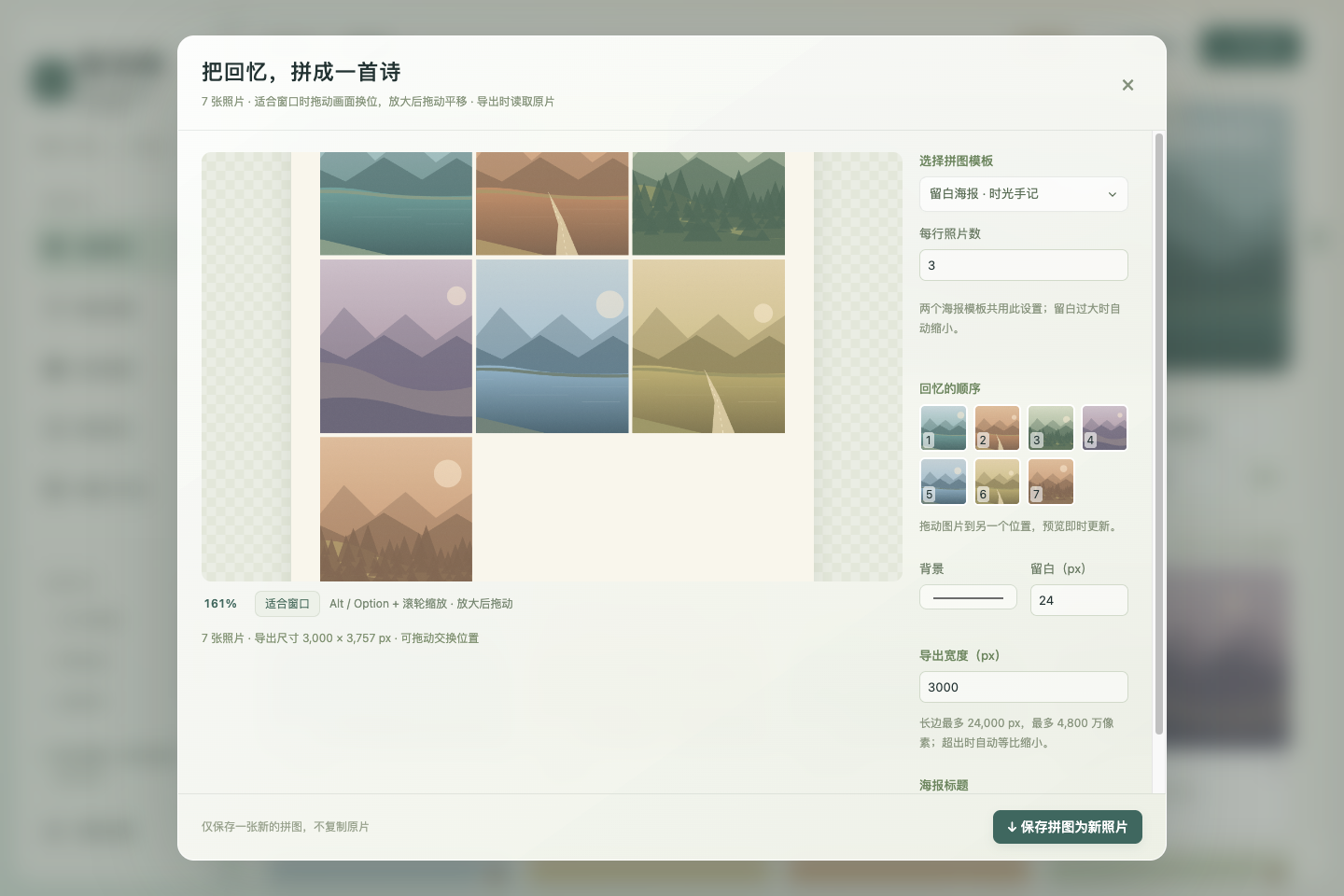
拼图放大与海报每行张数
拼图预览支持 Option(Mac)/ Alt + 滚轮 缩放,放大后拖动平移;点击“适合窗口”或双击恢复。100% 表示适合窗口大小,最高可放大到其 16 倍。缩放只影响浏览,导出的照片保持设定尺寸。右侧缩略图在放大时仍可拖动换序。
两个海报模板均可设置 每行照片数,默认 2 张,可选 1–12 张,剩余照片自动排入后续行。所有选中照片参与排版与实际 JPEG 导出。详情照片原有的 Option / Alt 缩放也保留。
当前 RAW 支持限于 Canon CR3,使用相机内嵌预览,不执行 RAW 显影。 提供 Apple Silicon / Intel Mac 的 DMG 与 ZIP,以及 Linux x64 的 AppImage 与 deb。请使用本版 SHA256SUMS.txt 核验下载。
English
Release reminders and in-app updates
Settings → Software update shows the current version and offers manual checks, downloading, and installation. Stable-release checks are enabled by default. A newer release produces a reminder without forcing you out of browsing or editing. For Mac / AppImage, the update-and-restart action downloads the package matching your platform and architecture, checks the SHA-256 manifest and GitHub asset digest, then installs and restarts. A download-only action lets you install later.
For a Mac app installed in Applications or an AppImage in a writable Linux location, updates replace the existing installation at its original path and retain its name. Favorites, tags, themes, and settings keep using existing application data. Only settings and library metadata are backed up before installation; originals and preview caches are not duplicated. Temporary apps use hidden update work directories that are cleaned after success, without leaving another searchable application. Failures report their cause, and failed replacement attempts restore the older version where possible.
For Linux deb, the app downloads and opens the system package installer for authentication and upgrading; reopen the app manually afterward. The system package manager handles installation and recovery. Mac apps running from a disk image or build folder must first be installed in a writable Applications location; read-only AppImages need to move to a writable location. Update checks do not upload photographs or library data. Update behavior and platform limits
Upgrading from v1.0.6 or earlier public releases requires one manual installation of this release; subsequent updates can use the in-app controls. Save settings and editing work before installation. Closing Settings during a download lets you restart later.
Collage zoom and poster columns
Hold Option (Mac) / Alt + scroll over the collage preview to zoom, then drag to pan. Choose “适合窗口” (Fit to window) or double-click to reset. 100% is the fitted view, with a maximum of 16 times that size. Zoom affects browsing only; exports retain the configured dimensions. Thumbnail reordering remains available while zoomed in.
Both poster templates now offer photos per row, defaulting to 2, with a range of 1–12. Remaining photos flow into subsequent rows, and all selected photos participate in the layout and actual JPEG export. Existing Option / Alt zoom in photo details remains available.
RAW support currently covers Canon CR3 only, using its embedded preview without RAW development. Packages include DMG and ZIP for Apple Silicon and Intel Mac, plus AppImage and deb for Linux x64. Verify downloads with this release's SHA256SUMS.txt.
验证记录 / Validation records: docs/validation.md
以下界面均为合成演示,无私人照片 / Synthetic demos below contain no private photographs.
拾光屿 v1.0.6 · 放大细节
拾光屿 v1.0.6 / Shiguang Isle v1.0.6
专为拍摄 RAW 的单反与微单摄影用户量身定制的本地相册。
A local photo library built specifically for DSLR and mirrorless photographers who shoot RAW.
macOS 首次打开 / First launch: 当前 Mac 包使用 ad-hoc 签名,无 Developer ID 或 Apple 公证。核对同版 SHA-256,将 Shiguang Isle.app 拖入 Applications 并尝试打开一次;被阻止后到“系统设置 → 隐私与安全性 → 安全性”点“仍要打开”,再确认“打开”。
Mac packages are ad-hoc signed, without Developer ID or Apple notarization. Verify the same-version checksum, move Shiguang Isle.app into Applications and try opening it once; if blocked, use System Settings → Privacy & Security → Security → Open Anyway, then confirm Open.
完整中英文安装与提示排查 / Full bilingual installation and warning guide
简体中文
当前支持 JPEG 与 Canon CR3,RAW 支持目前限于 CR3。 CR3 使用相机内嵌预览,不提供 RAW 显影。
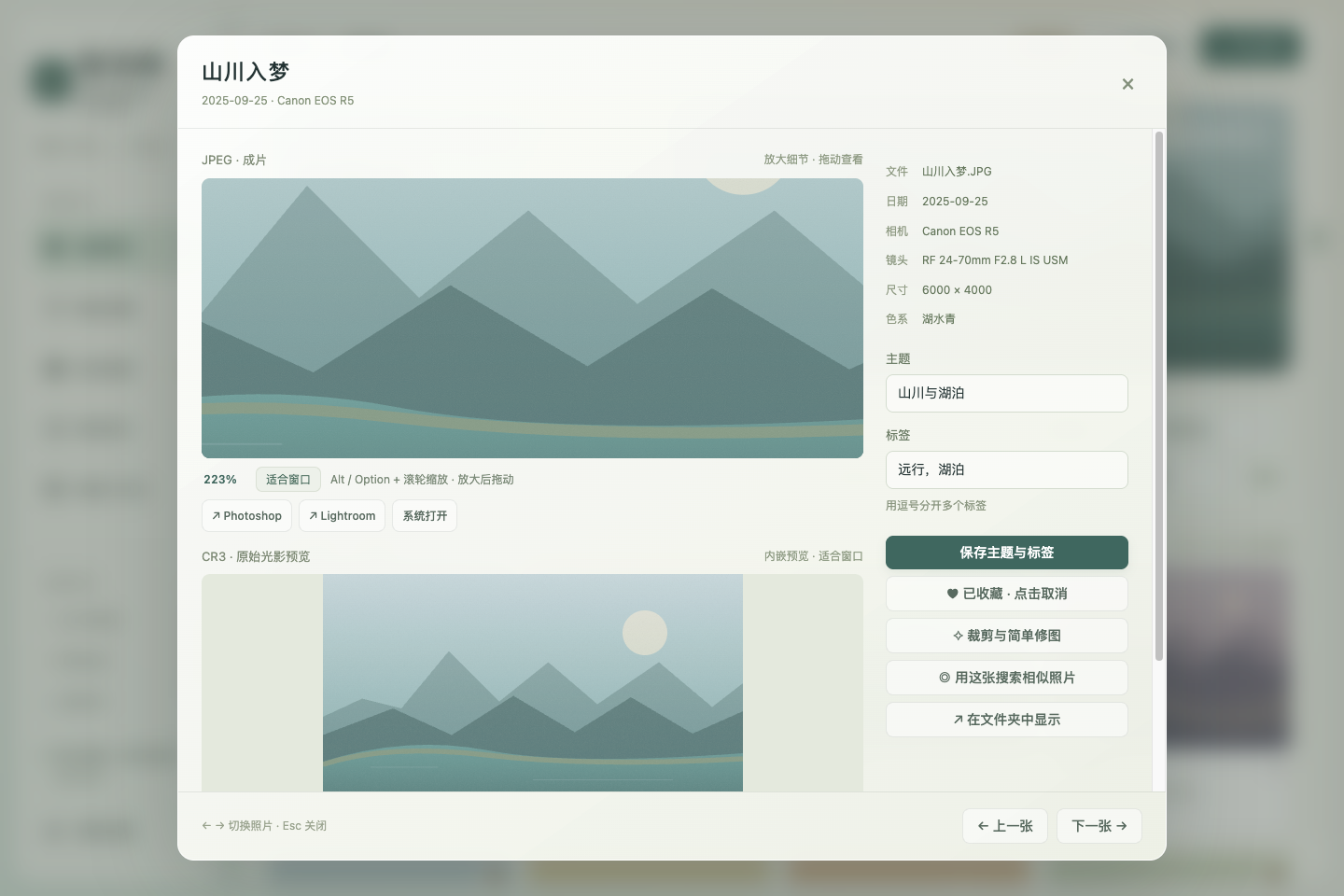
详情缩放与平移
详情默认保持比例、整张适配窗口。按住 Option(Mac)/ Alt 使用滚轮缩放,放大后拖拽平移,最多放大到适合窗口大小的 16 倍。点击“适合窗口”或双击图片恢复默认视图。100% 是相对于适合窗口大小,并非原图像素 1:1。
JPEG 与对应 CR3 继续上下配对显示,各自保留编辑器入口。CR3 放大的是内嵌预览,清晰度受预览分辨率限制;这些浏览操作不修改原片。
普通滚轮继续滚动详情;预览获得焦点时可按 + / − 缩放,按 0 复位。两个格式的预览独立缩放,切换照片或调整预览区域大小时恢复适配。
更新与已有资料
Mac 用户先退出旧版,再将新版 App 拖入 Applications 并替换,之后从 Applications 启动。相同系统用户及应用标识继续使用原有本地设置、标签与收藏,不需要重新复制照片。首次引导、按需预览缓存、选片与 SD 卡整理功能保留。
提供 Apple Silicon / Intel macOS 的 DMG 与 ZIP,以及 Linux x64 的 AppImage 与 deb;请使用同版 SHA256SUMS.txt 核验下载。
2026-10-12,源码缩放专项在 900 × 680 通过 667 项、1440 × 960 通过 661 项,共 1,328 项断言;原有详情适配回归在两种窗口各通过 233 项。本地最终 macOS arm64 包十六次启动通过 1,198 项断言,独立图库回归 24 项通过,共 1,222 项。真实文件复制与原片哈希、JPEG 导出、设置与引导状态持久化、可恢复 SD 日志均已核对;严格签名、DMG 完整性与包内脱敏检查通过。三平台 CI 的 macOS arm64、macOS x64 与 Linux x64 构建及包回归均成功,每个平台通过 1,222 项断言与实际磁盘结果核对。实际 Mac 更新后旧设置与相册资料保持一致,Applications 中的正式版本可唯一搜索并正常启动,生产详情放大与复位已核验。草稿装配成功,六个安装包及校验表全部上传且非空,六项 SHA-256 与 GitHub 资产摘要一致,校验表自身摘要也一致。
English
Currently supports JPEG and Canon CR3; RAW support is limited to CR3. CR3 browsing uses the camera's embedded preview, without RAW development.
Detail zoom and pan
Photo details initially fit the complete image to the window while preserving its aspect ratio. Hold Option (Mac) / Alt while scrolling to zoom, then drag the enlarged image to pan, up to 16 times the fitted size. Choose “适合窗口” (Fit to window) or double-click the image to reset. 100% is relative to the fitted view, not a 1:1 original-pixel scale.
JPEG and corresponding CR3 previews remain vertically stacked, each with editor handoff controls. CR3 zoom enlarges its embedded preview, so clarity depends on that preview's resolution. These viewing operations do not modify original photographs.
Ordinary scrolling still scrolls the detail view. With the preview focused, use + / − to zoom and 0 to reset. The two previews zoom independently; changing photographs or resizing the preview area restores the fitted view.
Updating and existing data
On Mac, quit the older version, drag the new app into Applications, choose Replace, and launch it from Applications. The same system account and application identifier continue using existing local settings, tags, and favorites without copying photographs again. The first-use guide, on-demand preview cache, selection tools, and SD organization remain available.
Packages include DMG and ZIP for Apple Silicon and Intel macOS, plus AppImage and deb for Linux x64. Verify downloads with the same-version SHA256SUMS.txt.
On 2026-10-12, the source zoom regression passed 667 assertions at 900 × 680 and 661 at 1440 × 960, totaling 1,328. The existing detail-fit regression passed 233 assertions at each size. The final local macOS arm64 package passed 1,198 assertions across sixteen launches and 24 independent gallery assertions, totaling 1,222. Actual file copies and original-file hashes, JPEG export, persisted settings and guide completion, and recoverable SD journals were verified. Strict signature verification, DMG integrity, and packaged privacy checks passed. Three-platform CI succeeded for macOS arm64, macOS x64, and Linux x64 builds and package regressions; each platform passed 1,222 assertions and actual disk-result checks. An actual Mac upgrade preserved existing settings and library metadata; the installed Applications copy appeared as a single searchable app and launched normally, with detail zoom and reset verified in production. Draft assembly succeeded. All six installers and the checksum file are uploaded and nonempty; all six SHA-256 entries match GitHub asset digests, and the checksum file's own digest also matches.
验收结果见 验证记录 / Validation records。
详情缩放 / Detail zoom — 合成演示,无私人照片 / Synthetic demo, no private photographs.
拾光屿 v1.0.5 · 首次引导与完整照片预览
拾光屿 v1.0.5 / Shiguang Isle v1.0.5
专为拍摄 RAW 的单反与微单摄影用户量身定制的本地相册。
A local photo library built specifically for DSLR and mirrorless photographers who shoot RAW.
macOS 首次打开 / First launch: 当前包使用 ad-hoc 签名,无 Developer ID 或 Apple 公证。先核对同版 SHA-256,将 Shiguang Isle.app 拖入 Applications 并尝试打开一次;被阻止后到“系统设置 → 隐私与安全性 → 安全性”点“仍要打开”,再确认“打开”。
Mac packages are ad-hoc signed, without Developer ID or Apple notarization. Verify the same-version checksum, move Shiguang Isle.app into Applications and try opening it once; if blocked, use System Settings → Privacy & Security → Security → Open Anyway, then confirm Open.
完整中英文安装与提示排查 / Full bilingual installation and warning guide
简体中文
拾光屿围绕 SD 卡导入、JPEG / RAW 配对选片、精选整理与修图交接设计。当前支持 JPEG 与 Canon CR3,RAW 支持目前限于 CR3。 CR3 浏览使用相机内嵌预览,不提供 RAW 显影。
首次使用引导
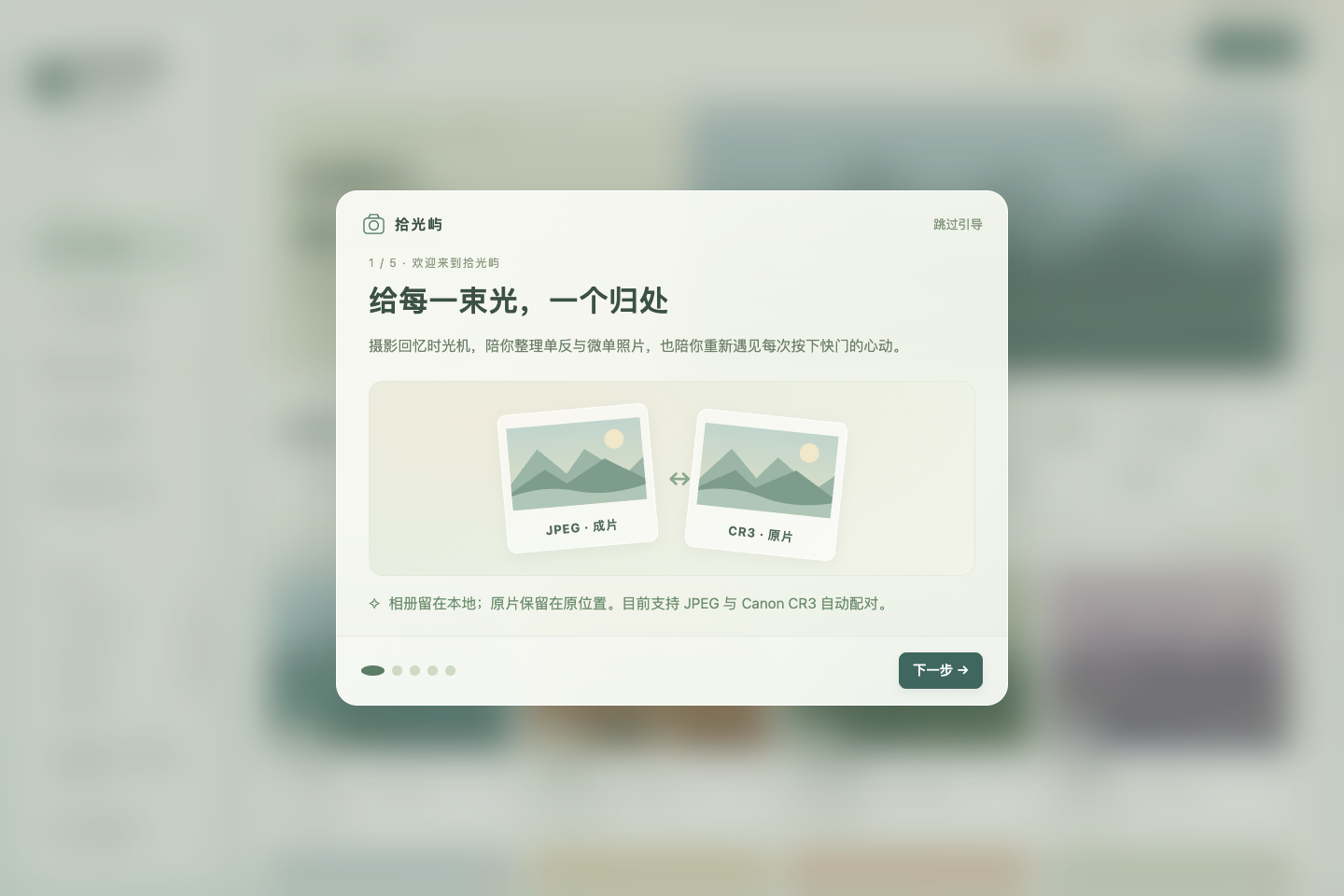
五步引导介绍本地相册、打开相册或 SD 卡导入、筛选收藏标签、修图分享,以及先预览再确认的 SD 卡整理。新用户首次正常启动自动显示;成功跳过或完成后保存状态,后续启动不再弹出。已有相册配置的用户升级不中断,可在“相册设置 → 重新查看使用引导”重看。
最后可关闭引导或打开照片文件夹选择器。引导不会自动整理照片;支持方向键、焦点导航、小窗口与放大字号。JPEG 可简单编辑,CR3 可交给外部编辑器;macOS 支持 Adobe 交接,Linux 可配置本机编辑器。
大照片详情显示
修复高分辨率横图、竖图及宽幅图在详情预览中被裁断的问题。JPEG 与 CR3 内嵌预览保持比例、整张适配预览框,预览区随窗口高度调整。配对预览继续上下显示,可滚动访问下方图片与编辑器按钮,底部上一张 / 下一张操作始终可用。
浏览不创建完整原片副本;缩略图和内嵌预览使用有容量上限、可清理的缓存。安装包提供 Apple Silicon / Intel macOS 的 DMG 与 ZIP,以及 Linux x64 的 AppImage 与 deb,下载后可使用 SHA256SUMS.txt 核验。
详情源码回归已在 900 × 680 与 1440 × 960 窗口各通过 233 项断言,覆盖大尺寸横图、竖图、宽幅图和放大字号。2026-10-12,本地最终 macOS arm64 包十五次启动、531 项断言及独立图库回归 24 项全部通过,共 555 项;真实文件复制与原片哈希、JPEG 导出、设置持久化和可恢复 SD 整理均已核对。严格签名验证、DMG 完整性与包内脱敏检查通过。三平台 CI 与草稿装配已成功,每个平台的打包应用均通过 555 项断言和实际文件结果核对。六个安装包均已上传且非空,SHA-256 校验表六项与 GitHub 资产摘要全部一致,校验表自身摘要亦一致。
English
Shiguang Isle follows the workflow of SD card import, paired JPEG / RAW selection, favorites, and editor handoff. Currently supports JPEG and Canon CR3; RAW support is limited to CR3. CR3 browsing uses the camera's embedded preview rather than RAW development.
First-use guide
Five steps introduce the local library, opening folders or importing from SD, filters and favorites, editing and sharing, and reviewing SD organization. It opens on a new user's first normal launch. Successfully skipping or finishing saves completion; later launches do not open it automatically. Existing users with a configured library are not interrupted on upgrade. Reopen it through Album Settings → View usage guide again.
The last step can close the guide or open the photo folder picker. It does not organize photographs automatically. Arrow keys and focus navigation work with compact windows and larger fonts. Simple editing applies to JPEG; CR3 can be sent to an external editor. Use Adobe apps on macOS or a configured local editor on Linux.
Large-photograph detail view
Fixes high-resolution landscape, portrait, and panoramic photographs being clipped in the detail preview. JPEG and CR3 embedded previews fit completely within the frame while preserving their aspect ratio, and the preview area adapts to the window height. Paired previews remain vertically stacked. Scroll to reach the lower image and editor buttons; previous / next controls stay available at the bottom.
Browsing does not create full original copies. Thumbnails and embedded previews use a bounded, removable cache. Packages include DMG and ZIP for Apple Silicon and Intel macOS, plus AppImage and deb for Linux x64, with SHA256SUMS.txt for download verification.
The source detail regression passed 233 assertions at each of 900 × 680 and 1440 × 960, covering large landscape, portrait, and panoramic photographs and larger fonts. On 2026-10-12, the final local macOS arm64 package passed 531 assertions across fifteen launches and all 24 independent gallery assertions, totaling 555. Actual file copies and original-file hashes, JPEG export, persisted settings, and recoverable SD organization were verified. Strict signature verification, DMG integrity, and packaged privacy checks passed. Three-platform CI and draft assembly succeeded; each platform's packaged application passed 555 assertions and actual disk-result verification. All six installers are uploaded and nonempty; all six checksum entries match GitHub asset digests, and the checksum file's own digest also matches.
验收结果见 验证记录 / Validation records。
首次使用引导 / First-use guide — 合成演示,无私人照片 / Synthetic demo, no private photographs.