Repository navigation
拾光屿 v1.0.8 · 更新与拼图

拾光屿 v1.0.8 / Shiguang Isle v1.0.8
专为拍摄 RAW 的单反与微单摄影用户量身定制的本地相册。 JPEG 与对应 Canon CR3 一起浏览,选片、收藏、标签和修图交接围绕你的原片目录展开。
A local photo library built specifically for DSLR and mirrorless photographers who shoot RAW. Browse JPEG and matching Canon CR3 together, with selection, favorites, tags, and editor handoff around your original photo folders.
macOS 首次打开 / First launch: 当前 Mac 包使用 ad-hoc 签名,无 Developer ID 或 Apple 公证。核对同版 SHA-256,将 Shiguang Isle.app 拖入 Applications 并尝试打开一次;被阻止后到“系统设置 → 隐私与安全性 → 安全性”点“仍要打开”,再确认“打开”。
Mac packages are ad-hoc signed, without Developer ID or Apple notarization. Verify the same-version checksum, move Shiguang Isle.app into Applications and try opening it once; if blocked, use System Settings → Privacy & Security → Security → Open Anyway, then confirm Open.
简体中文
新版提醒与一键更新
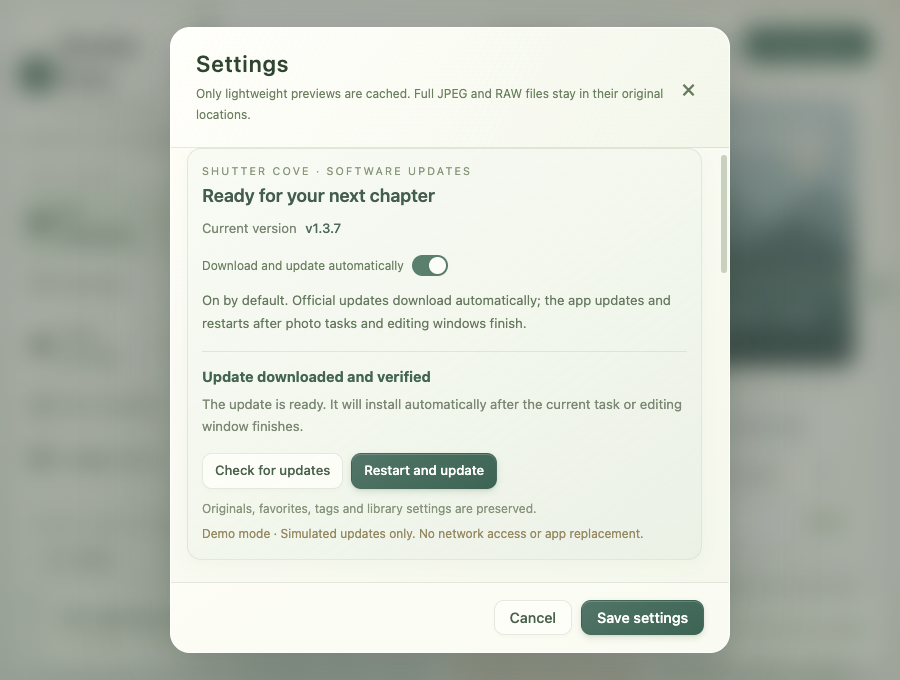
相册设置 → 软件更新 可查看当前版本、手动检查、下载及安装。默认自动检查正式新版,发现新版会显示提醒,继续浏览或修图时不会被强制打断。Mac / AppImage 的“一键更新并重启”会下载匹配系统与架构的包,核对 SHA-256 校验表和 GitHub 文件摘要,再安装重启;也可仅下载,稍后安装。
Mac 上正式安装在 Applications 内的 App,以及可写位置的 Linux AppImage,更新替换当前安装原路径,保留原名称。收藏、标签、主题和设置继续使用原有资料;安装前只备份设置与相册元数据,不复制原片或预览缓存。临时应用放在隐藏的更新工作目录,成功后清理,不留下另一个可搜索的应用副本。失败会报告原因,替换失败时尝试恢复旧版。
Linux deb 使用“下载并打开安装器”,由系统完成认证和升级,完成后手动重新打开应用;安装与恢复由系统包管理器负责。Mac 在 DMG 或构建目录运行时需要先安装到可写的 Applications,只读 AppImage 需要移至可写位置。更新检查不会上传照片或相册资料。更新方式与边界
从 v1.0.6 或更早公开版本升级,需要先手动安装本版一次;此后可使用应用内更新。 保存当前设置及编辑作品后再安装;下载期间关闭设置,可留待稍后重启。
拼图放大与海报每行张数
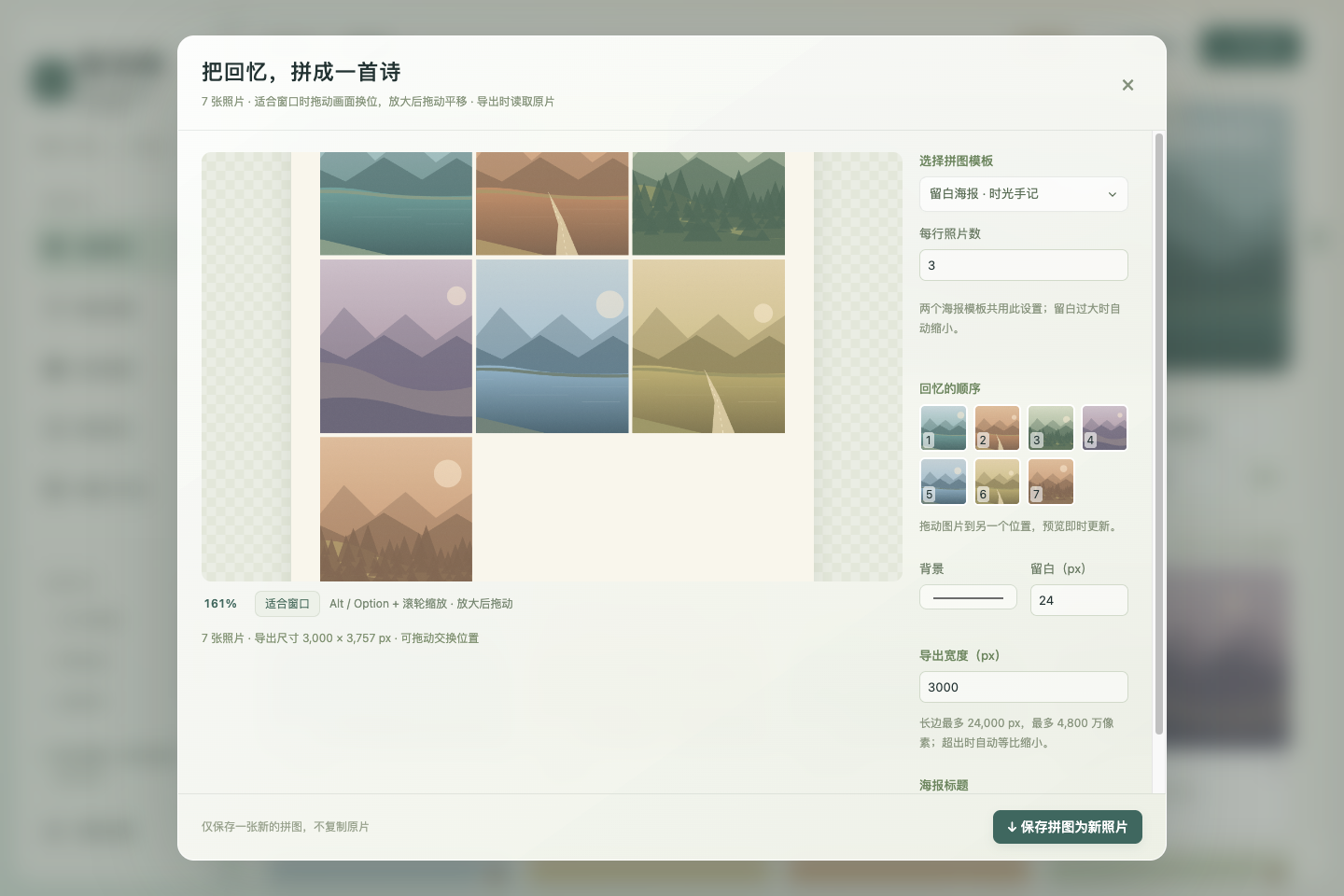
拼图预览支持 Option(Mac)/ Alt + 滚轮 缩放,放大后拖动平移;点击“适合窗口”或双击恢复。100% 表示适合窗口大小,最高可放大到其 16 倍。缩放只影响浏览,导出的照片保持设定尺寸。右侧缩略图在放大时仍可拖动换序。
两个海报模板均可设置 每行照片数,默认 2 张,可选 1–12 张,剩余照片自动排入后续行。所有选中照片参与排版与实际 JPEG 导出。详情照片原有的 Option / Alt 缩放也保留。
当前 RAW 支持限于 Canon CR3,使用相机内嵌预览,不执行 RAW 显影。 提供 Apple Silicon / Intel Mac 的 DMG 与 ZIP,以及 Linux x64 的 AppImage 与 deb。请使用本版 SHA256SUMS.txt 核验下载。
English
Release reminders and in-app updates
Settings → Software update shows the current version and offers manual checks, downloading, and installation. Stable-release checks are enabled by default. A newer release produces a reminder without forcing you out of browsing or editing. For Mac / AppImage, the update-and-restart action downloads the package matching your platform and architecture, checks the SHA-256 manifest and GitHub asset digest, then installs and restarts. A download-only action lets you install later.
For a Mac app installed in Applications or an AppImage in a writable Linux location, updates replace the existing installation at its original path and retain its name. Favorites, tags, themes, and settings keep using existing application data. Only settings and library metadata are backed up before installation; originals and preview caches are not duplicated. Temporary apps use hidden update work directories that are cleaned after success, without leaving another searchable application. Failures report their cause, and failed replacement attempts restore the older version where possible.
For Linux deb, the app downloads and opens the system package installer for authentication and upgrading; reopen the app manually afterward. The system package manager handles installation and recovery. Mac apps running from a disk image or build folder must first be installed in a writable Applications location; read-only AppImages need to move to a writable location. Update checks do not upload photographs or library data. Update behavior and platform limits
Upgrading from v1.0.6 or earlier public releases requires one manual installation of this release; subsequent updates can use the in-app controls. Save settings and editing work before installation. Closing Settings during a download lets you restart later.
Collage zoom and poster columns
Hold Option (Mac) / Alt + scroll over the collage preview to zoom, then drag to pan. Choose “适合窗口” (Fit to window) or double-click to reset. 100% is the fitted view, with a maximum of 16 times that size. Zoom affects browsing only; exports retain the configured dimensions. Thumbnail reordering remains available while zoomed in.
Both poster templates now offer photos per row, defaulting to 2, with a range of 1–12. Remaining photos flow into subsequent rows, and all selected photos participate in the layout and actual JPEG export. Existing Option / Alt zoom in photo details remains available.
RAW support currently covers Canon CR3 only, using its embedded preview without RAW development. Packages include DMG and ZIP for Apple Silicon and Intel Mac, plus AppImage and deb for Linux x64. Verify downloads with this release's SHA256SUMS.txt.
验证记录 / Validation records: docs/validation.md
以下界面均为合成演示,无私人照片 / Synthetic demos below contain no private photographs.