Repository navigation
02 Handlers
Handlers are the workhorses of the logging library. Each handler is responsible for taking log records and writing them to a specific destination, such as a file, a database table, or an email.
You can add multiple handlers to the Log_Manager to send the same log record to several destinations at once. All handlers inherit from Abstract_Handler and share a set of common configuration methods.
These methods are available on all built-in handlers.
| Method | Description |
|---|---|
set_channels(array $names) |
Restricts the handler to only process logs from the specified channel names. By default, it accepts all channels. |
set_formatter(Formatter_Interface $formatter) |
Overrides the default formatter for the handler. See the Formatters Guide. |
set_buffer_limit(int $limit) |
Sets the number of log records to buffer before forcing a write. 0 disables this, relying only on the shutdown flush. |
Writes log records to a specified file on the server. This is the simplest handler and is great for general-purpose debugging.
new File_Handler(string $path, string $min_level = 'debug', int $buffer_limit = 0, ?Formatter_Interface $formatter = null)
-
$path(string, required): The absolute path to the log file (e.g.,WP_CONTENT_DIR . '/logs/app.log'). The handler will attempt to create the directory if it doesn't exist. -
$min_level(string): The minimum log level this handler will process (e.g.,'info','error'). Defaults to'debug'. It is recommended to use thePsr\Log\LogLevelconstants (e.g.,LogLevel::WARNING) to prevent typos. -
$buffer_limit(int): The number of records to buffer. Defaults to0. -
$formatter(?Formatter_Interface): A custom formatter instance. Defaults to aLine_Formatter.
use WPTechnix\WP_Simple_Logger\Handlers\File_Handler;
use Psr\Log\LogLevel;

// Create a handler that only logs WARNING level and above to a specific file.
$file_handler = new File_Handler(
    path: WP_CONTENT_DIR . '/logs/warnings.log',
    min_level: LogLevel::WARNING
);

// Add it to the manager
$manager->add_handler($file_handler);Stores log records in a dedicated, optimized custom table in the WordPress database. This handler is powerful because it includes a full-featured admin log viewer.
new Database_Handler(string $table_name, string $min_level = 'debug', int $buffer_limit = 20, int $expiry_seconds = 0, ?Log_Repository $repository = null, ?Database_Installer $installer = null)
-
$table_name(string, required): The full, unique name for the log table (e.g.,{$wpdb->prefix}my_plugin_logs). The handler automatically creates and maintains this table. -
$min_level(string): The minimum log level to store. Defaults to'debug'. -
$buffer_limit(int): Defaults to20. A higher buffer limit can improve performance for high-volume logging. -
$expiry_seconds(int): The number of seconds to keep logs before they are automatically deleted.0means logs are kept forever. Cleanup runs hourly via a transient lock. Defaults to0. -
$repository(?Log_Repository): An optional repository instance for dependency injection. Defaults to creating a newLog_Repositoryfor$table_name. -
$installer(?Database_Installer): An optional installer instance for dependency injection. Defaults to creating a newDatabase_Installerfor$table_name.
This method enables the built-in log viewer in the WordPress admin area.
set_admin_viewer(string $parent_menu_slug, string $page_slug, string $page_title = 'Application Logs', string $menu_title = 'Logs', string $capability = 'manage_options'): self
-
$parent_menu_slug: The slug of the parent menu item (e.g.,'tools.php','options-general.php', or a custom top-level menu slug). -
$page_slug: A unique slug for the log viewer page (e.g.,'my-plugin-logs'). -
$page_title: The title displayed on the log viewer page. -
$menu_title: The text for the link in the admin menu. -
$capability: The user capability required to access the page.
global $wpdb;
use WPTechnix\WP_Simple_Logger\Handlers\Database_Handler;
use Psr\Log\LogLevel;

define( 'ONE_MONTH_IN_SECONDS', 2592000 );

$db_handler = new Database_Handler(
    table_name: $wpdb->prefix . 'my_app_logs',
    min_level: LogLevel::INFO,
    expiry_seconds: ONE_MONTH_IN_SECONDS
);

$db_handler->set_admin_viewer(
    parent_menu_slug: 'tools.php',
    page_slug: 'my-app-log-viewer',
    page_title: 'My App Logs',
    menu_title: 'App Logs',
    capability: 'manage_options'
);

$manager->add_handler($db_handler);
For more details on the UI, see the Log Viewer Guide.
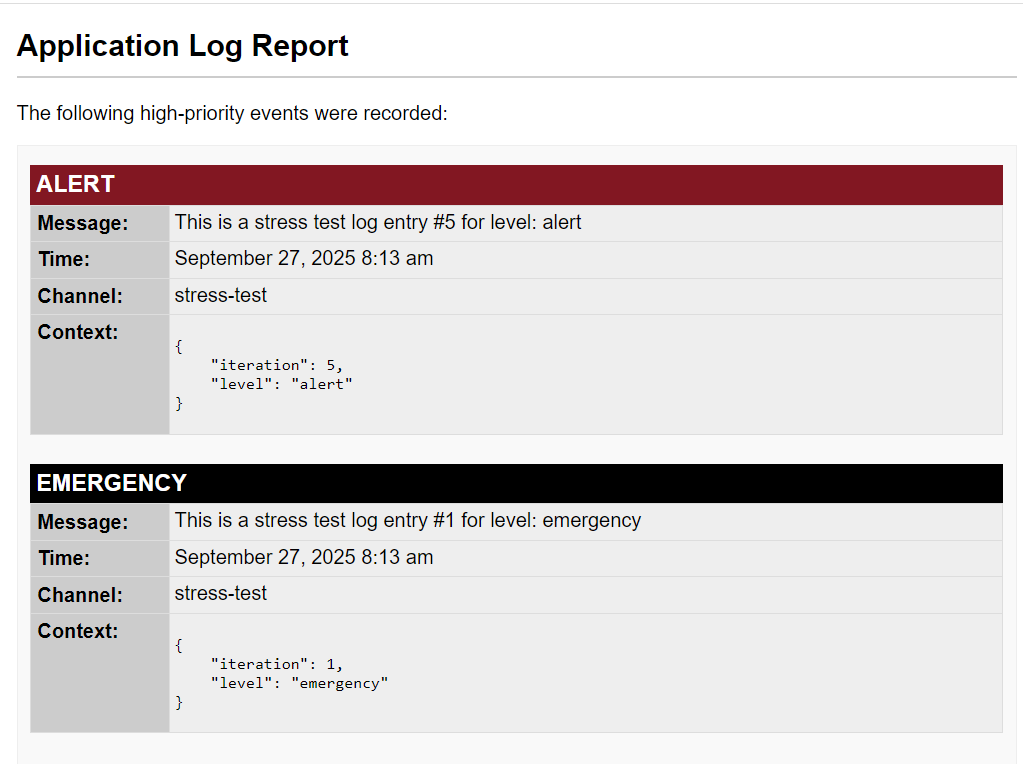
Buffers log records and sends them in a single, formatted HTML email when the buffer is full or the request ends. This is ideal for critical error notifications.
new Email_Handler(string|array $to_recipients, string $subject, string $min_level = 'error', int $buffer_limit = 10, ?Formatter_Interface $formatter = null)
-
$to_recipients(string|array, required): The email address or an array of addresses to send the notification to. -
$subject(string, required): The subject line for the email. -
$min_level(string): The minimum log level to email. It is highly recommended to use'error'or higher to avoid spam. Defaults to'error'. -
$buffer_limit(int): The maximum number of log records to include in one email. Defaults to10. -
$formatter(?Formatter_Interface): A custom formatter. Defaults to anHtml_Formatter.
These methods allow you to customize the content of the email.
| Method | Description |
|---|---|
set_email_title(string $title) |
Sets the main <h2> title inside the email body. |
set_email_intro(string $intro) |
Sets the introductory paragraph. |
set_email_footer(string $footer) |
Sets the footer text. |
set_headers(array $headers) |
Sets custom email headers (e.g., From:, Reply-To:). |
use WPTechnix\WP_Simple_Logger\Handlers\Email_Handler;
use Psr\Log\LogLevel;

$email_handler = new Email_Handler(
    to_recipients: 'dev-alerts@example.com',
    subject: 'Critical Error on Production Site',
    min_level: LogLevel::CRITICAL,
);

$email_handler
    ->set_email_title('Critical Site Alert')
    ->set_headers(['From: WordPress <wordpress@example.com>']);

$manager->add_handler($email_handler);Posts log records to a Slack Incoming Webhook. Each record is rendered as a color-coded attachment whose color reflects the severity, so high-priority alerts are easy to spot in a channel. Because Slack is an alerting destination, it defaults to the error level.
new Slack_Handler(string $webhook_url, string $min_level = 'error', int $buffer_limit = 10)
-
$webhook_url(string, required): The Slack Incoming Webhook URL. -
$min_level(string): The minimum log level to post. Defaults to'error'to avoid noise. -
$buffer_limit(int): The number of records to batch into a single message. Default