Repository navigation
Home
DOT SYSTEMX keeps a project's objective, work, evidence, and memory connected. Use this manual to install the folder, complete a first task, and maintain continuity across AI chats and agents. Start with the basics below; advanced coordination and operational details follow them.
ALPHA — USE AT YOUR OWN RISK. Experimental and subject to daily change. Pin reviewed defaults, retain recoverable backups, and validate them in your project. See Release policy and Versions and changelog.
Current alpha: 1.11.0-alpha.6.
Use its exact versioned instructions for an installation; the wiki is a
changeable manual.
The v1.9.0-alpha.1 tag was withdrawn after a distribution-manifest mismatch;
do not install it. See Versions and changelog.
Repository · First-time setup · Copy a setup prompt · Read white paper edition 2.0 · Watch on YouTube
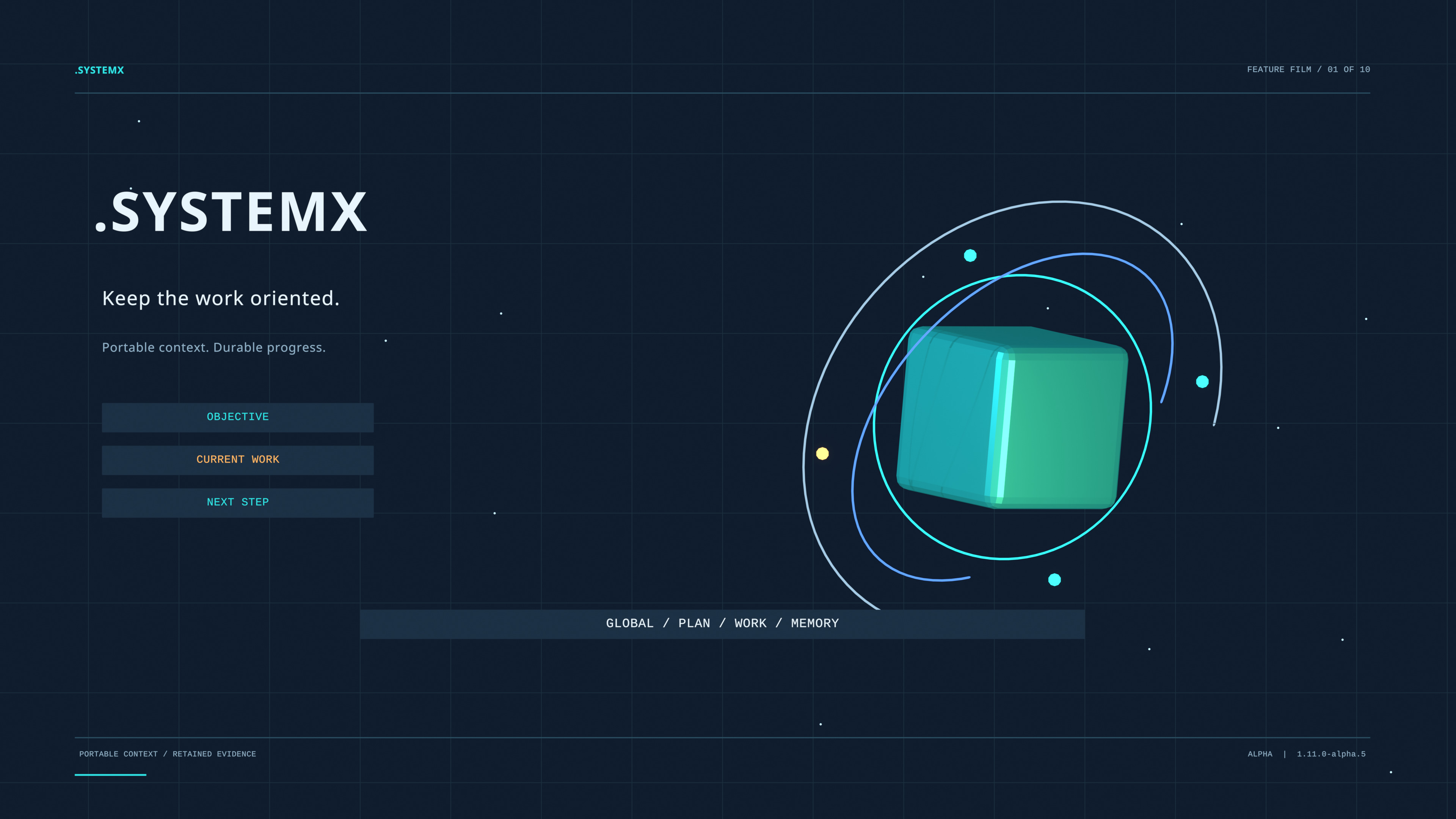
Watch the 1:50 introduction on YouTube · Download the Full HD MP4 · 4K poster · Chapters and film details

The narrated Blender introduction covers the records, Agent 0/X/Y/Z, Agent Alpha
and ten AUTOBOT references, ROOT, .SYSTEMXP, DATA, tools, and preserved updates.
Its media edition 1.0 is separate from the template release number.
The Wayne Tech Lab channel hosts the streaming copy; the
GitHub release retains the original MP4, captions, and transcript.

Advanced walkthrough: chapters, evidence, and limits · 5:54 Full HD film · Native 4K poster
Eighteen animated scenes explain current alpha.6 coordination, app-native workers versus Agent Y's external CLI lane, ROOT observations, scoped projects, and preserved adoption. A 39-command local demonstration uses 20 inventory fixture files; it is not a production app or recorded provider/PR run. The input-context comparison includes setup overhead and an ordinary compact-handoff control, without claiming billed savings, model quality, or speed. Media edition 2.0 is separate from the software version and the original introduction.
Open / download the full 4K JPEG
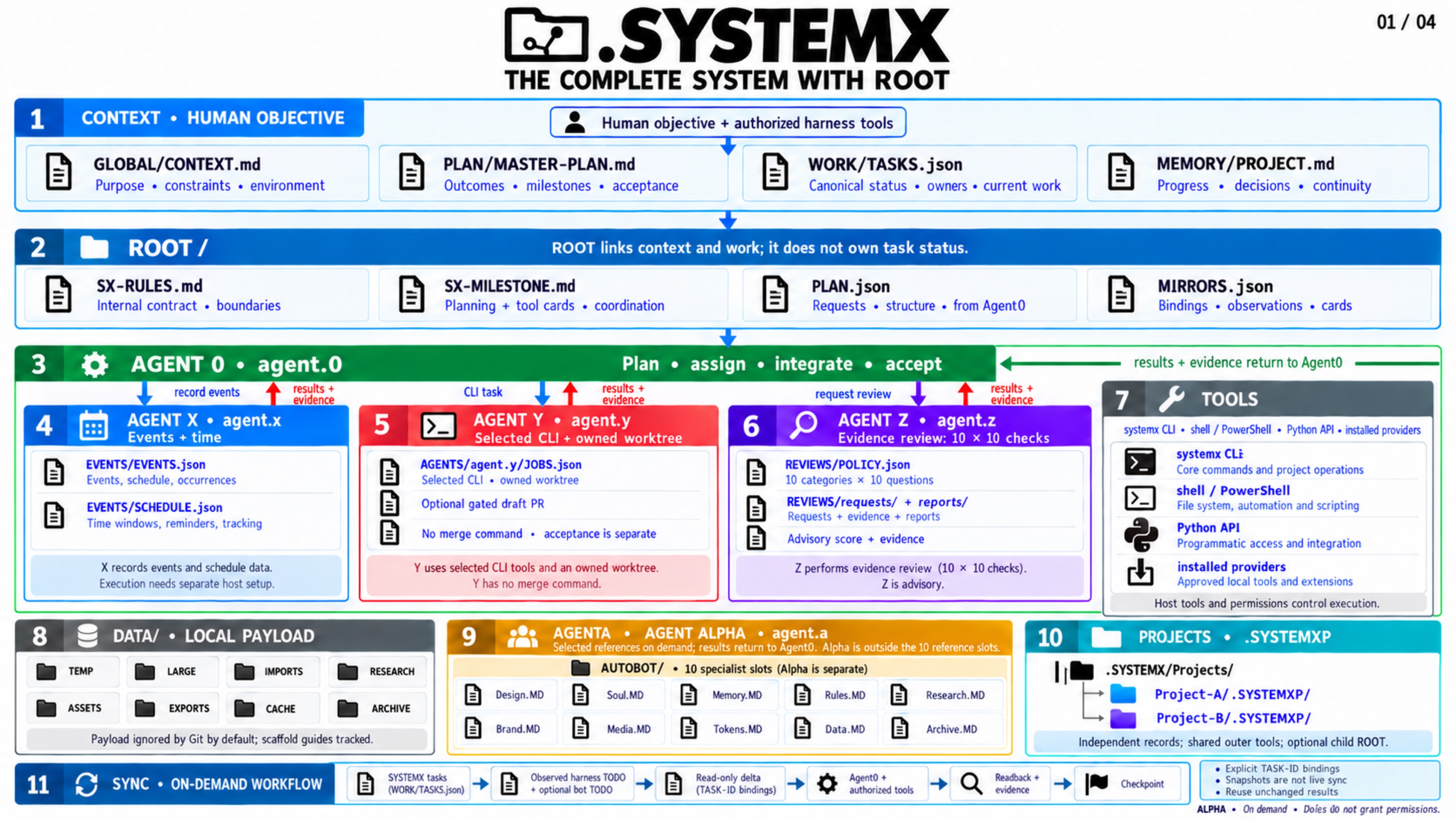
The four-part 4K field guide starts with one
complete overview, then gives three detailed pages for Agent 0/X/Y/Z and CLI
coordination, AGENTA with all ten AUTOBOTS, and DATA with named .SYSTEMXP
projects. The refreshed artwork now includes ROOT internal rules/planning and
SYSTEMX/harness/optional-bot TODO observations and reconciliation. Each page has a separate full-size download and accessible text.
The panel connects shared context, plan, tasks, evidence, tools, and scoped memory.
Agent 0 retains task acceptance. Agent X records events/time, Agent Y carries an optional task-selected external CLI/PR handoff, Agent Z applies the fixed review, and Agent Alpha / AGENTA routes selected detail from Design, Soul, Memory, Rules, Research, Brand, Media, Tokens, Data, and Archive. These reference roles add no automatic worker, recursive checking loop, or permission grant.
AUTOBOT and Agent Alpha explains explicit activation, bounded requests and unchanged-result reuse. Local DATA storage explains the eight payload folders, exact tracked scaffolds, sampled Git-ignore audit, and privacy limits. Root and named child panels/data stay separate. Use CLI and Tools to select the command, defaults, and scope.
Four environment cards cover ChatGPT + Drive, Codex + GitHub, Dots / Codex Cloud, and a local CLI. Their earlier artwork retains its stated baseline; the refreshed four-part field guide includes ROOT together with the Tier 2 panel and existing agent/tooling boundaries.
One workspace has one canonical .SYSTEMX installation. It holds the project's
context, Master Plan, tasks, accepted facts, and agent notes. Agent 0 coordinates
that information and reviews results. Your assistant's app, CLI, or IDE supplies
the tools and actual running agents.
The daily loop is understand → plan → work → verify → review → checkpoint. A new session reads the saved state, checks what has changed, and continues the next incomplete step. The same format can support software, research, operations, or another process with clear outcomes and evidence.
| Start here | What you will learn |
|---|---|
| Getting started | Choose a project, directory, Drive, or chat workspace |
| First-time setup | Preview installation, add project facts, and verify setup |
| One-shot project guide | Take a researched brief through a complete 20-page app or other deliverable |
| Shared workspaces, clouds, and bots | Coordinate authorized chats and workers against explicit record ownership |
| Daily workflow | Take a task from an objective to reviewed completion |
| Visual Guide | See the project loop, folder tree, and record flow |
| New chat setup prompt | Copy a prompt to adopt the format or resume in another chat |
| Prompt cookbook | Ask for solo work, Agent 0 with subagents, review, and recovery |
For multiple projects or channels, use SYSTEMX PROJECTS:
.SYSTEMX/Projects/Project-A/.SYSTEMXP. Each child keeps separate context,
plans, work, status, sources, decisions, and agent memory. Never install another
.SYSTEMX inside the outer folder. The public registry starts empty.
Create and select a child project.
| Guide | Responsibility |
|---|---|
| SYSTEMX PROJECTS | Set up separate .SYSTEMXP records for multiple projects or channels |
| AUTOBOT and Agent Alpha | Ten on-demand detail specialists and bounded request/result reuse |
| Local DATA storage | Local payload folders ignored by Git by default, audit, and privacy limits |
| Planning and memory | Context, milestones, verified facts, and session checkpoints |
| ROOT planning, rules, and task delta | Optional request/plan structure and observed IDE/cloud task reconciliation |
| System MAP | Trace sources, record scopes, toolchain, environments, and evidence routes |
| Access Matrix | Record project-specific actors, action boundaries, approval sources, and freshness |
| Task workflow | Ownership, dependencies, status transitions, and generated views |
| Agent X | Track human/bot/automation events, observation time, and due items |
| Agent Y | Route an authorized task through a selected CLI provider, isolated branch, and draft-PR handoff |
| Agent Z | Use the fixed 100-question peer review and compare evidence/revision deltas |
| 100 review questions | Read the complete standard rubric |
| Agent 0 and subagents | Harness setup, bounded assignments, routing, logging, and review |
| Subagent processing | Follow a worker through dispatch, execution, evidence, review, and recovery |
| Advanced use cases | Apply the format to features, incidents, research, shared folders, and multiple projects |
| Evidence and acceptance | Define what each check proves and when work is actually done |
| Anti-drift and long-running work | Sustain direction across many tasks, interruptions, and handoffs |
| Tokens, cost, and time | Understand possible savings and measure accepted outcomes fairly |
Use WORK/TASKS.json as the task-status authority. WORK/FOCUS.json selects the
current objective and task/checkpoint pointers; generated CURRENT.md summarizes
them. Generated TODO, WORKING-ON, BLOCKED, REVIEW, DONE, and CANCELLED pages are
views of the selected ledger. “Global” refers to shared context within that scope;
the outer Global context holds explicitly shared workspace constraints.
Begin each session with START-HERE.md in the selected defaults; use that
release's docs/FIRST-RUN.md for setup. These versioned files are authoritative
for their release, while this wiki is a reference that can change. In managed
installations, the chosen defaults live in a versioned cache while project
records remain in the outer .SYSTEMX or the explicitly selected child .SYSTEMXP. See Standard format.
| Location or operation | Guide |
|---|---|
| Repository / VS Code project | Project setup |
| Windows, macOS, or Linux directory | Directory setup |
| Locally synchronized Google Drive folder | Google Drive setup |
| LLM chat with attachments or file tools | Chat setup |
| Exact spelling and optional lowercase alias | Exact casing and alias |
| Install, pin, select defaults, and opt into check-only startup notices | Installation and updates |
| Preserve records during migration | Upgrading |
| Inspect logs, remove an install, and restore its backup | Uninstall and cleanup |
Keep the exact name .SYSTEMX, including the dot and uppercase letters.
For an existing managed installation, preview the backed-up
bootstrap-refresh migration
with the new external tool before selecting new defaults. Fresh setup stops on a
conflicting preexisting executable default for review.
The public distribution contains blank project records and only the agent.0
role. Activate optional X/Y/Z records in a compatible selected version and
populate your own project's copy. An empty ledger means no tasks have been
recorded; it does not mean the project is complete.
| Advanced reference | Use it for |
|---|---|
| Technical Guide | File layout, manager internals, boundaries, and extension design |
| Stack Guide | Connect an existing application's tools and commands |
| Library integration | Use the optional Python package and CLI |
| Configuration and quality | Register real checks, builds, and authorized delivery commands |
| CLI and Tools | Choose installed CLI, trusted local launcher, project tools, or Agent Y provider |
| Command reference | Find exact syntax and flags |
| Operations and troubleshooting | Diagnose conflicts, failures, and interrupted work |
| Security and support | Handle private records, report issues, and get help |
| Code review and readiness | See current release evidence, historical reviews, and limits |
Plain documents need no runtime. Optional tools require Python 3.9+ and use its standard library. The format supplies neither a model nor a background worker, cloud application, or MCP server. Recorded roles and scopes do not grant access to external services or authenticate an agent.
Read About .SYSTEMX and the founder's note for the origin of DOT SYSTEMX, its connection to the larger Firebase/Google Cloud template, and its long-term goal. Contributing explains how to improve this public standard.
The current alpha tool is 1.11.0-alpha.6. This documentation and media-discovery publication connects the YouTube introduction, 4K poster and original downloads, setup instructions, and current release evidence. It adds no runtime capability. The film has ten animated scenes and ten MP4 chapter markers; YouTube presents nine navigation chapters. The film is Full HD (1920 × 1080), while the separate poster is 4K (3840 × 2160).
White paper edition 2.0, Portable Project Coordination for
AI-Assisted Work, remains a 24-page publication with four original figures,
a reproducible 30-command local walkthrough on Python 3.9/3.14, and a proposed
evaluation. It examines the alpha.4 implementation, was published with alpha.5,
and labels its input-token model hypothetical, without claiming measured savings.
The introduction retains its alpha.5 feature reference and separate media edition
1.0. Application SDKs/business integrations remain host-owned; reusable template
records stay generic. The ROOT-aware four-page artwork keeps its
1.11.0-alpha.3 media edition and exact bytes.
WORK/TASKS.json retains canonical status and acceptance. ROOT initializes
independently in outer and selected child scopes, compares retained snapshots,
and starts no provider or synchronization service.
The refreshed four-page 4K field guide now depicts
ROOT, SX-RULES.md, SX-MILESTONE.md, and observed task-list reconciliation
alongside the existing agents, AUTOBOTS, DATA, and named projects. The
ROOT manual supplies current Mermaid diagrams
and exact examples.
Agent 0 retains acceptance, X records events/time, Y carries an optional CLI/PR
handoff, Z reviews evidence, and AGENTA supplies selected specialist context
without extra checking loops. Exact release IDs, downloads, validation evidence,
and changes belong in Versions and changelog. .SYSTEMX is a
project-maintained operating standard under the MIT License,
maintained by Wayne Tech Lab LLC. Adoption and
template validation do not certify a downstream project's production readiness.
- One-shot project guide: start with a deep-research brief, map a 20-page web app, organize phases/milestones/tasks/waves, coordinate workers, and finish with evidence.
- Shared workspaces, clouds, chats, and bots: choose repository, portfolio, or hybrid ownership; connect authorized Drive/cloud/local context; reconcile multi-chat and bot handoffs.
Both guides explain the shared-context feedback model and provide copyable prompts. Verified project knowledge can accumulate across turns; persistence and review remain explicit rather than automatic model training or a guarantee of AGI.