Repository navigation
v2.1.0-beta.1
Pre-release
Pre-release

WordPress Contributor Toolkit v2.1.0-beta.1
First beta of 2.1. This release adds step debugging with Xdebug, a code editor setting, a right-click menu for sites, Linux .deb and .rpm packages, and five more languages. 26 commits since v2.0.0.
This is a pre-release. v2.0.0 remains the latest stable release. Report problems in GitHub issues.
Step debugging with Xdebug
Turn on Step debugging (Xdebug) under Settings → Sites (#724). It is off by default because it slows every request, and applies at the next server start.
- While the server runs with Xdebug, the site's Debugging row reads
WP_DEBUG · SCRIPT_DEBUG · Xdebugand offers Set up Xdebug for your editor, with a setup for VS Code, Cursor, PhpStorm and Zed (#724). - When a code editor is chosen in Settings, the button opens that editor's setup directly (#773).
- Only one site's server has Xdebug at a time. The Debugging row says which site has it and when a restart is needed (#724).
- A server start can be cancelled while it is starting (#724).
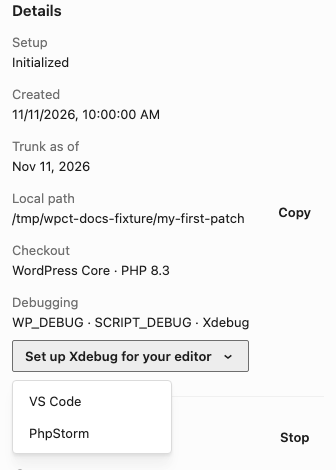
Full steps: Step debugging in the guide.
Code editor and sites
- Code editor setting under Settings → General → Applications (#753). With an editor chosen, clicking a changed file opens it there, and the site menu shows Open in with that editor's name. With Ask each time, both offer a menu of detected editors.
- Right-click menu for sites in the sidebar, also on Shift+F10 or the Menu key (#686). It has the same actions as the page header's site menu.
- Editor folders such as
.idea,.vscodeand.zedno longer show up in Changed files (#752).
Tickets, issues and pull requests
- The ticket card groups its pull requests and Trac attachments into folded sections, so long lists stay short (#713). An applied attachment now shows an Applied badge.
- The Apply PR preview says where your ticket's edits go while the pull request is checked out (#674).
- Typing a pull request number into the Gutenberg Issue field is refused (#749), and the message names the issue that pull request fixes, with a button to link it (#772).
- The issue and pull request fields show an example number from the right repository (#761).
Translations
New languages: German, Spanish, Japanese, Chinese (China) and Southern Balochi. Existing languages are updated.
Fixes
- The dev server can be retried after a failed start (#603).
- The server and build watch cannot be started while a build runs, and a failed build is still shown after a restart (#716).
- No false "Update incomplete" banner after carrying work onto a ticket (#770).
- An applied patch stays with its ticket when work is carried onto it (#725).
Known issues
- Southern Balochi is a right-to-left language. The app has not been officially tested with right-to-left languages, and its styles may not match. If you can test the app in Southern Balochi, please report what you find (#787).
Development
- Linux builds now include
.deband.rpmpackages (#783). - A branch switch logs what its cleanup removed or excluded, and why a step failed (#714).
- Windows builds on pull request branches are signed only on demand (#756).
- Release steps live in
RELEASING.md, with a release skill (#710). Branch naming and tracking issues are documented (#750, #768). - Docs updated for 2.1.0, with screenshots retaken (#777).
Downloads
- macOS (Apple Silicon):
wordpress-contributor-toolkit-2.1.0-beta.1-mac-arm64.dmg - Windows (x64):
wordpress-contributor-toolkit-2.1.0-beta.1-win-x64.exe - Linux (x64):
wordpress-contributor-toolkit-2.1.0-beta.1-linux-x86_64.AppImage - Linux (Debian, Ubuntu):
wordpress-contributor-toolkit-2.1.0-beta.1-linux-amd64.deb - Linux (Fedora, RHEL):
wordpress-contributor-toolkit-2.1.0-beta.1-linux-x86_64.rpm
Full changelog: v2.0.0...v2.1.0-beta.1