Releases: WordPress/contributor-toolkit
Release list
v1.0.0

WordPress Contributor Toolkit v1.0.0
The toolkit is a desktop app that takes a contributor from nothing to a working wordpress-develop checkout, lets them try the patch that already exists on a Trac ticket, and lets them send their own work back — as a file, as a mentor handoff, or as a real pull request — without leaving the app and without a push credential on disk.
It is built for the person sitting down at a Contributor Day with no local WordPress environment and two hours to spend.
What earns the 1.0 name is the second half of that sentence. Earlier releases stopped at a running development site; the contribution itself happened somewhere else. It now happens in the app. Everything below is what changed since v0.1.2, across one beta and two release candidates.
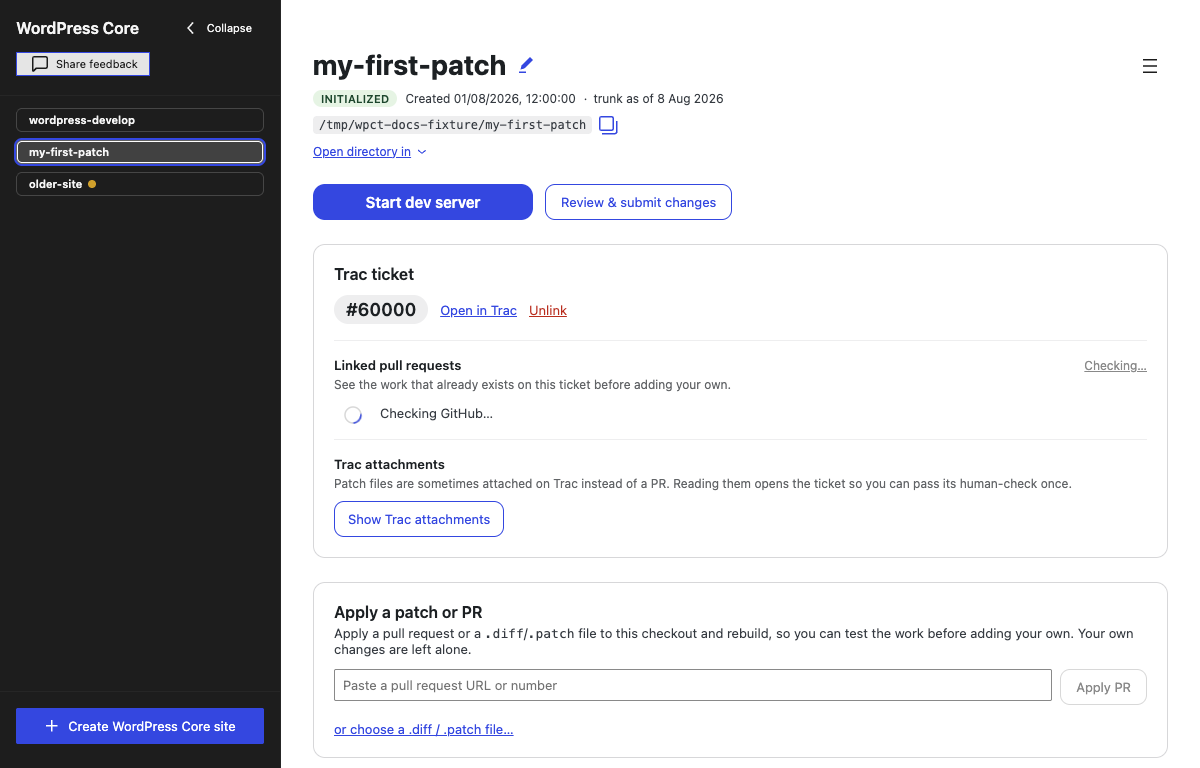
Setup runs itself
- The initial checklist is one chain, not four clicks (#246). After the clone finishes, install and build now start on their own and run to the end — the shape the app already used for a trunk update and for a patch apply, applied to setup at last. Walk away during a ten-minute clone at a Contributor Day and you come back to an environment you can work in, not to a checklist waiting on you.
- Stop can end a running
npm install(#274). Nothing in the app could, because a running install lived in a different registry than the one Stop consulted. That never mattered while install was reached by a button; it is the condition that makes running it unattended reasonable. - A step says "Ready", not "In progress", until its action actually runs (#258). Install npm dependencies used to announce itself as in progress while nothing was installing — which reads as "the app is already doing this" and invites you to wait instead of to click.
- "Start here" points at the one thing to do next (#252, in #254 #256 #260 #263). One tested resolver decides the single pending action for the current state and the matching block gets an accent ring, a pill and a scroll into view — through setup, and afterwards across the update banners, the dev-server and review buttons, the ticket panel, a running apply, and a staged patch preview. It is announced to screen readers as Next step: …, and it clears when the action completes, not on a timer.
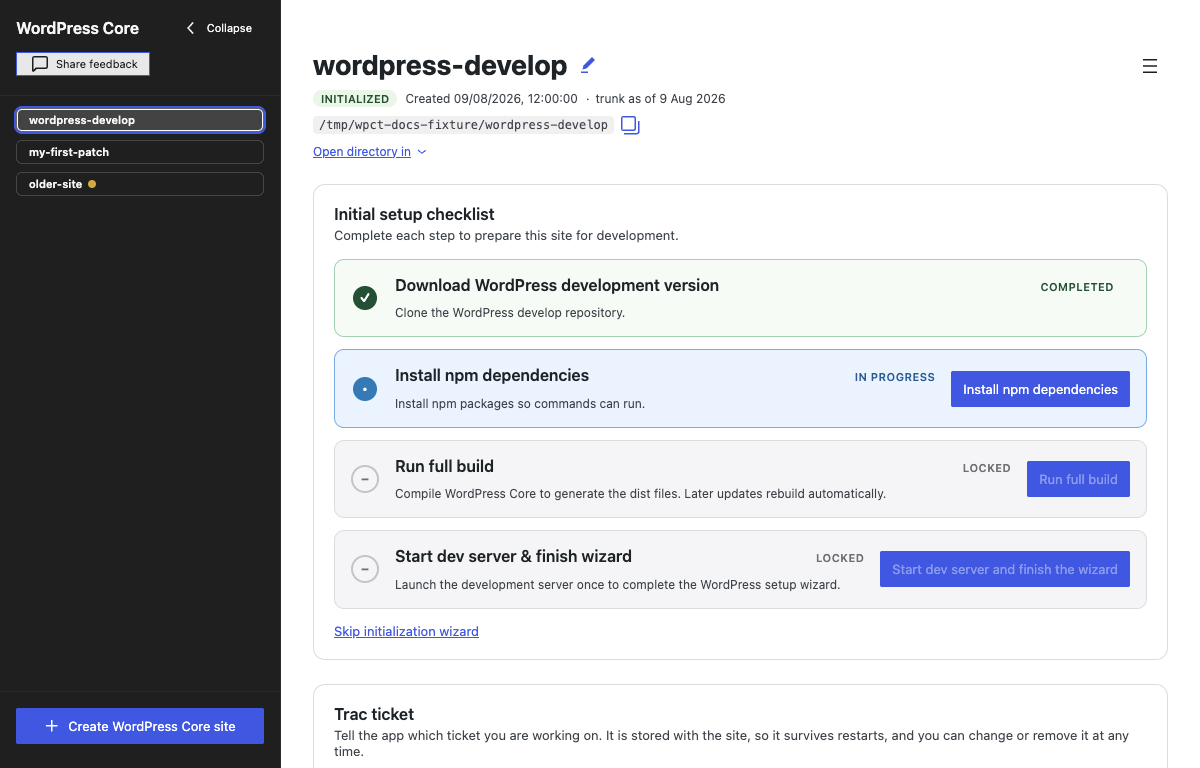
Work more than one ticket in the same site
A site is the expensive part — a clone of wordpress-develop, an npm install, a first build. A ticket is the cheap part.
- Every linked ticket gets its own branch inside the site (#108, #168), so moving between tickets is a file swap of seconds rather than another clone and another install. What you edited for one ticket is not in the tree while you are on another, and the patch you submit for a ticket contains only that ticket's changes.
- The site's tickets get their own card (#185, #242) — Other tickets on this site while one is linked, Your tickets on this site when none is, most recently used first — so coming back does not depend on remembering a number.
- A switch narrates itself (#205): saving your work on the ticket you are leaving, checking which files change, swapping files with a percentage, ready. A half-finished swap marks the site and refuses further ticket actions rather than leaving you to discover it.
- Edits made before you picked a ticket are asked about, not decided for you (#238, #218), because trunk is never committed to; and the unsubmitted-changes note counts a ticket's whole work, parked commits included (#241).
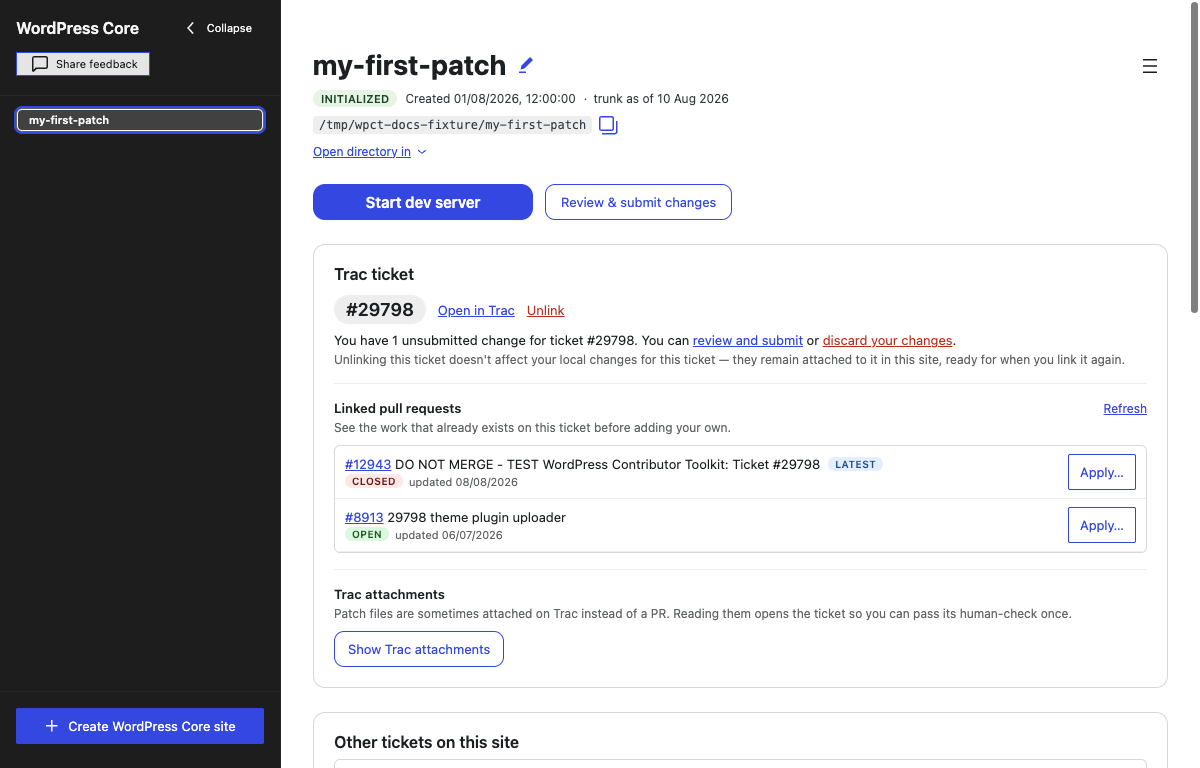
Try the work already on a ticket
The Contributor-Day failure this prevents: several people writing overlapping patches because none of them could see anybody else's.
- A site knows which Trac ticket it is for (#123). Asked optionally at creation — "What are you working on?" — or set, changed and cleared later, surviving restarts. Parsing accepts what a contributor actually pastes: a bare number,
#12345, or any core Trac URL with an anchor, trailing slash or?format=still attached. - A linked ticket shows its own facts (#292). Summary, status, resolution, type, milestone, component, keywords and age, read off the same embedded Trac page the attachment list already uses — same one-time human check, no second challenge. The status pill folds the resolution in, because "closed (fixed)" and "closed (wontfix)" are opposite instructions to a contributor. A ticket closed
wontfixyears ago no longer reads exactly like one filed last week. - The ticket's pull requests, listed and applyable (#136). Newest first, each with its state and date, in GitHub's own colours (#243) — green OPEN, purple MERGED, red CLOSED, where red is a label and not a warning. Apply… fetches that PR's diff into the preview → apply → rebuild flow.
- The ticket's Trac attachments too (#139). On many good-first-bugs the patch is a
.diffattached to the ticket, not a PR. Because Trac serves the attachment list only to a real browser, one click opens the ticket in an embedded window, you clear the proof-of-work challenge once, and the app scrapes the list into a native view — each.diff/.patchwith Apply…, non-patches shown but marked as such. - "Latest" means newest commit, not most recently touched (#140, #281). The pill is meant to point you at the freshest fix across both lists, and it was ranked by GitHub's
updated_at— which a comment, a label or a bot sweep bumps as hard as a push. On Trac #62064 an upstream force-push of trunk restamped roughly 2,580 open pull requests inside one window; the two on that ticket landed 19 seconds apart in that sweep, and the app crowned the one whose newest code is from November 2024 — which no longer applies — over the one from April 2026, which does. - Ticket reading is harder to fool or strand (#300, #333). A freshly linked ticket no longer leaves "Reading ticket…" stuck; historical
Trac ticket: 56320citations count as real pull-request links while incidental number mentions do not; and a Trac navigation that never finishes reaches the 90-second timeout and cleans up its hidden window instead of leaving the renderer waiting forever.
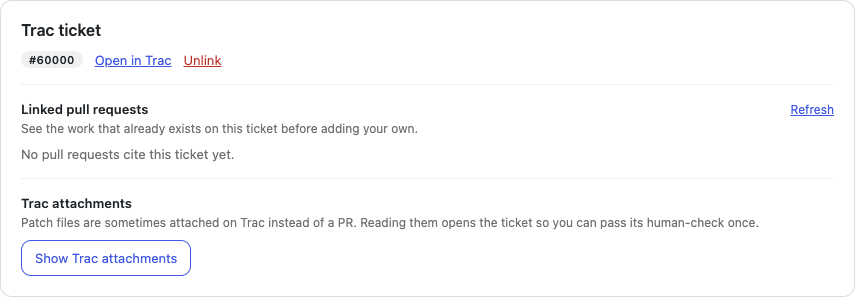
Apply a patch, then rebuild
- Choose a patch file → preview → apply and rebuild (#135). The preview lists the files the patch touches, flags collisions with your own edits, names binary files it will skip, and says whether
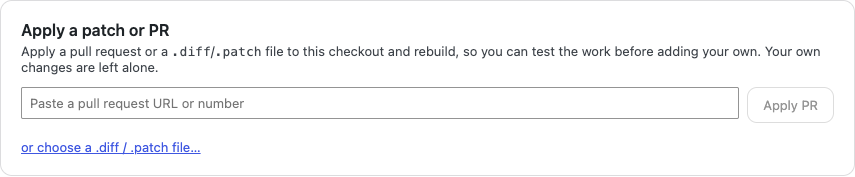
package-lock.jsonmoves so an install runs before the rebuild. The applied patch is recorded so it can be reverted after a restart, and the revert control tells the truth when there is nothing left to revert (#189). - Apply a PR straight from a pasted URL or number (#142), without it having to be linked to the ticket.
- New or deleted empty files survive the round trip (#315, #322), including the
/dev/nullside a Git-format patch needs for an addition or a deletion.
Applied work stays attributed to its author
- An applied patch is a named layer, not an undo blob (#318). The app keeps the patch or pull request's identity while a contributor works on top of it, so Revert removes that layer without pretending the contributor authored it.
- A contributor cannot submit somebody else's applied work as their own (#332). Attributed or published submission stays blocked while an external patch or pull request remains applied. An unattributed Save a copy remains available as the recovery path.
When a patch will not apply
- The refusal says how much failed, why, and what to do next (#282). It used to name one file and stop — the same sentence whether one region of twenty missed or all twenty did, which are opposite decisions for the contributor. Now every failing region reports why: its surroundings changed, or its change looks already present, told apart by whether the region's reverse fits. Each carries the lines it wanted to make and a searchable anchor line verified to exist in your file — because a hunk's own line numbers are coordinates in the file as the patch author had it, and on an old patch they miss by exactly the drift that made it fail. The apply itself is unchanged: still all-or-nothing, still nothing written to the checkout.
- A failed apply says whose work is in the way (#313). When a pull request fails in a file the contributor edited, the explanation names that local work instead of automatically blaming the pull request author and asking for a rebase.
- Conflict warnings are measured against the ticket's base (#302), not against its most recent parked save, so a contributor's own saved work no longer disappears from the collision calculation.
Ticket bases tell the truth
- The app says when a ticket's original base is unknown (#317) instead of quietly substituting current trunk and presenting a guess as history.
- A ticket created from older trunk gets a clear warning (#323). Updating the site does not silently rebase existing ticket work; the notice explains that patches may no longer apply and points to the existing safe exit when a fresh base is nee...
v1.0.0-rc.2
WordPress Contributor Toolkit v1.0.0-rc.2
This is the second release candidate for 1.0. The first candidate went back onto real ticket work, and this is what that testing found: an applied patch is now treated as somebody else's named layer instead of as contributor-owned work; patch failures distinguish the contributor's edits from stale upstream code; older ticket bases are explained honestly; and the ticket readers no longer miss historically linked pull requests or spin forever on a stalled Trac load.
It is still a pre-release. Please try it on a real ticket and report anything that breaks: use the feedback button or the installation-bug issue template.
The changes since v0.1.2 are below.
New since v1.0.0-rc.1
Applied work stays attributed to its author
- An applied patch is a named layer, not an undo blob (#318). The app keeps the patch or pull request's identity while a contributor works on top of it, so Revert removes that layer without pretending the contributor authored it.
- A contributor cannot submit somebody else's applied work as their own (#332). Attributed or published submission stays blocked while an external patch or pull request remains applied. An unattributed Save a copy remains available as the recovery path.
- A failed apply says whose work is in the way (#313). When a pull request fails in a file the contributor edited, the explanation names that local work instead of automatically blaming the pull request author and asking for a rebase.
- Conflict warnings are measured against the ticket's base (#302), not against its most recent parked save. A contributor's own saved work no longer disappears from the collision calculation.
Ticket bases tell the truth
- The app says when a ticket's original base is unknown (#317) instead of quietly substituting current trunk and presenting a guess as history.
- A ticket created from older trunk gets a clear warning (#323). Updating the site does not silently rebase existing ticket work; the notice explains that patches may no longer apply and points to the existing safe exit when a fresh base is needed.
- Discard explains why it is unavailable (#330). Both discard entry points now name the operation that must finish or stop first, instead of looking inert.
- A successful discard clears the patch error it resolved (#331), while a failed discard preserves the error and recovery information.
Patch files keep empty additions and deletions
- New or deleted empty files survive patch generation (#315), including the
/dev/nullside required for additions and deletions. - Git-format empty-file sections are read correctly (#322), so applying such a patch does not silently omit the file whose content happens to be zero bytes.
Ticket loading is harder to fool or strand
- Freshly linked tickets no longer leave “Reading ticket…” stuck (#300). The scrape generation now advances before the automatic read begins, so its completion is still recognized.
- Historical
Trac ticket: 56320citations count as real links (#333), while incidental number mentions and longer ticket numbers remain excluded. - A Trac navigation that never finishes reaches the existing 90-second timeout (#333) and cleans up its hidden window instead of leaving the renderer waiting forever.
Smaller fixes around the contribution flow
- Adminer sits with the other running-site destinations (#268): site URL · wp-admin · Adminer, leaving the action row for actions.
- Local coding-agent directories stay out of generated patches and pull requests (#36). Managed sites receive precise per-repository exclusions for Claude Code, Codex, Cursor, Windsurf, Gemini CLI and Cline files; existing exclude rules and tracked files are preserved.
- The guide and screenshots match the final 1.0 ticket workflow (#310, #334), including applied layers, failed-apply recovery, ticket bases and the current setup interface.
New since v1.0.0-beta.1
Setup runs itself
- The initial checklist is one chain, not four clicks (#246). After the clone finishes, install and build now start on their own and run to the end — the shape the app already used for a trunk update and for a patch apply, applied to setup at last. Walk away during a ten-minute clone at a Contributor Day and you come back to an environment you can work in, not to a checklist waiting on you.
- Stop can end a running
npm install(#274). Nothing in the app could, because a running install lived in a different registry than the one Stop consulted. That never mattered while install was reached by a button; it is the condition that makes running it unattended reasonable. - A step says "Ready", not "In progress", until its action actually runs (#258). Install npm dependencies used to announce itself as in progress while nothing was installing — which reads as "the app is already doing this" and invites you to wait instead of to click.
- "Start here" points at the one thing to do next (#252, in #254 #256 #260 #263). One tested resolver decides the single pending action for the current state and the matching block gets an accent ring, a pill and a scroll into view — through setup, and afterwards across the update banners, the dev-server and review buttons, the ticket panel, a running apply, and a staged patch preview. It is announced to screen readers as Next step: …, and it clears when the action completes, not on a timer.
The build watch is its own thing
- The build watcher has its own button, its own status and its own log (#247). It used to share one lifecycle with the PHP server: no state of its own, no output of its own, and — because it held the terminal's "running" lock for its whole life — it silently blocked every one-shot action while it ran. Now it starts and stops on its own, next to the dev-server button, with a dot that means something: green watching, amber building, red an unexpected exit, grey stopped. Its output goes to a Build watcher tab instead of into the terminal. Starting the server still auto-starts the watch; stopping the server leaves it running, so you get compile-on-save without a server.
- Applying a patch and updating trunk lean on that watch instead of fighting it (#262). A patch that does not move the lockfile, with a watch running, is applied and left for the watch to rebuild — no build of its own, no interruption. That is the case that used to print
A command is already runningand then do nothing. A patch that does move the lockfile, or a trunk reset, still needs the build directory andnode_modulesto itself, so the watch is paused for the duration and resumed after — with the PHP server up throughout. Update to latest trunk no longer requires stopping the dev server first.
When a patch will not apply
- The refusal says how much failed, why, and what to do next (#282). It used to name one file and stop — the same sentence whether one region of twenty missed or all twenty did, which are opposite decisions for the contributor. Now every failing region reports why: its surroundings changed, or its change looks already present, told apart by whether the region's reverse fits. Each carries the lines it wanted to make and a searchable anchor line verified to exist in your file — because a hunk's own line numbers are coordinates in the file as the patch author had it, and on an old patch they miss by exactly the drift that made it fail. The apply itself is unchanged: still all-or-nothing, still nothing written to the checkout.
- "Latest" now means newest commit, not most recently touched (#281). The pill is meant to point you at the freshest fix, and it was ranked by GitHub's
updated_at— which a comment, a label or a bot sweep bumps as hard as a push. On Trac #62064 an upstream force-push of trunk restamped roughly 2,580 open pull requests inside one window; the two on that ticket landed 19 seconds apart in that sweep, and the app crowned the one whose newest code is from November 2024 — which no longer applies — over the one from April 2026, which does.
What the ticket actually says
- A linked ticket shows its own facts (#292). Summary, status, resolution, type, milestone, component, keywords and age, read off the same embedded Trac page the attachment list already uses — same one-time human check, no second challenge. The status pill folds the resolution in, because "closed (fixed)" and "closed (wontfix)" are opposite instructions to a contributor. Component and keywords are links, using Trac's own query URLs lifted from the page. A ticket closed
wontfixyears ago no longer reads exactly like one filed last week. - Discard all changes rewinds the ticket to its base (#270). On a ticket-linked site it appeared to do nothing: the modal shows your work diffed against the ticket branch's base, so it includes the parked WIP commit — but discard only reset the tree to the branch HEAD, keeping that commit, and the modal reloaded identically. It now rewinds to the same base the diff is taken against. The branch survives and the ticket stays linked; only its work is rewound. Throwing the branch away is still what Delete this ticket's work is for.
Quieter, clearer, more accessible
- Completed actions are confirmed by an accessible toast (#253). Patch saved, trunk updated, patch applied, pull request opened, working tree reset — these used to complete silently or leave an inline sentence you may not have been looking at, and none of the success notices reached a screen reader. One service now carries them: success announces politely and dismisses itself, an error announces assertively and stays until dismissed, a double-click reads as one notice, and a confirmation for an act...
v1.0.0-rc.1
WordPress Contributor Toolkit v1.0.0-rc.1
This is the release candidate for 1.0. Nothing new was invented for it: v1.0.0-beta.1 was taken to real Trac tickets, and this is what that testing found. Setup no longer waits on you between steps. The build watcher stopped blocking the actions it shared a lock with. A patch that will not apply now says how much of it failed and what to try instead of it. A linked ticket shows what it actually says — including that it was closed wontfix three years ago — before you spend an afternoon on it.
It is still a pre-release. Please try it on a real ticket and report anything that breaks: use the feedback button or the installation-bug issue template.
The full 1.0 story is below: what is new since the beta first, then everything the beta brought, for anyone arriving here without having read it.
New since v1.0.0-beta.1
Setup runs itself
- The initial checklist is one chain, not four clicks (#246). After the clone finishes, install and build now start on their own and run to the end — the shape the app already used for a trunk update and for a patch apply, applied to setup at last. Walk away during a ten-minute clone at a Contributor Day and you come back to an environment you can work in, not to a checklist waiting on you.
- Stop can end a running
npm install(#274). Nothing in the app could, because a running install lived in a different registry than the one Stop consulted. That never mattered while install was reached by a button; it is the condition that makes running it unattended reasonable. - A step says "Ready", not "In progress", until its action actually runs (#258). Install npm dependencies used to announce itself as in progress while nothing was installing — which reads as "the app is already doing this" and invites you to wait instead of to click.
- "Start here" points at the one thing to do next (#252, in #254 #256 #260 #263). One tested resolver decides the single pending action for the current state and the matching block gets an accent ring, a pill and a scroll into view — through setup, and afterwards across the update banners, the dev-server and review buttons, the ticket panel, a running apply, and a staged patch preview. It is announced to screen readers as Next step: …, and it clears when the action completes, not on a timer.
The build watch is its own thing
- The build watcher has its own button, its own status and its own log (#247). It used to share one lifecycle with the PHP server: no state of its own, no output of its own, and — because it held the terminal's "running" lock for its whole life — it silently blocked every one-shot action while it ran. Now it starts and stops on its own, next to the dev-server button, with a dot that means something: green watching, amber building, red an unexpected exit, grey stopped. Its output goes to a Build watcher tab instead of into the terminal. Starting the server still auto-starts the watch; stopping the server leaves it running, so you get compile-on-save without a server.
- Applying a patch and updating trunk lean on that watch instead of fighting it (#262). A patch that does not move the lockfile, with a watch running, is applied and left for the watch to rebuild — no build of its own, no interruption. That is the case that used to print
A command is already runningand then do nothing. A patch that does move the lockfile, or a trunk reset, still needs the build directory andnode_modulesto itself, so the watch is paused for the duration and resumed after — with the PHP server up throughout. Update to latest trunk no longer requires stopping the dev server first.
When a patch will not apply
- The refusal says how much failed, why, and what to do next (#282). It used to name one file and stop — the same sentence whether one region of twenty missed or all twenty did, which are opposite decisions for the contributor. Now every failing region reports why: its surroundings changed, or its change looks already present, told apart by whether the region's reverse fits. Each carries the lines it wanted to make and a searchable anchor line verified to exist in your file — because a hunk's own line numbers are coordinates in the file as the patch author had it, and on an old patch they miss by exactly the drift that made it fail. The apply itself is unchanged: still all-or-nothing, still nothing written to the checkout.
- "Latest" now means newest commit, not most recently touched (#281). The pill is meant to point you at the freshest fix, and it was ranked by GitHub's
updated_at— which a comment, a label or a bot sweep bumps as hard as a push. On Trac #62064 an upstream force-push of trunk restamped roughly 2,580 open pull requests inside one window; the two on that ticket landed 19 seconds apart in that sweep, and the app crowned the one whose newest code is from November 2024 — which no longer applies — over the one from April 2026, which does.
What the ticket actually says
- A linked ticket shows its own facts (#292). Summary, status, resolution, type, milestone, component, keywords and age, read off the same embedded Trac page the attachment list already uses — same one-time human check, no second challenge. The status pill folds the resolution in, because "closed (fixed)" and "closed (wontfix)" are opposite instructions to a contributor. Component and keywords are links, using Trac's own query URLs lifted from the page. A ticket closed
wontfixyears ago no longer reads exactly like one filed last week. - Discard all changes rewinds the ticket to its base (#270). On a ticket-linked site it appeared to do nothing: the modal shows your work diffed against the ticket branch's base, so it includes the parked WIP commit — but discard only reset the tree to the branch HEAD, keeping that commit, and the modal reloaded identically. It now rewinds to the same base the diff is taken against. The branch survives and the ticket stays linked; only its work is rewound. Throwing the branch away is still what Delete this ticket's work is for.
Quieter, clearer, more accessible
- Completed actions are confirmed by an accessible toast (#253). Patch saved, trunk updated, patch applied, pull request opened, working tree reset — these used to complete silently or leave an inline sentence you may not have been looking at, and none of the success notices reached a screen reader. One service now carries them: success announces politely and dismisses itself, an error announces assertively and stays until dismissed, a double-click reads as one notice, and a confirmation for an action taken inside a modal is still seen.
- The log panes read as consoles (#280). One font shared with the terminal, so the columns of a PHP stack trace line up, and colour by severity per line —
fatal · warning · deprecated · notice · trace · ready— soReady! WordPress is running on …no longer has the same weight as four repeated deprecation warnings above it, and a fatal no longer sits in the same wall of grey as a notice. - A wp-admin link beside the site URL (#250), in both the checklist step and the site page. The app showed you
admin/passwordnext to a screen it gave you no way to reach. - "Forget this site" is gone (#266). It was sold as the safe exit — the guide said outright that forget is reversible, delete is not — and it was the one menu action with no way back: it dropped the path from the registry and left the checkout on disk with nothing in the app able to readopt it. It comes back when a site can genuinely be added back.
- The CI package cache no longer breaks packaging (#265). No branch had produced a signed macOS or Windows artifact since the last version bump, because the cache lived inside the checkout and electron-builder tried to package it. This is why there is an rc.1 to download at all.
Everything from v1.0.0-beta.1
The headline of the beta was that the patch flow goes both ways: you can pull the work that already exists on a Trac ticket into your checkout and test it, and you can send your own change back — as a file, as a mentor handoff, or as a real pull request — without leaving the app.
Work more than one ticket in the same site
A site is the expensive part — a clone of wordpress-develop, an npm install, a first build. A ticket is the cheap part.
- Every linked ticket gets its own branch inside the site (#108, #168), so moving between tickets is a file swap of seconds rather than another clone and another install. What you edited for one ticket is not in the tree while you are on another, and the patch you submit for a ticket contains only that ticket's changes.
- The site's tickets get their own card (#185, #242) — Other tickets on this site while one is linked, Your tickets on this site when none is, most recently used first — so coming back does not depend on remembering a number.
- A switch narrates itself (#205): saving your work on the ticket you are leaving, checking which files change, swapping files with a percentage, ready. A half-finished swap marks the site and refuses further ticket actions rather than leaving you to discover it.
- Edits made before you picked a ticket are asked about, not decided for you (#238, #218), because trunk is never committed to; and the unsubmitted-changes note counts a ticket's whole work, parked commits included (#241).
- Pull request states are coloured in GitHub's own colours (#243) — green OPEN, purple MERGED, red CLOSED, where red is a label and not a warning.
Try the work already on a ticket
The Contributor-Day failure this prevents: several people writing overlapping p...
v1.0.0-beta.1
WordPress Contributor Toolkit v1.0.0-beta.1
This is the beta for the first 1.0, published so contributors can test it before the stable tag. The headline is that the patch flow now goes both ways: you can pull the work that already exists on a Trac ticket into your checkout and test it, and you can send your own change back — as a file, as a mentor handoff, or as a real pull request — without ever leaving the app. On the way, the app also opens and debugs your code, and keeps a site's trunk current instead of freezing it on the day it was cloned.
It is a pre-release: please try it on a real ticket and report anything that breaks. Use the feedback button or the installation-bug issue template.
Try the work already on a ticket
The whole point is the Contributor-Day failure this prevents: several people writing overlapping patches because none of them could see anybody else's.
- A site knows which Trac ticket it is for (#123). Asked optionally at creation — "What are you working on?" — or set, changed and cleared later, and it survives restarts. Parsing accepts what a contributor actually pastes: a bare number,
#12345, or any core Trac URL with an anchor, trailing slash or?format=still attached. - The ticket's pull requests, listed and applyable (#136). Newest first, each with its state and last-updated date; Apply… fetches that PR's diff into the preview → apply → rebuild flow.
- The ticket's Trac attachments too (#139). On many good-first-bugs the patch is a
.diffattached to the ticket, not a PR. Because Trac serves the attachment list only to a real browser, one click opens the ticket in an embedded window, the contributor clears the proof-of-work challenge once, and the app scrapes the list into a native view — each.diff/.patchwith Apply…, non-patches shown but marked as such. - A "Latest" pill marks the most recent patch across both (#140), PR or attachment, so a contributor arriving at a ticket knows which fix to try first.
Apply a patch, then rebuild
- Choose a patch file → preview → apply and rebuild (#135). The preview lists the files the patch touches, flags collisions with your own edits, names binary files it will skip, and says whether
package-lock.jsonmoves so an install runs before the rebuild. The applied patch is recorded so it can be reverted after a restart. - Apply a PR straight from a pasted URL or number (#142), without it having to be linked to the ticket. Same release also fixes three states found in testing: the apply error persisting after Cancel, the "try someone else's patch" sub-copy contradicting itself during a PR preview, and two failure sentences running together.
- Honest empty state (#189): the revert control tells the truth when there is no patch left to revert.
Send your change back
- The patch flow names its destinations, each with its real cost (#166). Attaching to Trac saves the file and deep-links this site's ticket attach page; nothing is uploaded, no account is asked for. Submit patch → Create patch, because it makes a file, it does not submit one.
- Mentor handoff, zero accounts (#166). The saved patch carries a provenance header — handle, event, ticket, base revision, date — so someone else can push it and the props still land on whoever wrote it.
- Open a pull request from the app, with no push credential on disk (#179). Device-code sign-in, then fork, commit and pull request through GitHub's API. No password is typed in, nothing is written to disk, and the token is forgotten on quit. The OAuth application belongs to the WordPress organisation, so no contributor sees an individual's name on their consent screen. Verified end to end on macOS and Windows against
wordpress-develop, with checks running and props-bot picking the PRs up. - Every pull request gets a testable description a reviewer can read in five minutes (#170), and a notes field placed above the paperwork asks what a reviewer actually needs (#204). Two facts from the core handbook a first-timer cannot guess are stated inline: PRs on GitHub are not monitored and must be attached to a Trac ticket to be considered, and nothing is merged on GitHub — which is why the flow ends by sending you back to Trac.
- The destinations are grouped by who does the sending (#200) — file-and-carry (Trac, mentor) in one card, push-on-your-behalf (pull request) in its own — and the diff sits first, with the destinations beside it (#207), because the code is what you opened the screen to look at.
Open and debug your code without leaving the app
- Open in editor and Show in Finder / Explorer / file manager on every site (#158), next to the path. First use offers a picker of the editors found on the machine; after that the button names the editor and launches straight through. Because a packaged app does not inherit the shell
PATH, detection stats absolute install locations rather than runningwhich/where— the reason the old dropdown was removed. - Open a site's folder while it is still being cloned (#212), instead of the app spending several minutes refusing to open a folder it just created.
- Debug your WordPress code (#217). The blueprint now sets
WP_DEBUG,WP_DEBUG_LOG,WP_DEBUG_DISPLAY,SCRIPT_DEBUGandWP_DISABLE_FATAL_ERROR_HANDLER, so notices, deprecations,_doing_it_wrong()and — crucially — a real fatal surface as themselves instead of behind WordPress's recovery screen. The debug log gets its own tab, with the file's path, Show in folder, Copy and Clear.
Keep a site current
- Update to latest trunk, at any time, without recreating the site (#111). Sites used to be pinned forever to the trunk of the day they were cloned, so patches aged against a frozen snapshot and stopped applying on Trac. The site header now shows "trunk as of <date>"; past 14 days an amber notice warns that patches you create may not apply, and Update to latest trunk in the ☰ menu re-fetches, reinstalls dependencies if they changed, and rebuilds.
Clearer, and safer, on every platform
- The editor opens with a visible window on Windows (#201), and
main.jsis held to usingwindowsHideonly where it belongs (#224). - The app shows the directory it created from the moment it creates it (#223), and says what actually went wrong when a folder will not open (#211).
- Only http and https addresses open externally (#121).
- Says which files need a rebuild, and why (#210), and points contributors at the terminal for a rebuild or reinstall (#187).
- Stops promising a dark mode the window does not have (#206).
- Refuses to delete a path that is not a registered site (#138), and the quit sweep now covers all four child-process registries (#163).
Under the hood
- A LICENSE file and license metadata (#102), README badges for the latest release and total downloads (#101), and download counts recorded on a metrics branch (#103, #105), documented in
STATS.md(#106). - The agent-review setup moved to an agent-neutral standard in
AGENTS.mdand.github/instructions(#112, #125, #127) after the credential-carrying CI review was retired. - Substantial new test coverage around the IPC handlers, the child-process modules, logging and the trunk-update flow (#131, #153–#157), and the renderer bundle is no longer committed (#122).
Downloads
- macOS (Apple Silicon):
wordpress-contributor-toolkit-1.0.0-beta.1-mac-arm64.dmg - Windows (x64):
wordpress-contributor-toolkit-1.0.0-beta.1-win-x64.exe - Linux (x64):
wordpress-contributor-toolkit-1.0.0-beta.1-linux-x86_64.AppImage
Full changelog: v0.1.2...v1.0.0-beta.1
v0.1.2
WordPress Contributor Toolkit v0.1.2
The Windows problems reported since v0.1.0 are fixed, so the app now properly runs end to end on Windows. And the dev server starts much faster: it no longer re-downloads WordPress or rebuilds the whole thing every time.
Reporting problems and providing feedback is also easier now. The app writes a log file you can open from the Help menu, there's a feedback button in the app itself, and the repository has issue templates.
Windows
Clone → install → build → dev server → WordPress wizard → wp-admin, verified on a clean Windows VM.
- The first full build no longer dies at
grunt gutenberg:verifywithspawn EINVAL(#56).wordpress-develop's Gruntfile spawns a barenode, which hit our shim; Node ≥ 20.12.2 refuses to spawn a.cmdwithout a shell. Every descendant process now resolvesnodeto Electron's own binary. - "Run first full build" shows its output, instead of an empty terminal, and no longer flashes black console windows across the screen (#52).
- Adminer opens the database browser instead of a page of PHP session warnings (#64).
- "Install npm dependencies" stays locked until the clone finishes (#51), so an early click can't half-install into an incomplete checkout.
- Sites show their folder name, not the whole
C:\Users\…path (#99). The renderer split paths on forward slashes, so any site added by pointing at an existing directory displayed in full.
Starting the dev server
- No re-download of WordPress and no full production rebuild on every start (#77, #74). A
skipWordPressSetupoption that doesn't exist in Playground's API was being passed and silently ignored, so each start re-installed WordPress over the site's ownbuild/. - The spinner always ends, and shows elapsed time (#75). "Starting dev server…" used to be a one-way door: a server that died mid-boot left the button spinning with nothing written anywhere, and the only way out was quitting the app.
- A server that dies during boot fails immediately (#97), instead of leaving the spinner counting up to the two-minute timeout after the crash has already happened.
- The login hint shows credentials that actually work (#80). The panel said
admin/admin; sites are created with the Playground default, so the first trip towp-login.phpfailed. It now readsadmin/password.
The dev server is no longer exposed to your network
The site now binds to 127.0.0.1 only (#79). Playground's CLI called listen(port) with no address, so Node bound every interface — your WordPress, admin login and all, was reachable by anything on the same Wi-Fi. On Windows that's what raised the firewall prompt at every start; on macOS and Linux it happened silently. Upstream has no host option to pass, so the app now patches net.Server.prototype.listen in the runner subprocesses to default to loopback. An explicitly requested address still passes through untouched. Filed upstream as WordPress/wordpress-playground#4224; the workaround goes away when that lands.
When something goes wrong
- A failed
npm installno longer counts as a finished step (#96). A debug short-circuit left in the wizard marked the site initialized regardless of the exit code, so a broken install advanced to a build that could never succeed, with no way back. The step now stays open and the button stays available for a retry. - Quitting the app stops what it started (#98). Nothing swept the child processes on quit, and killing a runner never reached its grandchildren — so
grunt _watchkept rebuilding and the WASM PHP server kept its port, with Task Manager as the only remedy. Whole process trees are now killed:taskkill /Ton Windows, a process-group signal on macOS and Linux. - The app writes a log to disk, opened from Help → Open App Log (#50). A packaged build has no terminal, so a failed spawn and a spawn that never started looked identical: nothing happens. Child-process output, the command used to spawn each one and the code it exited with, renderer errors and crash stacks all land in the file now (see video)

- A feedback button inside the app (#33), for sharing feedback or reporting experiences without leaving it.

- Issue templates in the repository, including one for installation problems, so a report arrives with the platform and the step it failed at.
Environment
- Electron upgraded to 43, bundling Node 24 (#40). Current
wordpress-developdependencies need a modern Node; on the old runtime,npm installfailed withEBADENGINE. Installs also retry with relaxed engine checks as a fallback (#38, #58). - The site path is shown inline, with a copy button (#29).
- The "Open directory in" dropdown is gone (#26). Its editor detection was unreliable in the packaged, signed build: a GUI-launched app doesn't inherit the shell
PATH, so VS Code went undetected there even though it worked undernpm start(#24). Rather than keep patching around that across platforms, the feature is out for now. "Submit patch" is untouched. - The app reports its own version correctly (#81).
package.jsonhad read0.1.0since the v0.1.0 release, so the v0.1.1 artifacts — and the first line of every log they wrote — identified themselves as 0.1.0.
Signing
- Windows installers are signed via Azure Trusted Signing (#21, #27). The previous Sectigo certificate expired 2026-07-05.
- macOS signing fixed (
CSSMERR_TP_NOT_TRUSTED, #22) — the app is signed and notarized, so it opens without the right-click workaround.
Tests, CI and docs
- There is now a test suite. this release adds 113 tests across 15 files, most of them written alongside the fixes above — 11 for the loopback binding, 11 for the Windows spawn patch, 14 for the npm runner.
- They run on macOS and Windows, on both Node runtimes (#68) — the system Node and the one bundled inside Electron, since that second one is what every child process the app spawns actually runs on. That's 452 test executions per push.
- The Electron pass no longer breaks silently on Node 22 and newer (#69), where it had been reporting success without running anything.
- Setup docs refreshed (#15), and the macOS launch instructions corrected now that the app is signed and notarized (#18) — the old right-click-to-open steps no longer apply.
Downloads
- macOS (Apple Silicon):
wordpress-contributor-toolkit-0.1.2-mac-arm64.dmg - Windows (x64):
wordpress-contributor-toolkit-0.1.2-win-x64.exe - Linux (x64):
wordpress-contributor-toolkit-0.1.2-linux-x64.AppImage
Full changelog: v0.1.1...v0.1.2
v0.1.1 draft

This experimental release adds a few equally experimental features:
Submit PR workflow:

A few UI improvements, e.g. "Open in [IDE]" button:


