Repository navigation
0.3.3

Cite as you write from your EndNote library, then export to Word or LaTeX.
Install
- Unzip
endnote-cite-0.3.3.zipinto<your vault>/.obsidian/plugins/endnote-cite/—
thebridge/folder must sit next tomain.js, the EndNote-field export needs it. - Settings → Community plugins → Reload, then enable EndNote Cite.
- Point the plugin at your
.enlfile and pick a style.
Desktop only (Windows / macOS / Linux). The live EndNote-field export and the
automatic library refresh additionally need Windows + Microsoft Word + EndNote.
What's new in this release
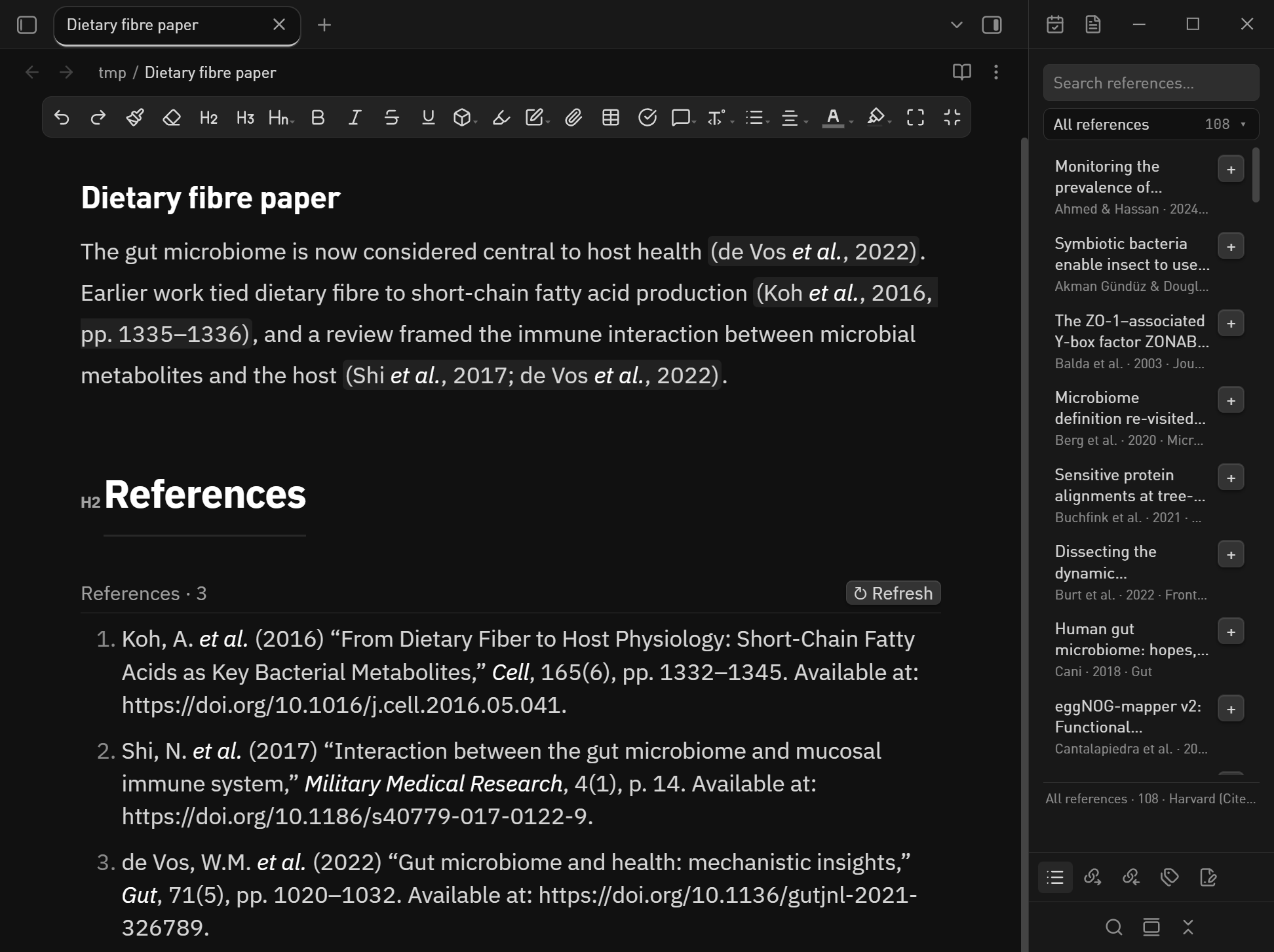
- The reference list now keeps itself up to date. An
endnote-bibcode block
redraws about half a second after you add or remove a citation, and within 5 s of
EndNote saving the library — new records, edited authors, years and journal
metadata included. Before, it rendered once and waited for the manual↻ Refresh. - Fixed: collapsing a row in the library sidebar. The details panel used to open
as a flex sibling and squeeze the title to a sliver, so in a narrow sidebar there
was nothing left to click. The whole row is now the toggle (Enter/Spacetoo),
the details take their own line underneath, a▸ / ▾chevron marks the state, and
the list keeps its scroll position. - Documented the two ways to get a reference list: static text, or the live block.
Features
- Reads your library, never writes it — the
.enlSQLite file is opened read-only;
groups, keywords and the output style all come from the library itself. [@completion in the editor, plus EndNote: Insert citation for a search dialog.
[@key, pp. 12-13]adds a locator.- Formatted citations in the editor, rendered with the output style EndNote
currently has selected (Cite Them Right-Harvard by default). - Library sidebar — search, groups, abstract, and one click to cite the note you
were last editing. - Word, two ways: plain pandoc text, or real
ADDIN EN.CITE+EN.REFLISTfields
that Word's Update Citations and Bibliography still understands. - LaTeX / BibTeX / CSL JSON export.
Checksums
SHA256SUMS.txt covers every asset in this release.
中文说明
边写边引:直接读你的 EndNote 文献库,正文里显示排好版的引用,文末自动生成参考文献表,
再导出成能在 Word 里继续「更新引文与参考文献」的 .docx,或者 LaTeX / BibTeX。
安装:把 endnote-cite-0.3.3.zip 解压到 <你的库>/.obsidian/plugins/endnote-cite/
(bridge/ 文件夹必须和 main.js 放在一起,EndNote 域导出要用它),然后
设置 → 第三方插件 → 重新加载,再启用 EndNote Cite。只支持桌面版 Obsidian;
EndNote 真域导出和库自动刷新还需要 Windows + Word + EndNote。
这一版做了什么
- 文末的参考文献表会自己更新了:新增或删除一条引用,约 0.5 秒后重画;EndNote 保存库后
5 秒内同步,新文献、改过的作者和年份都会跟着变。以前只渲染一次,要手动点↻ Refresh。 - 修好了侧边栏「展开后收不回来」:详情原来和标题挤在同一行,侧栏一窄标题就被压没了。
现在整行都是开关(键盘Enter/Space也行),详情单独占一行,左侧有▸ / ▾箭头
指示状态,列表滚动位置也不会再跳回顶部。 - 文档里补了一节,讲清楚"静态参考文献表"和"实时文献表代码块"两种做法的区别。
能力:只读你的 .enl 库(绝不写入);[@ 补全;正文引用按 EndNote 当前
Output Style 排版;文献库侧边栏(搜索、分组、摘要、一键插入到刚才编辑的笔记);
Word 两种导出(纯文字 / 真 EndNote 域,可在 Word 里更新);LaTeX / BibTeX / CSL JSON 导出。