Repository navigation
Releases
0.3.7

Cite as you write from your EndNote library, then export to Word or LaTeX.
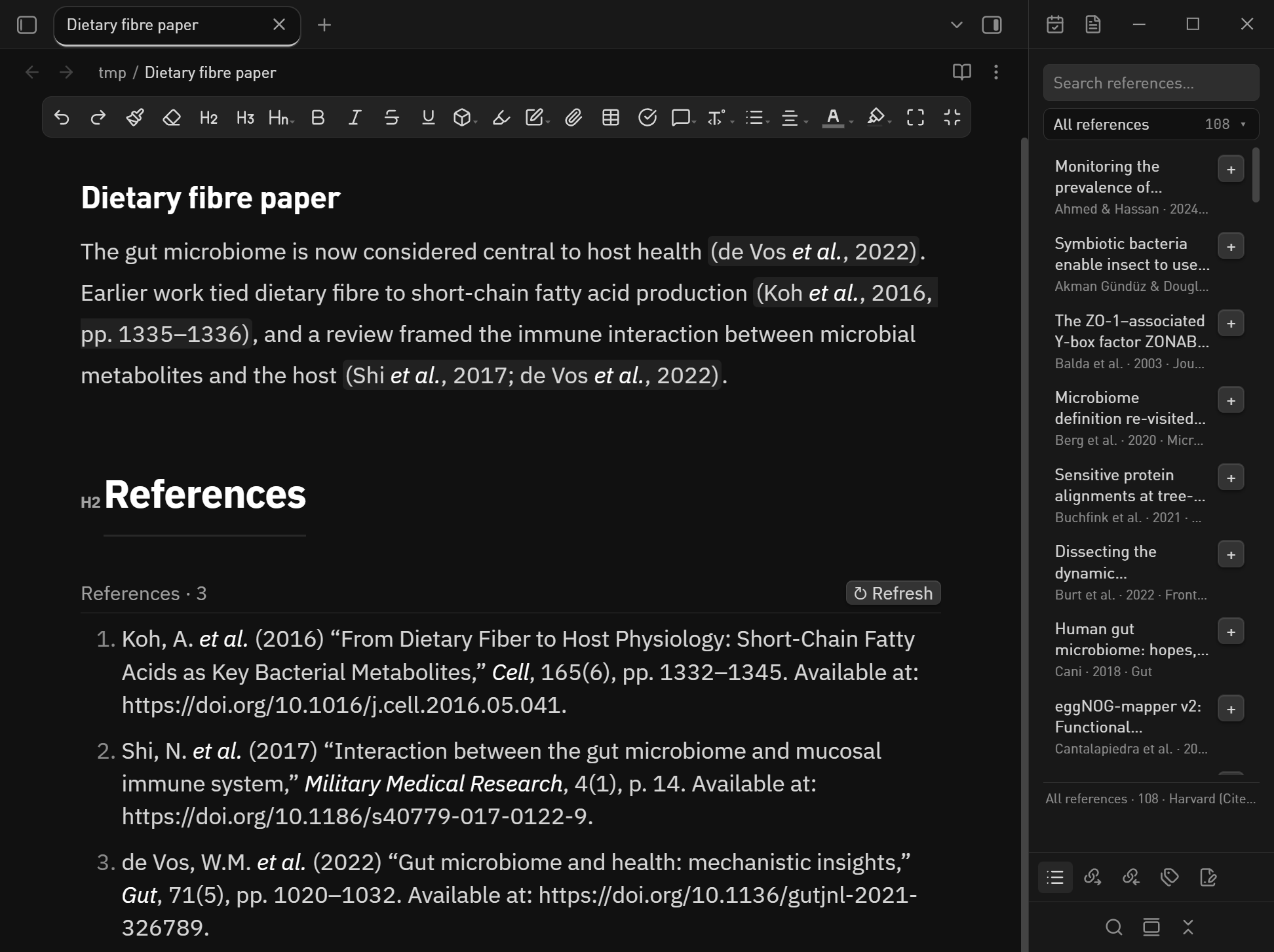
What changed in 0.3.7
- The last remaining style risk is gone. The group menu now receives its measured
position as CSS custom properties (--en-menu-left,--en-menu-top,--en-menu-width)
and the stylesheet ownsleft/top/min-width, which is the form the directory
scanner accepts. - README now discloses everything the scan asks about, in a
## Disclosuressection:
no network traffic (and why the twofetchcall sites inside the bundled WebAssembly
loader never open a socket), the read-only.enloutside the vault, the export-only
use ofpandoc/ PowerShell / Word, write-only clipboard access, and the bundled
sql-wasm.wasm.
SHA256SUMS.txt covers every asset in this release.
中文说明
- 最后一条样式风险清掉了:分组菜单的位置改为用 CSS 自定义属性传递
(--en-menu-left/--en-menu-top/--en-menu-width),left/top/min-width
回到样式表里 —— 这是审核扫描接受的形式。 - README 新增「行为披露」章节,把扫描关心的东西全写明:不联网(以及为什么打包进来的
WebAssembly 加载器里那两处fetch永远不会建立连接)、只读库外.enl、只在导出时调用
pandoc / PowerShell / Word、剪贴板只写不读、内置的sql-wasm.wasm是什么。
0.3.6
Cite as you write from your EndNote library, then export to Word or LaTeX.
What changed in 0.3.6
Both blocking findings from the directory review are fixed, plus the cheap warnings.
- No more direct style assignment. The group menu still positions itself from
measured geometry, but only the coordinates are set from code (setCssProps); its
position and look live instyles.css. - No API newer than
minAppVersion. The sidebar now opens with
rightSplit.expand()+setActiveLeaf()instead ofrevealLeaf(), and the UI
language follows the system locale instead of reading Obsidian's internal
localStoragekey. - Review hygiene:
document→activeDocument/activeWindow(pop-out windows),
createSpan()/createFragment()instead ofdocument.createElement(),
vault.configDirinstead of a hard-coded.obsidian, ES imports instead of
require(),@codemirror/*declared as dependencies, nobuiltin-modules,
no!importantin the CSS, unused imports and pointless escapes removed. npm run lintruns the sameeslint-plugin-obsidianmdrules the scanner uses —
it currently reports 0 errors.- Releases now carry GitHub artifact attestations, so the build provenance of
main.jsandstyles.csscan be verified.
SHA256SUMS.txt covers every asset in this release.
中文说明
审核报的两个阻断项都修了,顺带清掉了一批警告:
- 不再直接写样式:分组菜单仍按实测位置弹出,但代码只传坐标(
setCssProps),
位置和外观都回到styles.css里。 - 不再用到高于最低版本的 API:侧边栏改用
rightSplit.expand()+setActiveLeaf()
代替revealLeaf();界面语言跟随系统语言,不再读 Obsidian 内部的localStorage。 - 其它清理:
document换activeDocument/activeWindow(支持弹出窗口)、
createSpan()/createFragment()取代document.createElement()、
用vault.configDir取代硬编码.obsidian、ES import 取代require()、
@codemirror/*声明为依赖、去掉builtin-modules、去掉 CSS 里的!important、
清理未使用的导入和无意义转义。 - 新增
npm run lint,跑的就是审核用的同一套eslint-plugin-obsidianmd规则,
现在是 0 error。 - 发布产物现在带 GitHub 构建证明(artifact attestation),可以验证
main.js确实由这个仓库构建。
0.3.5
Cite as you write from your EndNote library, then export to Word or LaTeX.
What changed in 0.3.5
No behaviour change — this release makes the build reproducible, which is what the
community directory's build verification compares:
- The bundled CSL styles and locales are now line-ending normalised, and
.gitattributeskeeps every file LF. A fresh clone plusnpm run build
reproduces the committedmain.jsbyte for byte on Windows, macOS and Linux. - Previously a CRLF checkout produced a bundle with different escapes for the
embedded style XML, so "does the committed build match the source" could fail
for reasons unrelated to the code.
SHA256SUMS.txt covers every asset in this release.
中文说明
功能没有变化,这一版是让"构建结果可复现"——Obsidian 目录审核会重新构建插件、和仓库里提交的
main.js 逐字节比对:
- 内嵌的 CSL 样式和语言包现在会统一换行符,配合
.gitattributes让仓库里所有文件都是 LF。
重新克隆 +npm run build在 Windows / macOS / Linux 上产物完全一致。 - 以前用 CRLF 检出时,内嵌 XML 的转义会变,导致"提交的构建是否等于源码构建"这一项无端报错。
0.3.4
Cite as you write from your EndNote library, then export to Word or LaTeX.
First submission to the Obsidian community directory.
Install
From the directory once published: Settings → Community plugins → Browse → EndNote Cite.
Until then, unzip endnote-cite-0.3.4.zip into <your vault>/.obsidian/plugins/endnote-cite/
(the bridge/ folder must sit next to main.js) and reload the plugins list.
What changed in 0.3.4
- Citation text is now built as DOM nodes instead of going through
innerHTML, so no
markup from your library can ever be parsed as HTML. - Removed console logging and gave the manifest a real author name and author URL, per
the submission requirements. - README now states the plugin's file access and network behaviour explicitly
(read-only.enloutside the vault, no network, no telemetry).
SHA256SUMS.txt covers every asset in this release.
中文说明
第一次提交到 Obsidian 官方社区插件目录。
这一版改了什么
- 正文引用不再走
innerHTML,改为一颗一颗节点手工构建,文献库里的文字不可能被当成 HTML 解析。 - 去掉控制台日志;manifest 补上真实作者名和作者主页(提交要求里有这一条)。
- README 明确写清文件访问和联网行为:只读库外的
.enl、不联网、无遥测。
安装:发布后从 设置 → 第三方插件 → 浏览 搜索 EndNote Cite;在此之前把
endnote-cite-0.3.4.zip 解压到 <你的库>/.obsidian/plugins/endnote-cite/ 并重新加载插件列表。
0.3.3

Cite as you write from your EndNote library, then export to Word or LaTeX.
Install
- Unzip
endnote-cite-0.3.3.zipinto<your vault>/.obsidian/plugins/endnote-cite/—
thebridge/folder must sit next tomain.js, the EndNote-field export needs it. - Settings → Community plugins → Reload, then enable EndNote Cite.
- Point the plugin at your
.enlfile and pick a style.
Desktop only (Windows / macOS / Linux). The live EndNote-field export and the
automatic library refresh additionally need Windows + Microsoft Word + EndNote.
What's new in this release
- The reference list now keeps itself up to date. An
endnote-bibcode block
redraws about half a second after you add or remove a citation, and within 5 s of
EndNote saving the library — new records, edited authors, years and journal
metadata included. Before, it rendered once and waited for the manual↻ Refresh. - Fixed: collapsing a row in the library sidebar. The details panel used to open
as a flex sibling and squeeze the title to a sliver, so in a narrow sidebar there
was nothing left to click. The whole row is now the toggle (Enter/Spacetoo),
the details take their own line underneath, a▸ / ▾chevron marks the state, and
the list keeps its scroll position. - Documented the two ways to get a reference list: static text, or the live block.
Features
- Reads your library, never writes it — the
.enlSQLite file is opened read-only;
groups, keywords and the output style all come from the library itself. [@completion in the editor, plus EndNote: Insert citation for a search dialog.
[@key, pp. 12-13]adds a locator.- Formatted citations in the editor, rendered with the output style EndNote
currently has selected (Cite Them Right-Harvard by default). - Library sidebar — search, groups, abstract, and one click to cite the note you
were last editing. - Word, two ways: plain pandoc text, or real
ADDIN EN.CITE+EN.REFLISTfields
that Word's Update Citations and Bibliography still understands. - LaTeX / BibTeX / CSL JSON export.
Checksums
SHA256SUMS.txt covers every asset in this release.
中文说明
边写边引:直接读你的 EndNote 文献库,正文里显示排好版的引用,文末自动生成参考文献表,
再导出成能在 Word 里继续「更新引文与参考文献」的 .docx,或者 LaTeX / BibTeX。
安装:把 endnote-cite-0.3.3.zip 解压到 <你的库>/.obsidian/plugins/endnote-cite/
(bridge/ 文件夹必须和 main.js 放在一起,EndNote 域导出要用它),然后
设置 → 第三方插件 → 重新加载,再启用 EndNote Cite。只支持桌面版 Obsidian;
EndNote 真域导出和库自动刷新还需要 Windows + Word + EndNote。
这一版做了什么
- 文末的参考文献表会自己更新了:新增或删除一条引用,约 0.5 秒后重画;EndNote 保存库后
5 秒内同步,新文献、改过的作者和年份都会跟着变。以前只渲染一次,要手动点↻ Refresh。 - 修好了侧边栏「展开后收不回来」:详情原来和标题挤在同一行,侧栏一窄标题就被压没了。
现在整行都是开关(键盘Enter/Space也行),详情单独占一行,左侧有▸ / ▾箭头
指示状态,列表滚动位置也不会再跳回顶部。 - 文档里补了一节,讲清楚"静态参考文献表"和"实时文献表代码块"两种做法的区别。
能力:只读你的 .enl 库(绝不写入);[@ 补全;正文引用按 EndNote 当前
Output Style 排版;文献库侧边栏(搜索、分组、摘要、一键插入到刚才编辑的笔记);
Word 两种导出(纯文字 / 真 EndNote 域,可在 Word 里更新);LaTeX / BibTeX / CSL JSON 导出。