Repository navigation
LabelPrint Studio 2.2.1

What's new in 2.2.1
🔗 A label and its roll stay in step
- New label asks for the roll (the one you used last comes first) and takes the size of one of its labels.
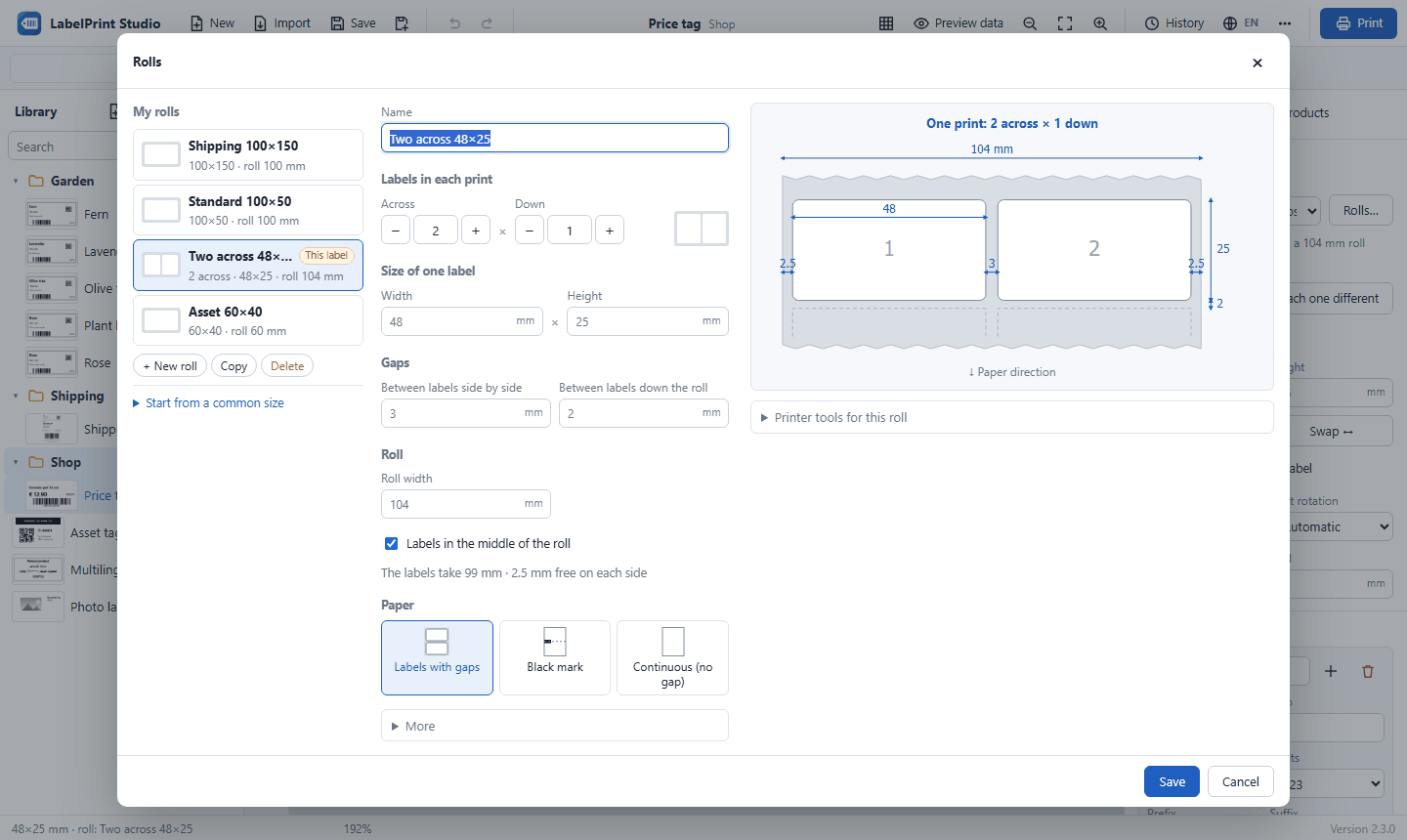
- Rolls… in the label panel now saves with Save and use for this label, and the roll your label uses is marked This label.
- When you change the size of a roll's labels, labels on that roll follow.
- If a label's size differs from its roll's labels, the panel says so and fixes it with one click (undoable).
- Printer control starts with the label's roll, like the print window.
🧻 The roll picture shows one print
The picture shows exactly what one print contains (2 across × 1 down, for example), with the roll going on above and below, so the numbers match what you see.
Download
👉 LabelPrintStudio-v2.2.1-win64.zip (Windows 10 / 11, 64-bit, about 11 MB; nothing else to install)
How to install
- Download the zip above.
- Right-click it → Extract All… to a permanent folder, for example
C:\LabelPrintStudio. - Double-click
Create Desktop Shortcut.batonce. - Start LabelPrint Studio from the desktop shortcut.
Updating in place: close the app and copy the folders app, web, python, the file run.py and the .bat files from the new zip over your installation folder. Your labels, rolls, settings and print history stay as they are.
Free and open source under the MIT License. Designed and developed by Amirhossein Arani.