Repository navigation
Releases
v2.3.0

Full Changelog: v2.2.1...v2.3.0
LabelPrint Studio 2.2.1
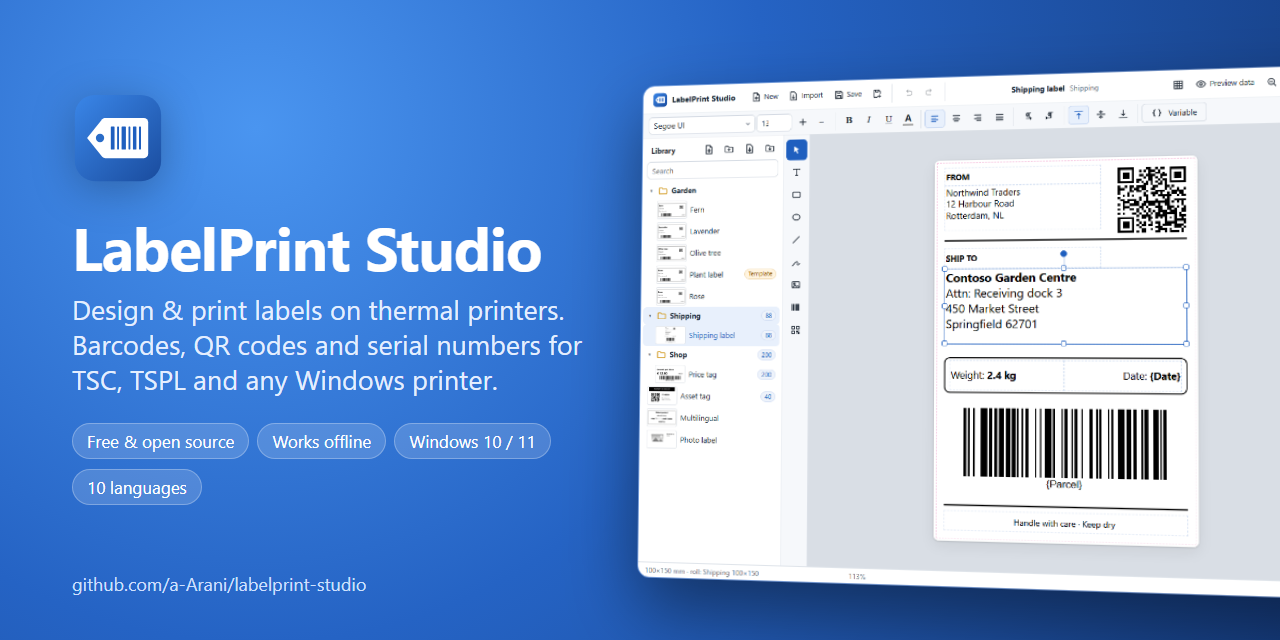
What's new in 2.2.1
🔗 A label and its roll stay in step
- New label asks for the roll (the one you used last comes first) and takes the size of one of its labels.
- Rolls… in the label panel now saves with Save and use for this label, and the roll your label uses is marked This label.
- When you change the size of a roll's labels, labels on that roll follow.
- If a label's size differs from its roll's labels, the panel says so and fixes it with one click (undoable).
- Printer control starts with the label's roll, like the print window.
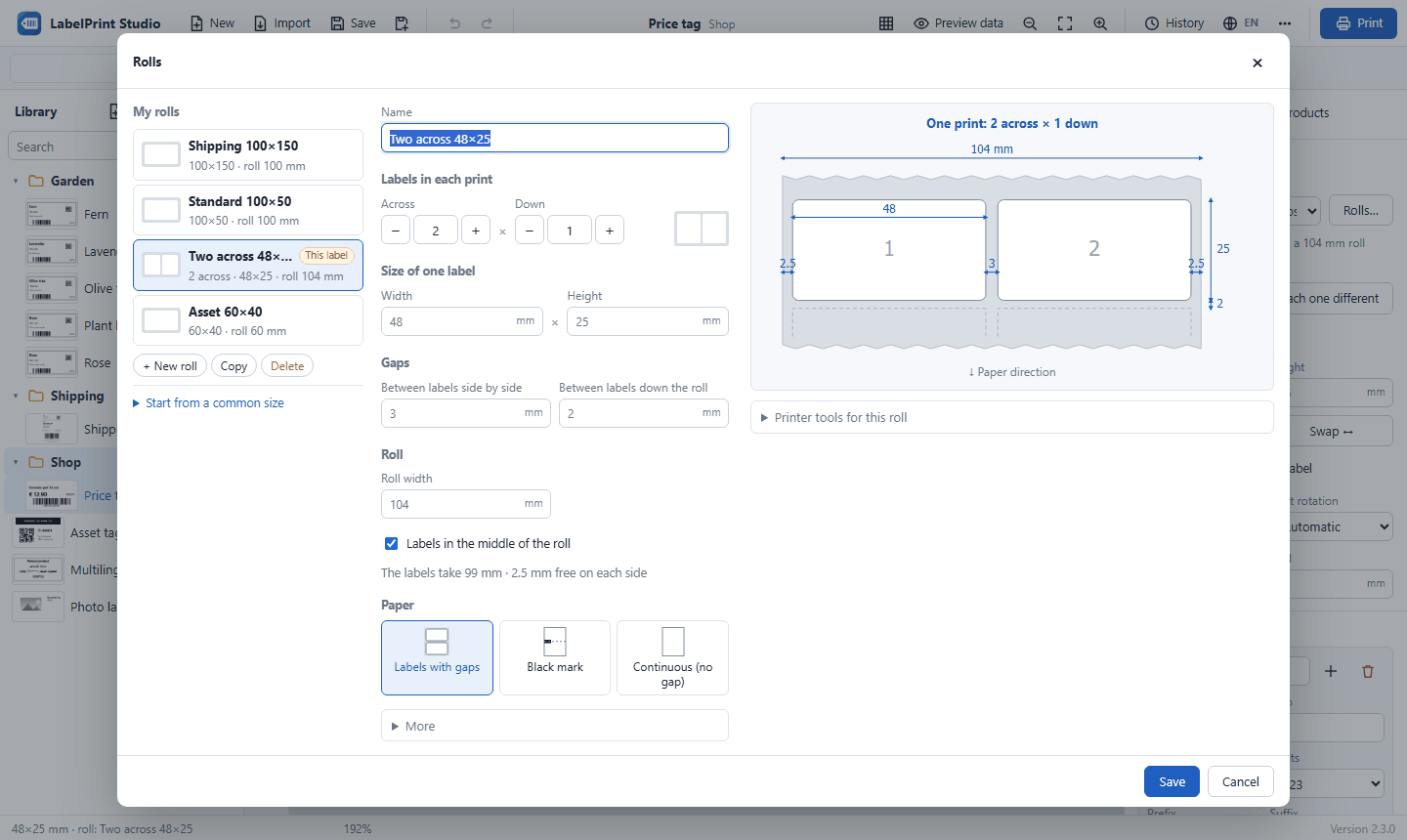
🧻 The roll picture shows one print
The picture shows exactly what one print contains (2 across × 1 down, for example), with the roll going on above and below, so the numbers match what you see.
Download
👉 LabelPrintStudio-v2.2.1-win64.zip (Windows 10 / 11, 64-bit, about 11 MB; nothing else to install)
How to install
- Download the zip above.
- Right-click it → Extract All… to a permanent folder, for example
C:\LabelPrintStudio. - Double-click
Create Desktop Shortcut.batonce. - Start LabelPrint Studio from the desktop shortcut.
Updating in place: close the app and copy the folders app, web, python, the file run.py and the .bat files from the new zip over your installation folder. Your labels, rolls, settings and print history stay as they are.
Free and open source under the MIT License. Designed and developed by Amirhossein Arani.
LabelPrint Studio 2.2.0
What's new in 2.2
🧻 A Rolls window you understand at a glance
Describe your roll the way you see it:
- Labels in each print: how many across, and how many down (nearly always 1), with − and + buttons and a small picture.
- Size of one label: the width and height of a single label, not the whole row.
- Gaps: between labels side by side, and down the roll (for black-mark paper, the mark's height).
- Roll width, with Labels in the middle of the roll.
A large picture shows the roll as it comes out of the printer, with the labels numbered in print order, a frame around one print, and readable sizes. The size you are editing is highlighted.
If the labels don't fit (for example two 100 mm labels on a 100 mm roll), the window says by how much and offers one-click fixes: make the roll wider, or each label narrower. You can also start from a common size (single, two-across, three-across). A roll's name follows its layout until you rename it.
Also
- A print can hold more than one row of labels. The preview, test print, layout test and the printer's paper size follow it.
- Fixed a stray "null" under the roll form, and number boxes no longer show spin arrows over their "mm".
Download
👉 LabelPrintStudio-v2.2.0-win64.zip (Windows 10 / 11, 64-bit, about 11 MB; nothing else to install)
How to install
- Download the zip above.
- Right-click it → Extract All… to a permanent folder, for example
C:\LabelPrintStudio. - Double-click
Create Desktop Shortcut.batonce. - Start LabelPrint Studio from the desktop shortcut.
Updating in place: close the app and copy the folders app, web, python, the file run.py and the .bat files from the new zip over your installation folder. Your labels, rolls, settings and print history stay as they are.
Free and open source under the MIT License. Designed and developed by Amirhossein Arani.
LabelPrint Studio 2.1.7
What's new in 2.1.7
📁 Folders work like a file manager
Click a folder and it turns blue. The library buttons above it (new label, new folder, import a file, import a folder) then act inside that folder. Click on empty space in the list to unselect it, and the buttons act on the top level again. The highlighted Library title shows that the top level is selected.
See the changelog for 2.1.5–2.1.6 (Stop LabelPrint Studio, old folders can always be deleted).
Download
👉 LabelPrintStudio-v2.1.7-win64.zip (Windows 10 / 11, 64-bit, about 11 MB; nothing else to install)
How to install
- Download the zip above.
- Right-click it → Extract All… to a permanent folder, for example
C:\LabelPrintStudio. - Double-click
Create Desktop Shortcut.batonce. - Start LabelPrint Studio from the desktop shortcut.
Updating in place: close the app and copy the folders app, web, python, the file run.py and the .bat files from the new zip over your installation folder. Your labels, settings and print history stay as they are.
Free and open source under the MIT License. Designed and developed by Amirhossein Arani.
LabelPrint Studio 2.1.6
What's fixed in 2.1.6
🗑️ Old folders can always be deleted
- If an older folder could not be deleted although all its files could, the cause was the black window of Create Desktop Shortcut.bat waiting at "Press any key to continue". It kept the folder in use. Close that window and the folder can be deleted. In this version, that window (and the one of Stop LabelPrint Studio.bat) waits outside the app folder.
- Stop LabelPrint Studio.bat now also finds a copy whose files were already deleted while it was still running.
- When the app starts, an app window left open from an earlier start (for example one an older version opened) is closed, so the new window gets a browser of its own.
See the changelog for 2.1.5 (Stop LabelPrint Studio, older copies replaced instead of reused).
Download
👉 LabelPrintStudio-v2.1.6-win64.zip (Windows 10 / 11, 64-bit, about 11 MB; nothing else to install)
How to install
- Download the zip above.
- Right-click it → Extract All… to a permanent folder, for example
C:\LabelPrintStudio. - Double-click
Create Desktop Shortcut.batonce. - Start LabelPrint Studio from the desktop shortcut.
Removing an older copy: close any black command windows from it, run Stop LabelPrint Studio.bat from the new folder, then delete the old folder.
Updating in place: close the app and copy the folders app, web, python, the file run.py and the .bat files from the new zip over your installation folder. Your labels, settings and print history stay as they are.
Free and open source under the MIT License. Designed and developed by Amirhossein Arani.
LabelPrint Studio 2.1.5
What's new in 2.1.5
🛑 Stop LabelPrint Studio
The app folder now has Stop LabelPrint Studio.bat. It ends every running part of the app: the server of any copy or older version, and the app window. Run it before you move or delete the folder.
✅ Nothing keeps running
- Closing the app window still stops everything within a few seconds.
- If a copy from another folder or an older version is still running, starting the app now replaces it instead of connecting to it. Before, the old copy kept running and its folder could not be deleted.
- The app window is started outside the app folder, so the browser never keeps that folder in use.
- The app no longer stops after the computer wakes from sleep while its window is open.
Download
👉 LabelPrintStudio-v2.1.5-win64.zip (Windows 10 / 11, 64-bit, about 11 MB; nothing else to install)
How to install
- Download the zip above.
- Right-click it → Extract All… to a permanent folder, for example
C:\LabelPrintStudio. - Double-click
Create Desktop Shortcut.batonce. - Start LabelPrint Studio from the desktop shortcut.
Removing an older copy: run Stop LabelPrint Studio.bat from the new folder. It also stops older copies, and then the old folder can be deleted.
Updating in place: close the app and copy the folders app, web, python, the file run.py and the .bat files from the new zip over your installation folder. Your labels, settings and print history stay as they are.
Free and open source under the MIT License. Designed and developed by Amirhossein Arani.
LabelPrint Studio 2.1.4
What's new in 2.1.4
⏪ Reverse feed one label, exactly to the label
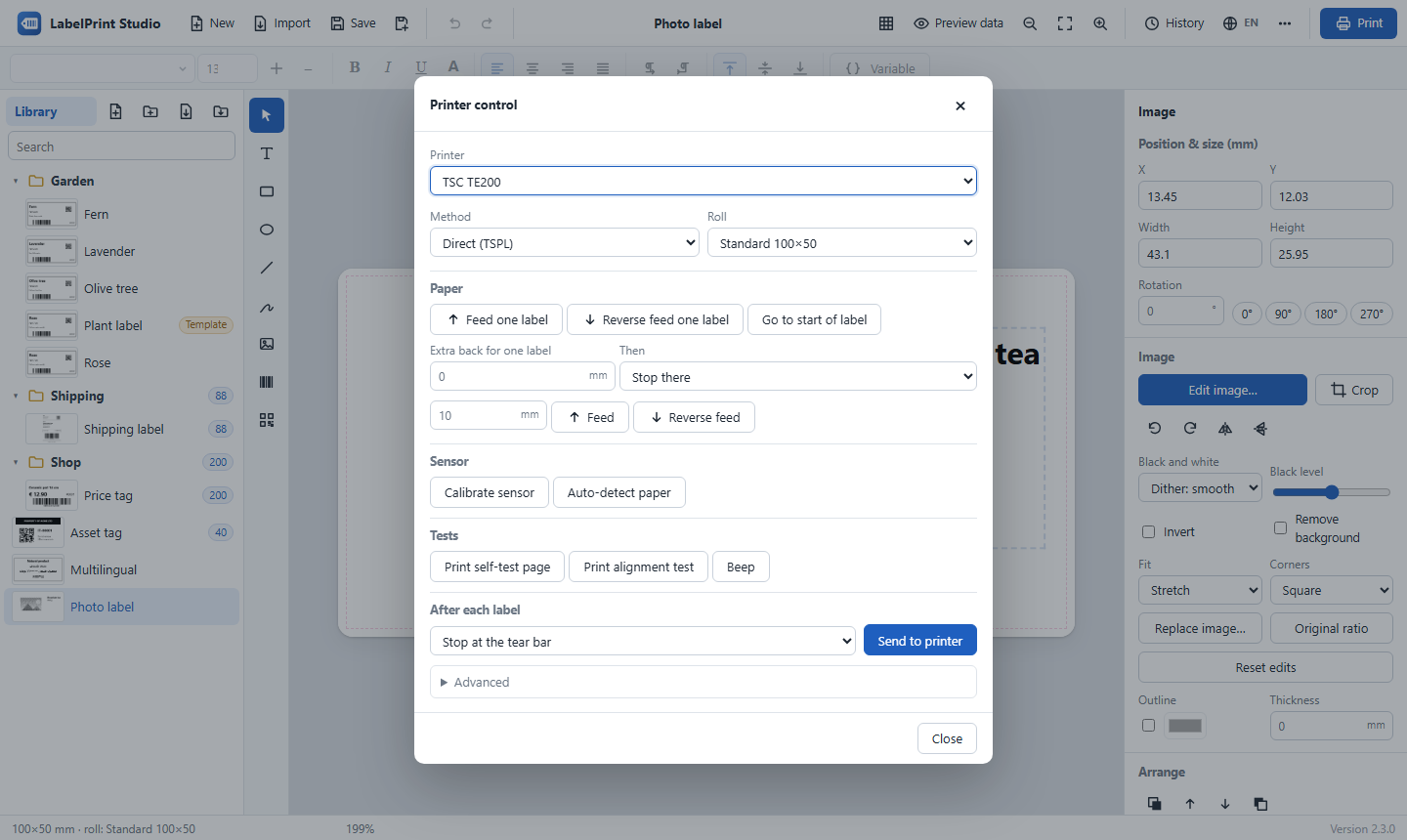
TSPL printers cannot report how far they just fed. So ⋯ → Printer control… → Reverse feed one label can now go back a little further than one label (Extra back for one label, in mm) and then come forward until the sensor finds the gap (HOME), or to the start of the next label (FORMFEED). The paper stops exactly at a label, however far the last feed really went.
Both settings are kept for each printer. The defaults (0 mm, Stop there) work as before. Start with an extra a little larger than the distance from the printer's gap sensor to the tear bar. Don't pull back so far that the paper edge leaves the rubber roller, because the printer manual warns that too much back feed can jam the paper.
See the changelog for 2.1.1–2.1.3 (the app closes completely, names with * / : and more, reverse feed one label).
Download
👉 LabelPrintStudio-v2.1.4-win64.zip (Windows 10 / 11, 64-bit, about 11 MB; nothing else to install)
How to install
- Download the zip above.
- Right-click it → Extract All… to a permanent folder, for example
C:\LabelPrintStudio. - Double-click
Create Desktop Shortcut.batonce. - Start LabelPrint Studio from the desktop shortcut.
Updating from an earlier version: close the app and copy the folders app, web, python and the file run.py from the new zip over your installation folder. Your labels, settings and print history stay as they are.
Free and open source under the MIT License. Designed and developed by Amirhossein Arani.
LabelPrint Studio 2.1.3
What's new in 2.1.3
⏪ Reverse feed one label
⋯ → Printer control… → Reverse feed one label pulls the paper back by exactly one label and its gap (or black mark), taken from the roll you select. TSPL printers have no command for this, so LabelPrint Studio sends BACKFEED with that length. The one-label moves (forward, back, start of label) and the distance moves now sit on separate rows.
Also in 2.1.2: names with characters Windows does not allow (* / : ? " < > |) are kept as look-alikes (50*100 → 50×100), so renaming such folders and labels works. See the changelog.
Download
👉 LabelPrintStudio-v2.1.3-win64.zip (Windows 10 / 11, 64-bit, about 11 MB; nothing else to install)
How to install
- Download the zip above.
- Right-click it → Extract All… to a permanent folder, for example
C:\LabelPrintStudio. - Double-click
Create Desktop Shortcut.batonce. - Start LabelPrint Studio from the desktop shortcut.
Updating from an earlier version: close the app and copy the folders app, web, python and the file run.py from the new zip over your installation folder. Your labels, settings and print history stay as they are.
Free and open source under the MIT License. Designed and developed by Amirhossein Arani.
LabelPrint Studio 2.1.2
What's fixed in 2.1.2
✏️ Renaming folders and labels
- Names can now contain the characters Windows does not allow in file names (
* / \ : ? " < > |): they become look-alike characters, so the name keeps its look.50*100becomes50×100and50/100becomes50∕100. Before, those characters became spaces, so a rename like50*100seemed to do nothing. - A
/in the name of a new folder or label no longer creates a sub-folder. - If another program (such as File Explorer or OneDrive) is holding a folder or label, renaming, moving or deleting it waits a moment and then tells you clearly, in your language, instead of showing an internal error. A folder can no longer end up half-moved.
- Names made of numbers, such as
50×100, no longer read backwards in a right-to-left interface (Persian, Arabic).
Everything from 2.1 is included: the built-in photo editor, test print with position nudge, full printer control, and the app closing completely when its window closes. See the changelog.
Download
👉 LabelPrintStudio-v2.1.2-win64.zip (Windows 10 / 11, 64-bit, about 11 MB; nothing else to install)
How to install
- Download the zip above.
- Right-click it → Extract All… to a permanent folder, for example
C:\LabelPrintStudio. - Double-click
Create Desktop Shortcut.batonce. - Start LabelPrint Studio from the desktop shortcut.
Updating from an earlier version: close the app and copy the folders app, web, python and the file run.py from the new zip over your installation folder. Your labels, settings and print history stay as they are.
Free and open source under the MIT License. Designed and developed by Amirhossein Arani.
LabelPrint Studio 2.1.1
What's new in 2.1.1
✅ Closing the window closes the app
When you close the LabelPrint Studio window, everything stops within a few seconds: no browser and no Python process stays in the background. The app window now runs in its own browser profile (%LOCALAPPDATA%\LabelPrintStudio\browser) with background mode off. Reloading the page or switching the language keeps the app running.
⏳ A longer start-up screen
The start-up screen now stays for 3 seconds.
Everything from 2.1 is included: the built-in photo editor, test print with position nudge, and full printer control. See the changelog.
Download
👉 LabelPrintStudio-v2.1.1-win64.zip (Windows 10 / 11, 64-bit, about 11 MB; nothing else to install)
How to install
- Download the zip above.
- Right-click it → Extract All… to a permanent folder, for example
C:\LabelPrintStudio. - Double-click
Create Desktop Shortcut.batonce. - Start LabelPrint Studio from the desktop shortcut.
Updating from 2.0 or 2.1: close the app and copy the folders app, web, python and the file run.py from the new zip over your installation folder. Your labels, settings and print history stay as they are.
Free and open source under the MIT License. Designed and developed by Amirhossein Arani.