Skip to content

This project aims to emulate an OS command shell, allowing the user to navigate through their file system, add, delete, and check the status of files and directories, as well as allow for piping the output of one command into the input of another.

Notifications You must be signed in to change notification settings

adamsthomas48/commandShell

Folders and files

NameName
Last commit message
Last commit date

Latest commit


History

5 Commits


Repository files navigation

Click on the image below to see a breif example of this programs output!
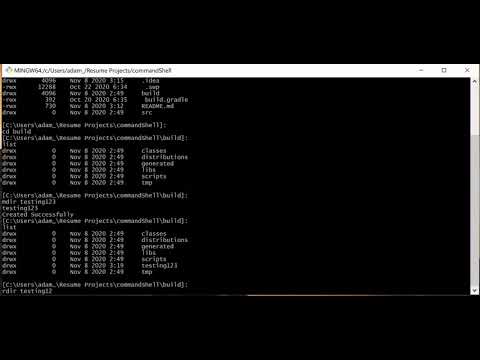
Example Usage

User Documentation:

Availible Commands:
	exit: terminates shell
	ptime: Check how much time the cpu has taken in running commands.
	list: Check status of files and directories at your current location.
	cd:
		- cd filename will move you into a specified file.
		- cd .. will move up one level in your file directory
	here: Get the current location in the file system.
	mdir filename: Will create a new folder with the user specified file name.
	rdir filename: Remove a user specified file.
	history: Returns a list of previously run commands.
	^ <number>: Allows user to run a command again from the history list.

Sources: Java Documentation - docs.oracle.com geeksforgeeks.com stackoverflow.com

About

This project aims to emulate an OS command shell, allowing the user to navigate through their file system, add, delete, and check the status of files and directories, as well as allow for piping the output of one command into the input of another.

Resources

Stars

Watchers

Forks

Releases

No releases published

Packages

No packages published

Languages