Repository navigation
Releases
noted 1.9.0

Install or update to this version
# npm: macOS, Linux, Windows
npm install -g @adrianmg/noted

# Homebrew: macOS, Linux (already installed with it? brew upgrade noted)
brew tap adrianmg/noted https://github.com/adrianmg/noted && brew trust adrianmg/noted && brew install noted

# Install script: macOS, Linux
curl -fsSL https://noted.computer/install | sh

# Windows, in PowerShell
irm https://noted.computer/install.ps1 | iex
What's changed
Pasting keeps what you copied, and menus move like a Mac's.
- Paste rich text as markdown. Copy a list with links from Slack, a doc, an email or a chat with Claude, and paste it into a note with
⌘Vor^V: links stay links, bullets become a markdown list, checklists become tasks, and copied tables (Google Sheets, Excel, web pages) become tables, links in cells kept. noted only uses the copied formatting when it matches the pasted text, so a stale clipboard, SSH or tmux paste still pastes plain. Redirect links (Google, Outlook Safe Links) are unwrapped,•bullets become-, and invisible characters such as zero-width spaces are dropped. - ↑ to the menu bar. In an open menu, ↑ on the first item highlights the menu's title, where ←/→ move along the bar, even from an item with a submenu such as Options ▸ Theme. ↑ no longer wraps to the last item.
- Jump in menus.
⌥↑/⌥↓go to the first or last item;⌘↑/⌘↓(or^↑/^↓) go to the previous or next section.
Each build is checked against SHA256SUMS. More at noted.computer.
noted 1.8.0
Install or update to this version
# npm: macOS, Linux, Windows
npm install -g @adrianmg/noted

# Homebrew: macOS, Linux (already installed with it? brew upgrade noted)
brew tap adrianmg/noted https://github.com/adrianmg/noted && brew trust adrianmg/noted && brew install noted

# Install script: macOS, Linux
curl -fsSL https://noted.computer/install | sh

# Windows, in PowerShell
irm https://noted.computer/install.ps1 | iex
What's changed
A steadier install from npm. noted itself is the same as 1.7.0.
- npm checks the build before using it. On install, npm's package now runs noted once before putting it in place. If it can't run on your system, for example on a
noexecmount or after a cut-short download, the small Node launcher stays instead of a brokennoted. A check that hangs is stopped rather than stalling the install. - Stopping noted stops noted. When the Node launcher stays on macOS or Linux (installed with
--ignore-scripts, or the check above failed), it now passesSIGTERM,SIGHUPandSIGINTon to noted, so ending the launcher no longer leaves noted running on its own. noted's exit is the launcher's exit.
Each build is checked against SHA256SUMS. More at noted.computer.
noted 1.7.0
Install or update to this version
# npm: macOS, Linux, Windows
npm install -g @adrianmg/noted

# Homebrew: macOS, Linux (already installed with it? brew upgrade noted)
brew tap adrianmg/noted https://github.com/adrianmg/noted && brew trust adrianmg/noted && brew install noted

# Install script: macOS, Linux
curl -fsSL https://noted.computer/install | sh

# Windows, in PowerShell
irm https://noted.computer/install.ps1 | iex
What's changed
Find your place, and keep your folders how you left them.
- Find in the open note.
^Fsearches literal text, regardless of case, without leaving the note. Every match is lit;ENTERandShift+ENTERmove forward and back, wrapping at either end. Selected text fills the query, andESCleaves the cursor at the match. The footer becomes a WAVE-DOS find line, with your query and3 OF 12on the right, without shrinking the writing area. Find a note is now^P; typing in the notes list still searches all notes. - Folders stay as you left them. Open and closed folders are remembered as you change them, separately for each notes folder, including when the terminal is closed. View's Collapse all folders and Expand all folders change the whole tree at once. Folder style offers Plain, Arrows, or open and closed folder Icons; Icons needs a Nerd Font in the terminal.
- Nineteen themes. Options has a Theme submenu again, grouping System, noted's own looks, and the popular schemes. Dracula, Darcula, Ayu Mirage, Cobalt2, Red Sands, GitHub Dark, Nord, and Gruvbox light join the collection; Neon lime and Kanagawa retire, with saved selections falling back to Turbo blue. Preview still redraws the screen as you move, keeping the theme only when you pick it. Tall menus scroll to fit smaller terminals.
- Small clarifications. The welcome note points out early that a folder path in a title files the note there. Save says what noted already does: it saves as you type.
- Windows fixes. Terminal color detection and platform-specific tests now account for Windows behavior.
Each build is checked against SHA256SUMS. More at noted.computer.
noted 1.6.0
Install or update to this version
# npm: macOS, Linux, Windows
npm install -g @adrianmg/noted

# Homebrew: macOS, Linux (already installed with it? brew upgrade noted)
brew tap adrianmg/noted https://github.com/adrianmg/noted && brew trust adrianmg/noted && brew install noted

# Install script: macOS, Linux
curl -fsSL https://noted.computer/install | sh

# Windows, in PowerShell
irm https://noted.computer/install.ps1 | iex
What's changed
Try a theme before you pick it.
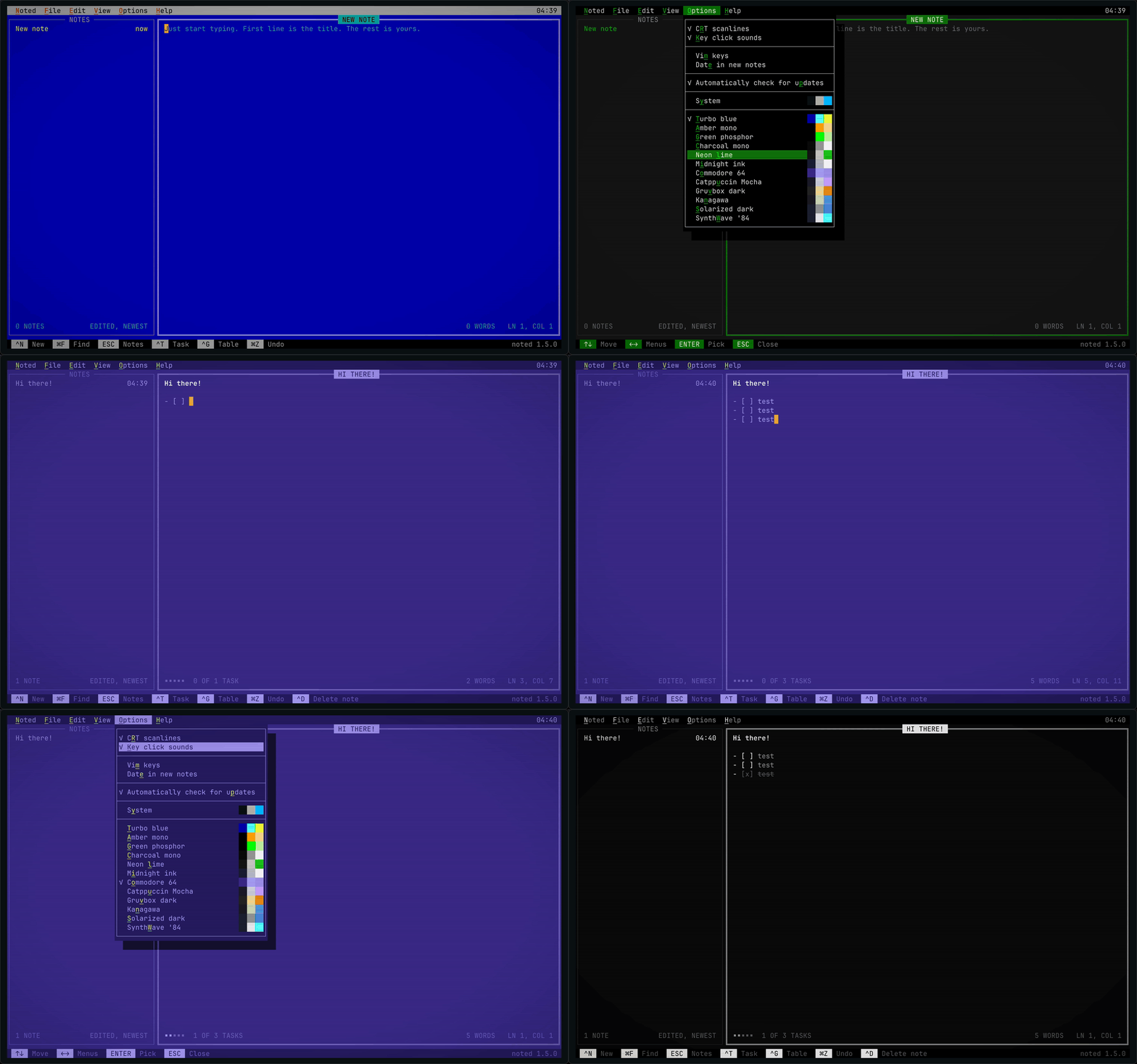
- Theme preview. In Options, move onto a theme and the whole screen is drawn in it at once.
ENTER, its letter or a click keeps it;ESC, moving off the themes or another menu puts back the one you had. Nothing is saved until you pick one, and the tick stays on the theme in use. Each theme shows its colors beside its name: the page, the text and what stands out. - Options. CRT scanlines and Key click sounds, Vim keys and Date in new notes, the update check, then every theme. CRT scanlines moves here from View, and its letter is now
R(Sis Solarized dark). Options opens on its first entry, so opening it never changes what you see, and it fits an 80 × 24 terminal. - View ▸ Image at cursor is grayed out until the cursor is on an image, as menus in DOS did for what can't be done yet.
⌥↩still says how to add one.
Each build is checked against SHA256SUMS. More at noted.computer.
noted 1.5.0
Install or update to this version
# npm: macOS, Linux, Windows
npm install -g @adrianmg/noted

# Homebrew: macOS, Linux (already installed with it? brew upgrade noted)
brew tap adrianmg/noted https://github.com/adrianmg/noted && brew trust adrianmg/noted && brew install noted

# Install script: macOS, Linux
curl -fsSL https://noted.computer/install | sh

# Windows, in PowerShell
irm https://noted.computer/install.ps1 | iex
What's changed
A theme in your terminal's own colors.
- System theme. Options ▸ System, or
noted --theme system, draws noted in your terminal's own text, background and colors. It asks the terminal for them after noted is on screen, and again whenever the terminal comes back into focus, so it follows your system from light to dark (in tmux, withset -g focus-events on). The last colors it was told are kept, so noted opens in them at once. A terminal that doesn't say gets xterm's colors; on Windows it doesn't ask. Turbo blue is still the default.
Each build is checked against SHA256SUMS. More at noted.computer.
noted 1.4.0
Install or update to this version
# npm: macOS, Linux, Windows
npm install -g @adrianmg/noted

# Homebrew: macOS, Linux (already installed with it? brew upgrade noted)
brew tap adrianmg/noted https://github.com/adrianmg/noted && brew trust adrianmg/noted && brew install noted

# Install script: macOS, Linux
curl -fsSL https://noted.computer/install | sh

# Windows, in PowerShell
irm https://noted.computer/install.ps1 | iex
What's changed
See the images in your notes, and paste them in.
- Images. A note's images,
, now open over the note:⌥↩on an image's line in Ghostty and kitty,⌥-click (or^-click), or View ▸ Image at cursor. In Ghostty and kitty the picture shows at its own pixels, sharp on Retina screens, shrunk only when it doesn't fit; PNGs as they are and, on a Mac, JPEG, HEIC, GIF and the rest; other terminals show its title and, for a PNG, its size. Open image hands it to your system's viewer;ESCgoes back. Nothing is read until you open one, so typing never waits on a picture. - Paste images. Copy a screenshot, or Copy Image in a browser, and press
^V: noted saves it beside the note asimage.pngand putsat the cursor. Paste the same image again and it uses that file again. Text on the clipboard still wins, so spreadsheet cells paste as a table. On macOS, Windows, and Linux withwl-clipboardorxclip. - Never fetched. An image a note names by a web or network address (
https://…,\\server\share\…) isn't fetched, so a note can't make noted, or Windows on its behalf, contact a server. - Windows. Noted ▸ Show notes folder went through
cmd, which read&,|,^and%in the folder's name: a folder namedR&Ddidn't open, and ranDas a command. Files and folders now open as a double-click opens them, and noted says when one can't.
Each build is checked against SHA256SUMS. More at noted.computer.
noted 1.3.0
Install or update to this version
# npm: macOS, Linux, Windows
npm install -g @adrianmg/noted

# Homebrew: macOS, Linux (already installed with it? brew upgrade noted)
brew tap adrianmg/noted https://github.com/adrianmg/noted && brew trust adrianmg/noted && brew install noted

# Install script: macOS, Linux
curl -fsSL https://noted.computer/install | sh

# Windows, in PowerShell
irm https://noted.computer/install.ps1 | iex
What's changed
Know when there's a new noted, three new themes, and tidier Options.
- Check for updates. Once a day, after noted is on screen, it asks noted.computer for the latest version, with nothing else sent. A newer one shows in the bottom-right corner as
^O Update to noted 1.4.0, and in the Noted menu.^Oopens where to get it: View on GitHub, or Not now to skip that version until a newer one is out. With nothing found,^Oor Noted ▸ Check for updates… looks now. Options ▸ Automatically check for updates turns the daily check off. - New themes. Commodore 64, Kanagawa and Solarized dark. Dracula and Rosé Pine are gone; if you used one, noted opens in Turbo blue.
- Options. Vim keys, Date in new notes and Key click sounds, then the update check. Neon lime is now
L. - About. Clearer copy, with a link to noted.computer.
Each build is checked against SHA256SUMS. More at noted.computer.
noted 1.2.0
Install or update to this version
# npm: macOS, Linux, Windows
npm install -g @adrianmg/noted

# Homebrew: macOS, Linux (already installed with it? brew upgrade noted)
brew tap adrianmg/noted https://github.com/adrianmg/noted && brew trust adrianmg/noted && brew install noted

# Install script: macOS, Linux
curl -fsSL https://noted.computer/install | sh

# Windows, in PowerShell
irm https://noted.computer/install.ps1 | iex
What's changed
Vim keys, notes from the command line, and dated titles.
- Vim keys. Turn them on in Options ▸ Vim keys: Normal and Insert modes, counts, motions,
dcywith text objects, undo and redo. The footer shows the mode and any half-typed command. ESC with nothing pending still goes to the notes list. - Add notes without opening noted.
noted --add call the dentistmakes a note;noted --append Groceries "- [ ] oat milk"adds to one, made if missing;--titlenames it; text can be piped in. The note's path is printed, so scripts, launchers and AI agents can use it. Usage errors now exit with2. - Date in new notes. Options ▸ Date in new notes starts every new note's title with today's date, written as your system writes it (
10-27-2026,27.10.2026,2026-10-27). Or set your own in settings:title = journal/{iso}. - Windows. Shortcuts read
CTRL+Xinstead of^X, and themes show in full color in Windows Terminal and other modern consoles, instead of 16 colors. - Ghostty on a Mac. Ghostty keeps ⌘↑ ⌘↓ for itself by default; noted now says so, once, when you seem to be reaching for them.
- Fixes. Three crashes editing Markdown tables:
^Gon a lone rule line, and Backspace in tables with ragged or leading-rule rows.
Each build is checked against SHA256SUMS. More at noted.computer.
noted 1.1.0
Install or update to this version
# npm: macOS, Linux, Windows
npm install -g @adrianmg/noted

# Homebrew: macOS, Linux (already installed with it? brew upgrade noted)
brew tap adrianmg/noted https://github.com/adrianmg/noted && brew trust adrianmg/noted && brew install noted

# Install script: macOS, Linux
curl -fsSL https://noted.computer/install | sh

# Windows, in PowerShell
irm https://noted.computer/install.ps1 | iex
What's changed
Typing is 2.2 times faster, and 30 to 49 times faster in long notes: a key in a 30,000-line note now takes about 0.05 ms, where 1.0.0 took about 1.5 ms. That's faster than vim: in the same sitting, noted answered a key in 0.075 ms and vim in 0.16 ms. noted still opens in about 2.5 ms, with 1,000 notes or 10,000.
| 1,000 notes on an Apple M4 Max, medians | 1.0.0 | 1.1.0 |
|---|---|---|
| Launch | 2.5 ms | 2.5 ms |
| Open a note | 0.17 ms | 0.16 ms |
| Type a key | 0.13 ms | 0.059 ms |
| Type a key in a 30,000-line note, at its end | 1.59 ms | 0.032 ms |
| Type a key in a 30,000-line note, at its start | 1.44 ms | 0.048 ms |
How these are measured, with every sample, and noted against Apple Notes, Obsidian, VS Code, vim and Emacs: benchmarks.
Each build is checked against SHA256SUMS. More at noted.computer.
noted 1.0.0
The first public release of noted: Markdown notes in your terminal, as if they ran on MS-DOS.
- Opens on a new note in about 2.5 ms, even with ten thousand notes.
- Saves as you type, one plain
.mdfile per note, in iCloud Drive or Documents. - Markdown lit as you type: headings, emphasis, code, links, quotes, task lists and tables.
- Find as you type across titles and text; folders from a
work/title prefix. - Pull-down menus, Norton Commander panes, eleven themes and optional CRT scanlines.
- macOS (one binary for Apple silicon and Intel), Linux (static, x86_64 and aarch64) and Windows (x86_64).
Install
npm install -g @adrianmg/noted
brew tap adrianmg/noted https://github.com/adrianmg/noted && brew trust adrianmg/noted && brew install noted
curl -fsSL https://noted.computer/install | sh     # macOS, Linux
irm https://noted.computer/install.ps1 | iex       # Windows, in PowerShell
Each build is checked against SHA256SUMS. More at noted.computer.