Network-tab-style DevTools for LLM calls in Angular apps. See every prompt, response, token, and dollar your app spends — without leaving the browser.



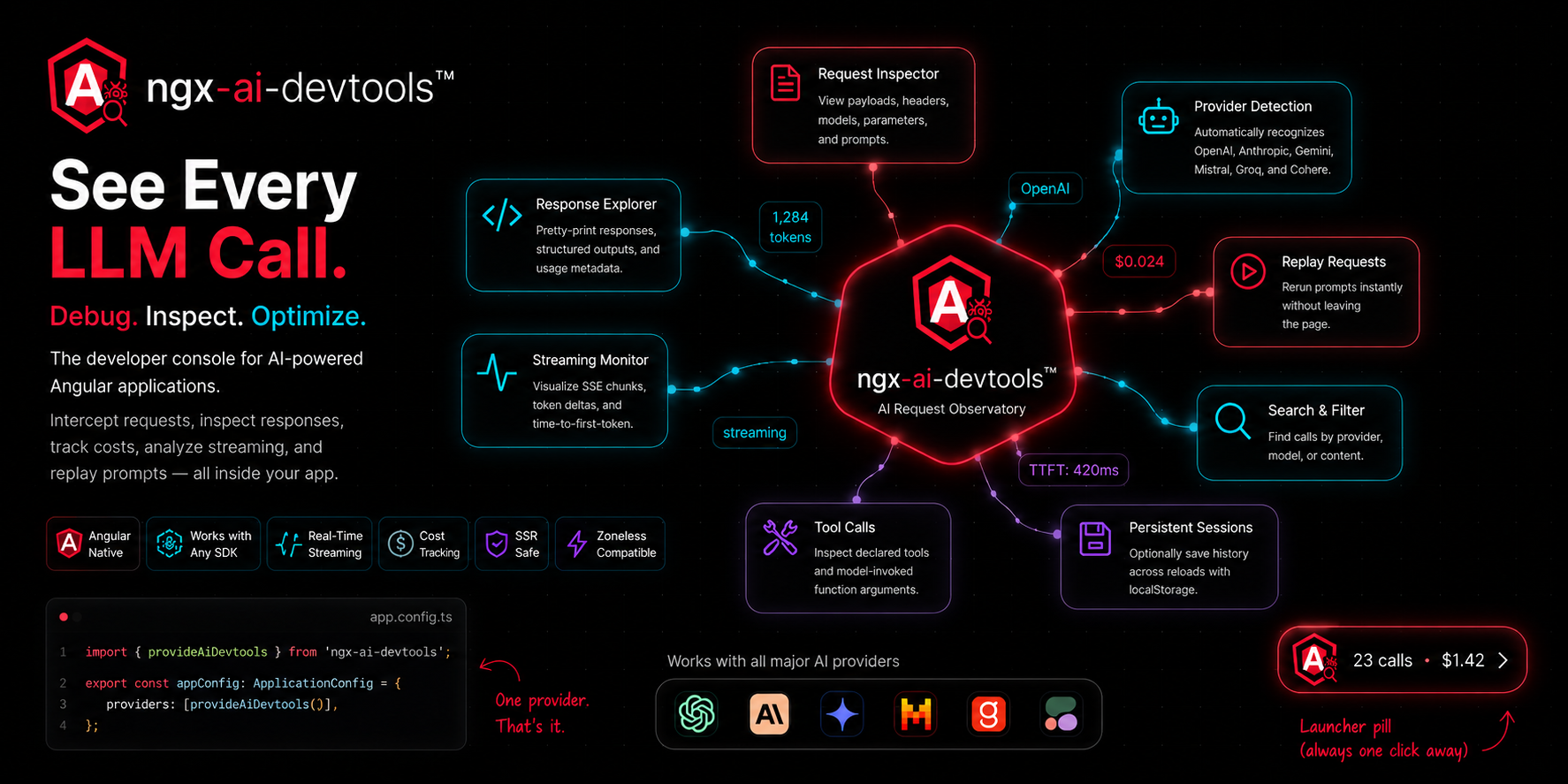
A floating DevTools panel that intercepts every LLM call your Angular app makes — fetch, HttpClient, OpenAI SDK, Anthropic SDK, anything. Shows the prompt, response, tokens, cost, tool calls, and streaming deltas in real time. One provider call to install. Works in dev, staging, and production behind a feature flag.
npm install ngx-ai-devtoolsRequires Angular 18.1+ (signals, standalone components, @let).
// app.config.ts
import { ApplicationConfig } from '@angular/core';
import { provideAiDevtools } from 'ngx-ai-devtools';
import { environment } from './environments/environment';

export const appConfig: ApplicationConfig = {
  providers: [
    provideAiDevtools({
      enabled: !environment.production,
    }),
  ],
};A floating launcher pill appears in the bottom-right corner. That's it.
This is the most important step. Most Angular apps don't call OpenAI/Anthropic/Google directly from the browser — they go through a backend like /api/chat. The library doesn't know about your custom paths until you tell it:
provideAiDevtools({
  enabled: !environment.production,
  additionalEndpoints: ['/api/openai', '/api/anthropic', '/api/gemini'],
  // ↑ list the paths your backend exposes for LLM calls
});
If you skip this step, your calls go through but nothing shows up in the panel. The library only intercepts URLs it recognizes.
Important: include the provider name in your proxy path so the library knows which response parser to use:
| Proxy path | Detected as |
|---|---|
/api/openai/chat |
OpenAI |
/api/anthropic/messages |
Anthropic |
/api/gemini/generate |
|
/api/llm-proxy |
Falls back to OpenAI |
If you call OpenAI/Anthropic/Google directly from the browser (no proxy), you can skip Step 3 — those URLs are auto-detected.
The library reads token counts from the provider's usage block. If your backend strips or reshapes the response, tokens and cost will be blank in the panel. The call, prompt, response, and latency still show — but cost depends on the provider's usage block surviving the round trip.
Your backend must forward these fields untouched:
| Provider | Required fields |
|---|---|
| OpenAI | model, choices[0].message, choices[0].finish_reason, usage |
| Anthropic | model, content, stop_reason, usage |
candidates, usageMetadata |
The simplest pattern is to forward the provider response untouched:
// Express / Node backend
app.post('/api/openai/chat', async (req, res) => {
  const upstream = await fetch('https://api.openai.com/v1/chat/completions', {
    method: 'POST',
    headers: { Authorization: `Bearer ${process.env.OPENAI_KEY}` },
    body: JSON.stringify(req.body),
  });
  res.json(await upstream.json());  // ← forward as-is
});By default, OpenAI's streaming responses omit the usage block. Text streams correctly, but token counts and cost never arrive. To get usage on streams, pass stream_options in the request:
{
  model: 'gpt-4o-mini',
  stream: true,
  stream_options: { include_usage: true },  // ← required for token counts on streams
  messages: [...]
}
Anthropic and Google include usage on streaming responses by default.
| Option | Type | Default | What it does |
|---|---|---|---|
enabled |
boolean |
true |
When false, no patching, no UI, no overhead. Gate on !environment.production. |
additionalEndpoints |
string[] |
[] |
URL substrings to treat as LLM endpoints. Required for proxy/custom backends. |
maxCalls |
number |
100 |
Maximum calls retained in memory. Older drop FIFO. |
persist |
boolean |
false |
Persist call history to localStorage across reloads. |
autoMount |
boolean |
true |
Auto-inject the UI into document.body. Set false to place <ngx-ai-devtools /> manually. |
position |
'bottom-right' | 'bottom-left' | 'top-right' | 'top-left' |
'bottom-right' |
Launcher position. |
redact |
boolean |
false |
Hide request/response bodies in the UI (still recorded). Useful for screenshots. |
Full example:
provideAiDevtools({
  enabled: !environment.production,
  additionalEndpoints: ['/api/openai', '/api/anthropic'],
  maxCalls: 200,
  persist: true,
  position: 'bottom-left',
  redact: false,
});// OpenAI SDK
import OpenAI from 'openai';
const openai = new OpenAI({ baseURL: '/api/openai', apiKey: 'unused' });
await openai.chat.completions.create({
model: 'gpt-4o',
messages: [{ role: 'user', content: 'Hello' }],
});
// Anthropic SDK
import Anthropic from '@anthropic-ai/sdk';
const anthropic = new Anthropic({ baseURL: '/api/anthropic', apiKey: 'unused' });
await anthropic.messages.create({
model: 'claude-sonnet-4-5',
max_tokens: 1024,
messages: [{ role: 'user', content: 'Hello' }],
});
// Raw fetch
await fetch('/api/openai/chat', {
method: 'POST',
body: JSON.stringify({ model: 'gpt-4o-mini', messages: [...] }),
});
// Angular HttpClient
this.http.post('/api/anthropic/messages', payload).subscribe();All of these get intercepted automatically once the path is in additionalEndpoints.
The store is a public signal-based service. Use it in your own components, dashboards, or budget alerts.
import { Component, computed, inject } from '@angular/core';
import { AiDevtoolsService } from 'ngx-ai-devtools';

@Component({
  selector: 'app-cost-badge',
  template: `<span>Spent today: ${{ totalCost() | number:'1.4-4' }}</span>`,
})
export class CostBadge {
  private svc = inject(AiDevtoolsService);
  totalCost = computed(() => this.svc.stats().totalCost);
}
The service exposes:
| Member | Type | Purpose |
|---|---|---|
calls |
Signal<LlmCall[]> |
All recorded calls, newest first. |
filtered |
Signal<LlmCall[]> |
Current filtered view (matches the search box). |
selected |
Signal<LlmCall | null> |
Currently selected call in the detail pane. |
stats |
Signal<{ count, totalCost, totalTokens, avgLatency }> |
Running aggregates over the call list. |
ui |
Signal<{ open, selectedId, filter }> |
UI state of the panel. |
clear() |
() => void |
Drop all calls. |
setOpen(b) |
(boolean) => void |
Open or close the panel. |
select(id) |
(string | null) => void |
Select a call programmatically. |
setFilter(s) |
(string) => void |
Set the search filter. |
replay(id) |
(string) => Promise<string | null> |
Re-issue a recorded call. |
All call records conform to the LlmCall type, exported from the package root.
| Provider | Request parsing | Response parsing | Streaming | Cost |
|---|---|---|---|---|
| OpenAI | ✅ | ✅ | ✅ SSE deltas | ✅ |
| Anthropic | ✅ | ✅ | ✅ named events + JSON deltas | ✅ |
| Google Gemini | ✅ | ✅ | partial | ✅ |
| Mistral | ✅ (OpenAI shape) | ✅ | ✅ | ✅ |
| Groq | ✅ (OpenAI shape) | ✅ | ✅ | ✅ |
| Cohere | detected only | partial | — | — |
Pricing data is in src/lib/pricing.ts and ships with current rates for the major models. If a model isn't in the table, the call still records — cost just stays blank rather than guessing. PRs welcome to keep prices fresh.
At bootstrap, the library monkey-patches window.fetch. Calls to any URL matching a known provider (or your additionalEndpoints) are recorded into a signal store; everything else passes through untouched. For streaming responses, the body is tee()'d so the consumer still receives the original stream while the devtools consume a copy, parsing SSE events as they arrive.
The library doesn't tokenize anything itself. Token counts come from the provider's usage block (prompt_tokens / completion_tokens for OpenAI, input_tokens / output_tokens for Anthropic, usageMetadata for Google). Cost is tokens × price_per_million / 1_000_000 against the local price table. If usage is missing, tokens and cost stay blank rather than guessing.
The UI mounts itself into document.body (or anywhere you place <ngx-ai-devtools />) and renders directly from the signal store with OnPush change detection. No global state library, no zone.js dependency, no extra runtime. In production builds where enabled: false, neither the patch nor the UI is installed.
Two runnable demos ship in this repo. Use whichever fits your needs.
Simulated LLM calls with canned responses. No API keys, no setup, no cost. Best for seeing the UI in action and exploring the panel features.
git clone https://github.com/ahmedkhan1/ngx-ai-devtools.git
cd ngx-ai-devtools
npm install
npm start
Open http://localhost:4200. Click the buttons. Click the launcher pill. This is what's running at ngx-ai-devtools.vercel.app.
Real calls to OpenAI, Anthropic, and Google through a local Node proxy that holds your API keys server-side. Verifies real response shapes, real streaming chunks, real cost calculation.
# Terminal 1 — start the proxy
cd proxy
cp .env.example .env
# Edit .env with your API keys
npm start

# Terminal 2 — start the Angular app
cd projects/real-api-demo
npm install
npm start
Each click costs real money (typically fractions of a cent on gpt-4o-mini or claude-haiku-4-5). Use this when you want to verify the library works end-to-end with your own provider account.
See projects/real-api-demo/README.md for full setup details.
Debugging LLM calls in the browser is genuinely painful. You make a call, something goes wrong, and now you're three tabs deep: Network panel for the request, a JSON viewer for the body, a calculator for the cost. Ten minutes later you tweak the prompt and do it all over again.
ngx-ai-devtools puts all of that in one floating panel inside your app. Every call your code makes — prompt, response, tokens, cost, tool use, streaming — recorded as it happens, structured the way you'd structure it if you wrote the logger yourself. Which you probably have, twice, in two different projects.
Use it in development to iterate on prompts. Use it in staging to verify what your app actually sends to the model. Use it in production behind a feature flag to debug live issues without redeploying. The library is one provider call, signal-based, zero RxJS, tree-shakeable to nothing when disabled.
Open issues for what would help you most:
- Cost budgets and alerts
- Diff view between two calls
- Tool-call result piping (showing what the tool returned to the model on the next turn)
- Prompt-caching discount awareness (OpenAI's
cached_tokensfield) - Persistent storage beyond
localStorage
git clone https://github.com/ahmedkhan1/ngx-ai-devtools.git
cd ngx-ai-devtools
npm install
npm start              # serves the mock demo
npm run build:lib      # produces dist/ngx-ai-devtools
npm run pack           # produces a .tgz you can install in another project
To test a local build inside another Angular app:
npm run build:lib && npm run pack
# In the other project:
npm install /absolute/path/to/dist/ngx-ai-devtools/ngx-ai-devtools-0.1.4.tgzIssues and pull requests welcome. Adding a new provider:
- Add a parser in
src/lib/providers/<provider>.parser.tsexportingis<Provider>,parse<Provider>Request,parse<Provider>Response, and (if streamed)accumulate<Provider>Stream. - Wire it into
src/lib/providers/index.ts. - Add the model's pricing to
src/lib/pricing.ts. - Add a card to
projects/demo/so it can be tested in the browser.
Keep the public surface small — every new option is one more thing to maintain.
MIT © Ahmed Khan
If this saved you a frustrating afternoon, a star is a kind way to say thanks.