Repository navigation
Releases
0xTerm 0.4.1

Fixed
- Quitting while Open this link? was showing could open the link: macOS
answers a sheet it closes on its own with its first button, which was Open.
Cancel is now the first button, so only clicking Open opens the link.
Return no longer opens it either; Escape still cancels.
0xTerm 0.4.0
Added
- The viewer edits files. Click into a tab and type; ⌘S (or Shell › Save)
saves. A dot marks a tab with unsaved changes, and closing it asks first.
Saving writes a new copy and swaps it in, so a crash never leaves half a
file. The file keeps its permissions, ACLs, extended attributes (Finder
tags), symlinks and hard links. Files you can't write, and files owned by
someone else's account, are handled without replacing them: read-only files
open read-only, and others are written in place. - If a file changes on disk while its tab has unsaved edits, the tab keeps
your text and asks: Reload or Keep Mine. Tabs without edits still
follow the file as before. - Markdown Preview shows unsaved Source edits.
- New File… (⌥⌘N, or right-click the file tree) asks for a name and
opens the new file in the viewer. Picking a name that exists opens that file
as it is. - Quitting or closing a window with unsaved edits asks to save them.
- Rename a tab: double-click it, right-click › Rename Tab…, or
Shell › Rename Tab…. Enter keeps the name, Escape cancels, and an empty
name goes back to following the running job or folder. The window title
follows the name.
Changed
- Files that aren't valid UTF-8 open read-only, marked in the viewer, so
saving can't replace characters it couldn't read. - In the viewer, ⌘[ and ⌘] switch panes and ⇧⌘F searches the folder, as
everywhere else. Find and replace in a file is ⌥⌘F; Tab and ⇧Tab indent.
Fixed
- Settings › Icon no longer opens a wide gap between columns, which showed
up after picking an icon. Tiles now have one width and the grid keeps its
size.
Known issues
- Quit from the Dock icon, and logging out, still quit without asking
about unsaved edits. ⌘Q and 0xTerm › Quit ask.
0xTerm 0.3.0
Added
- A Settings window (⌘,) with panes for the app icon, font, shell,
scrollback, the Option key and the theme. Each change is saved to
config.toml right away, and your comments and other keys stay as they are.
If config.toml has an error, the window shows it and changes nothing until
it's fixed. - Twelve official app icons: chrome, graphite, midnight, ivory, amber, mint,
ocean, crimson, violet, phosphor, mono and glass. Pick one in Settings, or
import your own.svgor.icns. They're also at
0xterm.org/icons. [app] iconin config.toml. The Dock changes as soon as you save, and the
icon stays after you quit and after updates.
Changed
- Settings… (⌘,) opens the Settings window instead of the config file. Its
Edit config.toml… button opens the file, where theme colors are set.
Known issues
- A custom icon is a file inside 0xTerm.app, so
codesign --verify --strict
reports the app as modified while one is set. Gatekeeper still accepts it,
and updates install normally.
0xTerm 0.2.2
Hardening from a review of how 0xTerm handles text it didn't write: file names, links and program output. Updating is recommended; details in GHSA-ghxv-7pf7-wh3j.
Security
- cd Here, Insert Path and dropping a path quote file names with unusual characters (control characters, quotes) correctly for the shell in use.
- ⌘-clicking a link opens files in the viewer, and only web and mail links outside 0xTerm. Links whose text can differ from their target (OSC 8, Markdown) ask before opening.
- Limits on clipboard writes from programs (1 MB, with a notice), on the length of escape sequences, and on Mermaid diagram size and render time.
Changed
- Links with other schemes (
vscode://,ssh://,ftp://) no longer open.
Install or update
- On 0.2.x: 0xTerm offers this update by itself, or choose 0xTerm → Check for Updates….
- On 0.1.x, or a new install: download
0xTerm-0.2.2.dmg, open it, and drag 0xTerm to Applications. Updates after this are automatic.
Requires a Mac with Apple Silicon and macOS 13 or later.
SHA-256: 6e5920633b99a122c615f89121668517e59c3b776bad2e4b8caa8505f2dc1add
Known issues
- Expanding Desktop, Documents or Downloads in the file tree shows the macOS privacy prompt, and the window waits for your answer.
- Emoji are drawn slightly wider than two cells.
- Wide Mermaid diagrams shrink to the viewer's width.
Full notes: CHANGELOG.md. Licensed under GPL-3.0.
0xTerm 0.2.1
A bug-fix release, and the first one 0.2.0 installs by itself.
Fixed
- Settings… (⌘,), Minimize (⌘M), Zoom and Toggle Full Screen work. In 0.2.0 they did nothing while a window was focused.
Install or update
- On 0.2.0: 0xTerm offers this update by itself, or choose 0xTerm → Check for Updates….
- On 0.1.x, or a new install: download
0xTerm-0.2.1.dmg, open it, and drag 0xTerm to Applications. Updates after this are automatic.
Requires a Mac with Apple Silicon and macOS 13 or later.
SHA-256: 653812012fa2c8c2ade48a938b559d19baaa1d05b78f94acbd12a900cb0c651b
Known issues
- Expanding Desktop, Documents or Downloads in the file tree shows the macOS privacy prompt, and the window waits for your answer.
- Emoji are drawn slightly wider than two cells.
- Wide Mermaid diagrams shrink to the viewer's width.
Full notes: CHANGELOG.md. Licensed under GPL-3.0.
0xTerm 0.2.0
The first notarized release, and the first that keeps itself up to date.
Added
- Notarized by Apple. Releases are signed with a Developer ID and notarized, so macOS opens 0xTerm without a warning.
- Automatic updates through Sparkle. The second time you open 0xTerm, it asks whether to check automatically; 0xTerm → Check for Updates… checks now.
- The standard Mac menus: About 0xTerm, Settings… (⌘, opens the config file), Services, Hide (⌘H), Hide Others (⌥⌘H), Show All, Minimize (⌘M), Zoom, Toggle Full Screen (⌃⌘F) and a Help menu.
- Open from Finder. Drop a folder on the Dock icon, or use Open With, to open a window there; a text file opens in the viewer.
- Programs run in 0xTerm can ask for the camera, the microphone, Apple events and protected folders, with a prompt that names 0xTerm.
Install or update
- Download
0xTerm-0.2.0.dmg, open it, and drag 0xTerm to Applications, replacing the old copy. - Coming from 0.1.x: this one install is by hand, because 0.1 can't update itself. macOS asks again for any permission you gave the old version. Updates after this are automatic.
Requires a Mac with Apple Silicon and macOS 13 or later.
SHA-256: deb0e69e51296531bcbaf61ddff4e77459315f3802a01e0e9d3d0490513011ba
Known issues
- Expanding Desktop, Documents or Downloads in the file tree shows the macOS privacy prompt, and the window waits for your answer.
- Emoji are drawn slightly wider than two cells.
- Wide Mermaid diagrams shrink to the viewer's width.
Full notes: CHANGELOG.md. Licensed under GPL-3.0.
0xTerm 0.1.1
A bug-fix release.
Fixed
- Tab completion. Tab and Shift+Tab now reach the shell, so file, folder and command completion work again.
- Shift+Enter is sent as its own key through the kitty keyboard protocol.
Added
packaging/install.shbuilds 0xTerm and installs it to /Applications.
Install or update
- Download
0xTerm-0.1.1.dmg, open it, and drag 0xTerm to Applications, replacing the old copy. - This build isn't notarized yet, so macOS blocks the first launch. Open 0xTerm once, dismiss the warning, then click Open Anyway in System Settings → Privacy & Security. Or run
xattr -dr com.apple.quarantine /Applications/0xTerm.app.
Requires a Mac with Apple Silicon and macOS 13 or later.
SHA-256: 320a7d76caf5471dd45f3be0571efa56647e1563d05b7406c9e726c2313d8996
Known issues
- Expanding Desktop, Documents or Downloads in the file tree shows the macOS privacy prompt, and the window waits for your answer.
- Emoji are drawn slightly wider than two cells.
- Wide Mermaid diagrams shrink to the viewer's width.
Full notes: CHANGELOG.md. Licensed under GPL-3.0.
0xTerm 0.1.0
The first release of 0xTerm: a minimal terminal workspace for macOS, drawn by the GPU.
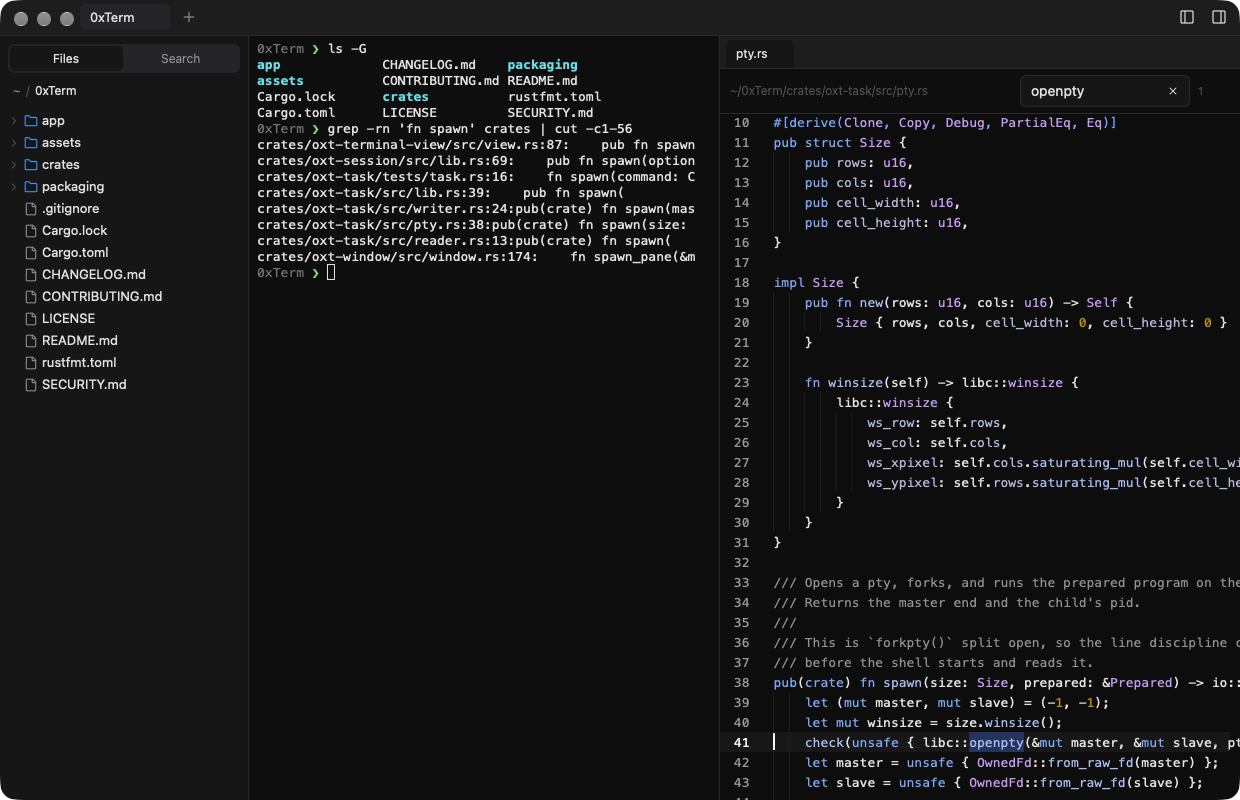
Highlights
- GPU-drawn terminal on Metal, with truecolor, wide characters, IME and a parser on its own thread.
- Tabs and splits. Tabs are named after the running job, and inactive panes dim.
- A file tree that follows your shell.
cdand it moves with you, skipping.gitignored files. - Folder search off the main thread, grouped by file.
- File viewer with syntax highlighting, ⌘F find and live reload, plus Markdown with native Mermaid diagrams.
- ⌘-click any
path:line, URL or OSC 8 link. Drag a file onto a pane to type its path. - One config file,
~/.config/0xterm/config.toml, reloaded on save. Light and dark follow the system.
Install
- Download
0xTerm-0.1.0.dmg, open it, and drag 0xTerm to Applications. - This build isn't notarized yet, so macOS blocks the first launch. Open 0xTerm once, dismiss the warning, then click Open Anyway in System Settings → Privacy & Security. Or run
xattr -dr com.apple.quarantine /Applications/0xTerm.app.
Requires a Mac with Apple Silicon and macOS 13 or later.
SHA-256: f5ea5d9f0e6412486a338a1be9a594ec8a9ac876226a88eebcc459d70678078c
Known issues
- Expanding Desktop, Documents or Downloads in the file tree shows the macOS privacy prompt, and the window waits for your answer.
- Emoji are drawn slightly wider than two cells.
- Wide Mermaid diagrams shrink to the viewer's width.
Full notes: CHANGELOG.md. Licensed under GPL-3.0.