
We can check the price (converts to US dollars) of an item sold in 6 Amazons(.com/.co.uk/.de/.fr/.jp) at once when you buy one from japan. CurrencyAPI, which is called CurrencylayerAPI (https://currencylayer.com/), has been used to get currencies as well.
Build it via Eclipse, and execute it.(maybe you need to import some libs.) There are some parameters in order to search. See "ItemData.java".
- The ASIN code of the product(See https://www.amazon.com/gp/help/customer/display.html?nodeId=200202190#find_asins).
- The weight(kg) of the product(Default: under 1kg).
- The category of the product(See ShipmentCharge-com.csv and Select one of them).
- Amazon associates tags for each Amazons.
- 2 Amazon AWS_Keys and AWs_Secret_Keys (For Japan and the others).
- CurrencyAPI(Currencylayer API) Key
- By Setting parameters
Please set your keys in AmazonConstants class of "SearchAnItem.java".
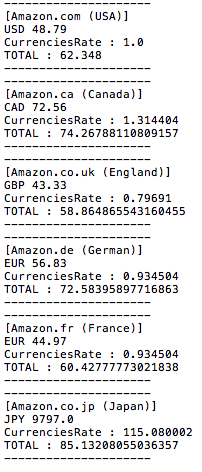
- Prices of The big bang theory Blu-ray
- Total shows how cheap is it. therefore, the lower this value, the less expensive it means.
- Compared to Amazon.co.jp, 2,990 JPY (115*(85-59)) will be saved if you buy on Amazon.co.uk .

- This is my first time to write in Java, so if you have some questions or suggestions, please tell me.
- It sometimes clashes when the HTTP request is sent (I'm still working for fixing).
- Future Work: Making more functions. For example, "Checking the price of multiple items", "Converting URL to ASIN number", "Making it available to select a destination country (since Japan is only available right now)", and so on...
- http://qiita.com/alpacatom/items/f02233f0feea7cad9244 (In japanese)