Repository navigation
Releases: amithgc/quarters
Release list
Quarters 0.8.2

- Claude Code agent teams work in Quarters (#21). With
"teammateMode": "tmux"in Claude Code's settings, spawning a teammate failed with "To use
agent swarms, install tmux" (and with tmux, the teammates would open in
panes no Quarters window shows). Quarters now starts Claude Code with its
teammates in-process, inside the tab, on the Mac and in the browser; a
--settingsof your own in the command is left alone. - Tabs don't inherit tmux or screen from where Quarters was started. A
server started inside tmux passedTMUXto every tab, so agents believed
they were inside tmux: Claude Code's"auto"teammate mode opened panes
in that hidden tmux, and OpenCode dropped to 256 colours.
Quarters 0.8.1
Fixes for agents that run full-screen (recent Claude Code versions), and
the server in Docker:
- The conversation stays after a reload or an idle tab (#14, #15).
Recent Claude Code versions draw full-screen, on the terminal's alternate
screen, and scroll their own history with the mouse wheel. They switch
that on once, as they start; a browser that joined later, reloaded, or
reconnected after sitting idle replayed only the recent output, so it
lost the full-screen mode and mouse reporting: the conversation was blank
and scrolling did nothing. Quarters now remembers the modes a program
has switched on and replays them first, and taking a tab over or
resizing it clears the screen without dropping them. On phones, swiping
a full-screen agent scrolls its history. - Windows no longer take sessions from each other by themselves (#16).
The mouse moving over a terminal and a window gaining focus are reported
to full-screen agents; Quarters treated those reports like typing, so
two windows showing the same session (the Mac and a browser) could take
it back and forth, each time redrawing it at another size. Only typing,
clicking and tapping take a session over now; reports from a window that
isn't the one in use are dropped. Taking a tab over makes the agent
redraw every time (the size nudge was too quick for Claude Code to see). - The ACTIVE list shows from 5 projects (#17). With fewer, every
project fits at a glance, and a project listed both in ACTIVE and in its
group looked like two projects. - Checkpoints work in a new repository (#18): where nothing had ever
been staged, every checkpoint failed with "index file smaller than
expected". - Two timing bugs CI found (#19): a file staged and then changed to the
same size within a second could be checkpointed as staged, and
config.json saved in the editor could stay unused on Linux until the next
change. - Run the server in Docker (#20):
docker/has aDockerfileand a
compose.yaml(the server, Claude Code, a volume for settings and
sign-ins, your code folder); see the README's Docker section.
Quarters 0.8.0
Everyday developer tools, around the agent's work:
- Commit, push and pull requests from the side panel, with CI status
(#7). Commit… under the GIT section's changed files opens a dialog;
✨ Draft it asks Claude Code (claude -p) for a message from the diff,
in the style of the repository's recent commits. Commit & push,
Push ↑n (setting the upstream the first time) and Open a pull
request (gh pr create --fill). The branch's pull request shows with
its checks: passed, running, failed (which). Files that look like they
hold secrets are never committed. - Scripts (#8): a project's
package.jsonscripts (run with pnpm,
yarn, bun or npm, from its lockfile),Makefiletargets,justfile
recipes,deno.jsontasks, and Cargo and Go commands, in the side panel;
a click runs one in a tab of its own, or goes to the tab it runs in.
run <name>in ⇧⌘P too. - Ports (#9): what the project's tabs listen on, with the process and
the tab, and other processes of yours working in its folder; open it,
go to its tab, or stop it (SIGTERM, then SIGKILL). macOS and Linux. - Checkpoints before every prompt (#10): a snapshot of the project's
files (everything git doesn't ignore, committed or not) each time an
agent gets a prompt, kept as commits underrefs/quarters/checkpoints/
(the last 50) without touching the branch, the index or the stash. See
what changed since one, file by file, and restore it; a restore takes a
checkpoint first, so it can be undone. A Settings switch turns it off. - Clickable
file:line, and Send to agent (#11):path:line(:col),
path(line,col)and Python'sFile "x", line nin a terminal are links
when the file is in the project; ⌘-click opens the editor at that line.
⇧⌘L (or the button that appears) types the selection, from a terminal
or the editor (with the file and lines), into the project's agent tab,
not sent. - Search every project (#12, ⇧⌘K): ripgrep (or git grep) across all
projects, with match case, whole words, regular expressions and a file
filter; results by project and file, Enter opens the line. Secret-looking
files are never searched. - Today's work (#13): on Home, per project, your commits since
midnight, the agent conversations and their prompts, and what isn't
committed yet; Copy (or ⇧⌘P → Copy today's summary) puts it on the
clipboard as Markdown.
And:
- Home (the house left of the title): a new home page in the middle,
with the name, one of 50 taglines (a different one each time), tiles to
jump to a project, add one, search conversations and open Settings, a
Today card (sessions, tokens and cache hits across every project, with
the last two hours as an animated chart: bars rise in, the current five
minutes glow, hover one for its time and tokens), today's work, every
active session at a glance, and the keys worth knowing. Tabs keep
running; opening a project shows them again. - Emoji project icons: Emoji… in the project dialog opens every emoji,
by group, with a search by name. config.json keeps it as"icon": "🚀".
Favicons and app icons found in the folder are still suggested. - The agent and permission choices in Settings and the project dialog are
the app's own menus, like the side panel's: what each agent runs, and
which aren't installed. - + add in the PROJECTS header, and a GitHub button in the title bar.
- Sign out and alerts no longer show in the Mac app (they're for a browser).
- Adding a project no longer opens the folder picker by itself: type the
path, or click Browse… when you want it. - The update dialog says
brew update && brew upgrade …, so Homebrew sees
the new version, and Quarters looks for one every hour (was six).
Quarters 0.7.1
- Edit config.json in a browser (#6). A browser can't open the file in an
app on the computer Quarters runs on, so ⌥⌘, (Settings → Edit
config.json…, or the palette) opens it in the editor. Add Project has the
button too, and says why you'd use it: to add several projects at once,
or to give a project's agent a command of its own, which the form
doesn't have. A save with a
mistake in it is refused, with the line it's on, and so is one that
changes remote access, which could lock the browser out. Quarters uses
the new settings at once.
Quarters 0.7.0
- Four more coding agents (#1): Amp, Goose, Qwen Code and Cursor CLI, twelve
in all. Each starts, continues the last conversation (⇧C) and, where it
has a switch, skips its permission prompts. quarters --version(#4): which Quarters this is, e.g.Quarters 0.7.0 (linux/amd64, server), for the server with no window and for bug reports.- The light theme reads better (#3): muted text, yellow, green, the accent
and red are darker, to WCAG AA contrast (4.5:1) on every light surface. - Keyboard shortcuts work in a browser too (#5). A browser has no menus,
so the page listens for the same keys. On Linux and Windows, Alt stands
in for ⌘ (Alt+P, Alt+Shift+P, Ctrl+Alt+T) and every label says so. On a
Mac, Chrome keeps ⌘T, ⌘W and ⇧⌘[ ] for its own tabs: add ⌃ (⌃⌘T). - The status bar shows the keys for what's in front of you: splitting in a
shell, moving between panes in a split, ⌘S in a file, moving and opening
in the projects list. - Keep awake, from the cup in the title bar: keep the Mac (or the server)
awake for 30 minutes to 24 hours or until you stop it, whatever it's
doing. The same menu switches the Keep awake setting (only while agents
work). - A pill beside the version: red "update available" when a newer release
is out, grey "up to date" when not. A click says how to update: Homebrew
or the download, for the Mac app or the server. Quarters asks GitHub at
most every six hours. - Add project, Settings, the theme (system, light, dark) and, in a
browser, alerts and sign out moved to the title bar beside the panel
buttons. On a phone they stay at the foot of the projects drawer. - Tips are always there: one line at the bottom right, the next one every
two minutes (› shows it now), the keys you haven't used first. They no
longer stop after a week or three a day, and there's no switch to turn
them off. - In a browser, Add project asks for the folder's path instead of offering
a Browse… button that can't open the machine's folder picker.
Quarters 0.6.0
- Split panes, as in iTerm: ⌘D opens a shell beside the tab you're in, ⇧⌘D
one below it, and splits nest. ⌘[ and ⌘] move between panes, ⌘W closes
just the pane (and a pane whose shell exits closes by itself), and drag
the line between two panes to resize them (double-click to make them
equal). A reloaded window, or another device, shows the panes the same
way. - A files panel (⇧⌘E, or the folder button in the title bar, which glows
while it's open): the project's folders and files, with git's marks
(changed, new, ignored) and a filter that finds any file. Click a file
to open it in an editor tab beside the terminals: syntax colours,
search, ⌘S to save. An agent's edit shows up by itself, and a save never
overwrites one made since you opened the file: you choose to reload or
keep yours. Right-click a file to copy its path, type it in the terminal
or show it in Finder. Files that may hold keys or passwords (.env,
*.pem…) are never opened. - Tips for the first week: now and then, one quiet line at the bottom
right about a key or a panel you haven't used yet (one you have never
shows). At most three a day; › shows another, × turns them off, and
Settings turns them back on. - The fold arrows in the side panel line up with their headings.
Quarters 0.5.2
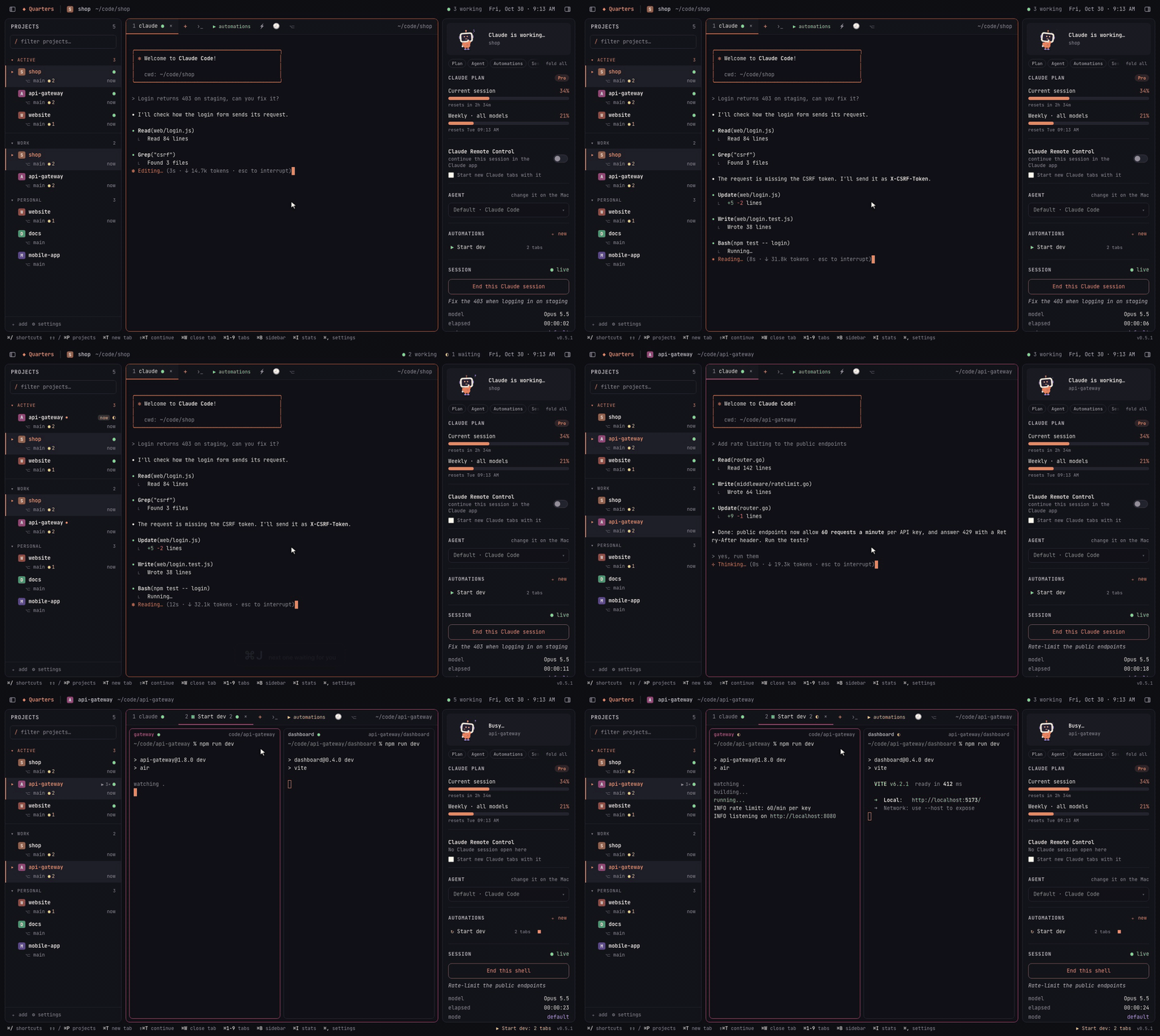
Quarters is a home for terminal coding agents on macOS. Every project gets a room: switch between projects in a click, run Claude Code, Codex, Gemini CLI, Aider and four more agents in several projects at once, see which one finished and is waiting for you (⌘J goes to it), start each project's dev servers with one action, and pick it all up from your phone. Free and open source (MIT), with no accounts and no AI of its own.
brew install --cask amithgc/tap/quartersOr download the zip below (signed and notarized, universal). Website · README · Discussions
What's new in 0.5.2
- Hide and show the side panels from the title bar: a button at each end
does what ⌘B and ⌘I do, and each device remembers which panels show. - Hiding a panel no longer squeezes the terminal into a thin strip.
- About Quarters: click the version at the bottom right for the version,
the licence, and links to the website, the source, the release notes
and the issue tracker.
Quarters 0.5.1
Quarters is a home for terminal coding agents on macOS. Every project gets a room: switch between projects in a click, run Claude Code, Codex, Gemini CLI, Aider and four more agents in several projects at once, see which one finished and is waiting for you (⌘J goes to it), start each project's dev servers with one action, and pick it all up from your phone. Free and open source (MIT), with no accounts and no AI of its own.
brew install --cask amithgc/tap/quartersOr download the zip below (signed and notarized, universal). Website · README · Discussions
What's new in 0.5.1
- The version shows at the bottom right of the window (in a browser too);
click it for what changed in that release.
Quarters 0.5.0
Run many agents without losing track: who's waiting for you comes first
(⌘J), prompts queue up for when an agent finishes, usage shows per
project, and agent instructions are edited in place. Quarters itself got
much lighter when idle (about 2% of a CPU core, from about 20%), its side
panel folds, and every command is a keystroke away.
-
Who's waiting for you. The ACTIVE list (and the start screen's) puts the
sessions that finished while you looked elsewhere first, longest waiting
first, with how long they've waited and whether the agent is asking you
something. ⌘J (Session → Next Waiting for You), or a click on the title
bar's "◐ waiting", opens the next one. -
Prompt queue. Line up prompts for a session in the side panel (QUEUE ·
+ add prompt; reorder, remove); each is sent when the agent has finished
the one before. Quarters waits while the agent asks a question or shows
a permission prompt, and never types over a message you started in its
input box; a prompt is sent once, and the next only after the agent
worked on it. No "your turn" alert while prompts are waiting. On a
phone, ⏭ in the message card queues what you typed while the agent works.
Settings → Prompt queue. -
Usage by project. The side panel's USAGE shows the project's tokens
today, over 7 and 30 days, a 14-day chart and its share of your week;
View → Usage by Project (⇧⌘U) ranks every project (worktrees count as
their project). Read from Claude Code's logs: input, output and cache
writes. Settings → Usage by project. -
Agent instructions and notes. INSTRUCTIONS in the side panel opens the
project's CLAUDE.md, AGENTS.md, GEMINI.md or CONVENTIONS.md in an editor
(the file the project's agent reads is offered even before it exists; a
CLAUDE.md that links to AGENTS.md is saved through the link), and won't
save over a version the agent changed meanwhile. Notes are yours: kept
with Quarters' settings, not in the project. Devices with less than full
access can read them, not save. Settings → Agent instructions & notes. -
Much lighter when idle. The mascot animates when something happens and
for a moment each minute, then stands still (its animation was redrawn
60 times a second, always); nothing on a timer runs while the window is
hidden, and less while Quarters isn't in front. git runs only when
something may have changed (a commit, a checkout, a session's output)
instead of every 2 seconds for the open project and every 15 for all;
the project list is sent to windows when it changes instead of asked for
every 3 seconds; ~/.claude.json and the session-log folders are read
again only when they change. Measured on a Mac with 14 projects, idle
in the background: about 20% of a CPU core before, 2% after. -
Terminals keep their fast GPU drawing: only the ones on screen and the
few shown last hold a WebGL context (WebKit allows about 16 and took the
oldest away, leaving it on the slow fallback for good). -
Remote access loads less: dialogs most visits never open (settings,
editing a project, past conversations, diffs, the editor, usage, the
shortcuts list) load the first time they open, and every file carries an
ETag, so a phone revalidates instead of downloading the app again. -
The side panel's sections fold to one line (click the title); the bar
above jumps to a section or folds them all. One look for all section
titles. -
Every command by name: ⇧⌘P, or ">" in the jump list. Focus mode (⇧⌘↵)
leaves only the terminal. -
A colour per project marks its tabs and the terminal's frame, from its
name or chosen in its dialog ("color" in config.json). Settings →
Appearance: System, Light or Dark, on each device. -
Quieter lists: idle projects show no status mark, a project listed in
ACTIVE doesn't repeat its status in its group, and dialogs open with a
short fade (none with reduced motion).
Quarters 0.4.0
The first release published as a signed, notarized app, installable with
brew install --cask amithgc/tap/quarters (and brew install amithgc/tap/quarters-server on Linux). Quarters now runs eight coding
agents, not only Claude Code; everything since 0.3.0 is below.
-
Images the agent sends. On a phone, a chat reply that names an image
file (PNG, JPEG, GIF, WebP) shows the picture under it; a tap opens it
full screen, and a missing file says so. In any terminal (the Mac, a
tablet, a phone's terminal view, every agent and shells), an image path
is a link: hover to preview it, click to open it full screen (Esc
closes). The Mac reads only a path the tab itself showed (in the agent's
conversation or printed in the terminal), checks the file really is an
image (not just named like one) and caps it at 15 MB. -
Phones: one session view for every coding agent. Claude Code, Codex,
OpenCode and the rest all get the message card below their transcript
(↑ send, ■ stop with the agent's own interrupt key, the tab tools) and
the key bar while typing. The card no longer lies over Claude's input
box: it sits below the terminal, which fits the space above it. Claude
Code keeps its chat view (▤/💬, remembered per agent); agents whose menus
can't be tapped always get the key bar's arrows. Shells stay plain
terminals; tablets are unchanged. -
Devin (Cognition's
devinCLI) is one of the coding agents: continue is
--continue, skipping permission prompts is--permission-mode bypass. -
The side panel lists the open project's automations: run or restart,
stop, edit, delete, and + new. It also has the project's coding agent
(Agent): pick one from the menu and Apply, on the Mac. In a project that
runs another agent, the panel leaves out Claude Code's plan, Remote
Control, session stats, tools, skills and MCP servers. Antigravity
projects show Antigravity's plan and each model's quota instead, read
from the Antigravity IDE on the same Mac while it's open (a local,
unofficial interface; nothing leaves the Mac). -
Other coding agents besides Claude Code: Codex, Gemini CLI, Antigravity,
OpenCode, GitHub Copilot CLI, Devin and Aider. Choose the default in Settings →
Coding agent, and per project in the side panel or ✎ ("harness"in
config.json). New
tabs, continue and yolo use each agent's own command and switches; ones
not installed are marked, and starting one says where to get it. Stats,
past conversations, the phone's chat view and Remote Control stay
Claude Code's; other agents are plain terminals there. -
Tablets type straight into the terminal (Claude's own input box), like
the Mac: no second text field; the key bar comes up while typing. Shell
tabs have no text field on any touch screen. -
On phones, shell and automation tabs are plain terminals: no message
box, you type straight in, the tab bar (with the tools) is always shown,
and the key bar comes up while typing. -
On Android over the home network's plain HTTP, the sign-in page shows how
to let Chrome install the app (it installs only from secure addresses;
Chrome's per-address setting is enough, no HTTPS needed). -
Linux: the remote-access server alone (no window) builds for Linux
(make server, amd64 and arm64, no dependencies) and runs from the
command line:--set-password,--pair,--devices,--remove-device.
It reads Claude Code's login from~/.claude/.credentials.json, keeps
the machine awake withsystemd-inhibitand opens links withxdg-open;
home-network addresses include Linux port names (eth0, enp3s0, wlan0…).
CI builds and tests it on Linux. -
Without
$SHELL(a service, a container), shells use the first of zsh,
bash and sh the machine has. -
Keyboard shortcuts dialog on the Mac: Help → Keyboard Shortcuts (⌘/),
or "⌘/ shortcuts" in the bottom bar. -
The Claude Remote Control switch is about the Claude session in view:
on when Claude Code has it connected (read from Claude Code's own list,
whoever turned it on), and flipping it runs/remote-controlin that
session. "Start new Claude tabs with it" is a checkbox below. The
project-list mark follows the same live state. -
End this Claude session in the side panel (⋯ on a phone), for the tab
you're looking at; it asks first. -
iPhone home-screen app: the status bar is opaque (
black), so the page
reaches the bottom of the screen; with the translucent bar iOS cut it 62
points short (re-add the app to the home screen to pick this up). The
page follows the visual viewport, so the message box stays above the
keyboard. -
The phone chat follows the log Claude Code actually writes, and no longer
mistakes ❯ lines from earlier prompts for a menu. -
Project list: a little room in git counts (● 6, ↑ 3), and a broadcast
icon on projects with a session under Claude Remote Control. -
Chat view on phones: a Claude tab reads like the Claude app. The
conversation comes from Claude Code's own log: your messages as bubbles,
Claude's replies formatted, tool use folded into rows such as "Ran a
command, edited a file ›" (tap for commands, results and diffs), and
"✻ Working…" while it works. Claude's menus and questions become
buttons, the send button stops Claude while it works, and ▤ switches to
the terminal. -
Phones look and feel like the Claude app: a round ☰, a centred title
with what the tab is doing, a status pill with ⋯ for Quarters' extras
(plan, session, tokens, git, servers, MCP, skills), tabs as pills, and a
message card with the tools (new tab, shell, automations, prompts,
conversations, worktrees) and a round send button. -
An ACTIVE section at the top of the project list shows the projects
with open sessions, working ones first. -
Phones type into a real text field (autocorrect, dictation, selection,
a backspace that repeats) and send with ↑ or return; backspace in an
empty field deletes in Claude's input. Tapping the terminal opens it. -
Swipe a terminal to scroll its history on touch screens, with momentum.
-
Claude Remote Control toggle in the side panel: new Claude tabs start
withclaude --remote-control <project>, so they can also be continued
from claude.ai/code and the Claude app. -
Phone-sized interface on phones: 16px text, a bigger title bar (19px
project name), taller tabs with 44pt buttons, roomier project rows in the
drawer, and the working/waiting counts as just ● and ◐ with a number. -
On phones and tablets, Claude Code's menus (trust this folder, allow a
tool…) are answered by tapping: tap an option to highlight it, tap it
again to choose it. No arrow keys needed. -
Phones show the terminal at 15px (was 11px), closer to a chat app, and
pinching a terminal with two fingers changes the text size. -
Each window works on its own. A Claude tab in a window you're not using
pauses ("In use on another device") instead of following the other
window's size and keystrokes; clicking or typing there takes it back,
and Claude reprints the whole conversation at that window's size.
Shell and automation tabs still mirror live, at the size of the window
in use. -
The phone's key bar (esc, tab, ⇧tab, ctrl, arrows) shows only while you
type in a terminal, and can be switched off in Settings (Phone key bar). -
Claude Code's ⏺, ✔, ⏸, ✳, ⚡… no longer turn into wide colour emoji on
phones: a small bundled font (tools/symbols) draws them one cell wide. -
The welcome screen lists the projects with open sessions (working or
waiting for you); tap one to open it. -
A session taken over by a window of another width (phone ↔ Mac) is
redrawn cleanly instead of leaving copies of Claude's input box behind.
The phone keyboard no longer shows the AutoFill bar over the terminal. -
Password sign-in: a username and password, set on the Mac, for
browsers that can't use a passkey. Stored as an argon2id hash, with the
same lockouts as passkeys.Quarters --set-password <name>sets it
without a window. -
Home network: Remote Access can also open Quarters at the Mac's
address on your Wi-Fi (http://192.168.x.x:8421), with a QR code, for
private addresses only. -
The public URL in Remote Access is optional: without one, the server runs
athttp://localhost:8421, for this Mac or an SSH tunnel. -
Opening
http://127.0.0.1:<port>without a public URL goes to
http://localhost:<port>, where passkeys work (it used to fail with
"cross-origin request blocked"). -
The title bar shows the date and a 12-hour clock; the remote pill is always
there (greyed out while the server is stopped) and its dot pulses while
it runs. -
Dialogs open in the middle of the window (Settings used to sit at the
bottom).