Repository navigation
Releases
Scattered Notes 1.3.6

| Device | Download |
|---|---|
| Mac (macOS 14 or later, Apple silicon and Intel) | ScatteredNotes-1.3.6-mac.zip |
| Windows 11 (Intel, AMD and Arm PCs) | ScatteredNotes-1.3.6-windows.exe |
| Android (8.0 or later) | ScatteredNotes-1.3.6-android.apk |
The iPhone and iPad app is in TestFlight.
Mac
- Dragging a note from the list onto a project or the Inbox in the sidebar works again. The row takes a drop a little past its text, and the outline shown while dragging frames the whole row.
- Quick Note opens a new panel each time the shortcut is pressed, so several notes can be started side by side. The panels can be resized and closed, and the first one remembers its size and place.
- Typing
+,#or@in a note suggests existing projects, tags and people. - A note's title leaves out its
+projectmarks and stops at the last whole word within 60 characters.
Windows and Android
- No changes to the apps since 1.3.3. The version number now matches the Mac.
Scattered Notes 1.3.5
| Device | Download |
|---|---|
| Mac (macOS 14 or later, Apple silicon and Intel) | ScatteredNotes-1.3.5-mac.zip |
This release is for the Mac only. Windows and Android stay on 1.3.3, and the iPhone and iPad app is in TestFlight.
Mac
- Dragging a note from the list onto a project or the Inbox in the sidebar works again.
- The sidebar rows take a drop a little past their text, and the outline shown while dragging frames the whole row.
- Quick Note opens a new panel each time the shortcut is pressed, so several notes can be started side by side. The panels can be resized and closed, and the first one remembers its size and place.
- Typing
+,#or@in a note suggests existing projects, tags and people. - A note's title leaves out its
+projectmarks and stops at the last whole word within 60 characters.
Scattered Notes 1.3.3
| Device | Download |
|---|---|
| Mac (macOS 14 or later, Apple silicon and Intel) | ScatteredNotes-1.3.3-mac.zip |
| Windows 11 (Intel, AMD and Arm PCs) | ScatteredNotes-1.3.3-windows.exe |
| Android (8.0 or later) | ScatteredNotes-1.3.3-android.apk |
The iPhone and iPad app is in TestFlight.
Links column (Mac and Windows)
- A section with nothing in it ("Links to", "Linked from") is no longer shown, and the hint text is gone.
- When a note has nothing to list, the whole Links column is hidden and Agenda takes the full height.
- Each linked note shows where it lives: its project name, or Inbox.
Scattered Notes 1.3.2
| Device | Download |
|---|---|
| Mac (macOS 14 or later, Apple silicon and Intel) | ScatteredNotes-1.3.2-mac.zip |
| Windows 11 (Intel, AMD and Arm PCs) | ScatteredNotes-1.3.2-windows.exe |
| Android (8.0 or later) | ScatteredNotes-1.3.2-android.apk |
The iPhone and iPad app is in TestFlight.
Log notes (Mac)
Start a note's title or first line with Log - and it becomes a log book. Press Return and the new line starts with the time, written the way log files write it. The times are plain text, so tail, lnav, grep and other log readers can read the note as it is, and copying the note copies the times.
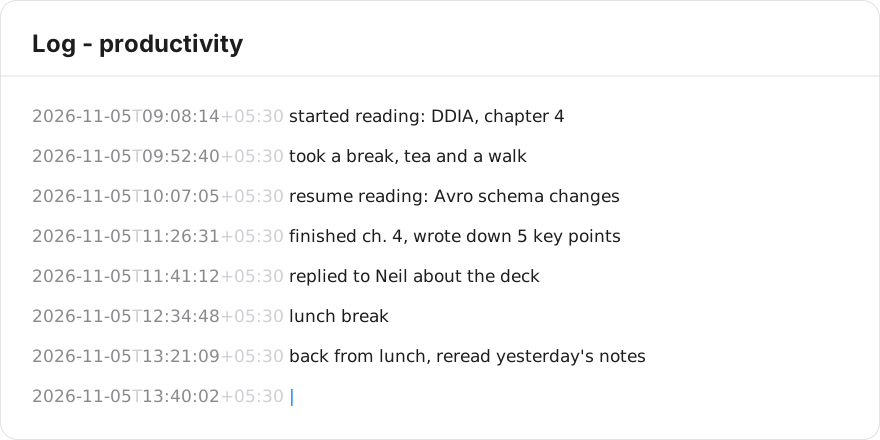
- The time is ISO 8601 with seconds and your UTC offset, for example
2026-11-05T14:22:19+05:30. - The note is shown in the system monospaced font. The times are in a quieter grey, and the "T" and the offset are lighter still, so the entries read first.
- The "Log -" line itself has no time.
- On the iPhone log notes have the same editor: monospaced, Return writes the time. Windows and Android show them as plain text for now.
Links between notes (Mac)
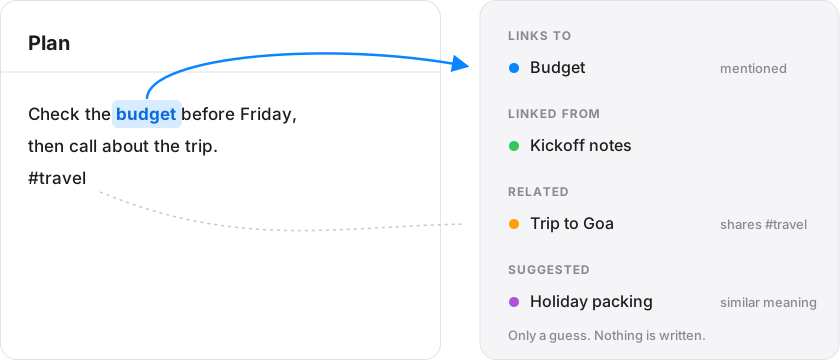
- A Links column at the right of a note lists the notes it mentions by title or with
[[Title]], and the notes that mention it. "Make this a link" turns a plain mention into[[Title]]. - Related lists notes that share a
#tagor@person, or many uncommon words. Suggested lists notes with a similar meaning, using Apple's on-device word model. It is off by default: turn it on in Settings, Suggestions. Nothing leaves your Mac. - The Agenda and Links share one column. Drag the bar between them to change how tall Links is.
Opening and the window (Mac)
- Scattered Notes opens at the last note you wrote, on the same line, and remembers the window size and whether the sidebar was hidden.
- Left arrow at the very start of a note goes back to the note list. Right arrow in the list goes into the note.
- The folder items are gone from the menu bar menu. Open the notes folder from Settings.
Agenda (Mac)
- Tasks still to do come first and done ones at the bottom.
- The window no longer repeats the note's title in the title bar.
Scattered Notes 1.3.1
| Device | Download |
|---|---|
| Mac (macOS 14 or later, Apple silicon and Intel) | ScatteredNotes-1.3.1-mac.zip |
| Windows 11 (Intel, AMD and Arm PCs) | ScatteredNotes-1.3.1-windows.exe |
| Android (8.0 or later) | ScatteredNotes-1.3.1-android.apk |
The iPhone and iPad app is in TestFlight.
Dates you can set and change (Mac and iPhone)
- Click the date on a to-do, or the calendar button on one without a date, to set or change it. Pick a day or use Today, Tomorrow or Next Monday. It works in Overdue and the other dashboard sections too.
- Every change is logged, and the last five show in the date popover. The log is a small file per device in your notes folder, so two devices never write the same file.
- When a note has a single to-do, the dashboard shows just that item. A note with several to-dos still shows the note with its tasks under it.
- "study", "find", "learn" and "practice" now start a to-do on Mac, Windows and Android.
Dashboard (Mac)
- A search box filters every section of the dashboard as you type.
- The arrow keys walk the dashboard: right from the project list goes to the first item, up goes to the search box, down goes to the next item.
- The note list is hidden while only the Dashboard is showing, and notes open from it without the old delay.
Notes and the sidebar (Mac)
- A Recent section under Quick Access lists the five notes you edited last. The arrow keys reach it, clicking one puts the cursor in the note, and an x or the right-click menu takes it off the list until you edit it again.
- The selected note in the list is drawn gray, not blue, while the cursor is in the note's text.
- A note row lights up when the pointer is over it.
- A new note takes its title from the first line.
- Right arrow in All Notes or Inbox selects the first note. ⌘N puts the cursor in the new note, and it files in the open project.
- Drag a note from the list onto a project or the Inbox to move it. ⌘O goes to a project, person or tag by name.
- The version shows next to the settings gear.
Scattered Notes 1.3.0
| Device | Download |
|---|---|
| Mac (macOS 14 or later, Apple silicon and Intel) | ScatteredNotes-1.3.0-mac.zip |
| Windows 11 (Intel, AMD and Arm PCs) | ScatteredNotes-1.3.0-windows.exe |
| Android (8.0 or later) | ScatteredNotes-1.3.0-android.apk |
The iPhone and iPad app is in TestFlight.
Dates are written into your lines
- When a note is saved, a relative date gets the day it means:
call the bank tomorrowbecomescall the bank tomorrow 📅 2026-10-27. A ticked task gets✅ 2026-10-28. - These are the markers the Obsidian Tasks plugin uses, so the dates live in the file, survive rewording and moving a line, and other tools can read them. Change the date in a marker and it wins over the words.
- This replaces the hidden
seen:anddone:lines in the note header. Lines written in another app have no marker until the note is next saved here. - Mac and Windows keep your cursor where it was when a marker is written into the line you are typing.
- The markers stay out of note titles and list previews.
New ways to write a day
22nd of the next month,22 of this month,end of the month,end of next monthandon the 22nd.
Completed tasks
- Every dashboard ends with a Completed section, closed to begin with. It lists ticked tasks that are not shown above, newest first, under the day they were ticked.
Obsidian
- Frontmatter the app does not use, such as aliases and custom properties, is now kept when a note is saved.
- Tags written as a list in the header are read.
Mac and Windows
- An empty dashboard no longer shows its counts, or the example block.
- Notes listed under a project no longer repeat the project name.
- Arrow keys: up from the first note goes to the project's dashboard and then the search box; left from the note list goes to the projects, on the note's own project; right goes back into the notes. The Mac keeps working after the Dashboard row. The selected note is drawn gray while the project list has the keyboard.
Speed
- Windows reloads only the notes that changed, and the sidebar counts people and tags once per note.
Scattered Notes 1.2.0
| Device | Download |
|---|---|
| Mac (macOS 14 or later, Apple silicon and Intel) | ScatteredNotes-1.2.0-mac.zip |
| Windows 11 (Intel, AMD and Arm PCs) | ScatteredNotes-1.2.0-windows.exe |
| Android (8.0 or later) | ScatteredNotes-1.2.0-android.apk |
The iPhone and iPad app is in TestFlight.
Projects, tags and people
- Type +project to file a note in a project. A new name creates the project.
- Type #tag to tag a note. Tags never move a note.
- Type @name to mention a person.
- A mark only counts at the start of a word with a letter after it, so email addresses, "C#" and phone numbers are left alone.
- On the Mac and Windows, the sidebar lists People and Tags. Clicking one shows its notes.
Areas are now tags
- Areas are gone: anything that isn't in a project stays in the Inbox.
- Notes in an area move to the Inbox, tagged with the area's name. For example, notes in "Home Office" get
#home-office. - Area folders left with nothing in them are removed. Other files are never deleted.
Mac: Quick Note saves as you type
- Quick Note now saves while you type. Close it or press Esc when you're done, and it files the note under its
+project. - To go back to saving only with the Save button, choose Settings → Quick Note.
Mac: notes on project dashboards
- Project, person and tag dashboards end with all their notes, newest first: the date, then the whole note.
- Pointing at a note highlights it in the note list.
Fixes
- Mac: moving a note from the editor's project menu no longer loses what you typed since opening it.
- Mac: a note open in the editor now shows changes made on another device, instead of overwriting them.
- iPhone and Android: leaving a note no longer puts an older version back over edits made on another device.
- iPhone and Android: a new note no longer shows "Note not found" a moment after opening, and a new note left empty leaves nothing behind.
- iPhone: the search bar is always shown on the Notes screen.
If you have 1.1.7 on the Mac or 1.1.5 on Windows or Android, choose Install in the update window, or Check for Updates….
Contributors

Assets 5
Scattered Notes 1.1.7
| Device | Download |
|---|---|
| Mac (macOS 14 or later, Apple silicon and Intel) | ScatteredNotes-1.1.7-mac.zip |
This release is for the Mac only. The Windows, Android and iPhone apps stay on 1.1.5.
Mac: dashboard
- Once everything planned for today is ticked, the today count on the dashboard turns into a sun ☀️.
If you have 1.1.6, choose Install in the update window, or Check for Updates… from the menu.
Scattered Notes 1.1.6
| Device | Download |
|---|---|
| Mac (macOS 14 or later, Apple silicon and Intel) | ScatteredNotes-1.1.6-mac.zip |
This release is for the Mac only. The Windows, Android and iPhone apps stay on 1.1.5.
Mac: dashboard
- Hide or show completed tasks. A Hide Completed / Show Completed button sits next to the summary at the top. When shown, tasks you ticked today stay in their section, struck through, until the day is over.
- Completed today. The dashboard shows how many tasks you completed today. Once everything planned for today is ticked, the today count turns into a smiley.
- Jump to a section. Click overdue, today, upcoming or open to-dos at the top to scroll to that section.
Tasks ticked before updating don't have a completion time, so they aren't counted as completed today.
If you have 1.1.5, choose Install in the update window, or Check for Updates… from the menu.
Scattered Notes 1.1.5
| Device | Download |
|---|---|
| Mac (macOS 14 or later, Apple silicon and Intel) | ScatteredNotes-1.1.5-mac.zip |
| Windows 11 (Intel, AMD and Arm PCs) | ScatteredNotes-1.1.5-windows.exe |
| Android (8.0 or later) | ScatteredNotes-1.1.5-android.apk |
Mac: a dashboard for each project and area
- Click a project or area in the sidebar to see its own dashboard: the to-dos, dates and notes from that project only.
- A Dashboard row at the top of the note list takes you back to it after opening a note.
- The sidebar footer is now a single Settings button. Changing the notes folder is still in Settings and the menu bar, and Quick Note is still on its shortcut.
Android: install from GitHub
- The Android app is now on GitHub as
ScatteredNotes-1.1.5-android.apk. It checks GitHub for new versions once a day and installs them after you confirm. A Google Play version is on its way. - If you installed a build you made yourself, uninstall it first: this one is signed with a different key.
iPhone and Android: search highlighting
- Search matches are now highlighted in the note list.
The iPhone and iPad app is in TestFlight.
If you have 1.1.4, choose Install in the update window, or Check for Updates… from the menu.