Repository navigation
Scattered Notes 1.3.2

| Device | Download |
|---|---|
| Mac (macOS 14 or later, Apple silicon and Intel) | ScatteredNotes-1.3.2-mac.zip |
| Windows 11 (Intel, AMD and Arm PCs) | ScatteredNotes-1.3.2-windows.exe |
| Android (8.0 or later) | ScatteredNotes-1.3.2-android.apk |
The iPhone and iPad app is in TestFlight.
Log notes (Mac)
Start a note's title or first line with Log - and it becomes a log book. Press Return and the new line starts with the time, written the way log files write it. The times are plain text, so tail, lnav, grep and other log readers can read the note as it is, and copying the note copies the times.
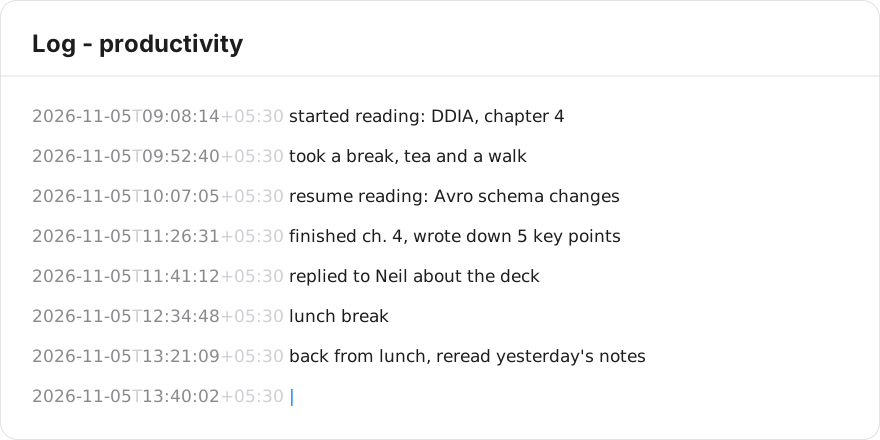
- The time is ISO 8601 with seconds and your UTC offset, for example
2026-11-05T14:22:19+05:30. - The note is shown in the system monospaced font. The times are in a quieter grey, and the "T" and the offset are lighter still, so the entries read first.
- The "Log -" line itself has no time.
- On the iPhone log notes have the same editor: monospaced, Return writes the time. Windows and Android show them as plain text for now.
Links between notes (Mac)
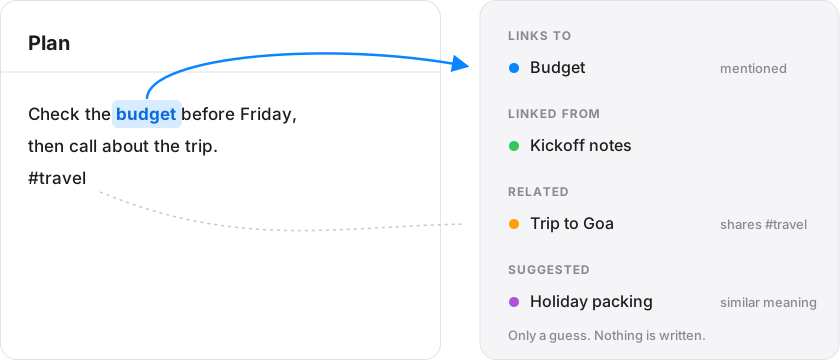
- A Links column at the right of a note lists the notes it mentions by title or with
[[Title]], and the notes that mention it. "Make this a link" turns a plain mention into[[Title]]. - Related lists notes that share a
#tagor@person, or many uncommon words. Suggested lists notes with a similar meaning, using Apple's on-device word model. It is off by default: turn it on in Settings, Suggestions. Nothing leaves your Mac. - The Agenda and Links share one column. Drag the bar between them to change how tall Links is.
Opening and the window (Mac)
- Scattered Notes opens at the last note you wrote, on the same line, and remembers the window size and whether the sidebar was hidden.
- Left arrow at the very start of a note goes back to the note list. Right arrow in the list goes into the note.
- The folder items are gone from the menu bar menu. Open the notes folder from Settings.
Agenda (Mac)
- Tasks still to do come first and done ones at the bottom.
- The window no longer repeats the note's title in the title bar.