Repository navigation
Releases
Crest v1.0.0

Install: download Crest_1.0.0_x64-setup.exe below and run it. No admin rights or developer tools needed. On a Windows on ARM PC (Snapdragon and other ARM64 laptops), take Crest_1.0.0_arm64-setup.exe instead.
Already installed? The app offers this version under Settings → General → Updates.
Portable: Crest-1.0.0-Portable-x64.zip (or -Portable-arm64.zip on ARM) needs no install: unzip it anywhere you can write to and run Crest.exe. It keeps its data in a data folder next to it and updates itself in place.
Mac: Crest_1.0.0_aarch64.dmg for Apple silicon (M1 and later), Crest_1.0.0_x64.dmg for Intel. Drag Crest to Applications. The app is not notarized yet: on first launch macOS refuses it, then System Settings → Privacy & Security → Open Anyway. Some tools are Windows-only for now and don't show on a Mac.
Checksums: SHA256SUMS lists the SHA-256 of every file of this release. Check a download with sha256sum -c SHA256SUMS --ignore-missing, or in PowerShell compare Get-FileHash <file> with its line.
Windows SmartScreen may warn because the installer is not code-signed yet: More info → Run anyway.
The biggest update so far: six new tools, break reminders, files to your phone by QR code, offline lyric translation, a pace line for AI limits, and fixes for more than 150 bugs found in a full review of the app on Windows x64, ARM64 and the Mac.
Every new tool is off until you turn it on in Settings → Tools.
New tools
- Calc: a notebook calculator, one calculation per line with the result on the right. It reads units (
5 km in miles,72 F in C), percentages (20% of 80), variables, dates and currencies, and a click on a result copies it. - Clocks: world clocks with a slider that moves the time up to a day either way, so you can see what 3 pm here is for everyone, plus sunrise, sunset, golden hour and the moon for your weather place.
- Colour: pick a colour from anywhere on the screen or paste one, copy it as HEX, RGB, HSL or OKLCH, check its contrast against another and see its harmonies.
- Habits: up to 20 habits, every day or on the weekdays you pick, with five weeks of dots and a streak that forgives a missed day now and then.
- Prompter: a teleprompter that scrolls your script at the speed you set, with a countdown, a mirror mode for glass and keys to move around while you read.
- Agents: the Claude Code sessions running on this PC, with their state, what each one is waiting for, and a button that copies the command to resume one.
New in the tools you have
- Break reminders (Settings → Timer → Breaks): an eye break every 20 minutes and a longer break every hour, counted from the time you actually spend at the computer. They wait during presentations, full-screen apps, recordings and Do Not Disturb.
- Shelf: Send to phone shows a QR code. Scan it and the phone's browser downloads the files straight from the PC, over your local network only.
- Lyrics: Translate offline translates songs on your PC with the models Firefox uses for page translation, into the language you pick. The closed notch can show the translated or the romanised line instead of the original (#10).
- AI usage: a pace line under each limit says where it will stand at the reset, or when you would hit it at this rate. An optional notice tells you when a limit has reset. Antigravity is read from its app, and the Claude card works with a claude.ai session key for those who use the desktop app without Claude Code (#9).
- Notices: a notice with a one-time code gets a Copy code button. Hide Windows banners shows each notification once, in the notch (#6).
- Clipboard: decode chips name a JWT, a Unix time, Base64, a UUID, JSON, a colour or a link with tracking, and show what it decodes to. Everything stays on the PC.
- To-dos: type "call Marco tomorrow 9am" or "venerdì alle 17" and the task gets that due time. English and Italian for now.
- Hardware: a sheet lists the ports your PC is listening on, with the program behind each one, and can end a process of yours.
- Hide Crest from screen sharing and recordings (Settings → Display → Presentation mode), a microphone mute among the quick controls with its own shortcut, and a closed notch that can show only the network speed (#11).
Fixes
- Crest pauses its readings while the screen is off or the PC sleeps, and no longer talks to a laptop's own panel over DDC/CI. Both could take part in a crash on wake from standby on some laptops.
- The panel stays open when the dock switches to a smaller tool and the pointer is left outside it (#12).
- Bluetooth headphones no longer drop out while music plays (#7), and the layout problems on some screens are fixed (#4, #5).
- A full review of the app fixed more than 150 smaller bugs: keyboard use and screen readers, Arabic and other long translations, the weather card, the calendar, the vault, the portfolio, captures, the Mac version and the installer. Crest also keeps working when its saved data is damaged.
Try every tool in your browser before installing: andrealo20.github.io/crest.
Changes
- Mention the dock fix for issue 12 in the 1.0.0 notes
- Add a token to the sample clipboard for the decode chips, and fix the video length in the README
- Rewrite the README by tool family, without a picture per feature
- Say in the guide that Clocks shows the sun in the place's own time
- Show Clocks' sun times in the weather place's own time, and label the to-do date chip with a colon
- Keep the open panel's shadow inside the window's margin
- Fix what the desktop test of the new tools found
- Write the 1.0.0 release notes and What's new entry
- Fix findings from the second review of the new tools
- Document the new tools and hide Copy code where the command does not exist
- Fix findings from the review of the new tools
- Fix the test typecheck after merging the fixes
- Translate the new and changed texts into every language
- Drop the install hook that could start an older Crest and block the installer
- Keep hover enter working on an open panel while a question waits
- Translate the new tools and settings into Arabic, Spanish, French, Hindi, Japanese, Portuguese, Russian and Chinese
- Add decode chips to the Clipboard tool
- Keep the monitor mode on the chosen screen on a Mac
- Add a listening ports sheet to Hardware, with copy, open and end process
- Fix the tool keys, the dock, the focus cards and the copies on other monitors
- Raise windows with SetWindowPos and check every mirror's monitor
- Poll the hit zone slowly when the pointer is far from the pet too
- Keep the panel size choice selected after a default size changes
- Keep the unpriced plus inside the left to right isolate of a cost
- Add Hide Crest from screen sharing and a microphone mute
- Measure the clock with tabular digits, forget Bluetooth devices when the alert is off
- Serialize the banner changes now that they run off the main thread
- Document the 4.5:1 minimum for the success colour
- Add Calc, a notebook calculator with units, dates and percentages
- Keep the character count of a text card readable in every language
- Add break reminders: eye breaks and long breaks from real work time
- Ignore Enter that ends an IME composition in the place search, retry when the saved forecast stands in
- Add an Agents tool that lists running agent sessions
- Add a Prompter tool that scrolls a script under the webcam
- Understand dates in the new to-do field
- Hide Mac-less settings, translate the Ask labels and tidy Settings
- Drop the demo from the app build and fix the browser mocks
- Keep the tray autostart check in step and wait for Applications on a Mac
- Add a pace forecast to AI usage and an optional notice when a limit resets
- Add a Clocks tool with world clocks, a time slider and sun and moon times
- Add a Copy code button to notices that contain a one-time code
- Add a Colour tool with a screen picker, contrast check and harmonies
- Add a habits tool with a forgiving streak
- Give the sliders a focus ring and keys, and write the volume one at a time
- Fix the weather card in other languages, time zones and small panels
- Keep the temperature in Hardware left to right in Arabic
- Keep the brightness HUD from covering the charger alert
- Run the dark theme and power commands off the main thread
- Keep the unit converter working when its saved state is null
- Fit the phone share panel, end it on a network change and hide file names when presenting
- Document the phone share and its Windows Firewall prompt
- Keep two dropped files with the same name apart in the demo
- Refresh the playing app's name in the mixer hook when the player changes
- Keep the size reset button in its card and read notice text in its own direction
- Watch monitor changes on a Mac, tell identical displays apart, and keep expected errors out of crash.log
- Use a find shortcut without AltGr risk, and name the Mac keys as a Mac does
- Keep the pet and the live resize inside the window, and tidy the shell's clicks
- Query usage providers side by side and honor a rate limit pause
- Fix portfolio history, realized gains and provider quirks
- Fix focus, errors, keyboard and retries in the vault
- Clear the QR screenshot and copied secrets from the clipboard reliably
- Hide Coinbase on a Mac, where its keys cannot be signed
- Show the open P/L percentage at full strength
- Word the battery times with a placeholder, widen the Hardware detail and align its figures for right to left
- Format Hardware, weather and download figures with the language's decimal s...
Crest v0.4.0
Install: download Crest_0.4.0_x64-setup.exe below and run it. No admin rights or developer tools needed. On a Windows on ARM PC (Snapdragon and other ARM64 laptops), take Crest_0.4.0_arm64-setup.exe instead.
Already installed? The app offers this version under Settings → General → Updates.
Portable: Crest-0.4.0-Portable-x64.zip (or -Portable-arm64.zip on ARM) needs no install: unzip it anywhere you can write to and run Crest.exe. It keeps its data in a data folder next to it and updates itself in place.
Mac: Crest_0.4.0_aarch64.dmg for Apple silicon (M1 and later), Crest_0.4.0_x64.dmg for Intel. Drag Crest to Applications. The app is not notarized yet: on first launch macOS refuses it, then System Settings → Privacy & Security → Open Anyway. Some tools are Windows-only for now and don't show on a Mac.
Checksums: SHA256SUMS lists the SHA-256 of every file of this release. Check a download with sha256sum -c SHA256SUMS --ignore-missing, or in PowerShell compare Get-FileHash <file> with its line.
Windows SmartScreen may warn because the installer is not code-signed yet: More info → Run anyway.
A Recorder for sound, a brightness slider in Overview, AI usage that says when its numbers are old, and notices that open what they show.
- Recorder: a new tool that records sound only, from the microphone, the system audio or both mixed, so a call keeps your voice and everyone else's. Files are M4A in Music\Crest\Recordings, listed in the tool with their length, and pause, stop and the timer in the closed notch work as for screen recordings. It is off by default: turn it on in Settings, Tools. Crest tells no one that you are recording; the first time you open it, a note reminds you that in many countries a conversation may only be recorded with everyone's consent.
- Brightness: Overview has a slider for the screen the notch is on, over DDC/CI on external monitors and through Windows on a laptop's own screen. On a Mac it sets the built-in display. The row shows only where Crest can set the brightness.
- AI usage: when a reading is out of date, the tool says why and dims the old limits instead of showing them as current. When the sign-in of the command line tool has expired, Renew in the terminal starts it in Crest's terminal, which refreshes the sign-in.
- Notices: a click on a notice opens what it is about, not the part of the closed notch it covers. The What's new line opens What's new instead of Hardware, a recording opens Capture or the Recorder, a quota alert opens AI usage and a new track opens Now Playing.
Changes
- Release 0.4.0
- Notes for 0.4.0
- Fix what the pre-release review found
- Record sound only with the new Recorder tool
- Set a laptop panel's brightness through WMI
- Set the brightness from Overview
- Renew an expired AI usage sign-in from Crest's terminal
- Say why an AI usage reading is out of date
- Update README
- Open a notice's own page when it covers the closed row
Crest v0.3.4
Install: download Crest_0.3.4_x64-setup.exe below and run it. No admin rights or developer tools needed. On a Windows on ARM PC (Snapdragon and other ARM64 laptops), take Crest_0.3.4_arm64-setup.exe instead.
Already installed? The app offers this version under Settings → General → Updates.
Portable: Crest-0.3.4-Portable-x64.zip (or -Portable-arm64.zip on ARM) needs no install: unzip it anywhere you can write to and run Crest.exe. It keeps its data in a data folder next to it and updates itself in place.
Mac: Crest_0.3.4_aarch64.dmg for Apple silicon (M1 and later), Crest_0.3.4_x64.dmg for Intel. Drag Crest to Applications. The app is not notarized yet: on first launch macOS refuses it, then System Settings → Privacy & Security → Open Anyway. Some tools are Windows-only for now and don't show on a Mac.
Checksums: SHA256SUMS lists the SHA-256 of every file of this release. Check a download with sha256sum -c SHA256SUMS --ignore-missing, or in PowerShell compare Get-FileHash <file> with its line.
Windows SmartScreen may warn because the installer is not code-signed yet: More info → Run anyway.
A font of your choice, a Report a bug button, and fixes for the setups that 0.3.3 got wrong: the notch on the bottom or a side edge, light themes, longer translations, other keyboards and Windows editions.
- Fonts: Settings → Themes → Font picks the font of the whole app from sixteen, each shown as itself in the menu. Inter stays the default; the others come with Windows, and on a Mac each one uses a Mac font of the same kind.
- Report a bug: below Plugins in Settings. It opens the bug report form on GitHub with your Crest version filled in.
- Bottom and side edges: menus in Settings open upright and in the right place (#2). On a side edge the open panel slides along the edge again, the privacy dots show in the dimmed column, and in resize mode the grips sit where they should and the Done button is in reach. The panel comes out of its own edge.
- Links: calendar Join buttons (Zoom, Teams and other links with parameters) opened Documents instead of the browser. They open the browser again, and so do files with a comma in the name.
- Light themes: the terminal keeps a dark ground and the video badges in Capture are readable.
- Languages: longer translations fit in Overview, Capture, the calendar and Hardware. Notice times and dates and 12-hour times follow the language. In Arabic, sliders and level bars fill from the left and the clipboard row scrolls the right way.
- Fonts with uneven digits (Gabriola, Ink Free, MV Boli) use Inter's digits, so timers and the clock do not jitter.
- Windows: Crest starts on Windows N editions without the Media Feature Pack, and recording says what is missing. Shortcuts recorded on a German, French or other layout fire on the key you pressed. With a left-handed mouse, leaving focus mode and the drop zone follow the primary button. Pasted images go to your Pictures folder, also when OneDrive moved it.
- Store version: the microphone is recorded.
Changes
- Build the macOS hit test again
- Release 0.3.4
- Notes for 0.3.4
- Fix light themes, languages and less common Windows setups
- Fix the notch on the bottom and side edges
- Draw select menus upright on the bottom and side edges (#2)
- Swap look-alike fonts for distinct ones, with Mac stand-ins
- Show each font in the font menu as itself
- Choose the app's font in Settings, Themes
- Open web links with ShellExecute instead of Explorer
- Add Report a bug below Plugins in Settings
- Update README
- Revert the WebView2 storage workarounds
- Keep saved settings and tool data in Crest's own file
- Restart once when WebView2 opens an empty localStorage
- Show three demo captures in the browser showcase
- Update README
- Update README
Crest v0.3.3
Install: download Crest_0.3.3_x64-setup.exe below and run it. No admin rights or developer tools needed. On a Windows on ARM PC (Snapdragon and other ARM64 laptops), take Crest_0.3.3_arm64-setup.exe instead.
Already installed? The app offers this version under Settings → General → Updates.
Portable: Crest-0.3.3-Portable-x64.zip (or -Portable-arm64.zip on ARM) needs no install: unzip it anywhere you can write to and run Crest.exe. It keeps its data in a data folder next to it and updates itself in place.
Mac: Crest_0.3.3_aarch64.dmg for Apple silicon (M1 and later), Crest_0.3.3_x64.dmg for Intel. Drag Crest to Applications. The app is not notarized yet: on first launch macOS refuses it, then System Settings → Privacy & Security → Open Anyway. Some tools are Windows-only for now and don't show on a Mac.
Checksums: SHA256SUMS lists the SHA-256 of every file of this release. Check a download with sha256sum -c SHA256SUMS --ignore-missing, or in PowerShell compare Get-FileHash <file> with its line.
Windows SmartScreen may warn because the installer is not code-signed yet: More info → Run anyway.
crest-v5-demo-10mb.mp4
Coloured icons, a notch that answers your coding agent, and a dozen new tools and options picked from what other notch apps do well.
- Coloured icons: each tool in the tool bar, each Settings page, the weather, the Overview tiles, the Hardware rows and the closed-row readings get a colour of their own. The colours are worked out for the theme you use, so they keep 3:1 contrast on light and custom themes too. Settings → Themes → Coloured icons; the old switch in Hardware moved here and keeps its value.
- Permission requests:
crest-notify askshows a question with Allow, Always allow and Deny in the notch and waits for your answer. docs/notices.md has a ready-made hook for a coding agent's permission requests. - Calendar: events with a Google Meet, Zoom, Teams or Webex link get a Join button, in the agenda and in the notice before the event.
- Overview: a Keep awake tile (until you turn it off, or for 30 minutes, 1 or 2 hours, with a cup in the closed notch while it is on), and a button on the volume tile that picks the audio output.
- Hardware: the Windows power plan in the Power row when the PC has more than one, each process's CPU share in percent, and temperatures and power from HWiNFO or LibreHardwareMonitor while one of them runs.
- Caps Lock and Num Lock show in the notch when you press them, like the volume.
- Timer and clock: Flip, Nixie, Ring, LCD and Analog join the seven looks there were, and Settings → Timer picks a colour for the focus timer (orange stays the default, breaks stay green) and one for the Overview clock.
- Timer: focus sounds (white, pink and brown noise, rain, waves) that play while a focus timer runs and fade out when it ends. Settings → Timer.
- Settings search: type in the field above the pages, or press Ctrl+F while Settings is open.
- Music: Spectrum and Wave equalizers and a Wavy progress bar (Settings → Display → Music), and a soft tint of the album art's colour on the open panel (Settings → Themes).
- Camera: a new tool, off by default, to check yourself before a call. The picture stays on your screen and is never recorded.
- Find on screen: Ctrl+Alt+F reads every screen with Windows' own text recognition and lets you search and copy what is on them. Nothing is saved or sent.
- Downloads: a browser download into your Downloads folder shows its size and speed in the closed notch, and a notice offers Show in folder and Add to Shelf when it is done.
- Notices: a Windows notice opens its app on a click, and deleting it in Crest removes it from the Windows notification centre too.
- Fixes: menus keep each choice on one line, so long window titles in Capture no longer overlap.
- Store version: Settings → Support and the What's new page have a button to rate Crest in the Microsoft Store.
Changes
- Release 0.3.3
- Update README
- Make the album art tint strong enough to see on real covers
- Notices: deleting a Windows notice removes it from the notification centre, and a click opens its app
- Timer and clock colours, and five new looks: Flip, Nixie, Ring, LCD and Analog
- Keep the dev server and git away from the shared build folder
- Keep each menu choice on one line, so long window titles in Capture no longer overlap
- Changelog and release notes for 0.3.3, and document the mixer and coloured icons
- Add Find on screen
- Show downloads in progress in the closed notch
- Add a Camera tool to check yourself before a call
- Answer permission questions from the notch with crest-notify ask
- Colour the Overview tiles' icons when coloured icons are on
- Read CPU and GPU temperature and power from HWiNFO or LibreHardwareMonitor
- Pick the audio output device from Overview
- Add keep awake to Overview and a power plan switch to Hardware
- Add Spectrum and Wave equalizer looks and a Wavy progress bar
- Search in Settings
- Add focus sounds to the timer
- Calendar: Join button for online meetings
- Show the CPU share of each process in Hardware with a percent sign
- Show Caps Lock and Num Lock in the notch
- Tint the open panel with the album art's colour, an option in Settings, Themes
- Hold coloured icons to 3:1 on every theme, keep the load colour on dials
- CPU icon in red in the Hardware tool and the closed notch
- Colour the Hardware tool's icons too when coloured icons are on
- Coloured icons across the app, switched in Settings, Themes
- Add a Rate Crest button to What's new and Settings in the Store build
- Update README
- Update README
- Update the trailer in the Chinese README too
- Update the README trailer: open on the whole desktop and click into the notch
- Save screenshots in Windows' Screenshots folder, and show files in Explorer even with a space in the name
- New trailer in the READMEs: no "notch for Windows" line, and it ends on Windows and macOS
- Draw the platforms badge with the Store button's own geometry, so the two match in size
- Platforms badge in white, with dark logos and a hairline border
- Always the dark Store button, beside the black platforms badge
- Platforms badge in black
- Platforms badge in indigo
- Give the platforms badge the Store button's exact size, and drop the underlined space between them
- Round the badges: shields.io's flat style, and rounded corners on the platforms badge
- Rename the platforms badge so cached copies of the labelled one don't show
- Platforms badge with the three logos only, and a darker orange for the languages
- Smaller PLATFORMS label, Sponsor in pink and the Chinese README button in blue
- Put the platforms badge next to the Store button, in red, and turn Sponsor blue
- Show the platforms as one badge with their three logos, and the stars again
Crest v0.3.2
crest-v5-demo-10mb.mp4
Install: download Crest_0.3.2_x64-setup.exe below and run it. No admin rights or developer tools needed. On a Windows on ARM PC (Snapdragon and other ARM64 laptops), take Crest_0.3.2_arm64-setup.exe instead.
Already installed? The app offers this version under Settings → General → Updates.
Portable: Crest-0.3.2-Portable-x64.zip (or -Portable-arm64.zip on ARM) needs no install: unzip it anywhere you can write to and run Crest.exe. It keeps its data in a data folder next to it and updates itself in place.
Mac: Crest_0.3.2_aarch64.dmg for Apple silicon (M1 and later), Crest_0.3.2_x64.dmg for Intel. Drag Crest to Applications. The app is not notarized yet: on first launch macOS refuses it, then System Settings → Privacy & Security → Open Anyway. Some tools are Windows-only for now and don't show on a Mac.
Checksums: SHA256SUMS lists the SHA-256 of every file of this release. Check a download with sha256sum -c SHA256SUMS --ignore-missing, or in PowerShell compare Get-FileHash <file> with its line.
Windows SmartScreen may warn because the installer is not code-signed yet: More info → Run anyway.
Eight new themes, a closed notch you can click into and resize in place, and a round of security and reliability fixes.
- Themes: Catppuccin Mocha and Latte, Nord, Rosé Pine and Rosé Pine Dawn, Gruvbox Dark, Solarized Light and Everforest join the seven there were, three more of them light. Settings → Themes.
- The closed notch opens where you point: a click on the readings opens Hardware, on the AI rings AI Usage, on the song the music, on the timer or the clock the Timer, on the next event the Calendar. With Open on hover, the part under the pointer decides the same way.
- Resize the closed notch, capsule or line on the notch itself: Settings → Display → Adjust on the notch, then drag its ends and its far side, and Done.
- What's new: after an update, or when a new version is out, a line in the closed notch says so and opens the changes, with a short note on supporting Crest.
- The converter opens on the units and currencies you used last.
- Weather keeps the last forecast for when Open-Meteo doesn't answer, and says how old it is.
- Security: Crest's windows stay on their own pages, a dropped link no longer opens in the notch, the timer and mirror windows can only call their own commands, and Explorer is started by its full path.
- Fixes: the vault no longer looks damaged while another program holds its file, and turning on Windows Hello twice in a row can't lose it; vault, plugin storage and portfolio history are flushed to disk before they are replaced; a stopped Ask question no longer breaks the next one; portfolio amounts like "1,000" read as a thousand; Shelf text is hidden while presenting; a timer that ran out while Crest was closed doesn't ring at login; Discord no longer reopens its consent dialog every few seconds.
Changes
- Release 0.3.2
- Tell the page where the pointer entered the closed notch
- Open a tool from its part of the closed notch, and resize the closed notch on the notch itself
- Open the converter on the units and currencies used last
- Add eight built-in themes: Catppuccin Mocha and Latte, Nord, Rosé Pine and Dawn, Gruvbox Dark, Solarized Light, Everforest
- Show the last weather forecast when Open-Meteo doesn't answer
- Link the Windows, macOS and languages badges
- Point questions and ideas to Discussions from the issue form
- Grant the FPS tracing right only to a user account
- Keep Crest's windows on their own pages and their own commands
- Keep the What's new page on the offered version when the download fails
- Say how far the calendar cache reaches since the month view
- Hide Shelf text cards while presenting
- Tell a vault file held by another program apart from a damaged one
- Drop the local tag too when a release is built again
- Read typed portfolio amounts with the converter's parser
- Drop the empty reply bubble after Stop, not only after an error
- Announce a new version and what an update changed in the closed notch
- Drop the unused secret_delete command, objc2 and two repeated windows features
- Let the mixer row show the level of the sessions that are not muted
- Read only the end of session logs for the fallback usage limits
- Take the Bluetooth baseline once the paired devices are all listed
- Run the Windows tests before a release and pin the actions that see the signing key
- Cap calendar replies as they arrive and give each source 30 seconds
- Skip copied texts over 2 MB and decode the image only when it can win
- Keep plugin tools when the plugin list can't be read
- Flush the vault, plugin storage and portfolio files to disk before the rename
- Start a header drag once, from the hit zone
- Don't ring a timer that ended while Crest was closed
- Check the custom AI address by its parsed host
- Read Discord frames in their own task and stop retrying a refused authorization
- Publish a release as a prerelease until its checksums are up
- Write the portfolio history atomically and never over a file that doesn't parse
- Keep the vault when Windows Hello is turned on twice or the file can't be read
- Move the To-dos to Scratchpad screenshots after Weather in both READMEs
- Say in both READMEs that Crest runs on macOS too, as a preview
Crest v0.3.1
Install: download Crest_0.3.1_x64-setup.exe below and run it. No admin rights or developer tools needed. On a Windows on ARM PC (Snapdragon and other ARM64 laptops), take Crest_0.3.1_arm64-setup.exe instead.
Already installed? The app offers this version under Settings → General → Updates.
Portable: Crest-0.3.1-Portable-x64.zip (or -Portable-arm64.zip on ARM) needs no install: unzip it anywhere you can write to and run Crest.exe. It keeps its data in a data folder next to it and updates itself in place.
Mac: Crest_0.3.1_aarch64.dmg for Apple silicon (M1 and later), Crest_0.3.1_x64.dmg for Intel. Drag Crest to Applications. The app is not notarized yet: on first launch macOS refuses it, then System Settings → Privacy & Security → Open Anyway. Some tools are Windows-only for now and don't show on a Mac.
Checksums: SHA256SUMS lists the SHA-256 of every file of this release. Check a download with sha256sum -c SHA256SUMS --ignore-missing, or in PowerShell compare Get-FileHash <file> with its line.
Windows SmartScreen may warn because the installer is not code-signed yet: More info → Run anyway.
A month in the Calendar, the clock in any timer look, Bluetooth notices for every device and a first Mac preview.
- Calendar: a month next to the agenda, with a dot for each calendar on the days that have events. Pick a day to see the agenda from there; the arrows go one month back and two ahead, and the month name brings you back to today.
- Clock look: the Overview clock can wear any of the timer looks, from Zen to HUD. Settings → Clock look. The idea came from RobbieIsTheName on Reddit.
- Bluetooth: the connect and disconnect notice now covers every Bluetooth device (headphones, mice, keyboards, controllers, speakers, phones), with its battery when the device reports one. Headphones never showed on PCs with an audio offload driver, AMD's among them; that is fixed. The setting is now called Bluetooth devices.
- Smoother: opening the notch and switching tools no longer blur the whole panel, which cost a long frame on every open on high-DPI screens.
- Mac preview: disk images for Apple silicon and Intel Macs. This is a first build, not notarized and barely tried on real hardware, so expect rough edges and please open an issue for what breaks. Shelf, Hardware, Discord, Vault, Terminal, Launcher, Notices and Capture are Windows-only for now and don't show on a Mac.
Changes
- Read the Mac's time zone database, and keep the portable test to Windows
- Release 0.3.1
- Keep the Bluetooth devices from the watcher's events instead of querying
- Build Crest for macOS and release it next to Windows
- Drop the blur from the panel opening and from tool switches
- Show the status notice for every Bluetooth device, not only headphones
- Show the month in the Calendar tool, with a dot for each calendar on days with events
- Let the Overview clock use any of the timer looks
- Show the interface languages as one badge and bring back the Sponsor badge
- Add an x64 and ARM64 badge to both READMEs
- Rename the README GIF so cached copies of the old one are not shown
- Show the new trailer and a new tool tour GIF in the READMEs
- Draw the language badges as local SVGs so Hindi and Arabic render, with blue and green added
- Show the 11 interface languages as badges in both READMEs
Crest v0.3.0
crest-v3-demo-10mb.mp4
Install: download Crest_0.3.0_x64-setup.exe below and run it. No admin rights or developer tools needed. On a Windows on ARM PC (Snapdragon and other ARM64 laptops), take Crest_0.3.0_arm64-setup.exe instead.
Already installed? The app offers this version under Settings → General → Updates.
Portable: Crest-0.3.0-Portable-x64.zip (or -Portable-arm64.zip on ARM) needs no install: unzip it anywhere you can write to and run Crest.exe. It keeps its data in a data folder next to it and updates itself in place.
Checksums: SHA256SUMS lists the SHA-256 of every file of this release. Check a download with sha256sum -c SHA256SUMS --ignore-missing, or in PowerShell compare Get-FileHash <file> with its line.
Windows SmartScreen may warn because the installer is not code-signed yet: More info → Run anyway.
Plugins, eleven languages, a calendar and a first-run setup.
- Plugins: a folder of HTML, CSS and JavaScript with a
crest-plugin.jsonbecomes a tool in the notch. Install it from Settings → Plugins; it runs sandboxed, with only the network addresses and storage it declares. Scripts can also put their own parts in the closed row withcrest-notify part. How to write one: docs/plugins.md. - Languages: English, Simplified Chinese, Spanish, Hindi, Arabic (right to left), French, Portuguese, Russian, Japanese, German and Italian. Crest follows the Windows language unless you pick one in Settings → General.
- Calendar: a read-only agenda from ICS links (Google, Outlook, iCloud) or CalDAV accounts, a notice before each event and the next event in the closed row.
- First run: a short setup picks a preset (Music, Productivity, AI or your own tools), the closed look and edge, and shows the shortcut. Settings → General runs it again.
- Volume and brightness: changes show in the closed notch, and Crest can hide the Windows indicator while it runs. Turning the option off brings the Windows indicator back.
- Lyrics: word by word where the source times words, with translation and romanisation for Japanese, Chinese and Korean, and more sources to look in.
- Monitors: the notch stays on the monitor you pick, follows the pointer, or shows a closed notch on every monitor.
- Toolbar: larger buttons, brighter icons and a mark under the tool you are on.
- Downloads: ARM64 installers and portable zips, and a
SHA256SUMSfile to check them. Settings → General → Copy diagnostics copies what an issue report needs. - Fixes: quick drop with the Shelf off, amounts written as "1,000" or "1.234,5", a second scrollbar in the terminal, Ask translating into German, stale header buttons after fast switching between tools.
Changes
- Move the README language badge under the other badges
- Release 0.3.0
- Add a Simplified Chinese README and language badges to both
- Keep a tool's header actions to its own view, and bring back the clipboard's Files filter label
- Translate the monitor options, and give the track buttons their own labels apart from the setup's Next and Back
- Monitor setting: follow the cursor, or a closed notch on every monitor
- Translate the interface into Chinese, Spanish, Hindi, Arabic, French, Portuguese, Russian, Japanese and Italian
- Plugins: sandboxed widget tools, and custom closed-row parts from crest-notify
- Language setting with 11 languages and right to left layout
- Restore the hidden Windows indicator by the same window search that hides it
- Lyrics: word by word, translation, romanisation and more sources
- Add SHA256SUMS, Copy diagnostics and ARM64 builds to the release
- Add a read-only Calendar tool with ICS links and CalDAV accounts
- Show a volume and brightness HUD in the closed notch
- Add a first-run setup with presets, closed look and shortcuts
- Fix the issues found in the UI pass and make the toolbar easier to use
- Show the closed notch with coloured icons in the README
Crest v0.2.2
Install: download Crest_0.2.2_x64-setup.exe below and run it. No admin rights or developer tools needed.
Already installed? The app offers this version under Settings → General → Updates.
Portable: Crest-0.2.2-Portable-x64.zip needs no install: unzip it anywhere you can write to and run Crest.exe. It keeps its data in a data folder next to it and updates itself in place.
Windows SmartScreen may warn because the installer is not code-signed yet: More info → Run anyway.
Sizes for the closed notch, a currency converter and a tidier closed row.
- Sizes: Settings → Display → Size sets the width and height of the closed notch and capsule, how far the capsule sits from the edge, and the line's length, thickness and distance. The content grows with the height, and the surface widens by itself when the content needs more room.
- Closed row: each percentage now sits next to its own icon instead of drifting towards the next one. Settings → Tools → Hardware → Coloured icons gives every reading its own colour.
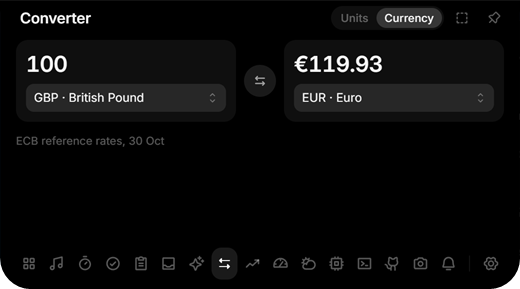
- Converter: Units and Currency. Currency converts between about 30 currencies at the European Central Bank's reference rates, with the date of the rates under the result. File conversion is gone, and files dropped on the notch now go to the Shelf.
- GitHub: your profile picture next to your name, and a click on either opens your profile.
- The installer shows the Crest icon.
Changes
- Release 0.2.2
- Open the GitHub profile from the name and picture in the GitHub tool
- Converter: currencies at the ECB rates instead of file conversion
- Let the closed notch, capsule and line be sized in Settings, Display
- Show the profile picture next to the name in the GitHub tool
- Show the Crest icon on the installer instead of the NSIS one
- Reorder the README badges: build, release, downloads, Windows, license
- Put each closed-row reading next to its own icon, and add coloured icons as an option
- Queue release runs so a push during a build cannot publish the same version twice
- Use the official Get it from Microsoft button in the README, like Pomelo's
- Link the Microsoft Store listing now that Crest Island is live
Crest v0.2.1
Install: download Crest_0.2.1_x64-setup.exe below and run it. No admin rights or developer tools needed.
Already installed? The app offers this version under Settings → General → Updates.
Portable: Crest-0.2.1-Portable-x64.zip needs no install: unzip it anywhere you can write to and run Crest.exe. It keeps its data in a data folder next to it and updates itself in place.
Windows SmartScreen may warn because the installer is not code-signed yet: More info → Run anyway.
Fixes a crash: when a timer finished, the notch could disappear until Crest was restarted.
Changes
- Release 0.2.1
- Show the real closed notch with most of its parts in the README
- Fix the notch going blank when a timer finishes
- Bring the downloads badge back, next to the stars
- Give crest-notify its alias through Crest's own app entry, as the Store refuses a second app without a Start menu entry
- Drop the downloads badge for now
- Add the Microsoft Store package script and manifest
- Add a store build feature without self-update and with the package's startup task
- Colour the README badges and give each its logo, and point the trailer at the public upload
Crest v0.2.0
Install: download Crest_0.2.0_x64-setup.exe below and run it. No admin rights or developer tools needed.
Already installed? The app offers this version under Settings → General → Updates.
Portable: Crest-0.2.0-Portable-x64.zip needs no install: unzip it anywhere you can write to and run Crest.exe. It keeps its data in a data folder next to it and updates itself in place.
Windows SmartScreen may warn because the installer is not code-signed yet: More info → Run anyway.
The first public release of Crest: a notch at the edge of your Windows screen with music and synced lyrics, notices, timers and to-dos, screenshots and screen recording, a terminal, an app launcher, your GitHub activity, AI usage limits, live hardware stats, a read-only portfolio across brokers, themes and more.
crest-store-trailer-10mb.mp4
Every tool, with a picture of each, is in the README. Download the installer below, or the portable zip if you would rather not install anything.
Changes
- The closed notch comes as a notch, a capsule or a line, on any screen edge
- A row shows cover, timer, Discord call, AI quota, title or lyrics, hardware, equalizer, clock and GitHub
- Notices in the notch: recording, timer, status alerts, Windows notifications, quota, to-dos and water
- Synced lyrics, an equalizer fed only by the player, and a player picker
- Screenshots and screen recording with system audio and microphone
- A terminal with PowerShell or Command Prompt in the notch
- A launcher with pinned apps, and your GitHub activity
- To-dos with due times, a water reminder and a code scratchpad
- AI usage with tokens and cost from local logs, and more providers
- Hardware with cores, GPUs, network, power, battery, temperatures, processes and drives
- A portfolio across several brokers in one base currency, read only
- Themes with an editor and a day and night switch
- Rules for full screen and apps, scaling, your own shortcuts and a portable build
- The interface is English only