Repository navigation
Crest v0.2.2

Install: download Crest_0.2.2_x64-setup.exe below and run it. No admin rights or developer tools needed.
Already installed? The app offers this version under Settings → General → Updates.
Portable: Crest-0.2.2-Portable-x64.zip needs no install: unzip it anywhere you can write to and run Crest.exe. It keeps its data in a data folder next to it and updates itself in place.
Windows SmartScreen may warn because the installer is not code-signed yet: More info → Run anyway.
Sizes for the closed notch, a currency converter and a tidier closed row.
- Sizes: Settings → Display → Size sets the width and height of the closed notch and capsule, how far the capsule sits from the edge, and the line's length, thickness and distance. The content grows with the height, and the surface widens by itself when the content needs more room.
- Closed row: each percentage now sits next to its own icon instead of drifting towards the next one. Settings → Tools → Hardware → Coloured icons gives every reading its own colour.
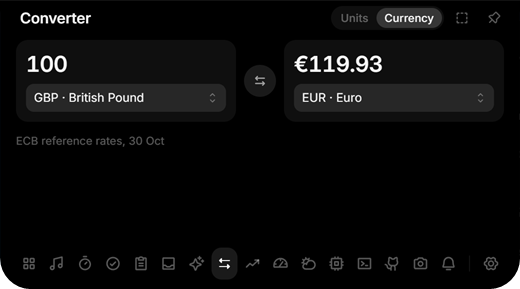
- Converter: Units and Currency. Currency converts between about 30 currencies at the European Central Bank's reference rates, with the date of the rates under the result. File conversion is gone, and files dropped on the notch now go to the Shelf.
- GitHub: your profile picture next to your name, and a click on either opens your profile.
- The installer shows the Crest icon.
Changes
- Release 0.2.2
- Open the GitHub profile from the name and picture in the GitHub tool
- Converter: currencies at the ECB rates instead of file conversion
- Let the closed notch, capsule and line be sized in Settings, Display
- Show the profile picture next to the name in the GitHub tool
- Show the Crest icon on the installer instead of the NSIS one
- Reorder the README badges: build, release, downloads, Windows, license
- Put each closed-row reading next to its own icon, and add coloured icons as an option
- Queue release runs so a push during a build cannot publish the same version twice
- Use the official Get it from Microsoft button in the README, like Pomelo's
- Link the Microsoft Store listing now that Crest Island is live