Repository navigation
Xylem v0.4.0

Where did the space go? (Alt+W)
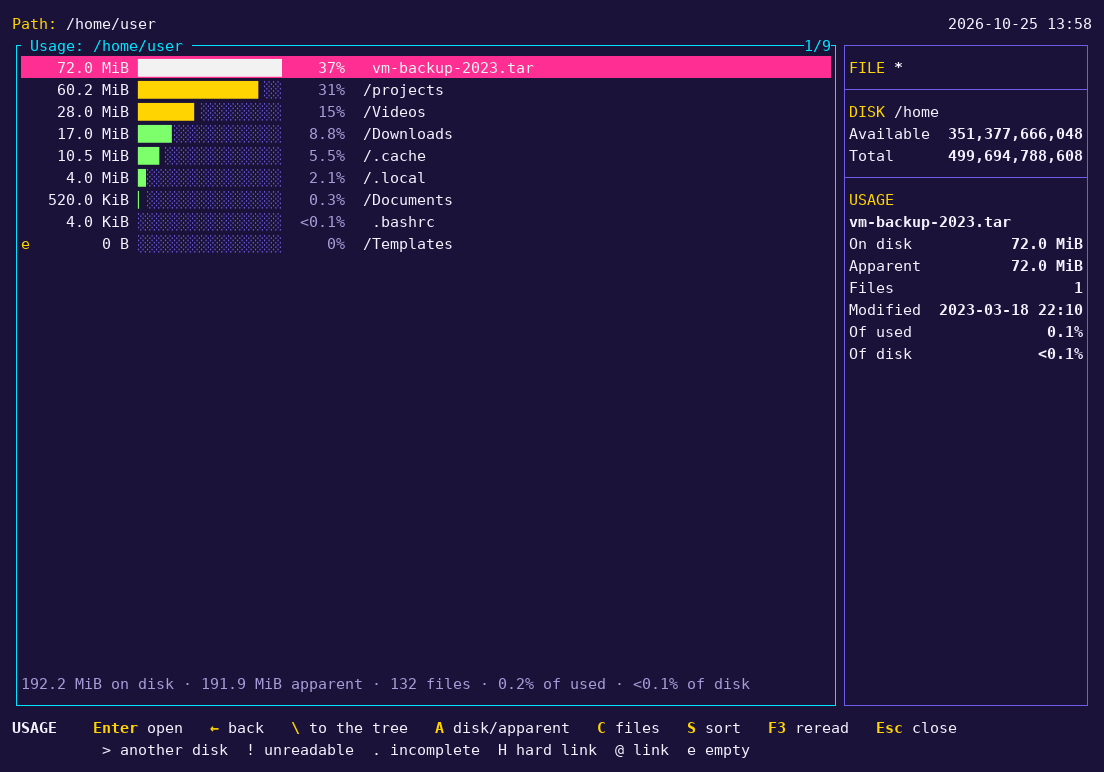
Alt+W opens the new Usage view: the folders and files of a branch by
the space they take, largest first, with a bar and their share of the folder.
Enter goes into a folder, down to what fills the disk; the panel on the right
shows the item's size on the disk and apparent, number of files and date.
One disk at a time (other file systems are marked > and left out), hard
links counted once, and the space on the disk as du counts it (A switches
to the apparent size). The bars take the color of their share: up to 10%, up
to 40%, more.
In the tree, Alt+K → Percent shows each folder's share of the one above,
with a colored bar against its largest sibling.
Remote machines over SSH
Type user@host:/path (or ssh://user@host:port/path) in L (Log), or
give it to xy, and browse that machine's files as a tree, alone or next to
this one with F8. Xylem speaks SFTP through your own ssh, so
~/.ssh/config, keys, the agent and known_hosts all apply, and nothing is
installed on the other side; passwords and host keys are asked in the
footer. The viewer, search, Compare and Copy (to this machine) work there,
and Alt+X opens a shell on the remote machine, with the tree following
its cd. The remote side is read-only for now.
Google Drive, S3 and other cloud storage, through rclone
Mount them with rclone and Xylem works there like on
any folder. On Linux, the DISK panel, Info and Avail say which service a
mounted folder is (Google Drive, Amazon S3, OneDrive...). The new manual page
explains the setup, what is different on a mounted remote, and how to find
what fills a Google Drive before buying more storage.
New themes: slate, graphite, daylight and vivid
In the style of Windows Terminal (slate) and of macOS in dark and light mode
(graphite, daylight), and vivid: strong colors on a deep indigo, for
presentations, videos and screenshots (the one above). Twelve themes in all,
in F4 or with theme = "..."; each has its own colors for the bars
(bar_low, bar_mid, bar_high, which [colors] can change too).
Smaller things
- E no longer opens binary files in the text editor: the new
[editors]
table inconfig.tomlchooses a program by file name, and binary files
without one are refused, with a hint to use O. xy --manshows the formatted manual page in a terminal; redirected to a
file, it still writes the source, for installing it.- The Alt menu in the footer lists Alt+W.
Install
Download the archive for your system below (Linux x86_64 or ARM64, static;
Windows x86_64), or cargo install xylem-fm. The website:
https://andrelnfernandes.github.io/xylem/
What's Changed
- Remote machines over SSH: browse, view and copy from them, with a terminal there by @andrelnfernandes in #24
- Editors by file type: E no longer opens binary files in the text editor by @andrelnfernandes in #25
- Website on GitHub Pages, new themes and screenshots in modern themes by @andrelnfernandes in #26
- Cloud storage through rclone: manual page and service in the DISK panel by @andrelnfernandes in #28
- Website: an author section and what is coming next by @andrelnfernandes in #30
- Alt+K Percent: each directory's share of the one above, with a bar by @andrelnfernandes in #29
- xy --man: show the formatted page in a terminal by @andrelnfernandes in #27
- Usage view (Alt+W): where the space of a branch goes by @andrelnfernandes in #31
- Website: the author's bio, the story of Xylem and XTree links by @andrelnfernandes in #32
- Manual: finding what fills a Google Drive with Alt+K Percent by @andrelnfernandes in #33
- Website: disk usage moves from "Coming next" to a section of its own by @andrelnfernandes in #34
- Version 0.4.0 by @andrelnfernandes in #35
Full Changelog: v0.3.0...v0.4.0
