MatLabel of an Autofilled MatFormField Does Not Float #12627


Description

Bug, feature request, or proposal: Bug
What is the expected behavior?
The label for an input field will float when "appearance" is set to "standard" and the field gets autofilled.
What is the current behavior?
When "appearance" of MatFormField is set to "standard" and the input field gets autofilled, the MatLabel doesn't float above the input field. Using "legacy" mode doesn't cause this issue.
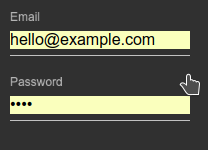
When using the "legacy" mode

When using the "standard" mode
What are the steps to reproduce?
- Create a form using
MatFormFieldandMatInput - Set "appearance" of
MatFormFieldto "standard" - Enter some values in those fields
- Submit the form
- Save the input values when the browser prompts
- Hard reload the page
What is the use-case or motivation for changing an existing behavior?
According to Material Design, the label for a filled input field should float above it.
Which versions of Angular, Material, OS, TypeScript, browsers are affected?
I tested with the latest versions of Angular and Angular Material. The TypeScript version was 2.9.2. I tested with Chrome on a Windows 10 machine.
Metadata
Metadata
Assignees
Labels
No labels