Repository navigation
Audio import
← User guide · Privacy and storage
New song → Import audio creates a draft of chords and, optionally, lyrics from a local recording. This feature is experimental: sung words, chord names and their placement can be wrong. Listen to the original and correct the draft before sharing or printing it.
This guide describes the public website's browser importer. The separate desktop candidate has different native models; check the official releases for actual installer availability.
- Open New song → Import audio. The model chooser opens on first use; Models and settings reopens it later.
- Keep LV-Chordia, the required chord detector. Choose Whisper Base for a smaller first lyric download, or Do not transcribe lyrics if you only need chords.
- Review the displayed download sizes, then select Download and continue. Visiting Chordleaf or selecting a model does not start a download by itself. Next appears when the selected models are already on the device.
- Choose a recording, or drop a file onto the upload area. The importer accepts MP3, WAV, M4A, FLAC or OGG when the browser can decode them, up to 30 MB and 10 minutes, with a minimum duration of one second. Try a short WAV or MP3 first if your format fails.
- Keep Include lyrics enabled to transcribe words and select the song language when you know it. Automatic can choose the wrong language over music and produce repeated phrases. Your explicit choice is remembered for the next import and after reopening this browser; changing EN/ES changes the interface, not the recording language. Disable Include lyrics for chord detection alone.
- Select Get lyrics and chords or Get chords. Keep the window open while it processes. Cancel, closing the dialog or going back stops the operation. Processing time depends on the recording, model and device; progress measures completed work, not time remaining.
- When analysis finishes, the resulting song opens in the editor and saves in this browser. Correct words in Lyrics, use Align to position chords, then review the page layout. Download an editable project or workspace backup to keep a portable copy.
The chord detector needs about 13 MB. The CPU runtime adds about 14 MB once; Qwen additionally downloads its GPU runtime, about 27 MB. The chooser shows model files separately from the shared engine still missing on your device. These are file/storage sizes: compressed network transfer may be smaller. Progress uses the exact pinned resource sizes. The following sizes are approximate additional lyric downloads.
| Choice | Additional download | Device requirements and intended use |
|---|---|---|
| Do not transcribe lyrics | None | Chords only; add or paste words later. |
| Whisper Base | 80 MB | CPU; a smaller starting point that works without WebGPU. |
| Whisper Small | 252 MB | CPU; more memory and processing than Base. |
| Whisper Large v3 Turbo | 1.09 GB | CPU; unavailable on iPhone/iPad WebKit; intended for a computer. |
| Qwen 0.6B | 1.95 GB | Compatible WebGPU required; includes a separate lyric alignment model. |
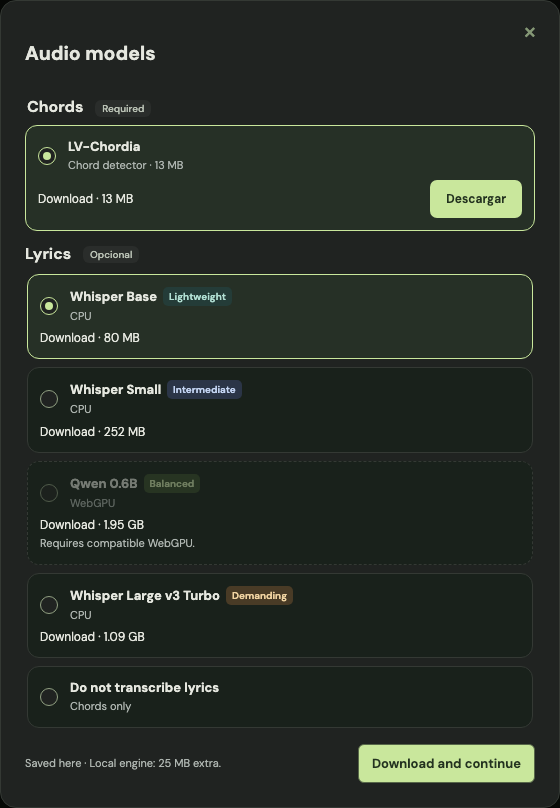
Whisper runs in CPU/WASM without WebGPU. Start with Base on a phone; Small needs more memory and processing. Base and Small completed tests on a physical iPhone 14 Pro. Turbo is unavailable on iPhone/iPad WebKit after Safari reloaded during its large download. Safari and other WebKit browsers use the CPU path; Qwen is disabled there, and wherever compatible WebGPU is unavailable. This does not mean Safari lacks WebGPU: Chordleaf uses its CPU runtime on WebKit to avoid Asyncify memory risks. A larger download does not guarantee correct lyrics for your recording. Singing, backing vocals, effects and dense arrangements can confuse the models; every result needs review. Models produce word timing for chord placement, which can still be approximate.
Downloaded models stay in this browser for later recordings. Already on your device means the required files are cached; updates to the offline application keep this separate model cache. Once the application and chosen models are available locally, analysis does not need a network connection. Website imports still require the network.
To change models or free space, open New song → Import audio → Models and settings and select Delete beside a model. A lyric model can be removed independently; Qwen's alignment files are removed with Qwen. Delete also appears for partially downloaded models. Removing lyrics preserves LV-Chordia, the shared runtime and your saved songs. Removing LV-Chordia requires downloading it again before another analysis. The shared runtime remains cached for reuse.
If a download is interrupted, reopen the chooser and retry. Complete verified files are reused; an incomplete file downloads again from its beginning. Pause download stops the current transfer. Clearing all browser site data removes saved songs as well as models: export a workspace backup first. Backups contain songs and settings, not model files or recordings.
Open Last attempt diagnostics → Download diagnostics in the audio import screen to save a local technical report. It contains the model, browser and processing stages, without audio, filenames or lyrics, and is never sent automatically. When Whisper detects a prolonged repeated phrase, it stops that fragment and warns that the lyrics need review. Ordinary repeated chorus phrases are retained. An unfinished attempt recovered after reloading is marked as interrupted; this cannot establish whether Safari ran out of memory or you closed the page yourself.
| What you see | What to try |
|---|---|
| Model download fails | Check the connection and retry; the complete files already saved are kept. |
| Browser cannot save a model | Use a normal browser session, free storage or choose a smaller model. Private sessions can have tighter limits. |
| Qwen is unavailable | Choose Whisper or chords only; Qwen needs compatible WebGPU. |
| File cannot be read | Try WAV or MP3, or convert the file locally to a format your browser can decode. |
| Analysis is slow or runs out of memory | Try a shorter recording, a smaller model or a computer with more available memory. |
| Words are missing or incorrect | Select the song language, try a clearer vocal fragment, then correct or paste the lyrics; the result is a draft. |
| Chords or timing are wrong | Listen to the recording and edit the chord names and anchors with Align. |
| No song opens | If neither lyrics nor chords are detected, the importer keeps the recording screen and shows a message. Try another recording. |
The recording and its transcription are processed locally and are not uploaded. Model downloads fetch public files from Chordleaf and Hugging Face; those services receive ordinary download request metadata. The recording is not saved in the model cache or included in editable song projects. See privacy and storage for storage and deletion details.