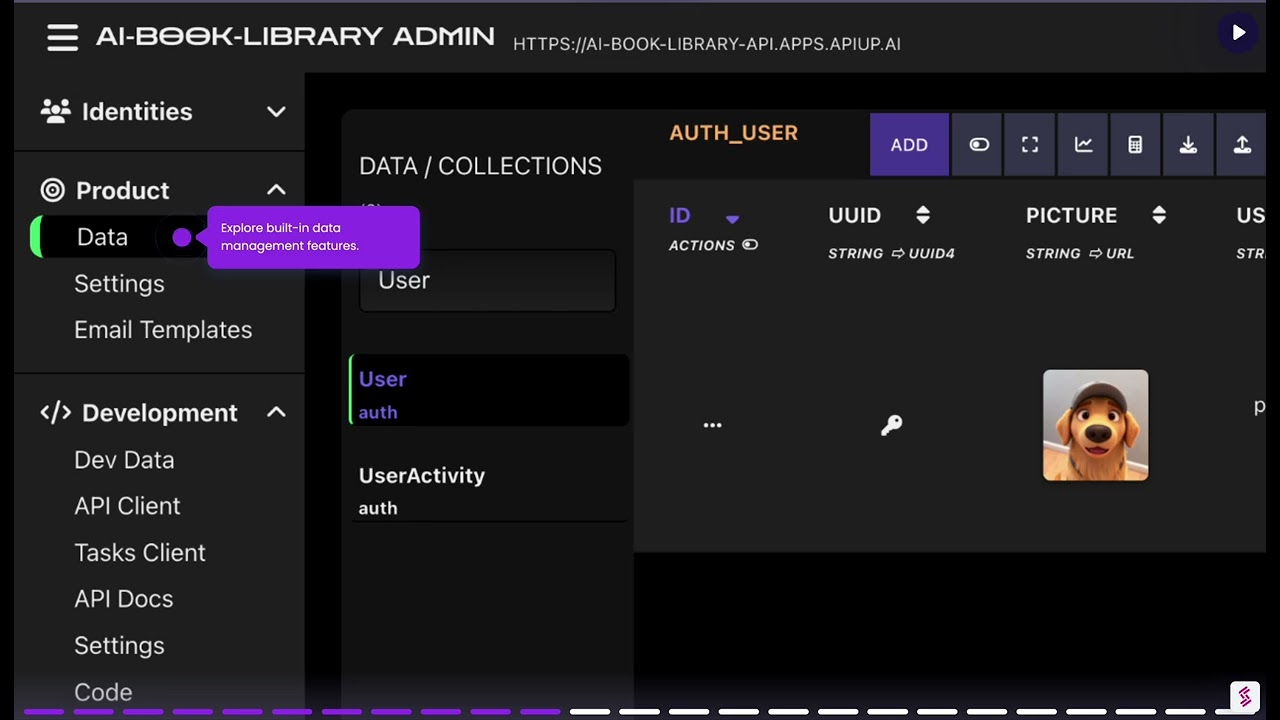
API UP Web Framework is a safe, fast and modern Python (3.14+) Web framework to create APIs. It is completely async, has a native and real background task execution system and include many of the most common and required features of a professional API, including support for Multi Tenant and Micro Services systems, commonly used in SaaS. Furthermore, it has an ecosystem of libraries and tools to help to create professional applications for Web, Mobile and IOT, including an Administrative UI, SDKs and a CLI tool to increase the productivity.
- Scalable: 100% asynchronous;
- Native embedded background task system;
- Native embedded ODM library;
- Authorization system per Endpoint/Collection/Document and Fields;
- Productivity: automatic implementation of CRUD and search operations;
- Performance oriented: automatic query optimization for most common API scenarios;
- Security oriented: private by default, configurable for public access;
- Clean code: Command pattern keeps each feature’s logic in one place;
- Testable: embedded test library and simple design to test Commands;
- Multi-Database: use different databases transparently for the application;
- Multi-Tenant: included features good for SaaS systems;
- Multi-Version: designed for a smooth
local➔dev➔alpha➔releasedeployment workflow; - Automated: CI and CD ready;
- Focused: No platform overhead, the API UP cloud system give you a professional infra with zero configuration;
- Usability: Administrative UI with the main developers and operations requirements included;
Normalized benchmarks, ignoring network latency but including a small I/O overhead to simulate database/cache access.
| TS | Requests% | RPS % | RPM % | Average % | p50 % | p90 % | p95 % | p99 % |
|---|---|---|---|---|---|---|---|---|
python API UP |
7579 | 247 | 14820 | 411.6ms | 430.1ms | 641.6ms | 682.4ms | 729.5ms |
python asgi uvicorn |
100.1 | 98 | 98 | 128.4 | 104.1 | 172.8 | 177.4 | 182.7 |
python django gunicorn |
17.7 | 16.2 | 16.2 | 763.6 | 782.6 | 539 | 509.5 | 478.1 |
python fastapi uvicorn |
97.6 | 96 | 96 | 120.3 | 103.6 | 155.2 | 160.1 | 162.7 |
python flask gunicorn |
17.6 | 16.2 | 16.2 | 755 | 775.3 | 532.2 | 501.5 | 470.3 |
python wsgi gunicorn |
18.1 | 16.6 | 16.6 | 747.5 | 770.3 | 522.8 | 492.5 | 461.9 |
go gin |
104.3 | 103.2 | 103.2 | 98.1 | 87.4 | 120.9 | 125.2 | 129 |
javascript nestjs |
99.1 | 99.3 | 99.3 | 128 | 110.7 | 169.6 | 175.1 | 178.6 |
ruby rails |
65.3 | 63.2 | 63.2 | 355.6 | 362.1 | 255.5 | 246.1 | 245.6 |
rust actix |
101.3 | 99.2 | 99.2 | 119.1 | 100.6 | 155.1 | 161.8 | 166.1 |
- RPS: requests per second;
- RPM: requests per minute;
- Average: average response time in milliseconds;
- p##: percentile of response time in milliseconds;
- Values normalized in % for comparison with API UP results;
- Requirements:
- Download the API UP CLI:
on Linux
curl -L -o apiup https://github.com/api-up/apiup-cli/releases/download/latest/apiup-linux-x64-latest ; chmod +x apiupon MacOS
curl -L -o apiup https://github.com/api-up/apiup-cli/releases/download/latest/apiup-macos-arm64-latest ; chmod +x apiupon Windows 10+
curl -L -o apiup https://github.com/api-up/apiup-cli/releases/download/latest/apiup-windows-x64-latest.exe-
Clone the Project Template: https://github.com/API-Up/api-template
-
Start the development with the commands described in the next section.
Project Template: https://github.com/API-Up/api-template
apiup check  # Check if the Env has the requirements to run the API
apiup models  # Generate models from YAML schemas
apiup start  # Start the API
apiup ping  # Ping the API to check it is running
apiup create_admin  # To create the first user and other admins
apiup admin  # Open the Admin UI
apiup stop  # Stop the resources
Development commands:
apiup models  # Generate models from YAML schemas
apiup format  # Format the source code
apiup lint  # Format and Lint the source code
apiup compile  # Check for syntax errors
apiup tests  # Run unit tests
apiup coverage  # Run test coverage
apiup build  # Build the Docker image
apiup rebuild  # Rebuild the Docker image (no cache)
apiup ci  # Run all: format lint build tests
apiup info  # Check the API resources

apiup db_changes  # Check the differences between the current schema and the DB
apiup db_migrate  # Update the database schema with the current one
apiup db_clean  # Drop the dev database, for a fresh start

apiup python # Start the Python shellClick in the image to watch the introduction video showing the API as a Service layer over the API UP Web framework.