Repository navigation
Releases: app-dialect/Dockside
Release list
Dockside 0.2.2 beta

Fixed
- Netflix and JioHotstar full screen: the picture-in-picture window and the dock no longer float on top of the video. Both fade out and ignore clicks until you leave full screen.
- Pages that open a blank pop-up no longer wipe the page you were on.
Added
- If a streaming site reports a playback error, the PiP window shows it with an Open in browser button.
Install: brew upgrade --cask dockside, or download the DMG below. Builds aren't notarized yet, so see the README for the one-time Open Anyway step.
SHA-256: ed336a61a05151e3bf816d4d9d9313fa26adb567a2796ef7ecc44d80b6246a29
Dockside 0.2.1 Beta
Dockside 0.2.1 — beta
🐞 Fixed
- Crash when a Netflix or JioHotstar video went full screen, or when resizing the picture-in-picture window while one was playing. Full screen now works — and when you exit, the video returns to the PiP window.
- Stopping a video that's full screen exits full screen first.
Everything else is the same as 0.2.0 — Watch with picture-in-picture, Countdown, drag to reorder, multi-display, Spanish and Hindi.
⬇️ Install or update
- Homebrew:
brew upgrade --cask dockside(orbrew install --cask shreyansa98/tap/dockside) - DMG: download Dockside-0.2.1-beta.dmg below and replace the app in Applications — your settings stay.
- First launch only (beta, not notarized yet): System Settings ▸ Privacy & Security ▸ Open Anyway, or
xattr -dr com.apple.quarantine /Applications/Dockside.app
SHA-256 Dockside-0.2.1-beta.dmg: 3c0c0c336336f461842ab65c747c3e0a8c237c959934eea46eb8311f7499eda1
Dockside 0.2.0 Beta
Dockside 0.2.0 — beta
📺 New: Watch, with picture-in-picture in the dock
Search YouTube right from the dock and watch it inside the dock bar — or pop it out to a floating window that stays over every app, Space and full-screen call. Netflix and JioHotstar play in the same player: sign in once, start a show, hit Fit video. If the dock hides mid-video, it pops out automatically.
✨ Also new
- Countdown widget — days until anything, with quick presets
- Drag to reorder widgets right on the dock
- Multiple displays — Settings ▸ Appearance ▸ Display ▸ Follow the pointer
- Español and हिन्दी — the app follows your macOS language
🐞 Fixed
- Scrolling a dock that's wider than the screen: trackpad swipes now scroll sideways and reach both ends.
⬇️ Install
- Download Dockside-0.2.0-beta.dmg below and drag Dockside into Applications. Updating? Replace the old app — your settings stay.
- First launch only: this beta isn't notarized yet. Open Dockside once, click Done, then System Settings ▸ Privacy & Security ▸ Open Anyway. Or:
xattr -dr com.apple.quarantine /Applications/Dockside.app
Requires macOS 14 Sonoma or later · Universal (Apple Silicon + Intel) · 4 MB
Thanks for trying the beta — report a bug or suggest a widget. A ⭐ helps others find Dockside.
SHA-256 Dockside-0.2.0-beta.dmg: 53c864d2e52d5ef5e000ee6de7b2381f2572eb48a5bddbf50524bb2304867476
Dockside 0.1.0 Beta
Dockside 0.1.0 — public beta 🎉
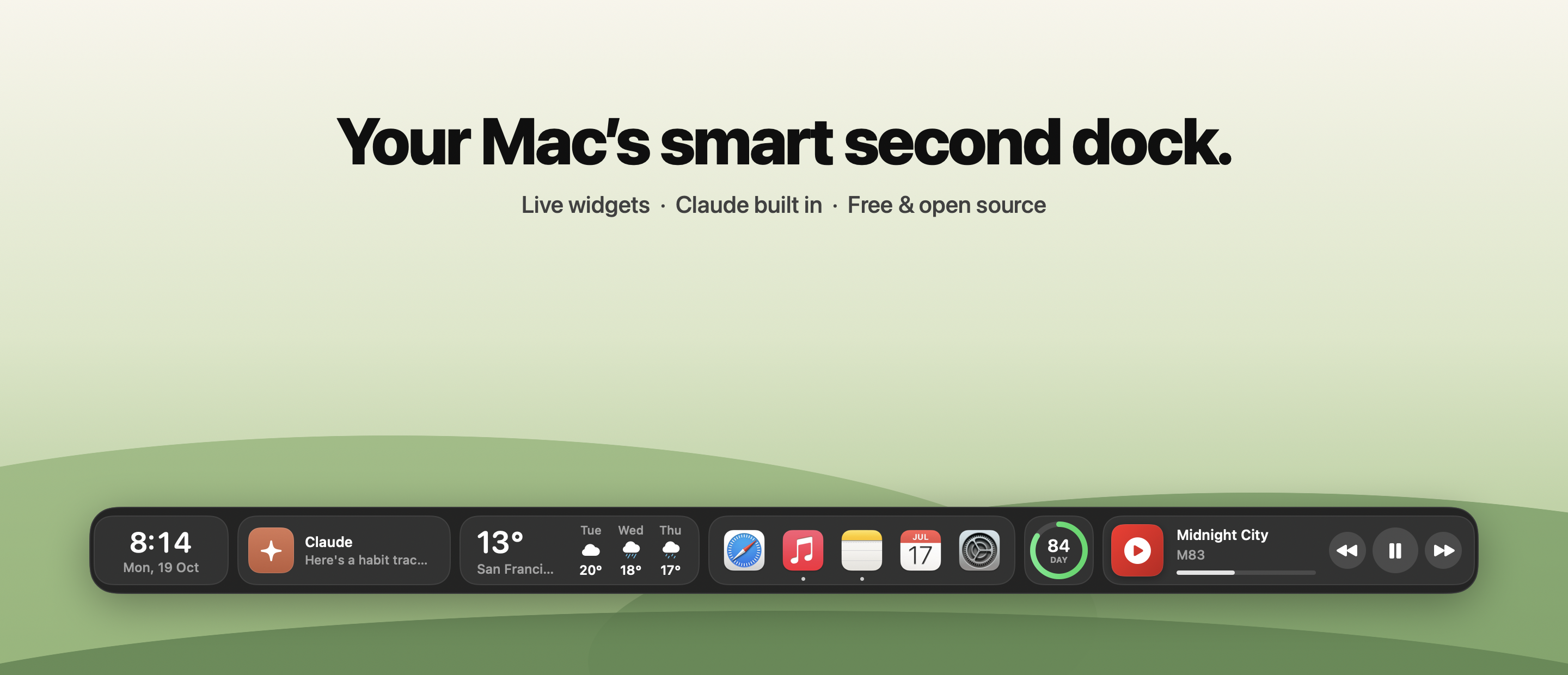
Your Mac's smart second dock. Live widgets, Claude built in, YouTube Music, and an auto-hiding bar that sits just above the macOS Dock.
⬇️ Install
- Download Dockside-0.1.0-beta.dmg below.
- Open it and drag Dockside into Applications, then open it.
- First launch only: this beta isn't notarized yet, so macOS asks you to confirm. Open Dockside once, click Done, then go to System Settings ▸ Privacy & Security and click Open Anyway.
Or in Terminal:xattr -dr com.apple.quarantine /Applications/Dockside.app
Requires macOS 14 Sonoma or later · Universal (Apple Silicon + Intel) · 3.7 MB download
✨ What's inside
- 34 widgets: clock, weather, music, Claude, apps & folders, search, todos, pomodoro, calendar, reminders, system stats, clipboard history, screenshots, quick toggles, color picker and more
- Claude panel (⌃⌥C): streaming chat, live artifacts, and your claude.ai account
- Now Playing for YouTube Music (Chrome, Brave, Edge, Safari), Spotify and Apple Music
- Auto-hide: touch the bottom edge to reveal; never covers the macOS Dock
- Profiles, 4 themes, 7 accents, 3 sizes, horizontal scrolling for big setups
🔐 Permissions
Dockside runs with zero permissions. macOS only asks when you first use a widget that needs one (Calendar, Reminders, Microphone, Automation for music/dark mode). Full list and everything that leaves your Mac →
🐞 It's a beta
Expect rough edges. Report a bug · Suggest a widget · Join the discussion
If Dockside makes your Mac nicer, a ⭐ on the repo helps others find it.
SHA-256 Dockside-0.1.0-beta.dmg: a4683aaf11a46cbd06de741bca7104b3cbfc85e3744a7b158a7d276b856a435f