Inline-authored CSS DSL
An extremely optimized library (≈6KB, ≈2.6KB gzip) that parses class tokens at runtime and converts them to CSS instantly — no build step required.
Click CSS is a game changer that delivers everything at once: the fastest development experience, the most convenient maintenance, and top-tier performance — especially for users on poor network connections. If you already know basic CSS, reading this README is all it takes to fully learn Click CSS.
Click CSS is an inline-authored CSS DSL that lets you write inline styles directly in class attributes. On top of that, it adds a simple set of syntax rules that make it more powerful than plain inline styles — supporting custom properties, selectors, media queries, and priority overrides.
That's all you need:
<script src="./lib/click-css.min.js"></script>
<script src="./src/main.js" type="module"></script>
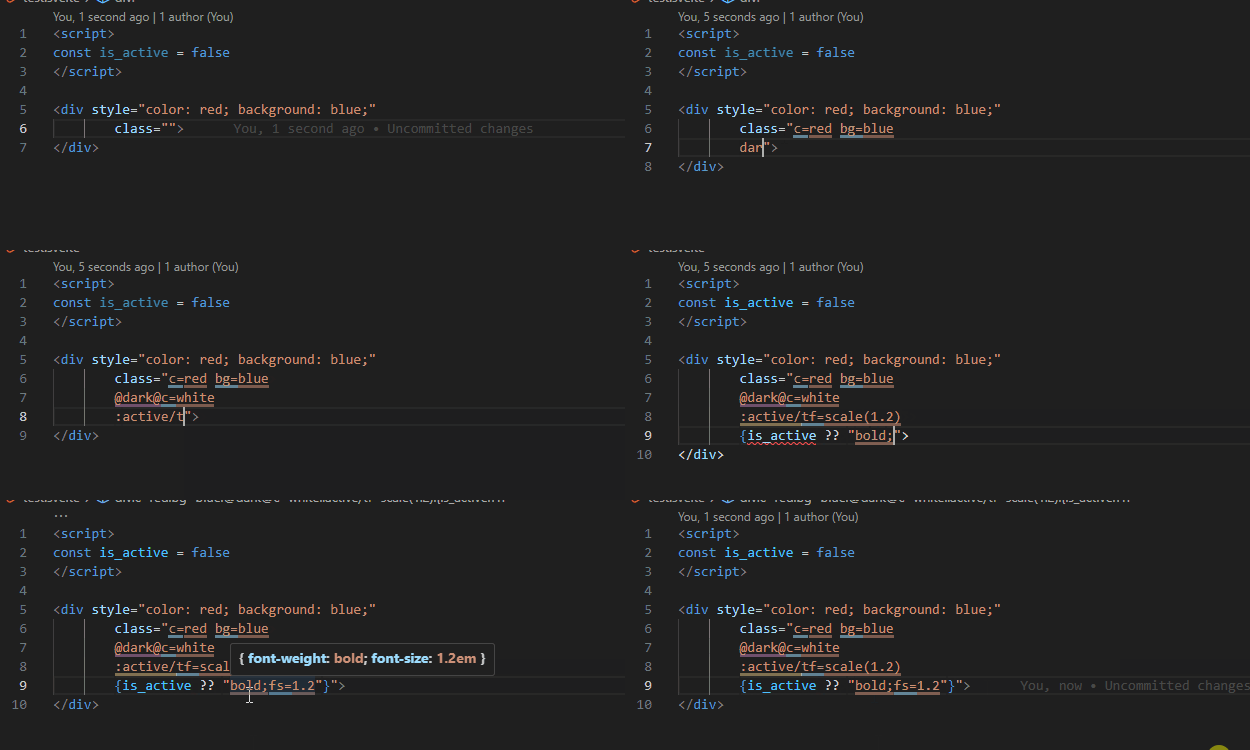
<html class="hello=click!">Hello Click!</html>VSCode Extension: https://marketplace.visualstudio.com/items?itemName=Artxe.intellisense-click-css
- Click CSS class token syntax highlighting
- Visual distinction between property / value / selector / media query segments
- Hover to preview generated CSS
- Shorthand autocomplete (property / value / media)
By default, any class starting with - or a lowercase letter a–z is parsed and injected into a <style> tag as CSS. Classes that contain neither : nor =, or that have unbalanced ', ", or () characters, or that end with a trailing escape (\), are silently ignored.
<style>
  .color\:red;background\:blue {
    color: red;
    background: blue
  }
  .new-property\:new-value {
    new-property: new-value
  }
</style>
<html class="
    color:red;background:blue
    new-property:new-value
    my-custom-class
    rounded-2xl
  ">
</html>
_ is treated as a space ( ), and = is treated as :.
<style>
  .margin\=1px_5px {
    margin: 1px 5px
  }
</style>
<html class="margin=1px_5px"></html>
Classes starting with a special character other than - or a lowercase letter are treated as selector-scoped rules. Use / as a delimiter in the format <selector>/<style>. Note that > is escaped as > during HTML streaming, but Click CSS handles this transparently.
<style>
  .\:hover\:after\/width\=100px:hover {
    width: 100px
  }
  ._\[type\=number\]\/font-size\=2em [type=number] {
    font-size: 2em
  }
  .\>div\/color\=\#000>div {
    color: #000
  }
</style>
<html class="
    :hover:after/width=100px
    _[type=number]/font-size=2em
    >div/color=#000
  ">
</html>
Appending ! to a class name increases its specificity. Rather than using !important, Click CSS artificially stacks [class] selectors to boost specificity — meaning you can override styles an unlimited number of times simply by adding more ! characters.
<style>
  [class][class].width\=100px\!\! {
    width: 100px
  }
  .width\=200px {
    width: 200px
  }
</style>
<html class="width=100px!! width=200px"></html>
Use @ as a delimiter to apply media queries.
<style>
  @media (max-width: 200px) {
    .\@\@media_\(max-width\=200px\)\@width\=100px {
      width: 100px
    }
  }
</style>
<html class="@@media_(max-width=200px)@width=100px"></html>
Using a single @ automatically prepends @media . & expands to and, and <key>=<value> pairs are converted to (<key>:<value>) format.
<style>
  @media (max-width: 200px) and (min-width: 100px) {
    .\@max-width\=200px\&min-width\=100px\@width\=100px {
      width: 100px
    }
  }
</style>
<html class="@max-width=200px&min-width=100px@width=100px"></html>
You can use localStorage to apply dark mode styles even without a system-level dark mode preference.
<style>
  .color\=black {
    color: black
  }
  @media (color) {
    .\@prefers-color-scheme\=dark\@color\=white {
      color: white
    }
  }
</style>
<html class="
    @prefers-color-scheme=dark@color=white
    color=black
  ">
</html>
<script>
  localStorage.setItem("THEME", "DARK") // changes "prefers-color-scheme:dark" to "color"
  click() // update styles
</script>
Values starting with -- are automatically wrapped in var().
<style>
  .background\=--bgc {
    background: var(--bgc)
  }
</style>
<html class="background=--bgc"></html>
When using + or - inside calc(), spaces are inserted automatically — no need to add them yourself.
<style>
  .width\=calc\(100\%-16px\) {
    width: calc(100% - 16px)
  }
</style>
<html class="width=calc(100%-16px)"></html>Click CSS ships with a recommended CSS reset: let pure_style
Click CSS also provides three categories of predefined shorthands for writing faster, more readable code. Value-only shorthands are the only exception that get parsed as CSS without containing : or =.
<style>
  .flex {
    display: flex
  }
  @media (prefers-color-scheme: dark) {
    .\@dark\@c\=white {
      color: white
    }
  }
</style>
<html class="flex @dark@c=white"></html>
For properties that require a numeric unit (such as border), Click CSS automatically appends px. You can change this to another unit like rem to match your design system:
let default_unit
<style>
  .w\=100 {
    width: 100px
  }
</style>
<html class="w=100"></html>This section is unrelated to day-to-day usage. It explains why Click CSS is unusually fast for a runtime CSS engine, analyzing its execution model and parsing cost from first principles.
Click CSS does not process CSS through complex JavaScript logic. Instead, it composes a series of clearly separated regex transformation stages, reducing each step to a pure string transformation problem — O(n).
The regexes used throughout have the following properties:
- No lookbehinds, recursive patterns, or complex capture groups
- Matching based on fixed token boundaries
- Only linear scans proportional to input length
As a result, most parsing bypasses the JS interpreter entirely and runs through the browser regex engine's native (machine-code) execution path. Backtracking cost is effectively zero, and the entire CSS parsing process is bounded to a predictable linear cost.
Click CSS does not handle all DOM mutations with a single observer. Instead, it uses two MutationObserver instances, each dedicated to a distinct type of change:
classattribute mutations- Subtree structural mutations (
childList)
For class attribute changes, the target element is already known, so Click CSS simply iterates over Element.classList and extracts only new tokens immediately.
For subtree changes, Click CSS neither walks the DOM recursively nor uses expensive APIs like querySelectorAll. Instead, it serializes the changed root node to a string via outerHTML and runs a single regex pass over the result to extract all class tokens at once.
This scan runs inside the browser engine's internal string processing routines — not a JS loop — so the cost scales linearly with the serialized subtree length.
The most important performance characteristic of Click CSS is not what it does, but when it runs.
Click CSS requires no explicit initialization step or compile trigger. It executes as soon as the script loads — and a script in <head> without a type attribute runs while HTML parsing is still in progress.
This timing produces the following effects:
- Initial class token collection and CSS generation complete before layout, style calculation, and paint
- The generated
<style>tag is naturally included in the first style calculation, causing no additional reflow or repaint
In other words, Click CSS's startup cost is not paid as a separate runtime expense — it is absorbed into the browser's HTML parsing cost.
Runtime updates after the initial load are also kept minimal:
- Already-processed class tokens are deduplicated with a
Set - Only new tokens are parsed and reflected into styles
- If nothing has changed, the
<style>element is never updated at all